Community listing page, reviews may not be monitored by the author.
Iron Spells Elemental Melee

No reviews yet
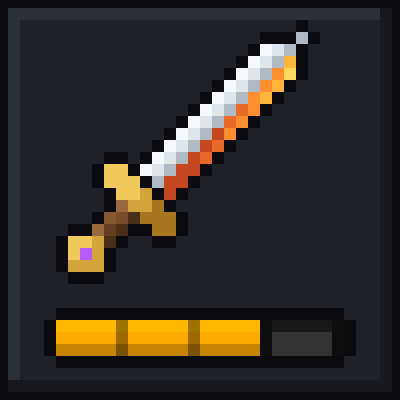
Iron Spells Elemental Melee is an addon for Iron's Spells 'n Spellbooks that lets melee weapons deal spell school damage, and adds an elden ring like build up system

Community voices
Reviews
No reviews yet. Be the first to review this project!
Get it on
Available Platforms
About
Project Details
For authors
Embed Badge
If you're the author of this project, you can embed a live badge anywhere that supports HTML or Markdown. It updates automatically whenever ratings change.
Use HTML for any page that supports it, or Markdown for README files and Markdown-based descriptions.
Identifiers
Platform IDs
Resources
External Links
About
Description
Elemental Melee is an addon for Iron's Spells 'n Spellbooks that lets melee weapons deal spell school damage.
Normally a sword hit is plain physical damage, even when the sword is a flaming one. With this mod, weapons can deal Fire, Ice, Blood or any other school's damage, including schools added by other addons. That damage goes up with your spell power for the school and down with the target's resistance to it, the same way it works for spells. There are also three physical types (blunt, slash and pierce), each with its own resistance.
Damage types
Every weapon has a damage profile that splits its hit between types. The tooltip shows the split, with your spell power already counted:
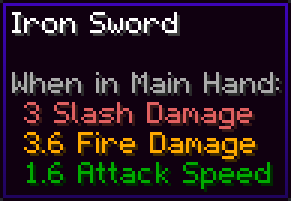
An iron sword set to half slash, half fire, held by a player with +20% Fire Spell Power.
Out of the box:
- Swords, axes and hoes deal slash
- Pickaxes, tridents and spears deal pierce
- Shovels and maces deal blunt
- Iron's own weapons get mixed profiles. Hellrazor is half slash, half fire, Boreal Blade is half slash, half ice, and the elemental staffs are half blunt, half their element.
Weapons from other mods fall back to those rules, and you can set up any weapon yourself with a datapack (see below).
The physical resistances (Blunt, Slash and Pierce Resistance) work on Iron's scale: 100% is normal, 125% takes 25% less damage.
Hits keep their normal damage source, so crits, sweeping, Sharpness, Strength, armor and shields all work the same as before. Only the amount changes.
Build-up
Each damage type fills its own meter on whatever you hit. When a meter fills, that type's effect goes off.
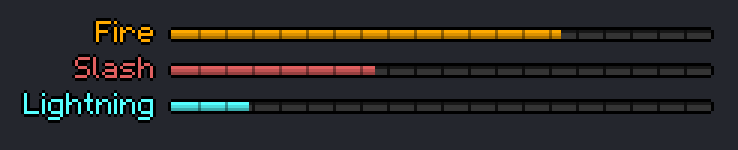
Your own meters sit above your health bar, styled after the XP bar. Mobs you've hit get the same bars over their heads. Each bar uses its type's color, and addon schools use whatever color their own mod gave them.
| Type | Effect | What it does |
|---|---|---|
| Slash | Hemorrhage | Deals 10% of the target's max health (up to 20) through armor, then Bleeding for 5s |
| Blunt | Stagger | Nausea IV for 10s, plus a 1s stun (no moving, attacking, using items or casting) |
| Pierce | Puncture | Rend IV for 10s |
| Fire | Combust | Sets off Iron's Immolation explosion, which spreads to nearby enemies |
| Ice | Flash Freeze | Freezes the target solid in an Ice Tomb |
| Lightning | Arc | Chains to 3 nearby enemies, or 5 in rain or water |
| Holy | Judgment | A holy burst (double damage to undead) that heals you and nearby allies |
| Blood | Exsanguinate | Drains health into you and applies Blight III for 10s |
| Ender | Nullify | Strips the target's buffs, and for 10s it can't cast or gain new ones |
| Evocation | Conjure | Summons 2 vexes that attack the target for 10s |
| Nature | Entangle | Roots the target for 5s and poisons it |
| Eldritch | Sonic Rupture | A sonic boom that ignores armor and resistances |
| Addon schools | Overload | A burst of that school's damage, unless a datapack gives the school its own effect |
How the meters work:
- A meter fills by how much damage that type actually dealt, after armor and resistances. Without any build-up gear, it takes about 30 damage of one type.
- Spells fill their school's meter too, so Fire spells build Fire.
- After 3 seconds without a hit, a meter starts to drain. After 15 seconds it resets.
- Once an effect goes off, that type can't build on the same target for 5 seconds, and the next one needs 50% more.
- Bosses build up at half speed, and get slowed instead of stunned, frozen or rooted.
- In multiplayer the meter lives on the target, so a group fills it together.
Building around a type
There are attributes for gearing into build-up (100% is normal):
- Build-up and Fire Build-up, Slash Build-up and so on: your hits fill meters faster.
- Build-up Decay Delay and the per-type versions: how long build-up on you holds before it drains. Lower is better here, since it means you shake it off sooner.
The all-types and per-type versions stack. 150% Build-up with 200% Fire Build-up fills Fire meters three times as fast. Per-type attributes exist for blunt, slash, pierce and Iron's nine schools. Schools from other addons use the all-types ones.
The mod doesn't put these on any items by itself. They're there for datapacks and modpacks to hand out.
Datapacks
Everything is data driven, so weapons from any mod can be set up without code. These files go in data/elemental_melee/data_maps/ in a datapack or a mod's resources. Files from every pack get merged.
Weapon damage (item/damage_profiles.json). Weights are relative, a single id means 100% of that type, and # works for item tags:
{
  "values": {
    "somemod:flame_sword": { "damage": { "elemental_melee:slash": 1, "irons_spellbooks:fire": 1 } },
    "somemod:frost_spear": { "damage": { "elemental_melee:pierce": 3, "irons_spellbooks:ice": 1 } },
    "#somemod:clubs": "elemental_melee:blunt"
  }
}
Extra attributes on items (item/item_attributes.json). Same format as vanilla attribute modifiers, and added on top of the item's own stats:
{
  "values": {
    "irons_spellbooks:hellrazor": [
      {
        "type": "elemental_melee:fire_buildup",
        "id": "mypack:hellrazor_fire",
        "amount": 0.5,
        "operation": "add_multiplied_base",
        "slot": "mainhand"
      }
    ]
  }
}
Effects for addon schools (irons_spellbooks/schools/school_procs.json). Gives a school its own effect, or replaces one of Iron's:
{
  "values": {
    "someaddon:void": {
      "damage": 0.75,
      "effects": [{ "effect": "minecraft:darkness", "duration": 100 }]
    }
  }
}
Run /elemental_melee types in game to list every damage type id, including addon schools. Click one to copy it.
Commands
/elemental_melee typeslists every damage type id./elemental_melee debug zombie <type>(op only) spawns a zombie that hits you with that damage type. Handy for testing resistances and effects. You need to be in Survival or Adventure for it to hit you.
Config
config/elemental_melee-common.tomlhas one switch to turn build-up off completely. Weapons still deal typed damage.serverconfig/elemental_melee-server.tomlin each world has the tuning: spell power scaling, whether mobs deal typed damage, and every build-up number (fill rate, drain timing, lockout, boss multiplier, effect damage).config/elemental_melee-client.tomllets each player hide the bars.
You can also change them in game from the Mods menu (server settings show up there while you're in a world).
Requirements
- NeoForge for Minecraft 1.21.1
- Iron's Spells 'n Spellbooks (made against 3.16.3)
- Install on both the client and the server. Weapon profiles and settings sync from the server, so tooltips always match what the server does.
FAQ
Does this work with addons that add new schools? Yes. New schools are picked up automatically, with their own colors. Point a weapon at them with a datapack, or use the default Overload effect.
Can I turn off the effects but keep the damage types?
Yes, set enableBuildup = false in config/elemental_melee-common.toml.
Will this make my weapons stronger? Not by itself. A weapon deals the same total damage before spell power and resistances come in. Spell power makes its school portion hit harder, and resistances work against it, just like spells.
Do mobs use it? Mobs holding weapons deal typed damage too. You can turn that off in the server config.
Screenshots
Gallery
-
banner.png banner.png
-
buildup.png buildup.png
-
 icon.png icon.png
 -
tooltip.png tooltip.png
Versions
Files
Relations
Project Relations
More like this
Similar Mods
Suggestions use data such as tags, dependencies, dependents, descriptions, titles, and more to rank how much they overlap with this mod.
On ModDex
Community snapshot
By the numbers
Statistics
 (opens in a new tab)
Get it on
Available Platforms
On ModDex
Community snapshot
By the numbers
Statistics
Resources