Community listing page, reviews here may not be monitored by the author.
Islands In The Sky

No reviews yet
A server side mod for multiplayer Skyblock servers.
Community voices
Reviews
No reviews yet. Be the first to review this project!
Get it on
Available Platforms
About
Project Details
For authors
Embed Badge
If you're the author of this project, you can embed a live badge anywhere that supports HTML or Markdown. It updates automatically whenever ratings change.
Use HTML for any page that supports it, or Markdown for README files and Markdown-based descriptions.
Identifiers
Platform IDs
Resources
External Links
About
Description
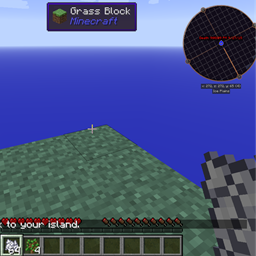
Islands in the sky adds a new world generation type (imaginatively named: SkyIsland). This is a void world, appropriate for playing skyblock worlds. Spawn starts as a 5x5 grass square, on top of a bed of hardened clay. Each island is 320x320 blocks, with a 32 block buffer space between islands, and these values can be changed in the config file.
To set Islands In The Sky to be the world generator used by a server, you need to edit the server.properties file, and set "level-type=skyisland", after which, you will probably need to delete the world folder to regenerate the world as a void world.
Islands In The Sky adds five commands. /island (or /is), /spawn, /invite, /accept, /setisland, and /abandon. /Island will take you to (and create, if necessary) your own private island, and /spawn will return to you spawn for easy interaction with your servermates. /spawn is not created if another forge mod already adds it. (Not sure how this will interact with the various bukkit mods.) /invite and /accept are used to share islands between players. Hopefully the uses are obvious. /setisland has two uses, if you're an op, you can use /setisland <playername> to set their island location to their current location, regular players can use /setisland with no arguments to set where they'll teleport when they use /island anywhere within the space of that island. /abandon will abandon your island. If you are the owner of the island, it will be deleted (Slowly, over the next several ticks so as not to cause lag), and your inventory will be cleared, along with the inventory in your Vanilla enderchest.
Islands In The Sky will also give you a starting inventory when you create your island, currently it is 64 bonemeal, and 4 oak saplings, this is configurable in the config file.
A configuration has been added that allows protection of islands, it is disabled by default. When it is on, you cannot break or place blocks in the overworld, unless you're on your island (or you're op...)
Additionally, a configuration has been added to allow you to set the Nether to be a void, it defaults to off. When it is enabled, the nether will be a complete void.
Screenshots
Gallery
Versions
Files
Relations
Project Relations
More like this
Similar Mods
Suggestions use data such as tags, dependencies, dependents, descriptions, titles, and more to rank how much they overlap with this mod.
On ModDex
Community snapshot
By the numbers
Statistics
Want to reach Minecraft players?
We're looking for a server hosting partner to feature here and other parts of the site. Interested? Send us a message!
Get in touchGet it on
Available Platforms
On ModDex
Community snapshot
By the numbers
Statistics
Resources