
Community listing page, reviews here may not be monitored by the author.
ItemLock

No reviews yet
Press O to lock a hotbar slot in place so you can't accidentally drop or move that item during PvP fights.
Community voices
Reviews
No reviews yet. Be the first to review this project!
Get it on
Available Platforms
Compatibility
Supported Environments
Runs entirely on the client. Works on vanilla servers.
About
Project Details
For authors
Embed Badge
If you're the author of this project, you can embed a live badge anywhere that supports HTML or Markdown. It updates automatically whenever ratings change.
Use HTML for any page that supports it, or Markdown for README files and Markdown-based descriptions.
Identifiers
Platform IDs
About
Description
Preview
A small Minecraft mod that stops you from losing loot to a misclick mid-fight.
What it does
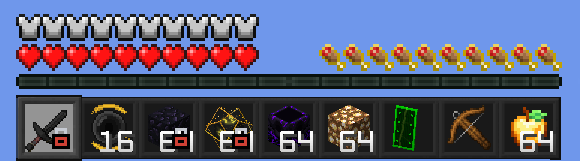
Press O while on a hotbar slot to lock it in place. While a slot is locked:
- Pressing Q (or Ctrl+Q) does nothing while that slot is selected - you can't accidentally drop the item.
- Clicking, dragging, shift-clicking, or number-key-swapping that item out of its slot is blocked in any inventory screen.
- Everything else in your inventory stays freely usable - you can still loot chests and reorganise other slots.
- A small lock icon appears in the bottom-right corner of the locked hotbar slot so you can see it's active at a glance, even after you switch away to a different slot.
You can lock several slots at once, and locked slots are remembered between sessions. The lock stays on its slot as you switch hotbar slots around it. Press O again while back on the locked slot to unlock it, or switch to a different slot and press O to move the lock there instead. An action-bar message confirms every lock/unlock.
The key is rebindable in Options -> Controls -> ItemLock if O clashes with something else.
This is a client-side mod - it works in singleplayer and on any multiplayer server, no server-side install required.
Requirements
Fabric / Quilt
- Minecraft 1.21 or 1.21.11 (pick the matching download)
- Fabric Loader >= 0.18.4 (or Quilt Loader, via its built-in Fabric compatibility layer)
- Fabric API (Quilted Fabric API on Quilt)
- Java 21
NeoForge
- Minecraft 1.21.11
- NeoForge >= 21.11.0-beta
- Java 21
Forge
- Minecraft 1.21.11
- Forge >= 1.21.11-61.0.0
- Java 21
License
CC0-1.0 - Do whatever you'd like with it.
Screenshots
Gallery
-
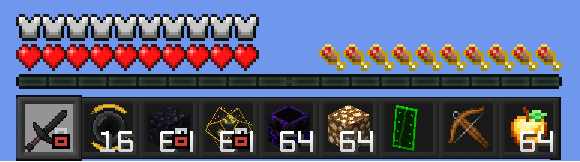 Example of the mod
Versions
Files
Relations
Project Relations
More like this
Similar Mods
Suggestions use data such as tags, dependencies, dependents, descriptions, titles, and more to rank how much they overlap with this mod.
On ModDex
Community snapshot
By the numbers
Statistics

Want to reach Minecraft players?
We're looking for a server hosting partner to feature here and other parts of the site. Interested? Send us a message!
Get in touchGet it on
Available Platforms
On ModDex
Community snapshot
By the numbers