
Community listing page, reviews here may not be monitored by the author.
ItemSearch: Ctrl+F


No reviews yet
Press Ctrl+F inside any chest, shulker box, or inventory to instantly filter items by name.
Community voices
Reviews
No reviews yet. Be the first to review this project!
Get it on
Available Platforms
Compatibility
Supported Environments
Runs entirely on the client. Works on vanilla servers.
About
Project Details
For authors
Embed Badge
If you're the author of this project, you can embed a live badge anywhere that supports HTML or Markdown. It updates automatically whenever ratings change.
Use HTML for any page that supports it, or Markdown for README files and Markdown-based descriptions.
Identifiers
Platform IDs
Resources
External Links
About
Description
Description (Markdown body — same for both platforms)
ItemSearch
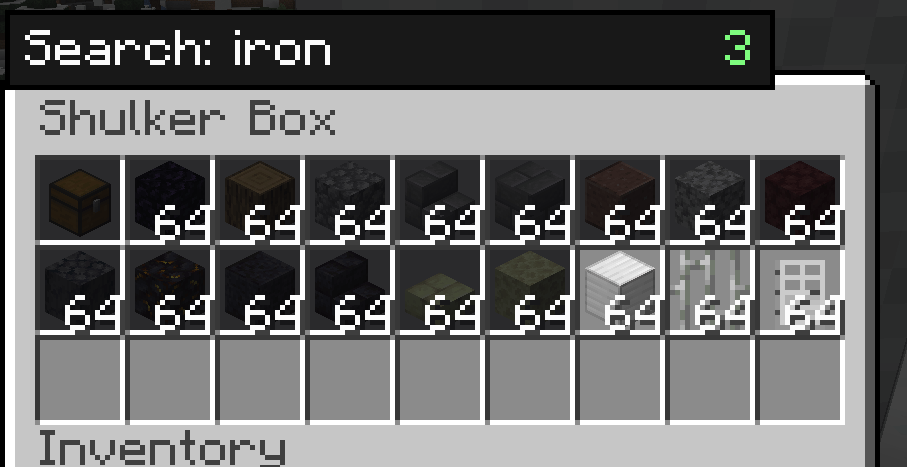
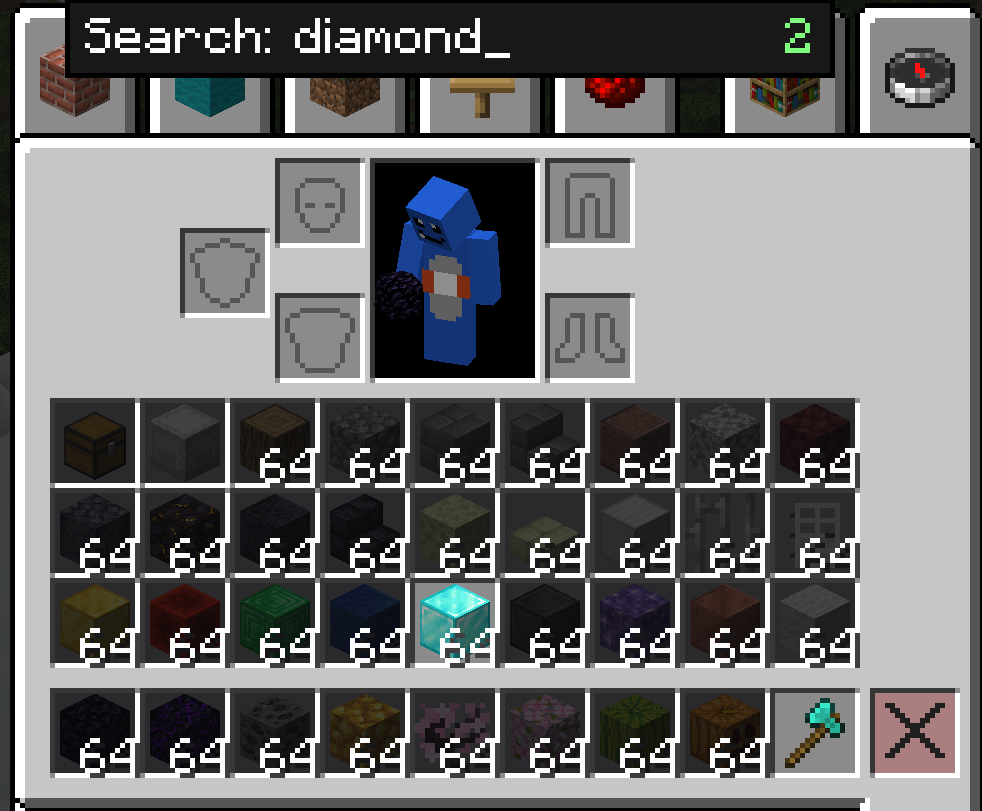
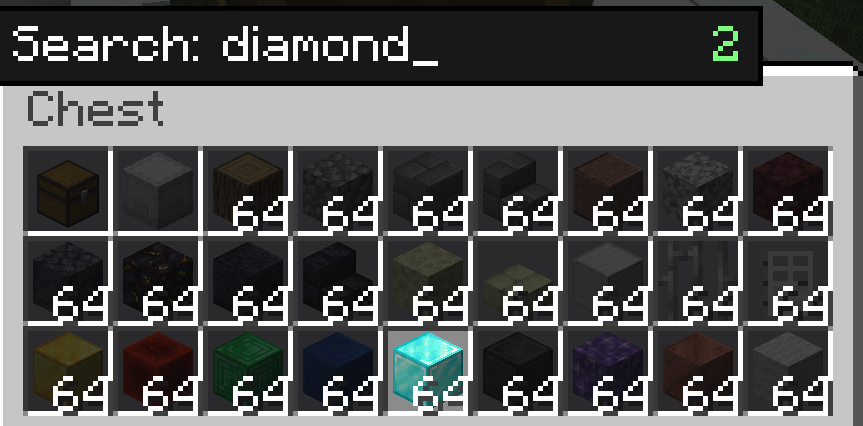
Press Ctrl+F inside any container to instantly filter your items.
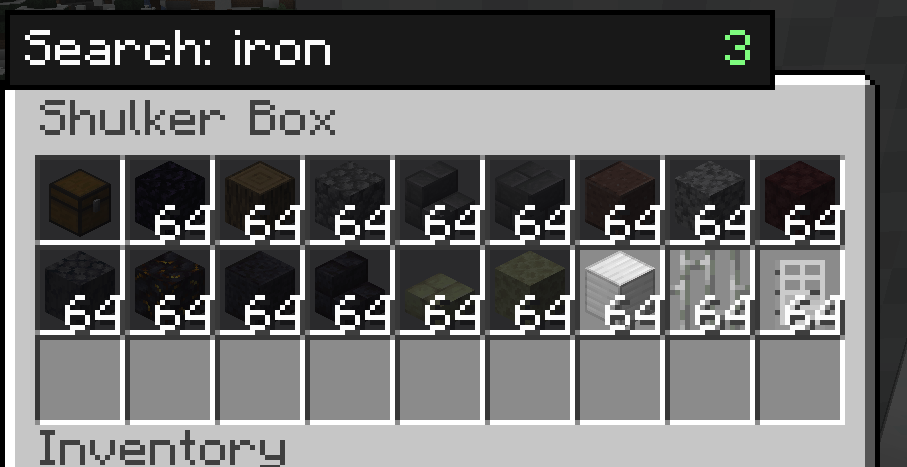
Tired of scrolling through a packed shulker box or storage chest looking for one item? ItemSearch adds a lightweight Ctrl+F search bar to every container screen — inventory, chests, barrels, shulker boxes, and more — so you can find what you need at a glance.
Features
- Ctrl+F to search — opens a small search box inside any
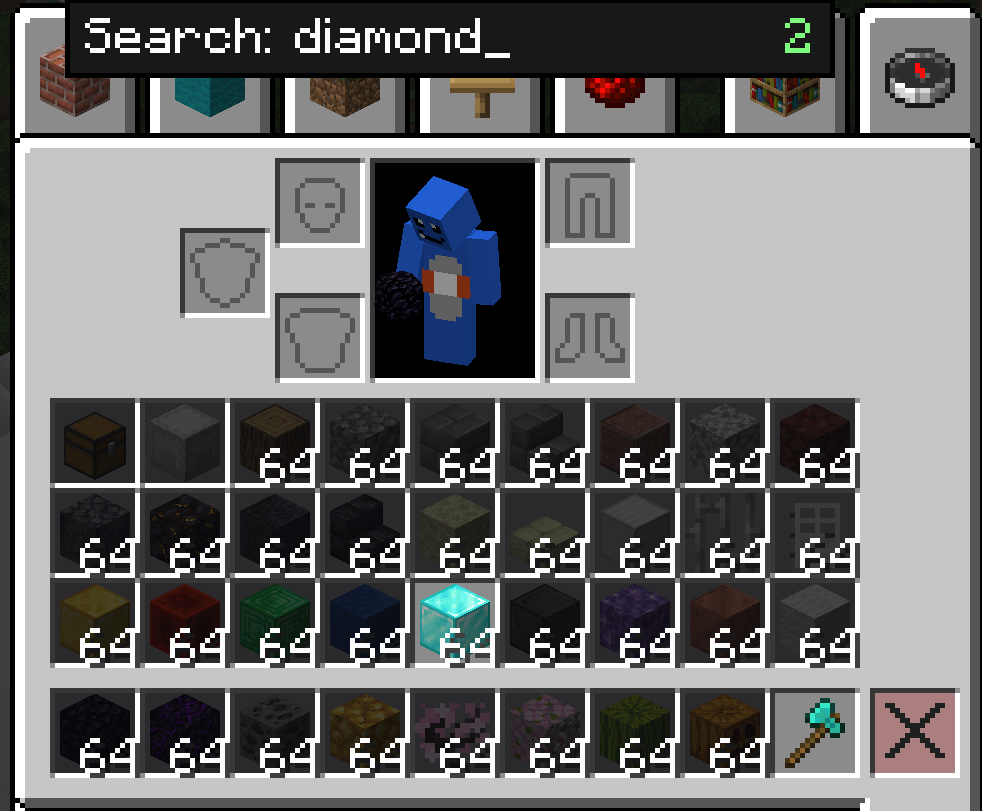
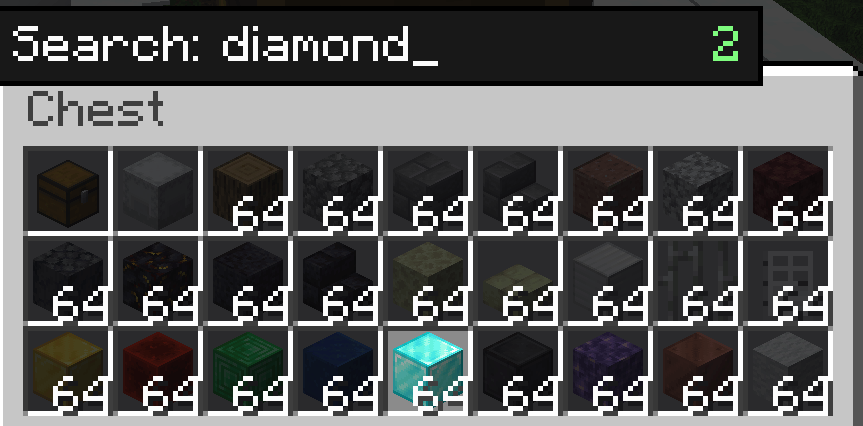
AbstractContainerScreen. Type to filter; matching items stay highlighted, everything else dims. - Works everywhere — chests, barrels, shulker boxes, your own inventory, and other inventory-style screens.
- Smart Creative Mode handling — on the Survival/Inventory tab, ItemSearch dims your own items just like everywhere else. On the Creative item-palette tabs, ItemSearch stays out of the way so vanilla's own creative search keeps working.
- Match by item ID (optional) — toggle whether the search also checks the item's registry ID (e.g.
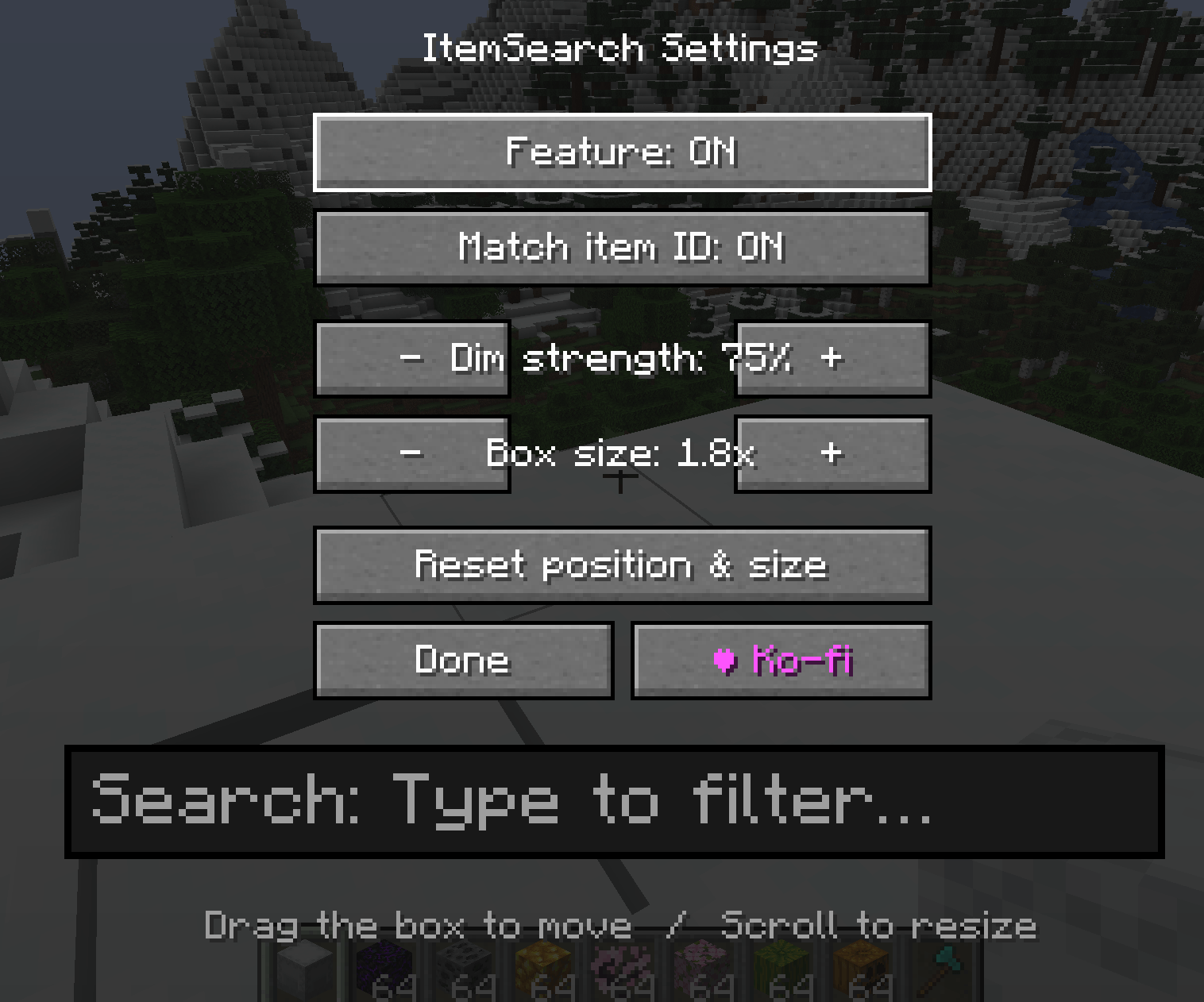
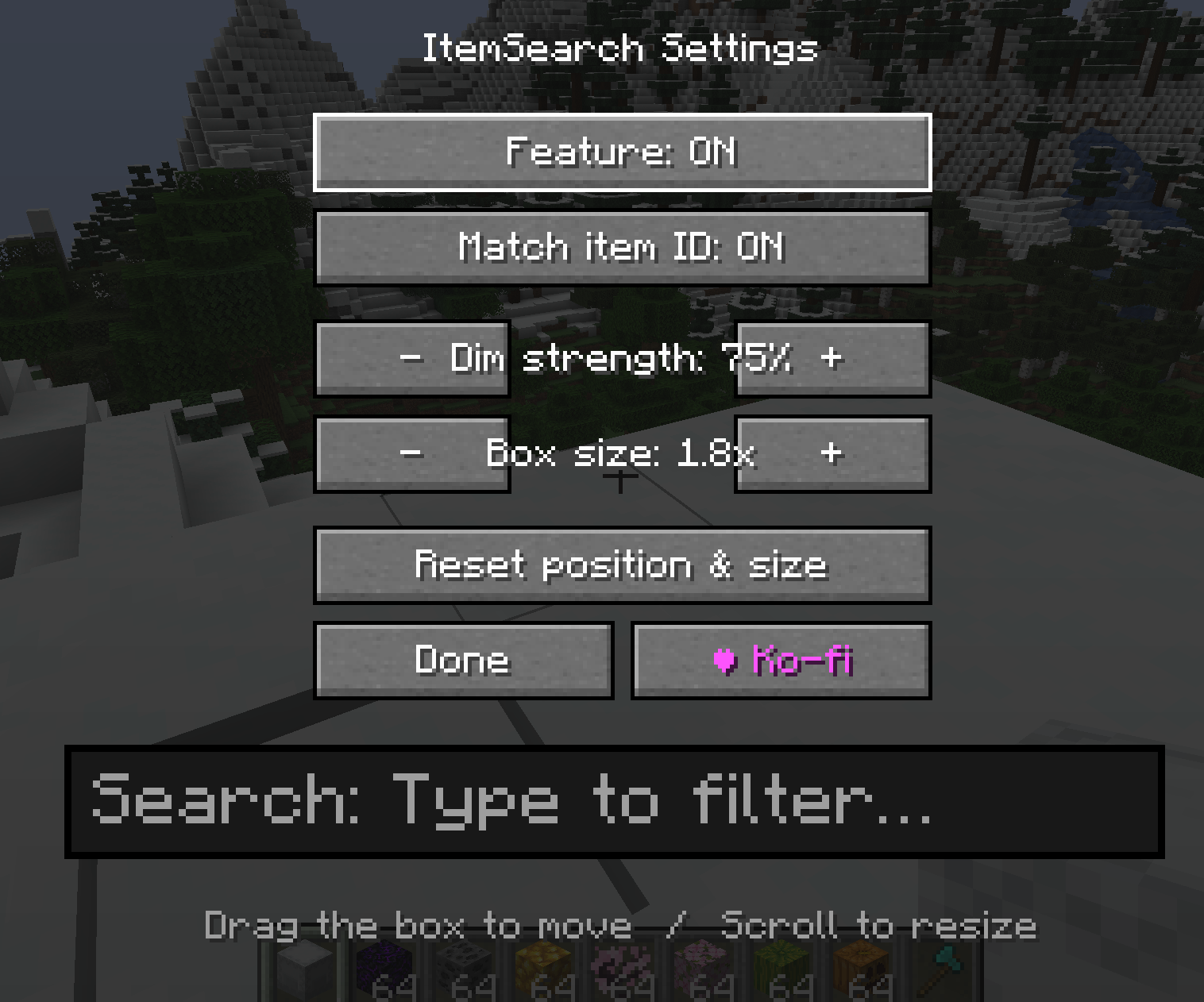
minecraft:diamond_sword), not just its display name. - Fully repositionable search box — open the settings screen, then drag the search box anywhere on screen and resize it with scroll or +/- buttons.
- Adjustable dim strength — control how strongly non-matching items are darkened.
- Lightweight & client-side only — no server install required, safe for singleplayer and any multiplayer server.
Controls
| Key | Action |
|---|---|
Ctrl + F |
Open/close the search box (while a container screen is open) |
| (typing) | Filter items live as you type |
Esc / Enter / Ctrl + F |
Close the search box and clear the query |
K |
Open ItemSearch settings |
Settings are also available from the Mods list → Config.
Settings
- Enable/disable the feature
- Match item ID toggle
- Dim strength (−/+)
- Search box size (−/+ or scroll)
- Drag-to-move search box position
- Reset position & size
Support
If you find ItemSearch useful, consider supporting development on Ko-fi (link in-game via the settings screen, and shown once on first join).
Compatibility
Client-side only — install on the client; no server-side requirement. Available for Forge, NeoForge, and Fabric across a wide range of Minecraft versions (see version list below).
Supported Versions / Loaders (for reference when filling out the version picker)
Forge: 1.20.1, 1.20.2, 1.20.4, 1.20.6
NeoForge: 1.20.2, 1.20.4, 1.20.6, 1.21.1, 1.21.3, 1.21.4, 1.21.5, 1.21.8, 1.21.10, 1.21.11, 26.1
Fabric: 1.20.1, 1.20.2, 1.20.4, 1.20.6, 1.21.1, 1.21.3, 1.21.4, 1.21.5, 1.21.8, 1.21.10, 1.21.11
Side: Client only
ItemSearch
Press Ctrl+F inside any container to instantly filter your items.
Tired of scrolling through a packed shulker box or storage chest looking for one item? ItemSearch adds a lightweight Ctrl+F search bar to every container screen — inventory, chests, barrels, shulker boxes, and more — so you can find what you need at a glance.
Features
- Ctrl+F to search — opens a small search box inside any
AbstractContainerScreen. Type to filter; matching items stay highlighted, everything else dims. - Works everywhere — chests, barrels, shulker boxes, your own inventory, and other inventory-style screens.
- Smart Creative Mode handling — on the Survival/Inventory tab, ItemSearch dims your own items just like everywhere else. On the Creative item-palette tabs, ItemSearch stays out of the way so vanilla's own creative search keeps working.
- Match by item ID (optional) — toggle whether the search also checks the item's registry ID (e.g.
minecraft:diamond_sword), not just its display name. - Fully repositionable search box — open the settings screen, then drag the search box anywhere on screen and resize it with scroll or +/- buttons.
- Adjustable dim strength — control how strongly non-matching items are darkened.
- Lightweight & client-side only — no server install required, safe for singleplayer and any multiplayer server.
Controls
| Key | Action |
|---|---|
Ctrl + F |
Open/close the search box (while a container screen is open) |
| (typing) | Filter items live as you type |
Esc / Enter / Ctrl + F |
Close the search box and clear the query |
K |
Open ItemSearch settings |
Settings are also available from the Mods list → Config.
Settings
- Enable/disable the feature
- Match item ID toggle
- Dim strength (−/+)
- Search box size (−/+ or scroll)
- Drag-to-move search box position
- Reset position & size
Support
If you find ItemSearch useful, consider supporting development on Ko-fi (link in-game via the settings screen, and shown once on first join).
Compatibility
Client-side only — install on the client; no server-side requirement. Available for Forge, NeoForge, and Fabric across a wide range of Minecraft versions (see version list below).
Supported Versions / Loaders (for reference when filling out the version picker)
Forge: 1.20.1, 1.20.2, 1.20.4, 1.20.6
NeoForge: 1.20.2, 1.20.4, 1.20.6, 1.21.1, 1.21.3, 1.21.4, 1.21.5, 1.21.8, 1.21.10, 1.21.11, 26.1
Fabric: 1.20.1, 1.20.2, 1.20.4, 1.20.6, 1.21.1, 1.21.3, 1.21.4, 1.21.5, 1.21.8, 1.21.10, 1.21.11
Side: Client only
Screenshots
Gallery
-
 ã¹ã¯ãªã¼ã³ã·ã§ãã 2026-07-01 222511.png ã¹ã¯ãªã¼ã³ã·ã§ãã 2026-07-01 222511.png
 -
 ã¹ã¯ãªã¼ã³ã·ã§ãã 2026-07-01 222454.png ã¹ã¯ãªã¼ã³ã·ã§ãã 2026-07-01 222454.png
 -
 ã¹ã¯ãªã¼ã³ã·ã§ãã 2026-07-01 222436.png ã¹ã¯ãªã¼ã³ã·ã§ãã 2026-07-01 222436.png
 -
 ã¹ã¯ãªã¼ã³ã·ã§ãã 2026-07-01 222404.png ã¹ã¯ãªã¼ã³ã·ã§ãã 2026-07-01 222404.png
Versions
Files
Relations
Project Relations
More like this
Similar Mods
Suggestions use data such as tags, dependencies, dependents, descriptions, titles, and more to rank how much they overlap with this mod.
On ModDex
Community snapshot
By the numbers
Statistics
Want to reach Minecraft players?
We're looking for a server hosting partner to feature here and other parts of the site. Interested? Send us a message!
Get in touchGet it on
Available Platforms
On ModDex
Community snapshot
By the numbers
Statistics
Resources