
Community listing page, reviews here may not be monitored by the author.

Community voices
Reviews
No reviews yet. Be the first to review this project!
Get it on
Available Platforms
About
Project Details
For authors
Embed Badge
If you're the author of this project, you can embed a live badge anywhere that supports HTML or Markdown. It updates automatically whenever ratings change.
Use HTML for any page that supports it, or Markdown for README files and Markdown-based descriptions.
Identifiers
Platform IDs
Resources
External Links
About
Description
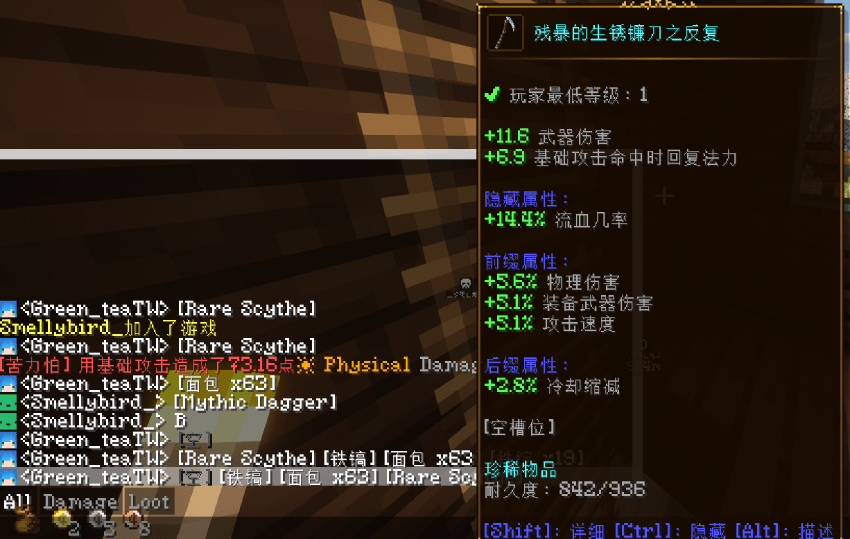
If you play modpacks, you've probably wanted to show off or sell gear in chat at some point — typing out enchants and stats by hand is a pain, and screenshots take up the whole chat. This mod lets you type a short tag in chat and it'll show the actual item — anyone can hover over it to see the full tooltip (enchants, rarity, durability, all of it).
How it works
Type [i] in chat to show whatever you're holding in your main hand.
Type [i1] through [i9] for hotbar slots 1 through 9.
You can mix it with normal text — type "selling [i]" and everyone sees "<YourName> selling [Item Name]", and they can hover the item name for details.
You can also drop multiple tags in one message, like "[i1] [i2] [i3] all for sale", and it'll show all three in order. Empty slots just show up as [Empty].
Heads up
This isn't client-only — the server needs it installed too, since the item data comes from the server reading what you're actually holding (so nobody can fake stats). If you're just hosting singleplayer and opening it to LAN for friends, you're already covered since the integrated server has the mod loaded.
Players without the mod aren't affected at all — chat works normally for them, they just won't see the hover tooltip.
玩模組包久了常常會想在聊天欄跟朋友炫耀/推銷身上的裝備,但打字描述附魔、屬性很麻煩,截圖又佔版面。這個模組讓你直接在聊天欄打幾個字,就能把手上或快捷欄的物品秀出來,別人滑鼠移過去就能看到完整的物品資訊(附魔、稀有度、耐久這些都有)。
怎麼用
聊天欄打 [i] 會秀出你主手拿的東西。
打 [i1] 到 [i9] 則對應快捷欄第 1 到第 9 格。
文字跟標記可以混著打,例如打「賣 [i]」,別人看到的就會是「<你的名字> 賣 [物品名稱]」,物品名稱可以上滑看詳細資訊。
一句話裡也可以放好幾個標記,像是「[i1] [i2] [i3] 都便宜賣」,會依序把前三格的東西都秀出來。空格子會顯示 [空]。
注意事項
這個模組不只是客戶端裝好就行,伺服器那邊也要裝,因為物品資料是伺服器讀你身上實際的東西再發給大家,這樣才不會有人亂改屬性騙人。如果是自己開單機分享給朋友(區域網路那種),不用額外處理,整合伺服器本身就算裝好了。
沒裝這個模組的人不會受影響,正常聊天照常運作,只是看不到那個可以上滑看屬性的效果。
Screenshots
Gallery
Versions
Files
Relations
Project Relations
More like this
Similar Mods
Suggestions use data such as tags, dependencies, dependents, descriptions, titles, and more to rank how much they overlap with this mod.
On ModDex
Community snapshot
By the numbers
Statistics
Want to reach Minecraft players?
We're looking for a server hosting partner to feature here and other parts of the site. Interested? Send us a message!
Get in touchGet it on
Available Platforms
On ModDex
Community snapshot
By the numbers
Statistics
Resources