
ItemSwap
No reviews yet
Swap items between hotbar and inventory slots easily!
Fabric is a mod loader for versions 1.14+ of Minecraft, particularly popular for client side and optimization mods.
Community voices
Reviews
Click once to include, again to exclude, again to clear
No reviews yet. Be the first to review this project!
Get it on
Available Platforms
 Modrinth
Compatibility
Supported Environments
About
Project Details
For authors
Embed Badge
If you're the author of this project, you can embed a live badge anywhere that supports HTML or Markdown. It updates automatically whenever ratings change.
Use HTML for any page that supports it, or Markdown for README files and Markdown-based descriptions.
Identifiers
Platform IDs
About
Description
Description
This mod provides an easy way of swapping items between inventory and hotbar slots. There is no in-inventory item swap, because the mod uses a hotbar swap (like, hovering over a hotbar slot and pressing that hotbar slot's key to swap the items). This is less error-prone than picking up the item, placing in the other slot and placing the item that was in the slot in the previous slot. It also makes the mod undetectable on servers unless you spam the swap.
Usage
In the inventory screen, hold the configuration key (L by default) while hovering a slot, drag your cursor to another slot and release the configuration key. If both slots are valid, you've successfully created a mapping. A mapping can only be created between inventory/armor slots and a hotbar slot. A hotbar slot has to be involved due to how the item swap is performed.
A mapping allows you to shift-click items between those 2 slots, rather than sending the item to the first available slot in the inventory/hotbar.
As of version 2.1.0, you can also chain the mappings. Clicking on any of the slots in the chain will perform the next swap in the cycle. The chain cycles from the first swap to last swap and back to first swap. For example, a chain of 5 swaps would be 1 2 3 4 5 4 3 2 (back to start). If you mess up the cycle, you can ctrl click to reset the cycle and move the items back into their starting positions manually.
With chaining, you can bind a slot to hotbar, and that hotbar slot to another slot, and swap the items between the 2 slots in 3 clicks. This achieves in-inventory item swap that is still undetectable if you don't spam the swaps. This is especially useful for quickly swapping 2 armor items. If the requirement of 3 clicks is too much for you, know that you can alternate between left and right click to make it easier (so, shift + (left-right-left) to swap the 2 armor items).
This isn't limited to 3 swaps, but I doubt there's much use for chains beyond that.
You can also delete slot swap chains using the delete chain keybinding (defaults to Del.)
Configuring
Execute /itemswap config or use Mod Menu.
Screenshots
Gallery
-
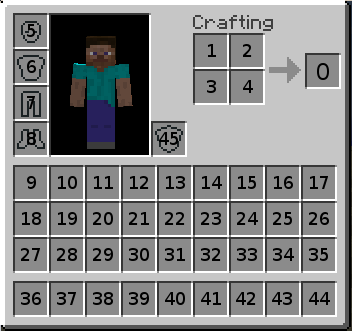 Inventory slot ids This isn't relevant beyond 1.0, but I'm keeping it for the sake of having at least 1 gallery item.
Versions
Files
Relations
Project Relations
More like this
Similar Mods
Suggestions use data such as tags, dependencies, dependents, descriptions, titles, and more to rank how much they overlap with this mod.
On ModDex
Community snapshot
By the numbers
Statistics

Want to reach Minecraft players?
We're looking for a server hosting partner to feature here and other parts of the site. Interested? Send us a message!
Get in touchGet it on
Available Platforms
On ModDex
Community snapshot
By the numbers