
Community listing page, reviews here may not be monitored by the author.
ItemViz

No reviews yet
A client-side mod that gives you complete control to easily resize and reposition items and blocks in your hand and inventory using an in-game UI.
Community voices
Reviews
No reviews yet. Be the first to review this project!
Get it on
Available Platforms
Compatibility
Supported Environments
Runs entirely on the client. Works on vanilla servers.
About
Project Details
For authors
Embed Badge
If you're the author of this project, you can embed a live badge anywhere that supports HTML or Markdown. It updates automatically whenever ratings change.
Use HTML for any page that supports it, or Markdown for README files and Markdown-based descriptions.
Identifiers
Platform IDs
Resources
External Links
About
Description
ItemViz ItemViz is a powerful client-side Fabric utility mod that gives you complete, granular control over how items and blocks look both when held in your hand (first-person view) and when rendered inside your inventory UI.
Whether you're a PvP player looking to shrink massive weapons to clear up screen space, or a builder who wants to tweak exactly how blocks sit in your hand, ItemViz provides a seamless in-game interface to make it happen.
Features Total Visual Control: Adjust the Size, X, and Y offsets of any individual item or block independently. In-Game Configuration Menu: No need to edit config files manually! Simply press the dedicated keybind or type /itemviz in chat to open a sleek, interactive configuration menu. Hand & Inventory Scaling: Settings are split into two categories. You can shrink a sword in your hand while keeping it normal-sized in your inventory, or vice-versa. Custom Backgrounds: Add custom colored backgrounds behind items in the configuration previews to help you see how they look against different colors. Multiple UI Themes: Customize the look of the ItemViz configuration menu itself with built-in Classic, Light, and Dark themes. Neat & Shareable Configs: All custom settings are saved securely in config/itemviz/items.json. Unmodified items are automatically kept out of the file to keep it clean, making it extremely easy to share your perfect PvP setups with friends or include them in modpacks. How to Use Launch the game and join a world or server. Press the ItemViz Menu Key (configurable in standard Minecraft Controls) or type /itemviz in chat. Select any item from the scrolling list on the left. Use the sliders on the right to tweak the Size, Position X, and Position Y for both the "In Hand" view and the "Inventory" view. Watch the live previews update instantly! Click "Done" to save. Any item you reset to its default size will automatically be cleaned from your config file. Installation ItemViz is a client-side only mod. You only need to install it on your client; it will work on any multiplayer server!
Requires Fabric Loader. Requires Fabric API.
Screenshots
Gallery
-
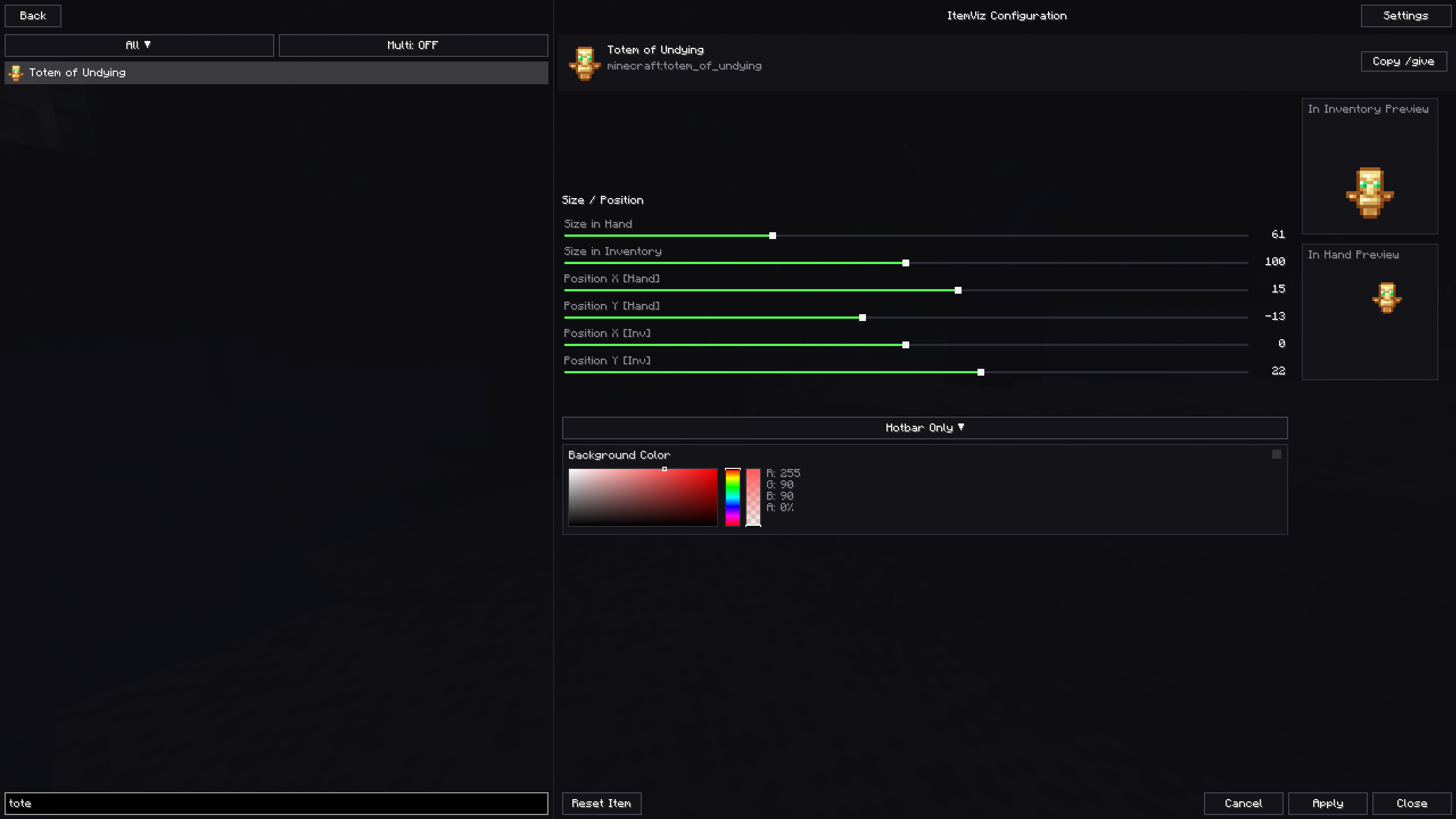 In-game menu
Versions
Files
Relations
Project Relations
More like this
Similar Mods
Suggestions use data such as tags, dependencies, dependents, descriptions, titles, and more to rank how much they overlap with this mod.
On ModDex
Community snapshot
By the numbers
Statistics

Want to reach Minecraft players?
We're looking for a server hosting partner to feature here and other parts of the site. Interested? Send us a message!
Get in touchGet it on
Available Platforms
On ModDex
Community snapshot
By the numbers
Statistics
Resources