
Community listing page, reviews here may not be monitored by the author.
It's the little things

No reviews yet
Enable changing of the minecraft icon, title, and adds other little options. Allows adding a dedicated server to the modpack
Community voices
Reviews
No reviews yet. Be the first to review this project!
Get it on
Available Platforms
About
Project Details
For authors
Embed Badge
If you're the author of this project, you can embed a live badge anywhere that supports HTML or Markdown. It updates automatically whenever ratings change.
Use HTML for any page that supports it, or Markdown for README files and Markdown-based descriptions.
Identifiers
Platform IDs
About
Description

It's the little things that make all the difference, the finishing touches to your modpack.
I'm conducting a user survey to get feedback on what ITLT v3 should look like. Please fill it out if you're interested: https://vrl9xxl97ap.typeform.com/to/MOoZy01v
Features
Branding customisation
itlt allows you to change the window title as well as its icon.
With HiDPI and multi-size ICO and ICNS icon file support, your modpack's icon can look crisp at any screen resolution and size. When an exact size isn't available, the closest one is resized and used automatically. There's also PNG support if you prefer.
In terms of changing the window title, there's support for dynamic titles that can optionally include the Minecraft version, modpack version, etc… This aids troubleshooting as well as allowing for using launcher integeration and static titles simultaneously - for instance, updating your pack's MC version can have it reflect in your window title on its own without needing to change the config.
Launcher integration
Auto-detects your modpack's details on supported launchers and brands your modpack for you without having to configure anything. Works out-of-the-box.
User guides are tailored to the launcher being used to make things as easy as possible for your users.
Welcome screen
Optionally show a screen on first launch that contains any text you want - be it the changelog, advice and tips or links to your pack's social media. The welcome screen supports scrolling, word-wrapping, colour codes, formatting (bold, italic, etc…) and even headings.
Warnings and requirements
Set recommended and minimum requirements for your modpack, respectively. It'll show helpful info to your players when the game starts if one isn't met.
You can now let people know when they haven't allocated enough RAM at launch with a helpful pop-up. Or if they're using the wrong Java version or architecture. Or if they're allocating waaaay too much RAM, or a combination of the above. These things can be set multiple times separately as warnings and requirements - where warnings are considered recommendations, requirements are considered "this modpack won't start or will crash if not met".
Using the launcher integration features, guides are tailored to the launcher your players are using, making it easier to find what settings to change to get your pack running.
Custom multiplayer server list
You can pre-install multiple server entries to the Multiplayer menu without overwriting or removing player-added ones when updating the modpack. You can also force the use of a server-provided resourcepack for specific preloaded server entries.
Enhanced Vanilla icon
On Windows and Linux, Minecraft only offers a 32px icon which looks blurry on HiDPI (aka retina) displays. ITLT uses a higher quality 48px macOS icon that's obtained directly from the game's resources, which looks better on such displays. It's not perfect, but still noticeably better.
Downloads
itlt is available for pretty much any Minecraft version you could want, although v2 is only available for Minecraft 1.13 and newer. There are no plans to backport v2 to older Minecraft versions at this time.
This mod is available for MC 1.19.4, 1.19.3, 1.19.2, 1.19.1, 1.19, 1.18.x, 1.17.1, 1.16.x, 1.15.x, 1.14.x, 1.13.2, 1.12.x, 1.11.x, 1.10.x, 1.9.x, 1.8.9, 1.8.8, 1.8.0, 1.7.x, 1.6.x, 1.5.x, 1.4.7, 1.4.6, 1.4.5, 1.4.4, 1.3.2 and 1.2.5.
v1 description
Adds those small features you didn't know you needed.
Features:
Allow you to make the Modpack yell at people using 32 bit versions of java
Note: This is off by default in versions 1.0.2 and older.

Allows you to make Minecraft open to full a fullsize window instead of the normal small one.
Allows you to set the title of the Minecraft window.
Allows you to change the icon of Minecraft in the taskbar.

Itlt can also auto-detect these things if you are using the Technic Launcher without you having to configure anything. Works out of the box.
From version 0.0.6:
- Add a custom dedicated server to the server list.
Features to come:
This mod will never add any blocks or items to the game.
Modpacks:
Feel free to use the mod.
Versions:
This mod is available for MC 1.16.x, 1.15.2, 1.14.x, 1.12.x, 1.11.x, 1.10.x, 1.9.4, 1.9, 1.8.9, 1.8, 1.7.10, 1.6.x, 1.5.x, 1.4.7, 1.4.6, 1.4.5, 1.4.4, 1.3.2 and 1.2.5
Screenshots
Gallery
-
 Warnings and requirements Show warnings like this such as when attempting to run the pack with far too little or too much RAM.
 -
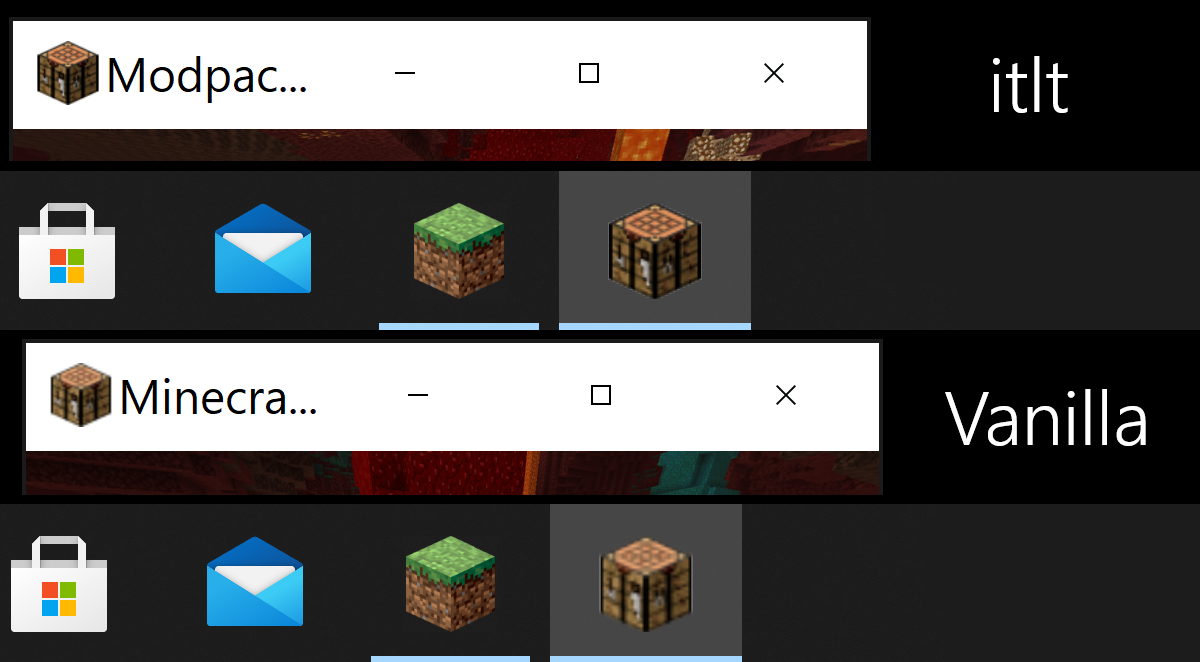 Enhanced Vanilla icon ITLT uses a higher quality Vanilla icon on hi-res screens by default for Windows and Linux.
 -
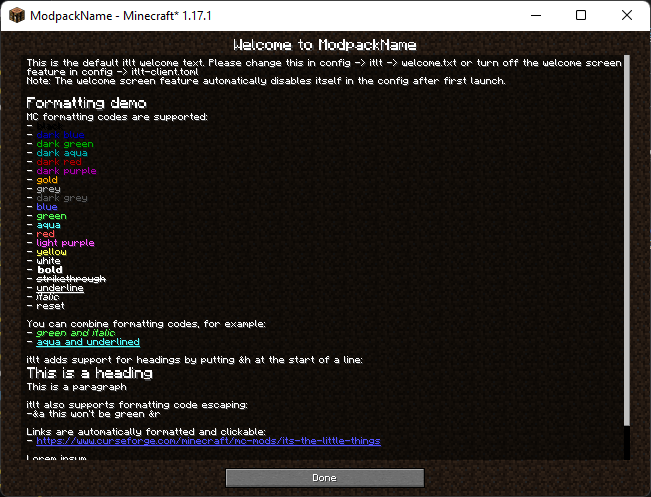 Welcome Screen Optionally show new users a welcome screen like this, with formatting and scrolling support.
Versions
Files
Relations
Project Relations
More like this
Similar Mods
Suggestions use data such as tags, dependencies, dependents, descriptions, titles, and more to rank how much they overlap with this mod.
On ModDex
Community snapshot
By the numbers
Statistics
Want to reach Minecraft players?
We're looking for a server hosting partner to feature here and other parts of the site. Interested? Send us a message!
Get in touchGet it on
Available Platforms
On ModDex
Community snapshot
By the numbers