Community listing page, reviews may not be monitored by the author.
JinGames Notes and Tomes

No reviews yet
A customizeable book creator mainly for Forge 1.7.10 Servers

Community voices
Reviews
No reviews yet. Be the first to review this project!
Get it on
Available Platforms
About
Project Details
For authors
Embed Badge
If you're the author of this project, you can embed a live badge anywhere that supports HTML or Markdown. It updates automatically whenever ratings change.
Use HTML for any page that supports it, or Markdown for README files and Markdown-based descriptions.
Identifiers
Platform IDs
Resources
External Links
About
Description
Notes and Tomes - Forge 1.7.10 Mod
A standalone mod that lets you create customizable books, mainly for servers.
Customization features:
- Add images from mods, or from the mod's folder (minecraft/jgnotesandtomes).
- Customize texture position, and size inside the image file.
- Format text.
- Resize everything.
Usage:
Creating a Book:
- (SERVERS ONLY) Create a Text file inside the "minecraft/jgnotesandtomes" folder. The name of the file will be the bookID and the page number. (For example a book with the ID "welcome" has to be titled "welcome_page1.txt" "welcome_page2.txt" etc...)
- Give yourself the book in-game using the command "/notesandtomes create @p welcome Welcome Message"
- (SERVERS ONLY) Edit the "welcome_page1.txt" file to your liking.
- Update the book's content using the command "/notesandtomes update welcome"
Command:
You have 3 command options: Create, Create missing, and Update.
Create: Gives a player a Book.
Create missing: Gives a player a Book IF he doesn't already have a book with the same bookID in his inventory.
Update: Updates all books with the set bookID. All admins are notified of the update.
Commands:
"notesandtomes create @p bookID BookTitle"
"/notesandtomes createmissing @p bookID BookTitle"
"/notesandtomes update bookID"
Example commands:
"/notesandtomes create @p welcome Tutorial to our Server!"
"/notesandtomes createmissing @p welcome Tutorial to our Server!"
"/notesandtomes update welcome"
Customization detailed:
Adding Images:
- Always use 1:1 Aspect ratio images, and try to mainly use a 256x256 image size.
- Images can have their XY position, and width,height be set like in the example below. The Width and Height isn't the Size of the image, but rather the width and height inside the image file.Code examples:
- Image from a minecraft: "(image=textures/blocks/stone;x=10;y=30;w=256;h=256)"
- Image from mod: "(image=jgnotesandtomes:book2)"
- Image from the "minecraft/jgnotesandtomes" folder: "(image=jgnotesandtomes/book2)"
Formatting Text:
- Minecraft MOTD codes work with the mod. (CHECK https://minecraft.fandom.com/wiki/Formatting_codes "Use in server.properties and pack.mcmeta" part for codes)Code examples:
- Color with black text: "\u00A70"
- Bold text: "\u00A71"
- Reset formatting: "\u00A7r"
Resizing:
- The default size is 100.Code examples:
- 100% text and image size: "(size=100)"
- 50% text and image size: "(size=50)"
Example Book:
Server side:
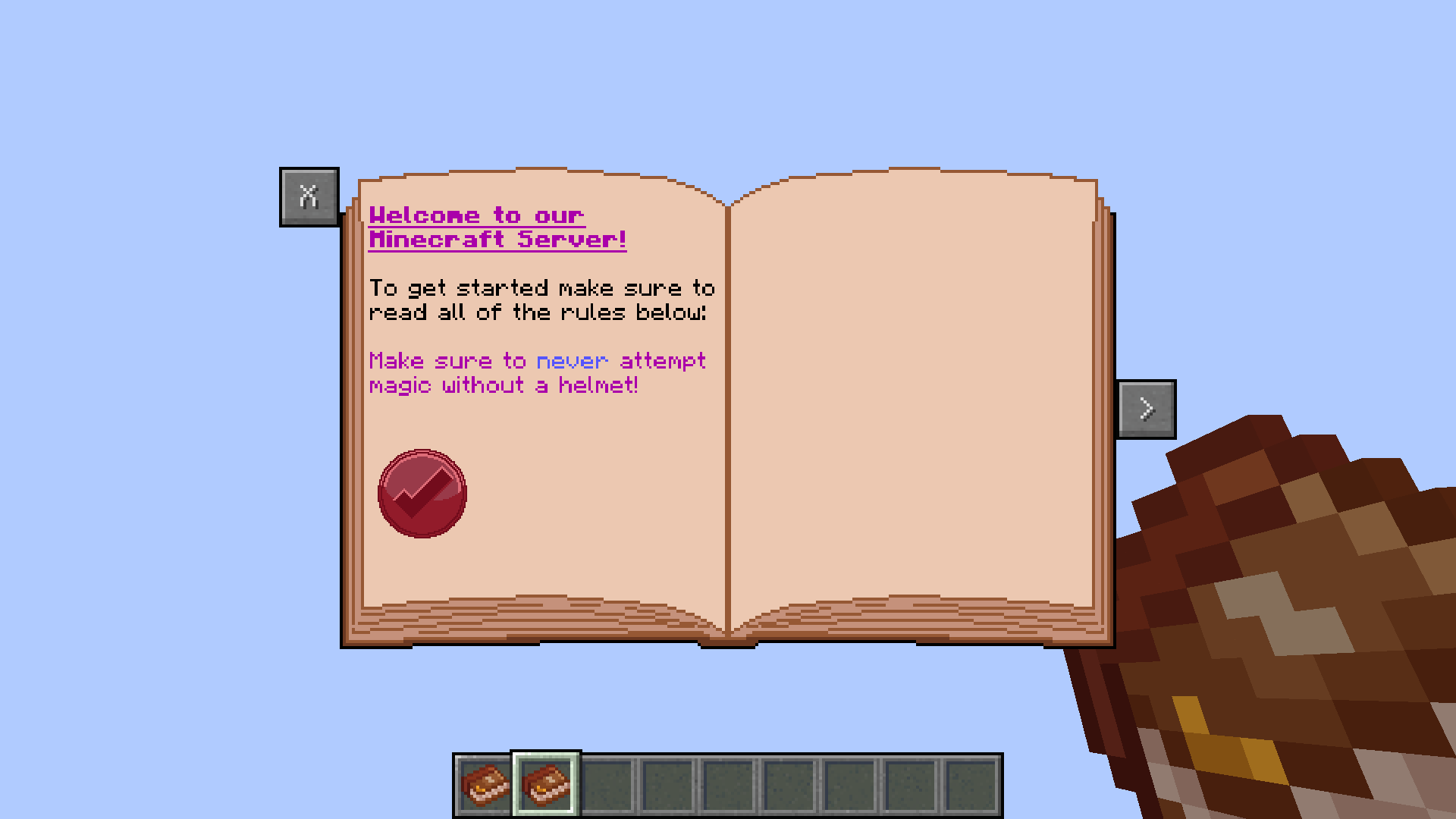
Page 1:
Filename should be "welcome_page1.txt"
Text File Content:
(size=100)
(image=jgnotesandtomes:book2)
(size=80)
\u00A75\u00A7n\u00A7lWelcome to our
Minecraft Server!
\u00A7rTo get started make sure to
read all of the rules below:
\u00A75Make sure to \u00A79never \u00A75attempt
magic without a helmet!
(size=50)
(image=jgnotesandtomes/stamp;x=10;y=90;w=80;h=70)
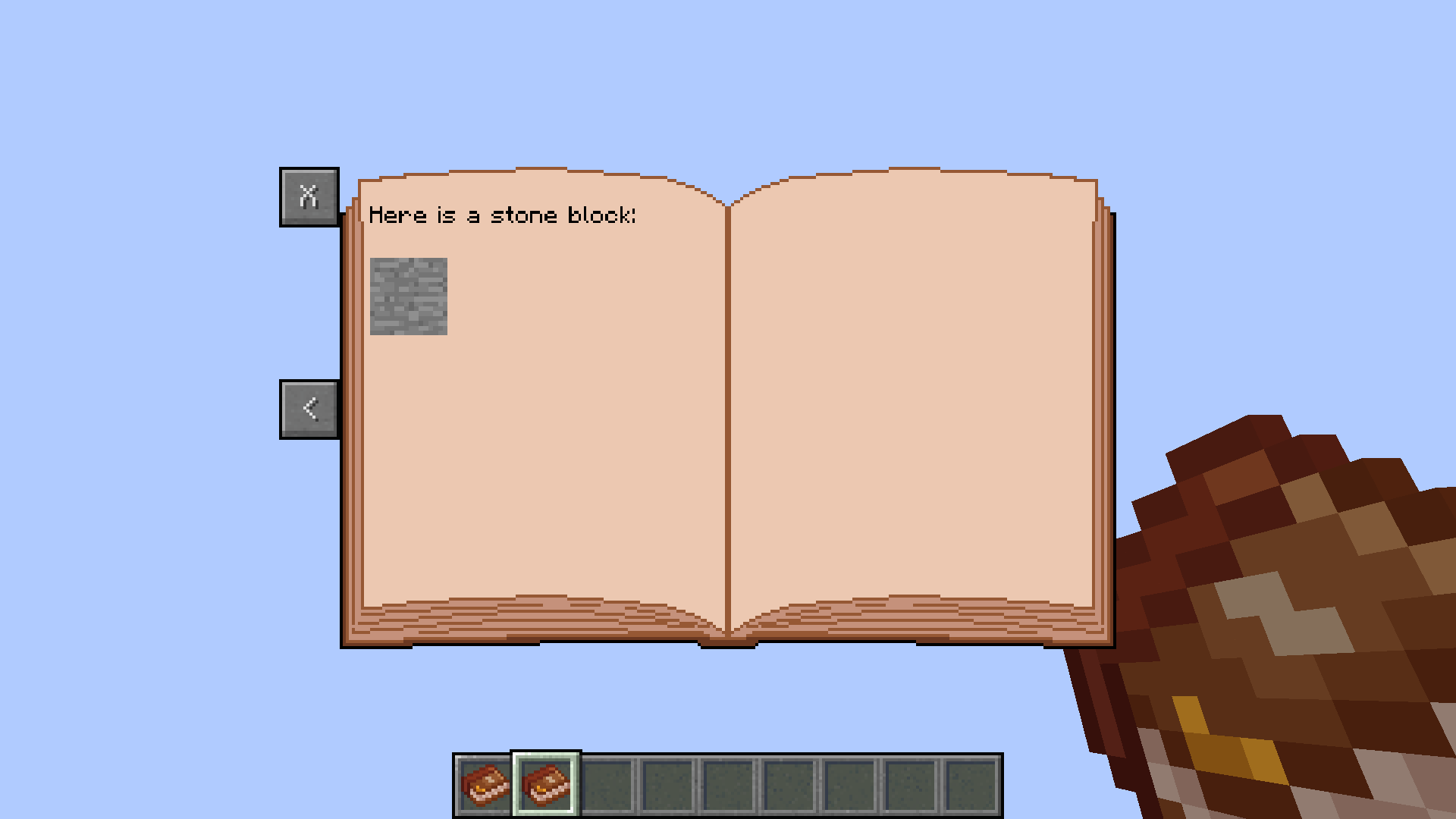
Page 2:
Filename should be "welcome_page2.txt"
Text File Content:
(size=100)
(image=jgnotesandtomes:book2)
(size=80)
\u00A7rHere is a stone block:
(size=10)
(image=textures/blocks/stone;x=10;y=30;w=256;h=256)
Client side:
Download this texture, and rename it to "stamp.png":

Common Question(s):
Q: Will the mod be updated to a newer Forge version?
A: I mostly quit Modding already so I doubt that.
Credits:
- Creator: Benjámin "JinGames_Ben" Nagy
Donate:
OUR PATREON: patreon.com/JinRyuu
SERVER DONATION: JinGames DBC Zero S Minecraft Server

JinGames is Sponsored by BisectHosting!
Need a Minecraft Server? BisectHosting is a super easy to use Server Hosting provider!
Use our Link and promo code JinGames to get 25% OFF your first month.
|
|

|
|
|


Screenshots
Gallery
-
 Example 1 - Page 2
 -
 Example 1 - Page 1
Versions
Files
Relations
Project Relations
More like this
Similar Mods
Suggestions use data such as tags, dependencies, dependents, descriptions, titles, and more to rank how much they overlap with this mod.
On ModDex
Community snapshot
By the numbers
Statistics
 (opens in a new tab)
Get it on
Available Platforms
On ModDex
Community snapshot
By the numbers
Statistics
Resources