
Community listing page, reviews here may not be monitored by the author.
Journey Map Visible World Border


No reviews yet
A JourneyMap add-on for battle-royale‑style servers (with shading, guidance lines, and click-to-share markers) and provides /jwbwp commands to automate waypoint creation as well as billboard.

Community voices
Reviews
No reviews yet. Be the first to review this project!
Get it on
Available Platforms
Compatibility
Supported Environments
Must be installed on both the client and the server.
About
Project Details
For authors
Embed Badge
If you're the author of this project, you can embed a live badge anywhere that supports HTML or Markdown. It updates automatically whenever ratings change.
Use HTML for any page that supports it, or Markdown for README files and Markdown-based descriptions.
Identifiers
Platform IDs
About
Description
JourneyMap Visible World Border
JourneyMap Visible World Border (JMVWB) is a Minecraft 1.20.1 Forge mod that extends JourneyMap with automation-friendly commands for creating, sharing, and annotating waypoints. It also adds billboard overlays (text or textures) that stay visible through walls, making it easier for staff teams and event hosts to guide players.
Features
- World border overlay
- Draws current vs. final JourneyMap border rings, optional shaded regions for outside-the-border areas, and an animated “run-to-safety” direction ribbon.
- Integrates with JourneyMap’s fullscreen map so shared waypoints and border visuals stay in sync while the world border shrinks or expands.
- Highly configurable via JourneyMap → Options → Mods → JMV World Border.
- Waypoint automation
/jwbwp create_poscreates fixed-position waypoints with optional icon, color, origin, persistence, and announcement flags./jwbwp create_entitysnapshots entities (e.g., wolves) into waypoints and broadcasts them to selected players./jwbwp delete_posremoves waypoints either by exact coordinates or by the closest matching waypoint near each player.
- Billboard overlays
/jwbwp billboard textureand/jwbwp billboard textspawn free-floating billboards at any coordinates with optional TTLs and up to 5× scale adjustment./jwbwp billboard waypoint ...attaches billboards to previously created waypoints.- Supports both
journeymap:, vanillaminecraft:texture paths and any other mod, but the texture should be smaller than 256x256. - Rendered with see-through depth settings so the billboard remains visible through walls (including shader/culling setups).
- Safe command aliases
- Players issue commands with
/jwbwp ...to avoid JourneyMap’s/jminterception. - Dedicated-server console (and server-side command blocks) should use
/jwbwp_server ....
- Players issue commands with
- JourneyMap integration
- Waypoint packets use JourneyMap’s JSON schema so client HUD/minimap refresh automatically.
- Billboard packets rate-limit per-player to avoid spamming or packet drops.
For a detailed list of command combinations, see Commands.
Requirements
- Minecraft 1.20.1
- Forge 47.4.0 to 47.4.10 (higher version not tested)
- JourneyMap 1.20.1 (both client and server need the same version for shared waypoints)
World border overlay
Open JourneyMap (J), then Options → Add-on → JMV World Border to access these controls ( Check out this guide: World Border Options.) for details):
- Overlay basics – Toggle the entire overlay on/off.
- Shaded areas – Show translucent red tint outside the current border, and gray tint outside the future/final border with independent opacity sliders.
- Border lines – Separate style/width/opacity controls for current vs. final border outlines.
- Direction line to safety – Animated ribbon that points to the nearest safe edge or to the center, with customizable width, color (#RRGGBB), and opacity.
- Click-to-place shared markers – Middle-click on the fullscreen map to drop expiring waypoints with per-click TTLs, audience selection (all players vs. team), and RGB color options.
Command quick reference
| Action | Example | Notes |
|---|---|---|
| Create waypoint at position | /jwbwp create_pos WolfHome 128 70 -32 @a |
Optional: "icon" color origin persistent announce arguments appended after the player selector. |
| Snapshot entities into waypoints | /jwbwp create_entity Wolf @e[type=minecraft:wolf,limit=5] @a |
Same optional fields as create_pos after <players>. |
| Delete waypoint | /jwbwp delete_pos WolfHome @a false |
Without coordinates it deletes the nearest matching waypoint for each player. |
| Billboard text | /jwbwp billboard text testSign ~ ~ ~2 @s ttl 10 Hello World |
ttl literal sets lifespan; inline (ttl N) suffix also works. |
| Billboard texture | /jwbwp billboard texture icon 5 ~ ~ ~ @s "minecraft:textures/item/compass.png" 30 |
Scale (5×) comes before position, TTL seconds after the texture path. |
| Waypoint billboard | /jwbwp billboard waypoint Wolf texture @s "journeymap:ui/img/waypoint-death-icon.png" |
Uses stored waypoint position/color metadata. |
Troubleshooting
- Commands rejected by client: Always use
/jwbwp. From the server console use/jwbwp_server. - Waypoints not appearing: Ensure the server sends packets to players that actually have JourneyMap installed. Check server logs for
[jmvwp]entries to confirm command execution. - Billboards hidden behind walls: The render handler mirrors JourneyMap’s see-through overlay, but shader packs may need a full reload (
F3 + T). Verify thatBillboardManager.enabledis true in client logs. - Textures missing: Confirm the resource location exists. For vanilla animated items (compass/clock) the mod automatically maps to their frame textures (
compass_00.png).
JourneyMap Visible World Border
JourneyMap Visible World Border (JMVWB) is a Minecraft 1.20.1 Forge mod that extends JourneyMap with automation-friendly commands for creating, sharing, and annotating waypoints. It also adds billboard overlays (text or textures) that stay visible through walls, making it easier for staff teams and event hosts to guide players.
Features
- World border overlay
- Draws current vs. final JourneyMap border rings, optional shaded regions for outside-the-border areas, and an animated “run-to-safety” direction ribbon.
- Integrates with JourneyMap’s fullscreen map so shared waypoints and border visuals stay in sync while the world border shrinks or expands.
- Highly configurable via JourneyMap → Options → Mods → JMV World Border.
- Waypoint automation
/jwbwp create_poscreates fixed-position waypoints with optional icon, color, origin, persistence, and announcement flags./jwbwp create_entitysnapshots entities (e.g., wolves) into waypoints and broadcasts them to selected players./jwbwp delete_posremoves waypoints either by exact coordinates or by the closest matching waypoint near each player.
- Billboard overlays
/jwbwp billboard textureand/jwbwp billboard textspawn free-floating billboards at any coordinates with optional TTLs and up to 5× scale adjustment./jwbwp billboard waypoint ...attaches billboards to previously created waypoints.- Supports both
journeymap:, vanillaminecraft:texture paths and any other mod, but the texture should be smaller than 256x256. - Rendered with see-through depth settings so the billboard remains visible through walls (including shader/culling setups).
- Safe command aliases
- Players issue commands with
/jwbwp ...to avoid JourneyMap’s/jminterception. - Dedicated-server console (and server-side command blocks) should use
/jwbwp_server ....
- Players issue commands with
- JourneyMap integration
- Waypoint packets use JourneyMap’s JSON schema so client HUD/minimap refresh automatically.
- Billboard packets rate-limit per-player to avoid spamming or packet drops.
For a detailed list of command combinations, see Commands.
Requirements
- Minecraft 1.20.1
- Forge 47.4.0 to 47.4.10 (higher version not tested)
- JourneyMap 1.20.1 (both client and server need the same version for shared waypoints)
World border overlay
Open JourneyMap (J), then Options → Add-on → JMV World Border to access these controls ( Check out this guide: World Border Options.) for details):
- Overlay basics – Toggle the entire overlay on/off.
- Shaded areas – Show translucent red tint outside the current border, and gray tint outside the future/final border with independent opacity sliders.
- Border lines – Separate style/width/opacity controls for current vs. final border outlines.
- Direction line to safety – Animated ribbon that points to the nearest safe edge or to the center, with customizable width, color (#RRGGBB), and opacity.
- Click-to-place shared markers – Middle-click on the fullscreen map to drop expiring waypoints with per-click TTLs, audience selection (all players vs. team), and RGB color options.
Command quick reference
| Action | Example | Notes |
|---|---|---|
| Create waypoint at position | /jwbwp create_pos WolfHome 128 70 -32 @a |
Optional: "icon" color origin persistent announce arguments appended after the player selector. |
| Snapshot entities into waypoints | /jwbwp create_entity Wolf @e[type=minecraft:wolf,limit=5] @a |
Same optional fields as create_pos after <players>. |
| Delete waypoint | /jwbwp delete_pos WolfHome @a false |
Without coordinates it deletes the nearest matching waypoint for each player. |
| Billboard text | /jwbwp billboard text testSign ~ ~ ~2 @s ttl 10 Hello World |
ttl literal sets lifespan; inline (ttl N) suffix also works. |
| Billboard texture | /jwbwp billboard texture icon 5 ~ ~ ~ @s "minecraft:textures/item/compass.png" 30 |
Scale (5×) comes before position, TTL seconds after the texture path. |
| Waypoint billboard | /jwbwp billboard waypoint Wolf texture @s "journeymap:ui/img/waypoint-death-icon.png" |
Uses stored waypoint position/color metadata. |
Refer to the billboard command guide for more curated examples, including vanilla texture usage and combination flows.
Troubleshooting
- Commands rejected by client: Always use
/jwbwp. From the server console use/jwbwp_server. - Waypoints not appearing: Ensure the server sends packets to players that actually have JourneyMap installed. Check server logs for
[jmvwp]entries to confirm command execution. - Billboards hidden behind walls: The render handler mirrors JourneyMap’s see-through overlay, but shader packs may need a full reload (
F3 + T). Verify thatBillboardManager.enabledis true in client logs. - Textures missing: Confirm the resource location exists. For vanilla animated items (compass/clock) the mod automatically maps to their frame textures (
compass_00.png).
Screenshots
Gallery
-
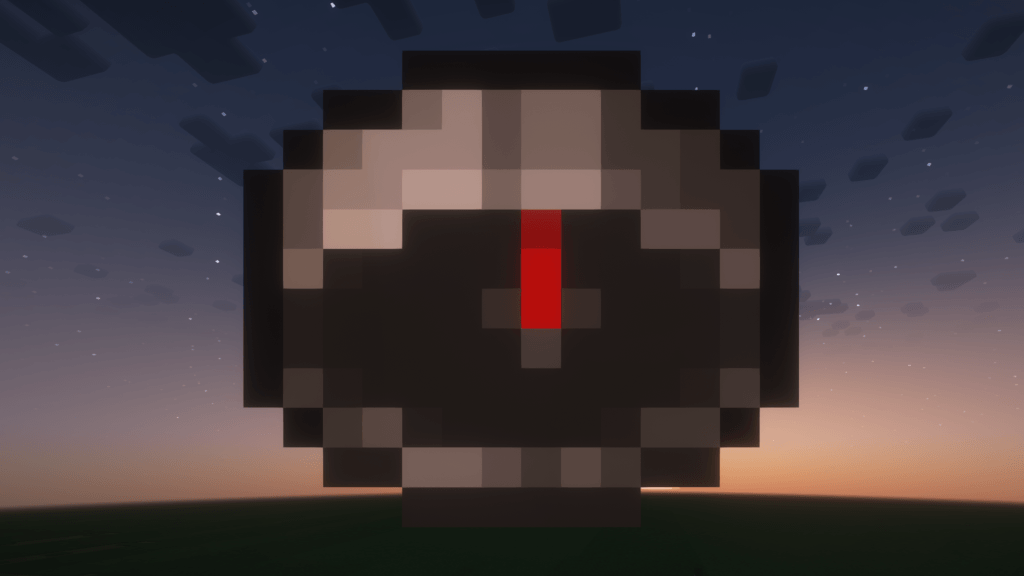 Billboard Billboard supports texture smaller than 256x256.
 -
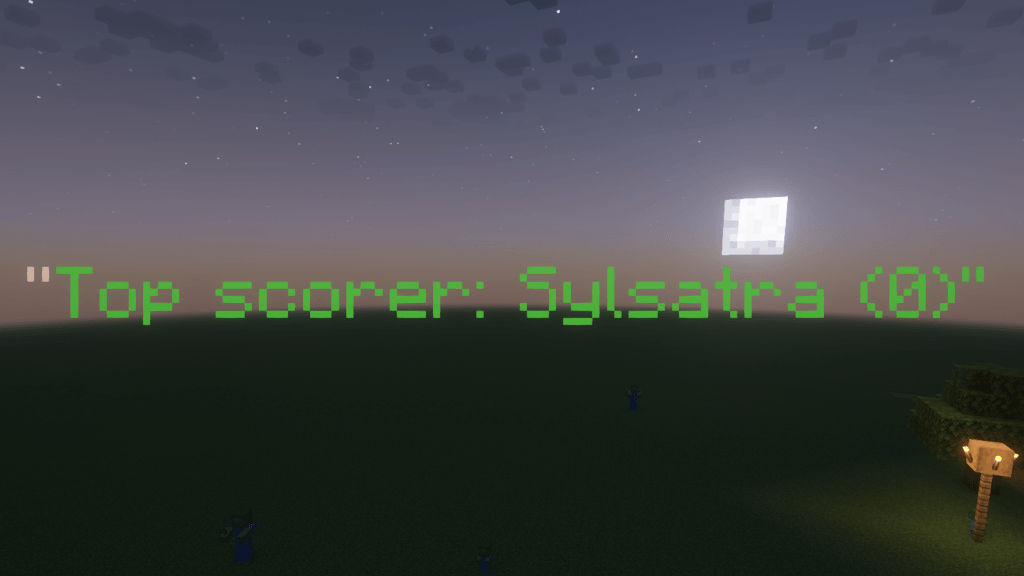 Billboard Text billboards support regex-powered templating.
 -
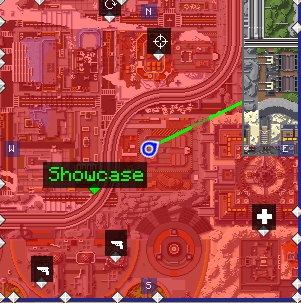 Minimap A minimap showing the world border with a line guiding toward the center.
 -
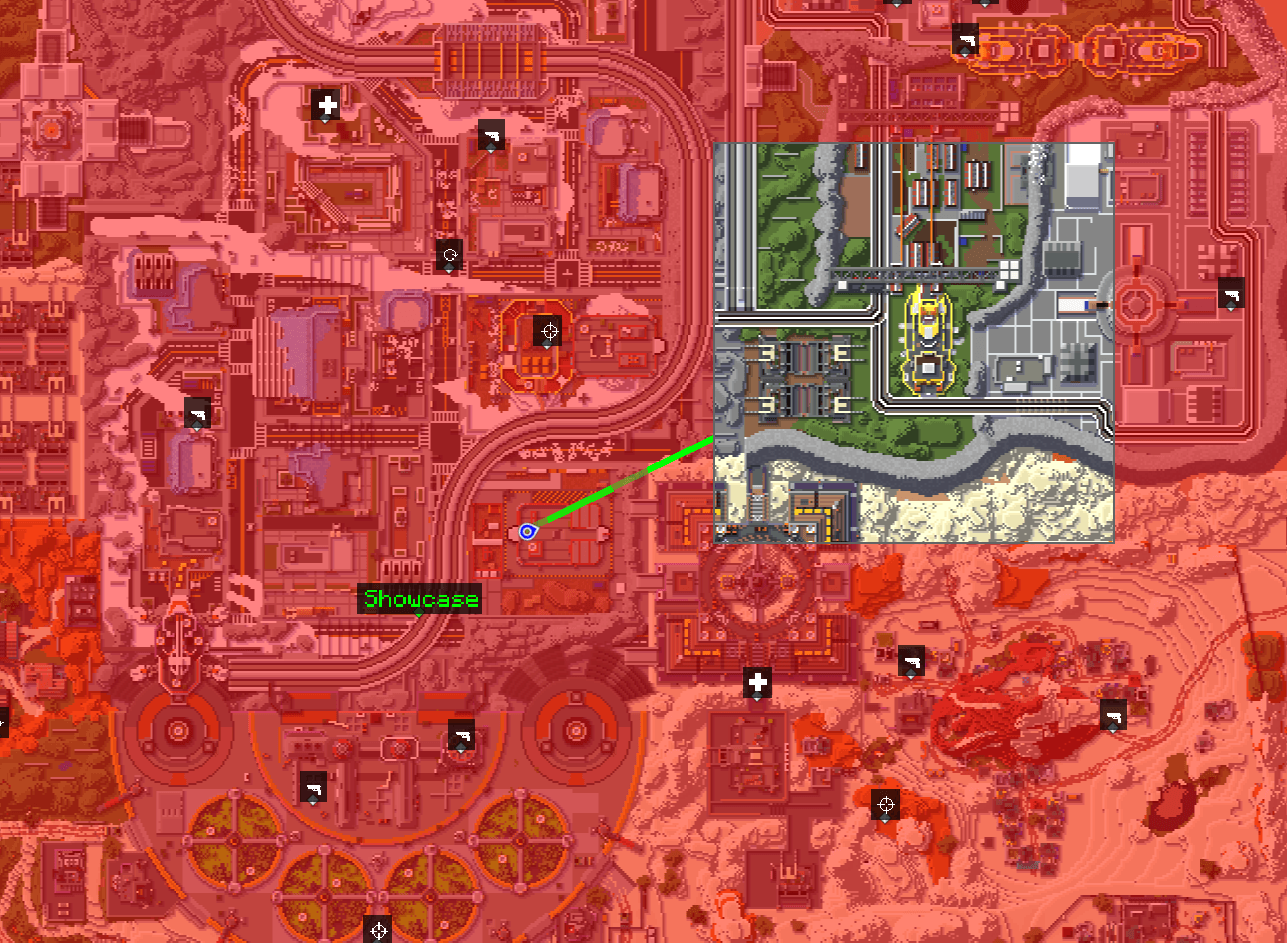 Full Screen Full screen visible world border with a line guiding toward the center.
-
 Minimap Visible World Border on the minimap with a line guiding toward the center.
 -
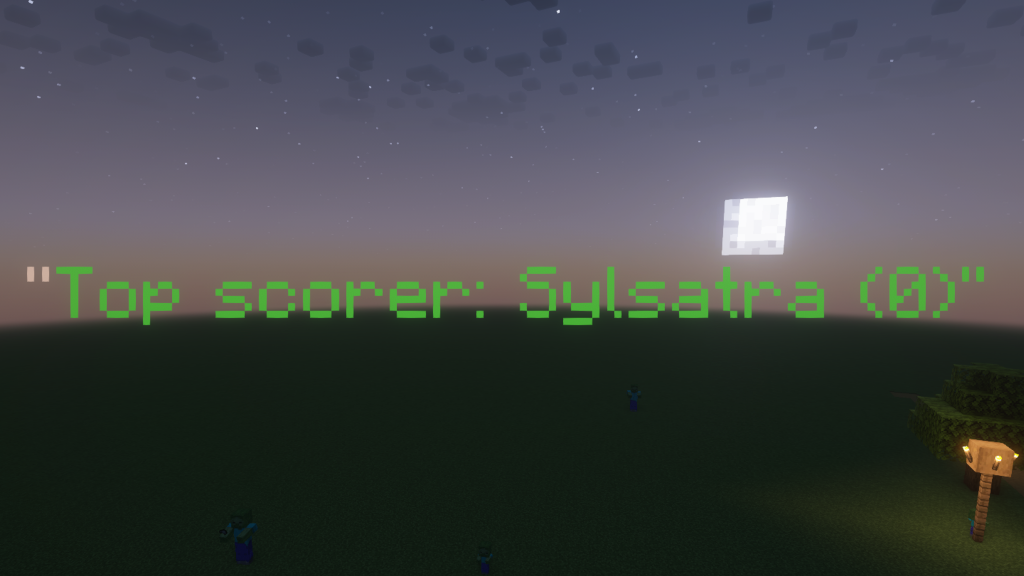 Billboard Text billboards support regex-powered templating.
 -
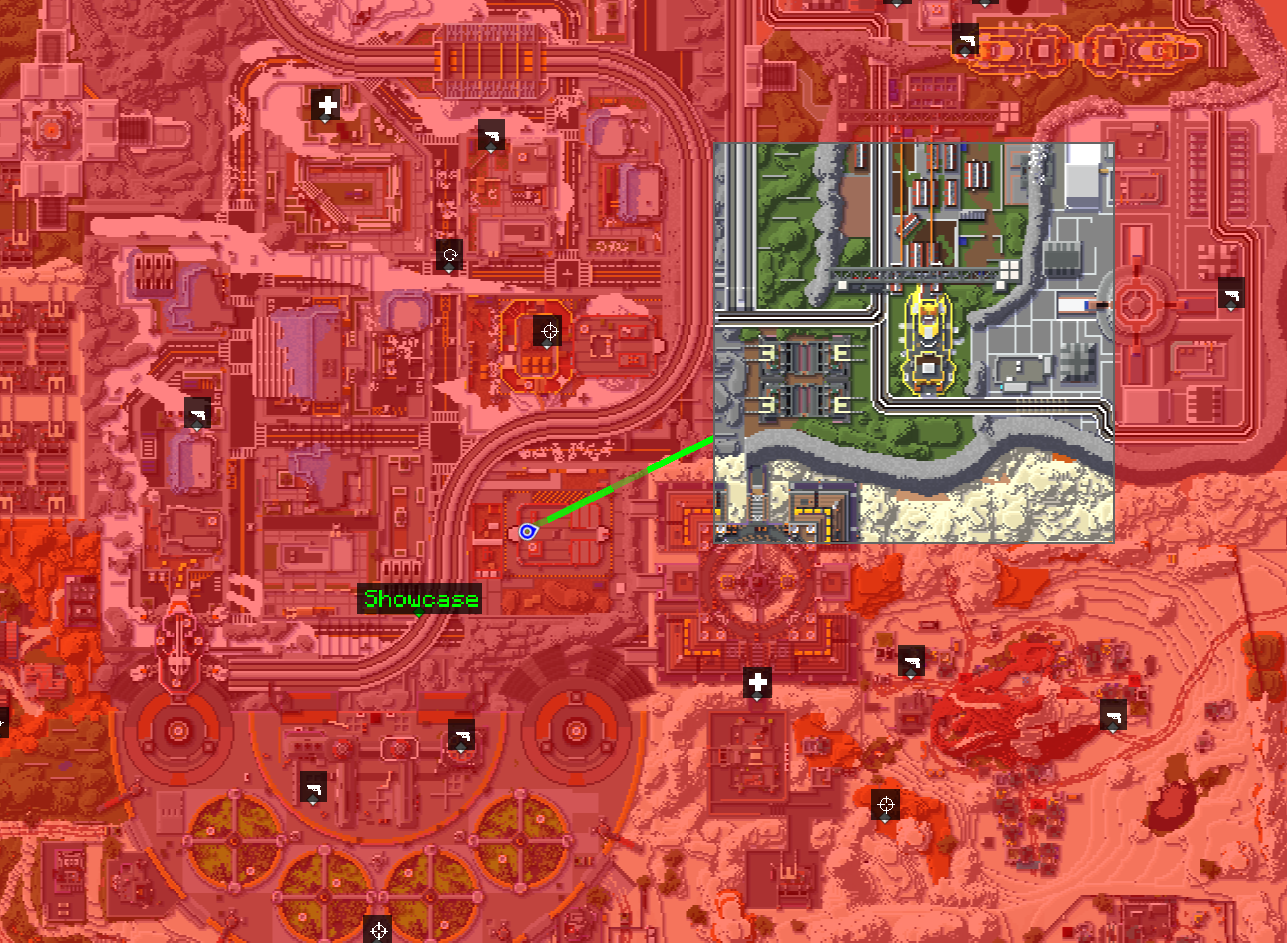 Full Map Visible World Border in JourneyMap with a line guiding toward the center.
 -
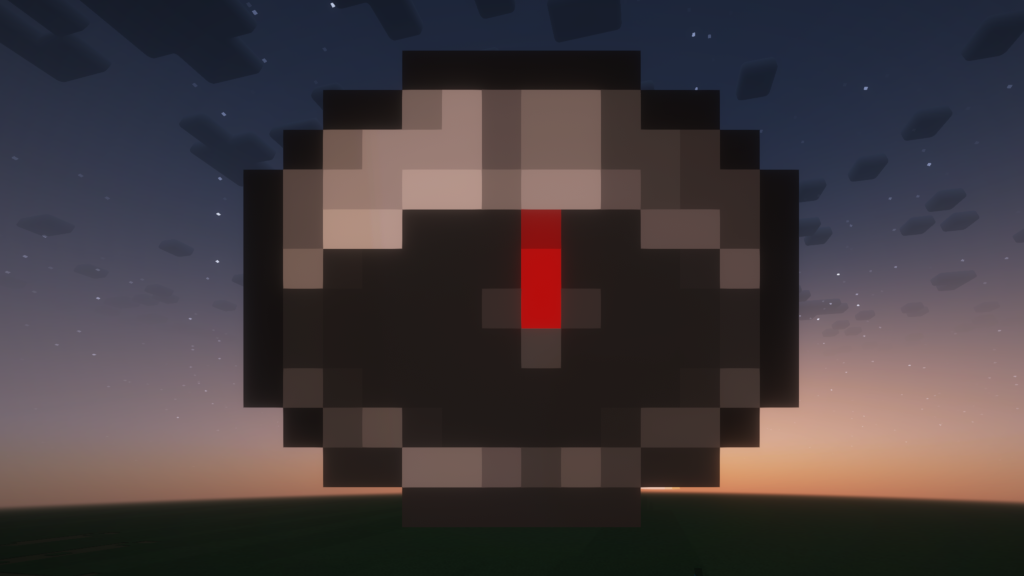 Billboard Billboard supports texture up to 256x256.
Versions
Files
Relations
Project Relations
More like this
Similar Mods
Suggestions use data such as tags, dependencies, dependents, descriptions, titles, and more to rank how much they overlap with this mod.
On ModDex
Community snapshot
By the numbers
Statistics
 (opens in a new tab)
Get it on
Available Platforms
On ModDex
Community snapshot
By the numbers