
JourneyMap Tracker
No reviews yet
A client-side mod that uses DynMap to create and update journeymap waypoints for players.
Fabric is a mod loader for versions 1.14+ of Minecraft, particularly popular for client side and optimization mods.
Community voices
Reviews
Click once to include, again to exclude, again to clear
No reviews yet. Be the first to review this project!
Get it on
Available Platforms
 Modrinth
Compatibility
Supported Environments
About
Project Details
For authors
Embed Badge
If you're the author of this project, you can embed a live badge anywhere that supports HTML or Markdown. It updates automatically whenever ratings change.
Use HTML for any page that supports it, or Markdown for README files and Markdown-based descriptions.
Identifiers
Platform IDs
Resources
External Links
About
Description
JourneyMap Tracker is a mod that creates and updates JourneyMap waypoints of tracked players given a DynMap URL.
Not all web map software will work, but so far I haven't found one that doesn't work.
The following are known to work:
- Squaremap
- Whatever EarthMC uses (couldn't find it)
Setting the URL and other parameters
You can either type /jmtracker url <url here> or set it using the config through ModMenu or running /jmtracker config.
There is an option in the config for modifying the polling delay but it doesn't seem to go below one second.
For the other parameters, you're going to have to press f12, navigate to Network, and right click -> open in new tab a file that repeatedly gets fetched. It's name should be something like players.json or tiles.json.
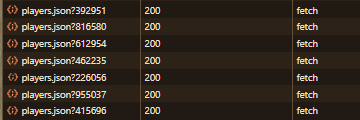
If the exact URL of the file isn't <your url>/tiles/players.json, you're gonna have to set the url suffix to what the /tiles/players.json is instead.
For the world specific option, if an individual player's object doesn't contain a world object, you need to turn it off.
For the position sub category, it's the opposite: if the player object directly has x,y, and z values, leave it blank. If not, change it to the name of the object containing the values.
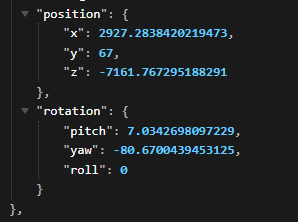
In this example, it would be set to position since the x y and z values are in a position object.
Tracking / Untracking players
Tracking and untracking players is unfortunately not possible through the config.
To track and untrack players, you have to use the commands:
/jmtracker add/remove <playername>
Issues and/or feature requests can be posted on my issue tracker.
Screenshots
Gallery
Versions
Files
Relations
Project Relations
More like this
Similar Mods
Suggestions use data such as tags, dependencies, dependents, descriptions, titles, and more to rank how much they overlap with this mod.
On ModDex
Community snapshot
By the numbers
Statistics

Want to reach Minecraft players?
We're looking for a server hosting partner to feature here and other parts of the site. Interested? Send us a message!
Get in touchGet it on
Available Platforms
On ModDex
Community snapshot
By the numbers
Statistics
Resources