
Community listing page, reviews here may not be monitored by the author.
Just Enough Backups (JEB)


No reviews yet
Backup mod that keeps your worlds safe with automatic and manual backups, with an easy in-game UI to create, manage, and restore them.
Community voices
Reviews
No reviews yet. Be the first to review this project!
Get it on
Available Platforms
Compatibility
Supported Environments
Works on the client or the server alone, but does more when on both.
About
Project Details
For authors
Embed Badge
If you're the author of this project, you can embed a live badge anywhere that supports HTML or Markdown. It updates automatically whenever ratings change.
Use HTML for any page that supports it, or Markdown for README files and Markdown-based descriptions.
Identifiers
Platform IDs
About
Description

Just Enough Backups is a Fabric mod that adds server-side world backups with a usable in-game workflow.
It supports:
- full, partial, and differential backups
- manual backups through commands and UI
- automatic scheduled backups
- configurable public backup/restore announcements
- retention by backup count
- retention by total backup size per world
- restore preparation from the backup browser
- a configurable client HUD popup with live preview
- parallel (multi-threaded) scanning, compression, and restore extraction
- optional Mod Menu integration
The mod is designed to keep the actual backup logic on the server side while exposing management and configuration through a client UI.
Features
Backup types
- Full: stores a complete snapshot of the world.
- Partial: stores changes relative to a base backup.
- Differential: stores changes relative to a base backup, while keeping a separate retention bucket from partial backups.
Dependencies between backups are tracked. Retention and delete operations respect those dependencies, so required base backups are preserved when newer partial or differential backups still depend on them.
Automatic backups
Automatic backups are driven by per-type schedulers (FULL, DIFFERENTIAL, PARTIAL) and can be configured to:
- run independently based on configured intervals for each backup type
- send optional public warning before an automatic backup starts
- pause when no players have been online since the last backup
- run on server start
- run on server stop
Public announcements can be sent to chat, sent to the action bar, or disabled.
Retention policy
Retention can be configured in two ways at the same time:
- count-based retention
- keep the newest
Xfull backups - keep the newest
Xpartial backups - keep the newest
Xdifferential backups
- keep the newest
- size cap per world
- optional hard cap for the total size of a world's backup folder
- applied to the final published backup set
- respects dependency chains
If a new backup would exceed the configured space cap even after deleting every backup that is allowed to be removed, creation fails instead of publishing an invalid final state.
Performance: parallel processing
Backups and restores use multiple worker threads to speed up large worlds:
- scanning / hashing: the world snapshot scan runs across
threadCountthreads (up to one per CPU core), reading and hashing files in parallel - compression: the ZIP archive is written with parallel compression
- restore extraction: backup ZIP files are extracted across
threadCountthreads
The number of threads is controlled by threadCount in the config and can be set between 1 and the maximum number of CPU threads (default: CPU cores minus two). Lower values reduce CPU usage; higher values speed up large worlds.
Backup management UI
The backup browser includes:
- refresh
- create backup
- rename backup
- delete backup
- restore backup
- dependency-aware inline details
- search/filtering
Manual backup creation supports a custom file name from both the command line and the UI.
Config UI and popup preview
The config screen exposes:
- backup mode and scheduler options
- retention rules
- permission level
- integrity mode
- backup directory and temporary backup directory
- excluded paths
- popup text, colors, channels, and layout
The popup preview screen lets you move and preview the HUD state before saving.
On a dedicated server the config screen is client-side only: it shows the HUD and Preview tabs (which apply locally to the popup), and server settings are edited on the server's config/justenoughbackups.json file followed by /jeb config reload. In single-player the whole config is shared and editable from the screen.
Commands
The root command is:
/jebAvailable commands:
/jeb now
/jeb now <name>

/jeb create full
/jeb create full <name>
/jeb create partial
/jeb create partial <name>
/jeb create differential
/jeb create differential <name>

/jeb list
/jeb next
/jeb restore <backup>
/jeb config reload
Notes:
<name>is optional and becomes the real.zipfile name after sanitization.<backup>is the visible backup name, with or without the.zipsuffix. Tab completion suggests the visible name.- restore is prepared asynchronously and then the server shuts down so the restore can be applied safely on the next startup.
/jeb nextdisplays a multi-schedule summary showing remaining times and exact execution timestamps for all configured backup types, sorted by proximity.- command access follows the configured permission level.
Default keybindings
Client-side keybindings:
B: open backup managementN: open config screen
These are regular Minecraft keybindings and can be changed in Controls.
Configuration
The mod writes its config file to:
config/justenoughbackups.jsonMain config areas:
backupModeautomaticBackupsEnabledpauseAutomaticBackupsWithoutPlayersbackupOnServerStartbackupOnServerStopautomaticIntervalMinutesautomaticBackupWarningEnabledautomaticBackupWarningMinutescommandPermissionLevelmessageChannelintegrityModeminimumFreeSpaceReserveMbthreadCountbackupDirectorytempBackupDirectoryexcludedPathsretentionfullincrementaldifferentialmaxTotalSizeMb
popup
backupDirectory may be relative to the game directory or an absolute path.
tempBackupDirectory controls where the backup ZIP is compressed before being moved into backupDirectory. It may be relative to the game directory or an absolute path. Leave it empty to compress inside the backup directory (default). Pointing it at a local drive is recommended when backups are stored on a slow or networked drive, since only the finished ZIP is then transferred to the backup location.
excludedPaths uses paths relative to the world root. A folder entry excludes that full subtree, while a file entry excludes only that specific file.
threadCount controls parallel scanning, compression, and restore extraction, and is clamped between 1 and the number of CPU threads.
Examples:
voxy
voxy/cache.db
Before creating a backup, the mod also checks free disk space on the backup destination filesystem. The check is conservative and requires:
(current world size * 2) + minimumFreeSpaceReserveMbIf that space is not available, backup creation is aborted before the temporary ZIP is written.
Backup naming
Manual backups support custom names:
- from commands:
/jeb now My backup - from the create dialog in the backup UI
If no custom name is provided, the mod uses the automatic naming scheme based on type and timestamp.
Rename uses the same sanitization rules as manual creation to keep naming behavior consistent.
License
This project is licensed under the MIT License.
Just Enough Backups is a Fabric mod that adds server-side world backups with a usable in-game workflow.
It supports:
- full, partial, and differential backups
- manual backups through commands and UI
- automatic scheduled backups
- configurable public backup/restore announcements
- retention by backup count
- retention by total backup size per world
- restore preparation from the backup browser
- a configurable client HUD popup with live preview
- parallel (multi-threaded) scanning, compression, and restore extraction
- optional Mod Menu integration
The mod is designed to keep the actual backup logic on the server side while exposing management and configuration through a client UI.
Features
Backup types
- Full: stores a complete snapshot of the world.
- Partial: stores changes relative to a base backup.
- Differential: stores changes relative to a base backup, while keeping a separate retention bucket from partial backups.
Dependencies between backups are tracked. Retention and delete operations respect those dependencies, so required base backups are preserved when newer partial or differential backups still depend on them.
Automatic backups
Automatic backups are driven by per-type schedulers (FULL, DIFFERENTIAL, PARTIAL) and can be configured to:
- run independently based on configured intervals for each backup type
- send optional public warning before an automatic backup starts
- pause when no players have been online since the last backup
- run on server start
- run on server stop
Public announcements can be sent to chat, sent to the action bar, or disabled.
Retention policy
Retention can be configured in two ways at the same time:
- count-based retention
- keep the newest
Xfull backups - keep the newest
Xpartial backups - keep the newest
Xdifferential backups
- size cap per world
- optional hard cap for the total size of a world's backup folder
- applied to the final published backup set
- respects dependency chains
- keep the newest
If a new backup would exceed the configured space cap even after deleting every backup that is allowed to be removed, creation fails instead of publishing an invalid final state.
Performance: parallel processing
Backups and restores use multiple worker threads to speed up large worlds:
- scanning / hashing: the world snapshot scan runs across
threadCountthreads (up to one per CPU core), reading and hashing files in parallel - compression: the ZIP archive is written with parallel compression
- restore extraction: backup ZIP files are extracted across
threadCountthreads
The number of threads is controlled by threadCount in the config and can be set between 1 and the maximum number of CPU threads (default: CPU cores minus two). Lower values reduce CPU usage; higher values speed up large worlds.
Backup management UI
The backup browser includes:
- refresh
- create backup
- rename backup
- delete backup
- restore backup
- dependency-aware inline details
- search/filtering
Manual backup creation supports a custom file name from both the command line and the UI.
Config UI and popup preview
The config screen exposes:
- backup mode and scheduler options
- retention rules
- permission level
- integrity mode
- backup directory and temporary backup directory
- excluded paths
- popup text, colors, channels, and layout
The popup preview screen lets you move and preview the HUD state before saving.
On a dedicated server the config screen is client-side only: it shows the HUD and Preview tabs (which apply locally to the popup), and server settings are edited on the server's config/justenoughbackups.json file followed by /jeb config reload. In single-player the whole config is shared and editable from the screen.
Commands
The root command is:
/jeb
Available commands:
/jeb now
/jeb now <name>

/jeb create full
/jeb create full <name>
/jeb create partial
/jeb create partial <name>
/jeb create differential
/jeb create differential <name>

/jeb list
/jeb next
/jeb restore <backup>
/jeb config reload
Notes:
<name>is optional and becomes the real.zipfile name after sanitization.<backup>is the visible backup name, with or without the.zipsuffix. Tab completion suggests the visible name.- restore is prepared asynchronously and then the server shuts down so the restore can be applied safely on the next startup.
/jeb nextdisplays a multi-schedule summary showing remaining times and exact execution timestamps for all configured backup types, sorted by proximity.- command access follows the configured permission level.
Default keybindings
Client-side keybindings:
B: open backup managementN: open config screen
These are regular Minecraft keybindings and can be changed in Controls.
Configuration
The mod writes its config file to:
config/justenoughbackups.json
Main config areas:
backupModeautomaticBackupsEnabledpauseAutomaticBackupsWithoutPlayersbackupOnServerStartbackupOnServerStopautomaticIntervalMinutesautomaticBackupWarningEnabledautomaticBackupWarningMinutescommandPermissionLevelmessageChannelintegrityModeminimumFreeSpaceReserveMbthreadCountbackupDirectorytempBackupDirectoryexcludedPathsretentionfullincrementaldifferentialmaxTotalSizeMb
popup
backupDirectory may be relative to the game directory or an absolute path.
tempBackupDirectory controls where the backup ZIP is compressed before being moved into backupDirectory. It may be relative to the game directory or an absolute path. Leave it empty to compress inside the backup directory (default). Pointing it at a local drive is recommended when backups are stored on a slow or networked drive, since only the finished ZIP is then transferred to the backup location.
excludedPaths uses paths relative to the world root. A folder entry excludes that full subtree, while a file entry excludes only that specific file.
threadCount controls parallel scanning, compression, and restore extraction, and is clamped between 1 and the number of CPU threads.
Examples:
voxy
voxy/cache.db
Before creating a backup, the mod also checks free disk space on the backup destination filesystem. The check is conservative and requires:
(current world size * 2) + minimumFreeSpaceReserveMb
If that space is not available, backup creation is aborted before the temporary ZIP is written.
Backup naming
Manual backups support custom names:
- from commands:
/jeb now My backup - from the create dialog in the backup UI
If no custom name is provided, the mod uses the automatic naming scheme based on type and timestamp.
Rename uses the same sanitization rules as manual creation to keep naming behavior consistent.
License
This project is licensed under the MIT License.
Screenshots
Gallery
-
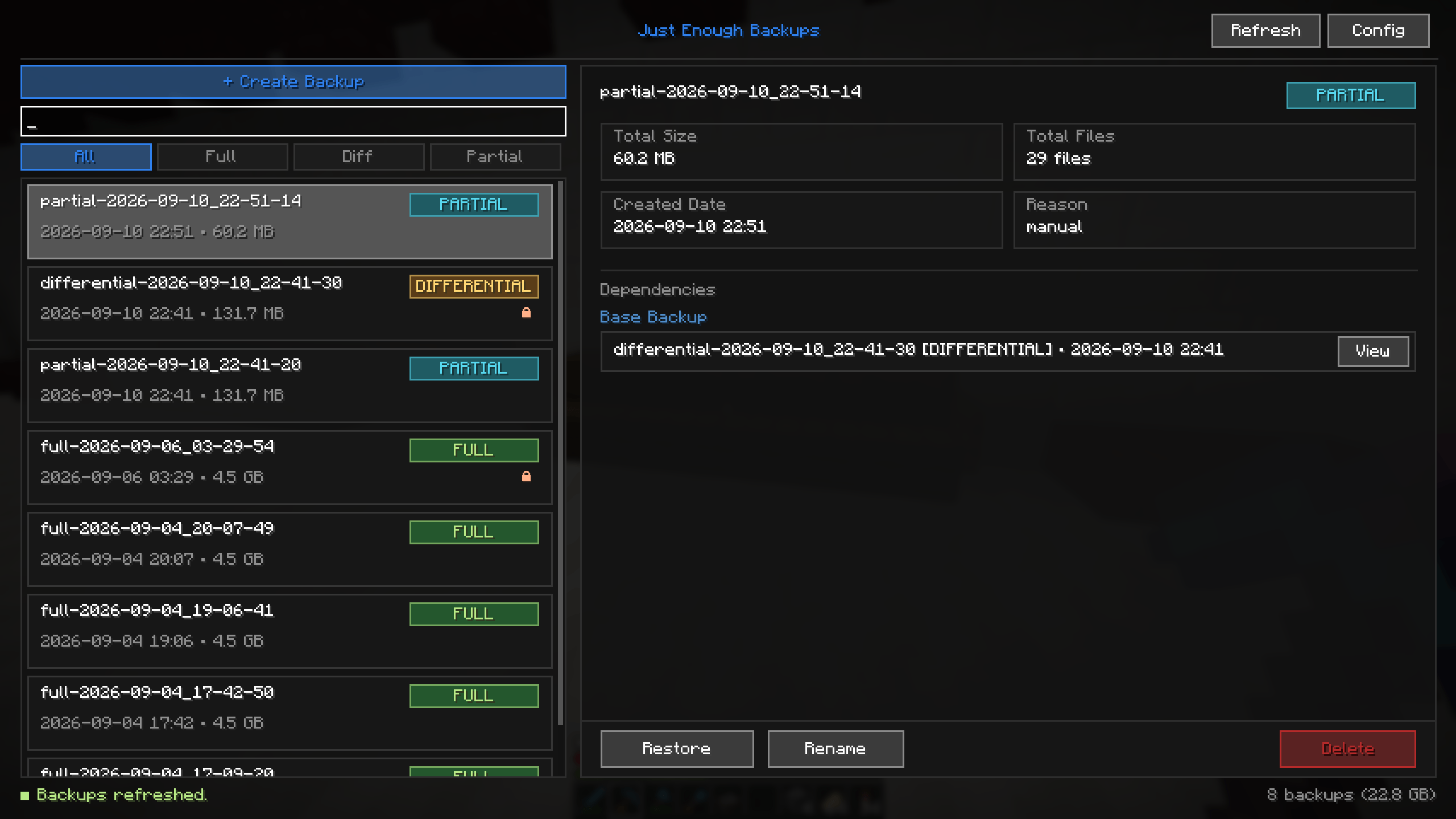 BackupManagementMenu.png BackupManagementMenu.png
 -
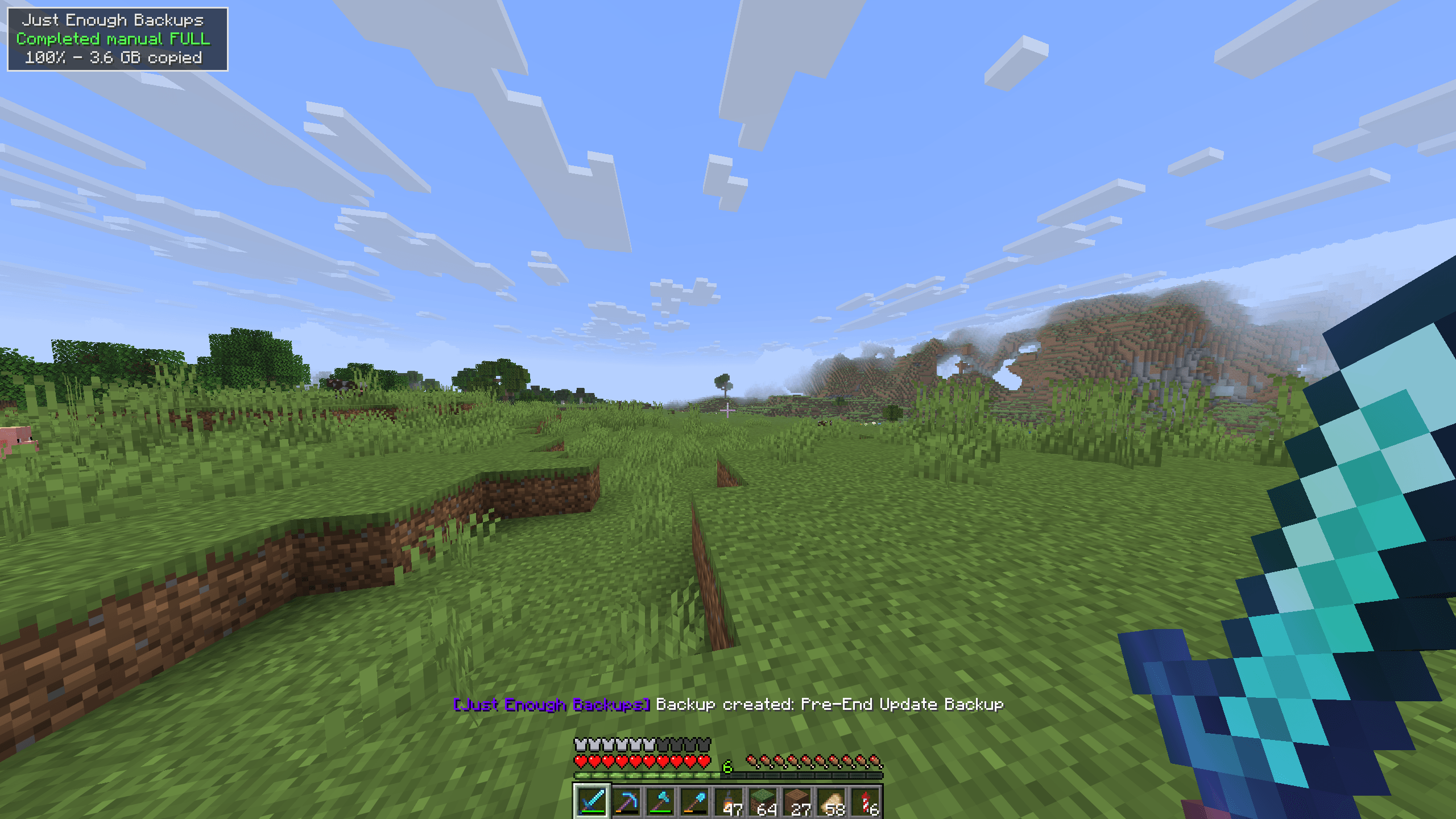 BackupCompleted.png BackupCompleted.png
 -
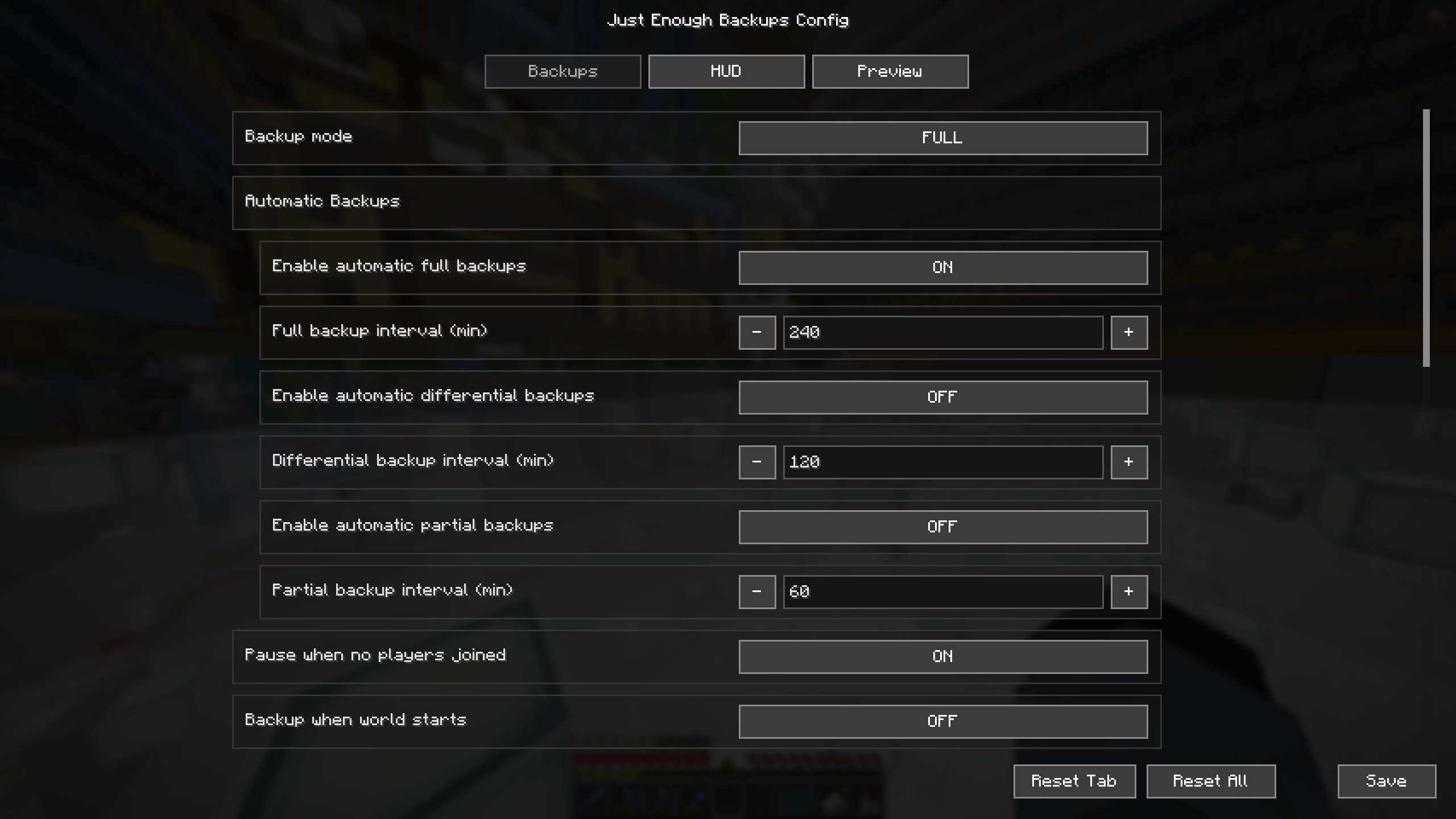 ConfigMenu.png ConfigMenu.png
 -
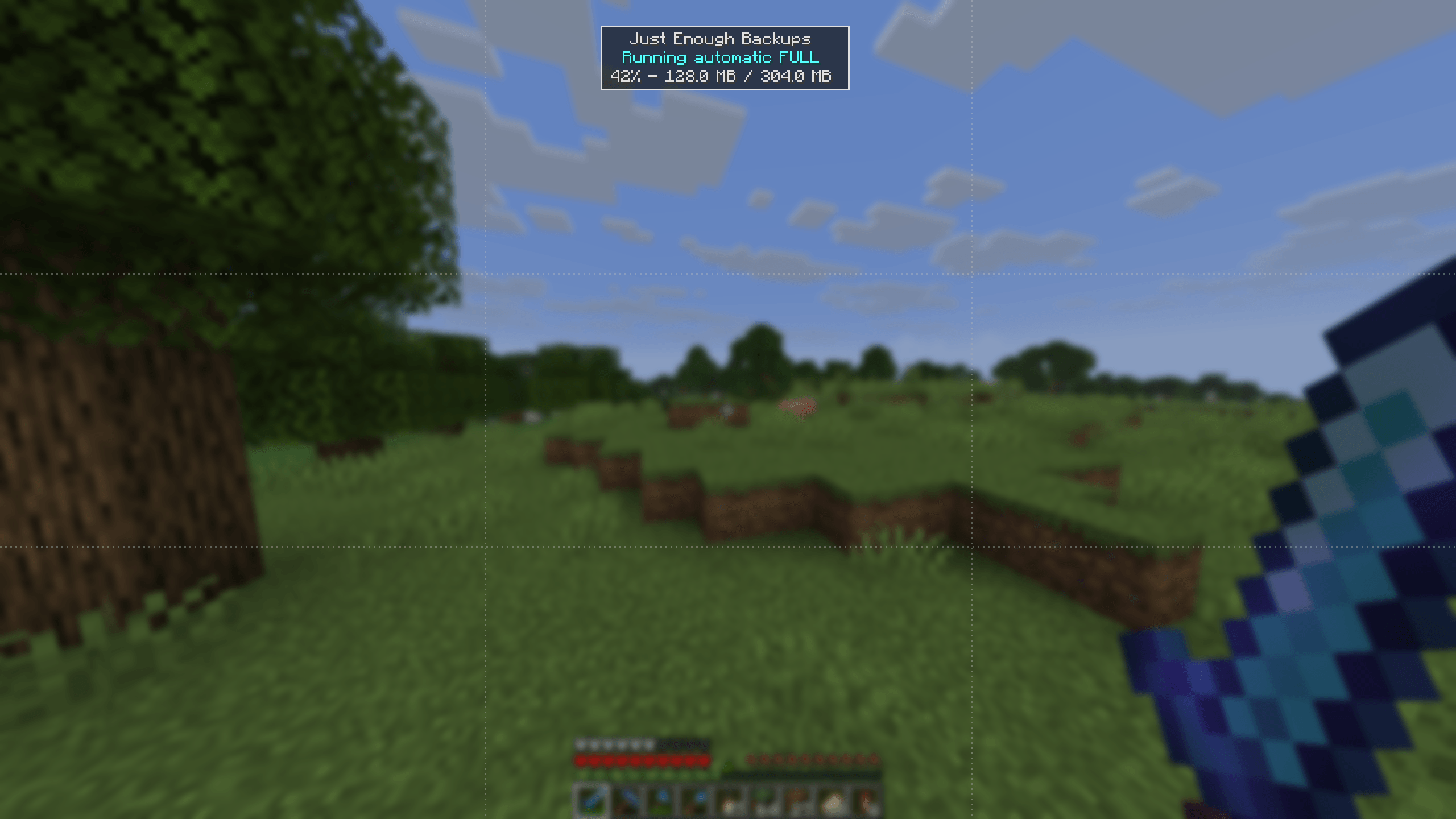 PreviewScreen.png PreviewScreen.png
-
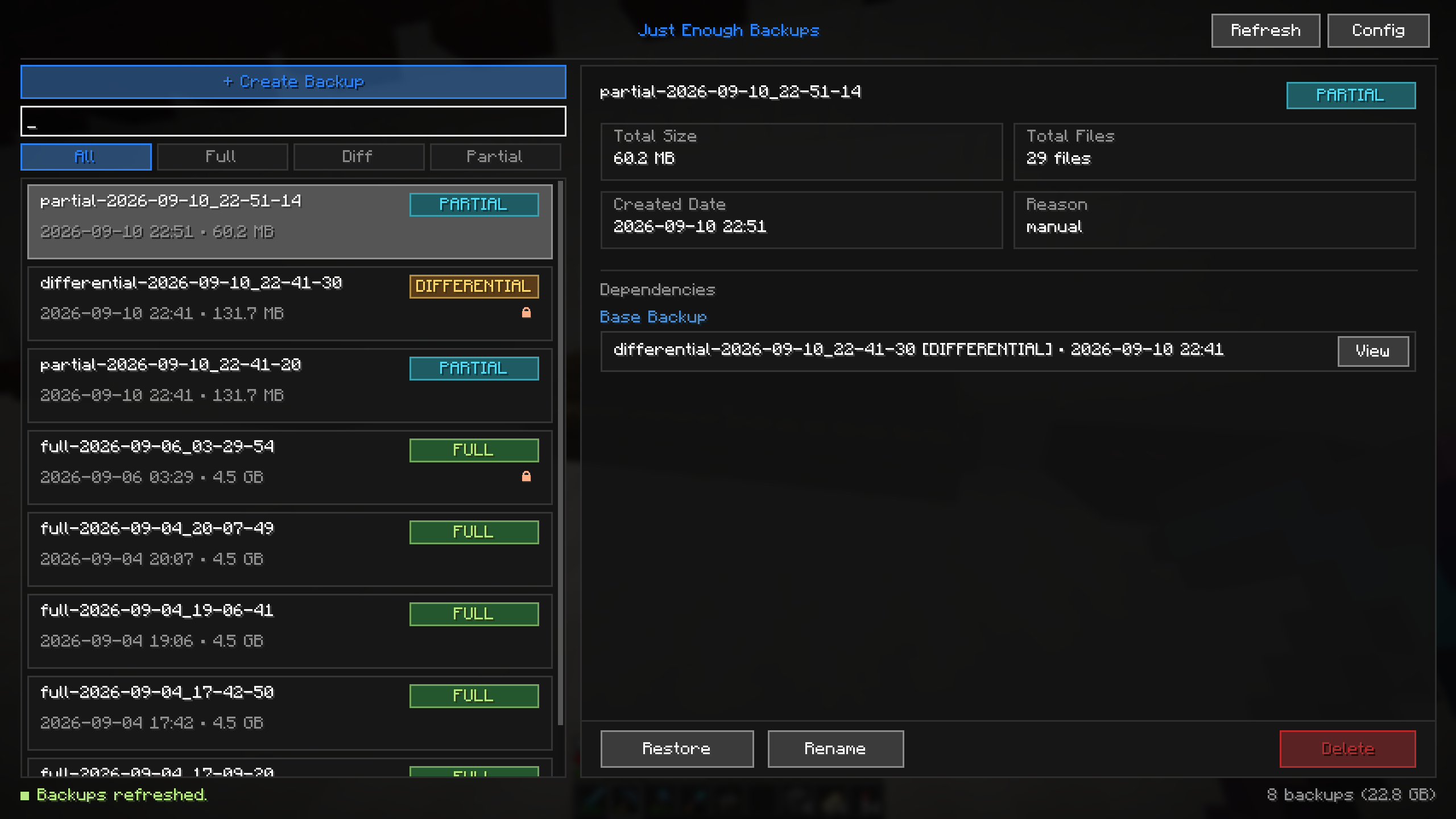 Backup Management
 -
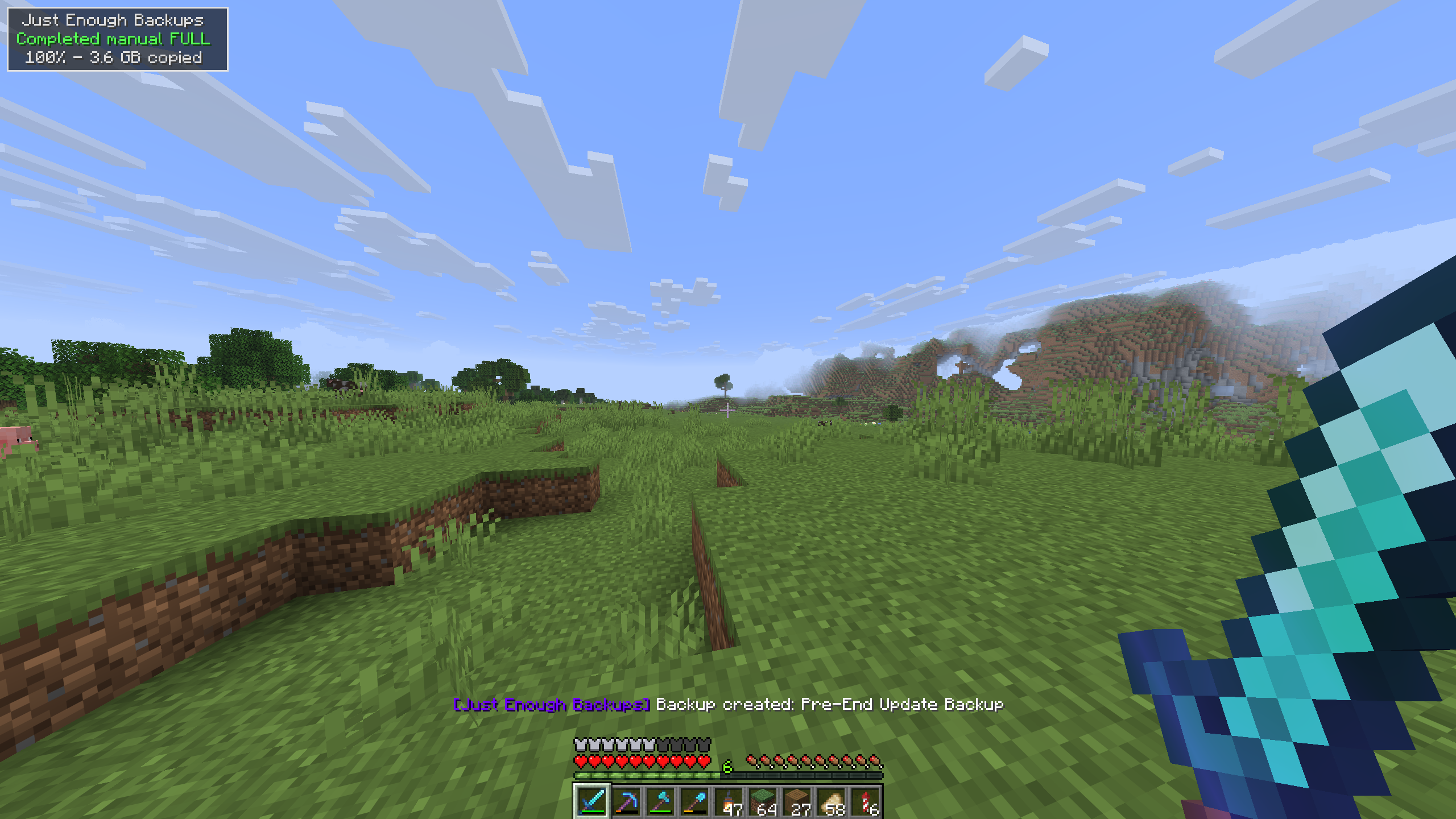 Completed Backup
 -
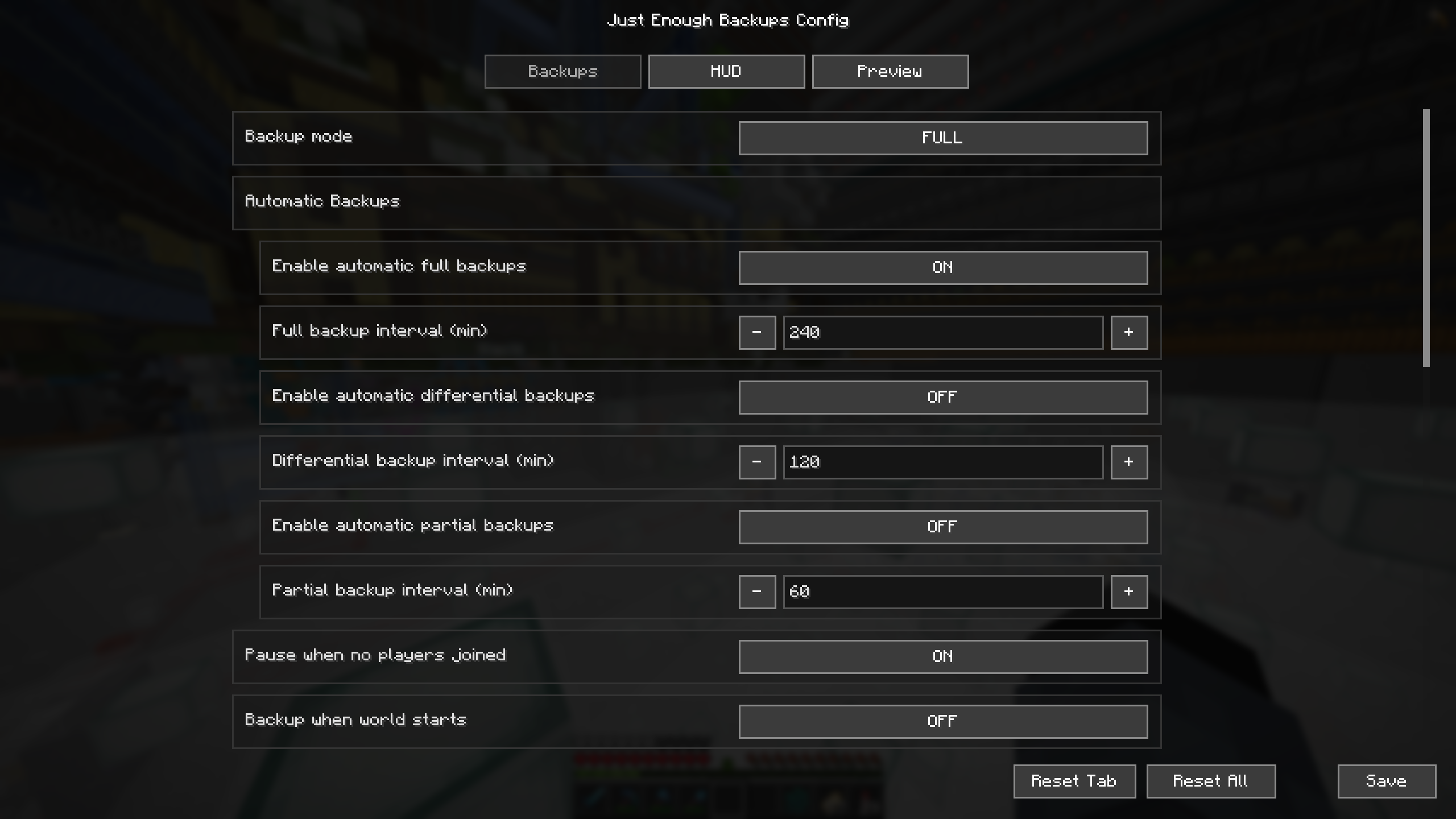 Config Menu
 -
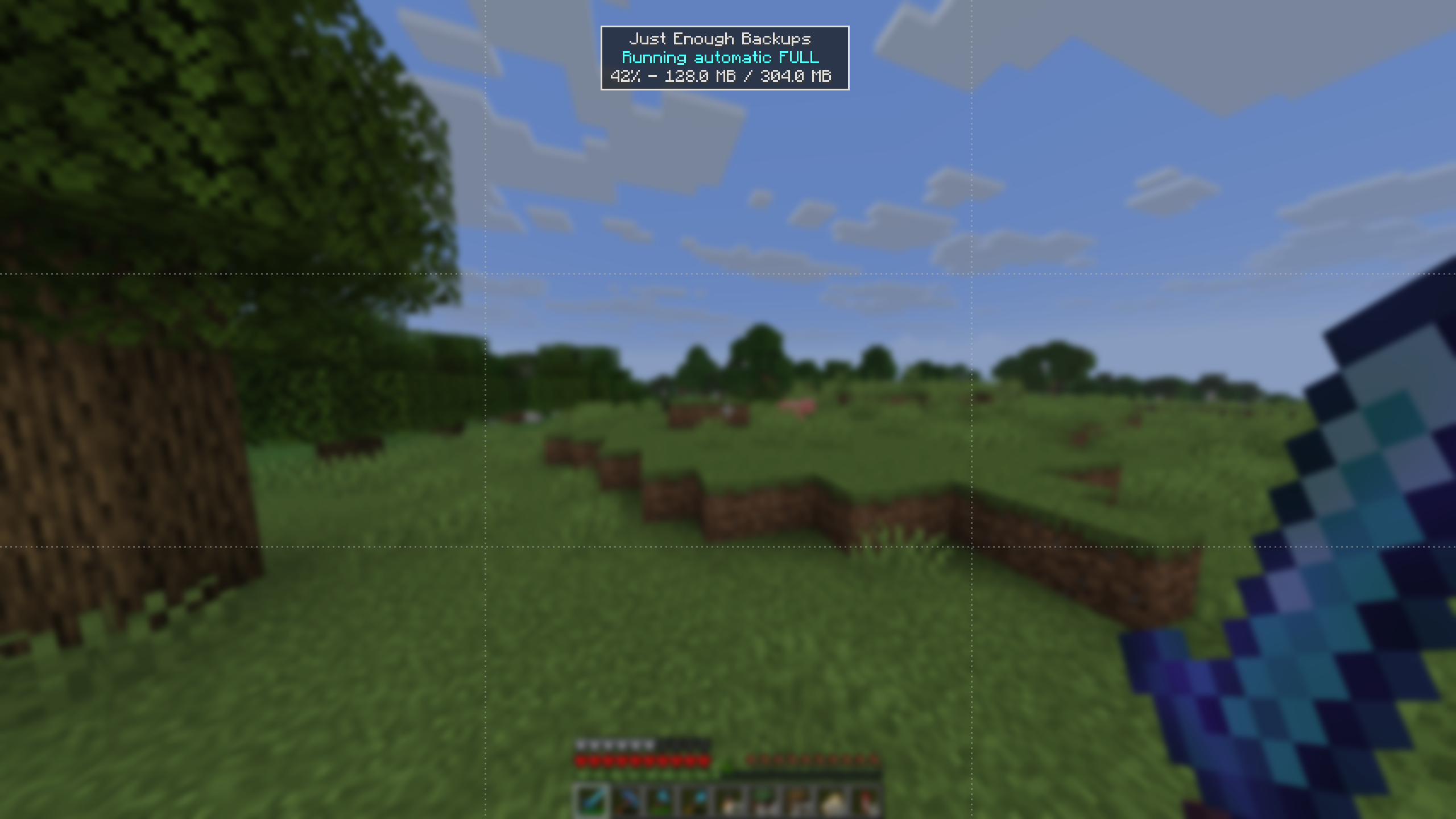
Versions
Files
Relations
Project Relations
More like this
Similar Mods
Suggestions use data such as tags, dependencies, dependents, descriptions, titles, and more to rank how much they overlap with this mod.
On ModDex
Community snapshot
By the numbers
Statistics
Want to reach Minecraft players?
We're looking for a server hosting partner to feature here and other parts of the site. Interested? Send us a message!
Get in touchGet it on
Available Platforms
On ModDex
Community snapshot
By the numbers