
Community listing page, reviews may not be monitored by the author.
KantoTeleports


No reviews yet
Configurable teleport blocks for adventure maps, with target setting, custom sounds, Room Sessions, safe teleport positioning, and optional Jade tooltips.

Community voices
Reviews
No reviews yet. Be the first to review this project!
Get it on
Available Platforms
Compatibility
Supported Environments
Must be installed on both the client and the server.
About
Project Details
For authors
Embed Badge
If you're the author of this project, you can embed a live badge anywhere that supports HTML or Markdown. It updates automatically whenever ratings change.
Use HTML for any page that supports it, or Markdown for README files and Markdown-based descriptions.
Identifiers
Platform IDs
About
Description
KantoTeleports
KantoTeleports is a Fabric utility mod that lets map creators and server owners build configurable teleport points using dedicated teleport blocks.
The mod was originally created for the CobbleKanto project, where it is used for map transitions, doors, interiors, dungeons, special rooms, and adventure progression. It can also be used in other Fabric worlds or servers that need simple, controlled, block-based teleport systems.
KantoTeleports is focused on builders: place a teleport block, set its destination, optionally choose a sound, optionally require an item, and let players move through your map in a cleaner way.

Get 25% off your Minecraft server with Shockbyte! Ready to start an epic adventure with your friends? Just click here and use promo code COBBLEKANTO, plus you will be helping us keep improving the mod and developing future projects!
Features
- Configurable Teleport Block
- Teleport Setter item for linking a teleport block to a destination
- Per-block teleport destinations saved in the world
- Optional per-block required item checks
- Optional per-block teleport sounds
- Built-in
teleport_genericandteleport_doorsound events - Room Session system for sending players to available rooms
- Safe target adjustment that searches upward if the destination is blocked
- Useful for adventure maps, server hubs, interiors, dungeons, event rooms, and progression gates
How It Works
KantoTeleports adds a physical teleport block that can be configured directly inside the world.
A configured teleport block can store:
- a target position
- a sound event
- a required item
- an optional Room Session ID
When a player steps on the teleport block, the mod briefly applies a transition effect, then teleports the player to the configured destination.
Show setup and command details
Basic Teleport Setup
- Place a
Teleport Blockin the world. - Hold the
Teleport Setteritem. - Right-click the teleport block.
- Right-click the destination block.
The destination is saved as the space above the block you clicked, centered on that block.
For example, if you right-click the floor where the player should appear, the teleport destination will be set one block above that floor.
Setting a Teleport Sound
Look directly at a teleport block and run:
/kantoteleports set sound <sound_event>Built-in sound examples:
/kantoteleports set sound kantoteleports:teleport_generic
/kantoteleports set sound kantoteleports:teleport_door
The command accepts registered sound event IDs.
Setting a Required Item
Hold the required item in your main hand, look directly at a teleport block, and run:
/kantoteleports set itemAfter that, players must have a matching item in their inventory to use that teleport.
This is useful for key items, tickets, badges, dungeon passes, quest rewards, or other progression gates.
Room Sessions
Room Sessions are used when one teleport should send players to the first available room from a configured list.
This is useful for:
- private challenge rooms
- repeatable dungeon rooms
- event rooms
- arenas
- hotel-style interiors
- multiplayer adventure-map instances
Room Session data is saved inside the world folder:
config/kantoteleports/room_sessions.jsonCreate a Room Session
/kantoteleports roomsession create <session_id>Example:
/kantoteleports roomsession create gym_roomsAdd a Room to a Session
Use two positions to define the room area:
/kantoteleports roomsession add <session_id> <room_id> <pos1> <pos2>By default, the teleport target will be the center of the room box.
You can also define a specific target position:
/kantoteleports roomsession add <session_id> <room_id> <pos1> <pos2> <target>Example:
/kantoteleports roomsession add gym_rooms room_1 100 64 100 110 70 110 105 64 105Link a Teleport Block to a Room Session
Look directly at a teleport block and run:
/kantoteleports roomsession set <session_id>When players step on that block, the mod checks the session rooms and sends each player to an available room.
Other Room Session Commands
List rooms in a session:
/kantoteleports roomsession list <session_id>Remove a room from a session:
/kantoteleports roomsession remove <session_id> <room_id>Clear the Room Session ID from the teleport block you are looking at:
/kantoteleports roomsession clearEnable or disable the Room Session system globally:
/kantoteleports roomsession enabled <true|false>All setup commands require operator/admin permission.
Recommended Uses
KantoTeleports works well for:
- door transitions
- cave entrances
- building interiors
- region gates
- server hubs
- event rooms
- dungeon checkpoints
- shortcuts
- passages
- private challenge rooms
- multiplayer room allocation systems
Builder Notes
For best results:
- Install the mod on both the server and client.
- Configure teleports before opening the world to regular players.
- Keep backups before editing
room_sessions.jsonmanually. - Use clear session IDs and room IDs, such as
gym_rooms,dojo_rooms, orevent_rooms. - If you replace the built-in audio files, keep the same sound IDs if you want existing configured blocks to keep working.
Known Issues
- Room Sessions depend on correctly defined room boxes. If a room area is too small or incorrectly positioned, availability checks may not behave as expected.
- If a teleport destination is blocked, the mod tries to move the target upward, but builders should still test every teleport location manually.
Compatibility & Dependencies
Required:
- Minecraft 1.21.1
- Fabric Loader 0.16.9 or newer
- Fabric API
- Java 21
Optional:
- Jade, for builder tooltip information on configured teleport blocks
FAQ
Does KantoTeleports require Cobblemon?
No. KantoTeleports was created for the CobbleKanto project, but the mod itself does not require Cobblemon.
Does the mod need to be installed on both client and server?
Yes. The mod adds blocks, items, models, sounds, and server-side teleport logic, so it should be installed on both sides in multiplayer.
Can I use this in my own adventure map or server?
Yes. The mod is useful for custom maps, server hubs, dungeons, private rooms, progression gates, and other builder-controlled teleport systems. Feel free to create and publish videos about/with this mod!
Can I lock a teleport behind an item?
Yes. Hold the item in your main hand, look at the teleport block, and run:
/kantoteleports set itemPlayers will need a matching item in their inventory to use that teleport.
Can I change the teleport sound?
Yes. Look at the teleport block and run:
/kantoteleports set sound <sound_event>Built-in examples:
/kantoteleports set sound kantoteleports:teleport_generic
/kantoteleports set sound kantoteleports:teleport_door
Will replacing the audio files break existing teleport blocks?
Not if the sound IDs stay the same. Existing blocks store sound IDs such as kantoteleports:teleport_generic or kantoteleports:teleport_door, not the audio waveform itself.
Where are Room Sessions saved?
Room Sessions are saved in the world folder:
config/kantoteleports/room_sessions.jsonSpecial Thanks
- To everyone helping polish the CobbleKanto project and its custom mods.
If you have ideas or feedback, you can share them through our public issue tracker or send a direct message to cobblekanto on Discord.

Get 25% off your Minecraft server with Shockbyte! Use promo code COBBLEKANTO and get ready to start an epic adventure with your friends!
Gigante pela própria natureza 🇧🇷
KantoTeleports is an unofficial fan-made Minecraft mod.
This project is not affiliated with, endorsed by, sponsored by, or approved by Nintendo, Game Freak, Creatures Inc., The Pokémon Company, Mojang Studios, Microsoft, or the Cobblemon team.
Minecraft is a trademark of Microsoft Corporation. Pokémon and related names are trademarks of their respective owners. Cobblemon belongs to its respective creators.
KantoTeleports
KantoTeleports is a Fabric utility mod that lets map creators and server owners build configurable teleport points using dedicated teleport blocks.
The mod was originally created for the CobbleKanto project, where it is used for map transitions, doors, interiors, dungeons, special rooms, and adventure progression. It can also be used in other Fabric worlds or servers that need simple, controlled, block-based teleport systems.
KantoTeleports is focused on builders: place a teleport block, set its destination, optionally choose a sound, optionally require an item, and let players move through your map in a cleaner way.
Get 25% off your Minecraft server with Shockbyte! Ready to start an epic adventure with your friends? Just click here and use promo code COBBLEKANTO, plus you will be helping us keep improving the mod and developing future projects!
Features
- Configurable Teleport Block
- Teleport Setter item for linking a teleport block to a destination
- Per-block teleport destinations saved in the world
- Optional per-block required item checks
- Optional per-block teleport sounds
- Built-in
teleport_genericandteleport_doorsound events - Room Session system for sending players to available rooms
- Safe target adjustment that searches upward if the destination is blocked
- Useful for adventure maps, server hubs, interiors, dungeons, event rooms, and progression gates
How It Works
KantoTeleports adds a physical teleport block that can be configured directly inside the world.
A configured teleport block can store:
- a target position
- a sound event
- a required item
- an optional Room Session ID
When a player steps on the teleport block, the mod briefly applies a transition effect, then teleports the player to the configured destination.
Show setup and command details
Basic Teleport Setup
- Place a
Teleport Blockin the world. - Hold the
Teleport Setteritem. - Right-click the teleport block.
- Right-click the destination block.
The destination is saved as the space above the block you clicked, centered on that block.
For example, if you right-click the floor where the player should appear, the teleport destination will be set one block above that floor.
Setting a Teleport Sound
Look directly at a teleport block and run:
/kantoteleports set sound <sound_event>
Built-in sound examples:
/kantoteleports set sound kantoteleports:teleport_generic
/kantoteleports set sound kantoteleports:teleport_door
The command accepts registered sound event IDs.
Setting a Required Item
Hold the required item in your main hand, look directly at a teleport block, and run:
/kantoteleports set item
After that, players must have a matching item in their inventory to use that teleport.
This is useful for key items, tickets, badges, dungeon passes, quest rewards, or other progression gates.
Room Sessions
Room Sessions are used when one teleport should send players to the first available room from a configured list.
This is useful for:
- private challenge rooms
- repeatable dungeon rooms
- event rooms
- arenas
- hotel-style interiors
- multiplayer adventure-map instances
Room Session data is saved inside the world folder:
config/kantoteleports/room_sessions.json
Create a Room Session
/kantoteleports roomsession create <session_id>
Example:
/kantoteleports roomsession create gym_rooms
Add a Room to a Session
Use two positions to define the room area:
/kantoteleports roomsession add <session_id> <room_id> <pos1> <pos2>
By default, the teleport target will be the center of the room box.
You can also define a specific target position:
/kantoteleports roomsession add <session_id> <room_id> <pos1> <pos2> <target>
Example:
/kantoteleports roomsession add gym_rooms room_1 100 64 100 110 70 110 105 64 105
Link a Teleport Block to a Room Session
Look directly at a teleport block and run:
/kantoteleports roomsession set <session_id>
When players step on that block, the mod checks the session rooms and sends each player to an available room.
Other Room Session Commands
List rooms in a session:
/kantoteleports roomsession list <session_id>
Remove a room from a session:
/kantoteleports roomsession remove <session_id> <room_id>
Clear the Room Session ID from the teleport block you are looking at:
/kantoteleports roomsession clear
Enable or disable the Room Session system globally:
/kantoteleports roomsession enabled <true|false>
All setup commands require operator/admin permission.
Recommended Uses
KantoTeleports works well for:
- door transitions
- cave entrances
- building interiors
- region gates
- server hubs
- event rooms
- dungeon checkpoints
- shortcuts
- passages
- private challenge rooms
- multiplayer room allocation systems
Builder Notes
For best results:
- Install the mod on both the server and client.
- Configure teleports before opening the world to regular players.
- Keep backups before editing
room_sessions.jsonmanually. - Use clear session IDs and room IDs, such as
gym_rooms,dojo_rooms, orevent_rooms. - If you replace the built-in audio files, keep the same sound IDs if you want existing configured blocks to keep working.
Known Issues
- Room Sessions depend on correctly defined room boxes. If a room area is too small or incorrectly positioned, availability checks may not behave as expected.
- If a teleport destination is blocked, the mod tries to move the target upward, but builders should still test every teleport location manually.
Compatibility & Dependencies
Required:
- Minecraft 1.21.1
- Fabric Loader 0.16.9 or newer
- Fabric API
- Java 21
Optional:
- Jade, for builder tooltip information on configured teleport blocks
FAQ
Does KantoTeleports require Cobblemon?
No. KantoTeleports was created for the CobbleKanto project, but the mod itself does not require Cobblemon.
Does the mod need to be installed on both client and server?
Yes. The mod adds blocks, items, models, sounds, and server-side teleport logic, so it should be installed on both sides in multiplayer.
Can I use this in my own adventure map or server?
Yes. The mod is useful for custom maps, server hubs, dungeons, private rooms, progression gates, and other builder-controlled teleport systems. Feel free to create and publish videos about/with this mod!
Can I lock a teleport behind an item?
Yes. Hold the item in your main hand, look at the teleport block, and run:
/kantoteleports set item
Players will need a matching item in their inventory to use that teleport.
Can I change the teleport sound?
Yes. Look at the teleport block and run:
/kantoteleports set sound <sound_event>
Built-in examples:
/kantoteleports set sound kantoteleports:teleport_generic
/kantoteleports set sound kantoteleports:teleport_door
Will replacing the audio files break existing teleport blocks?
Not if the sound IDs stay the same. Existing blocks store sound IDs such as kantoteleports:teleport_generic or kantoteleports:teleport_door, not the audio waveform itself.
Where are Room Sessions saved?
Room Sessions are saved in the world folder:
config/kantoteleports/room_sessions.json
Special Thanks
- To everyone helping polish the CobbleKanto project and its custom mods.
If you have ideas or feedback, you can share them through our public issue tracker or send a direct message to cobblekanto on Discord.
Get 25% off your Minecraft server with Shockbyte! Use promo code COBBLEKANTO and get ready to start an epic adventure with your friends!
Gigante pela própria natureza 🇧🇷
KantoTeleports is an unofficial fan-made Minecraft mod.
This project is not affiliated with, endorsed by, sponsored by, or approved by Nintendo, Game Freak, Creatures Inc., The Pokémon Company, Mojang Studios, Microsoft, or the Cobblemon team.
Minecraft is a trademark of Microsoft Corporation. Pokémon and related names are trademarks of their respective owners. Cobblemon belongs to its respective creators.
Screenshots
Gallery
-
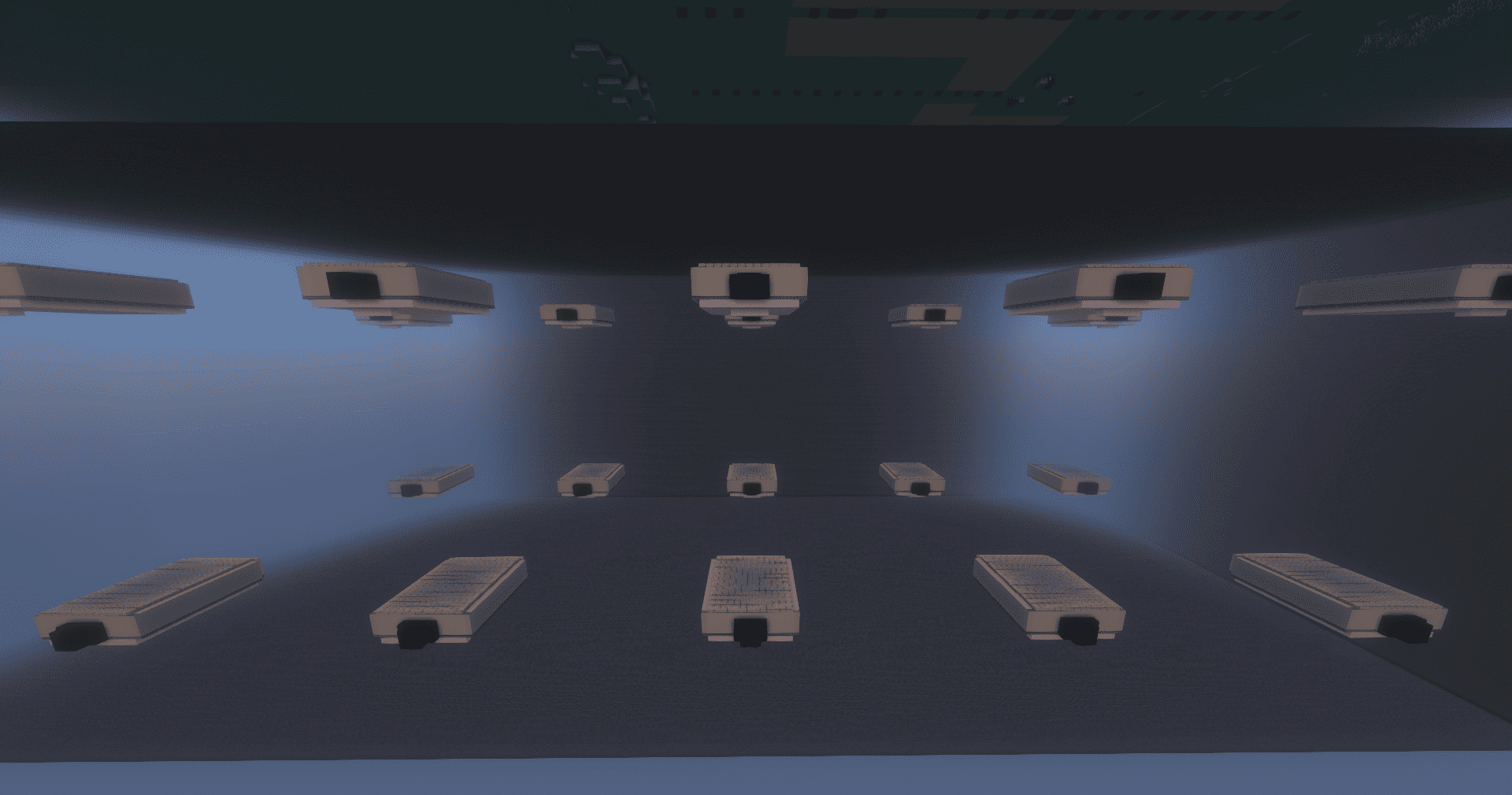 Session Example 20 copies of the same Oak's Lab. When different players enter the same TeleportBlock at the same time, each one are sorted in one of the empty rooms so they can have their own unique private experience!
 -
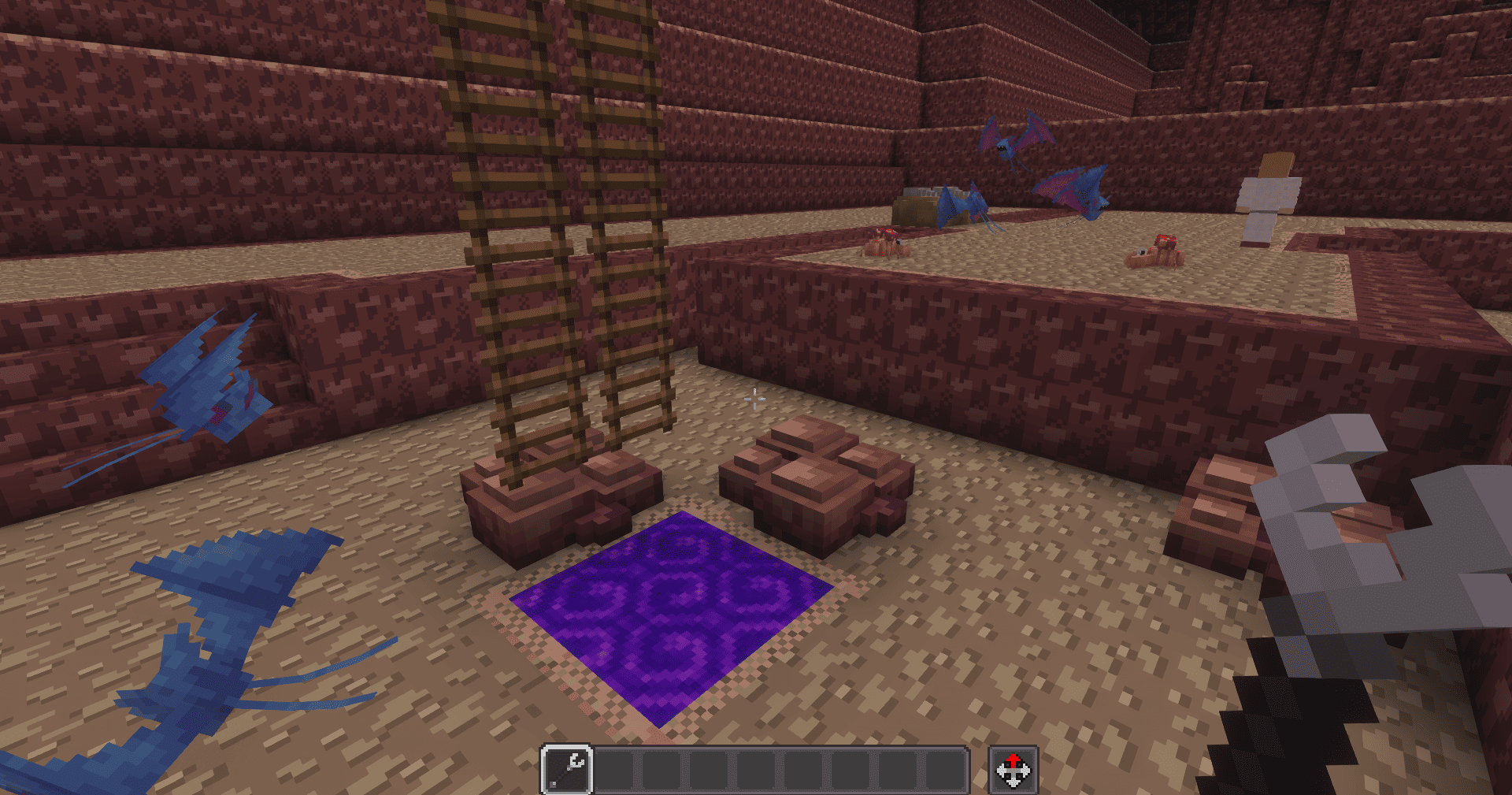 Mt. Moon You can use it to travel between cave floors!
-
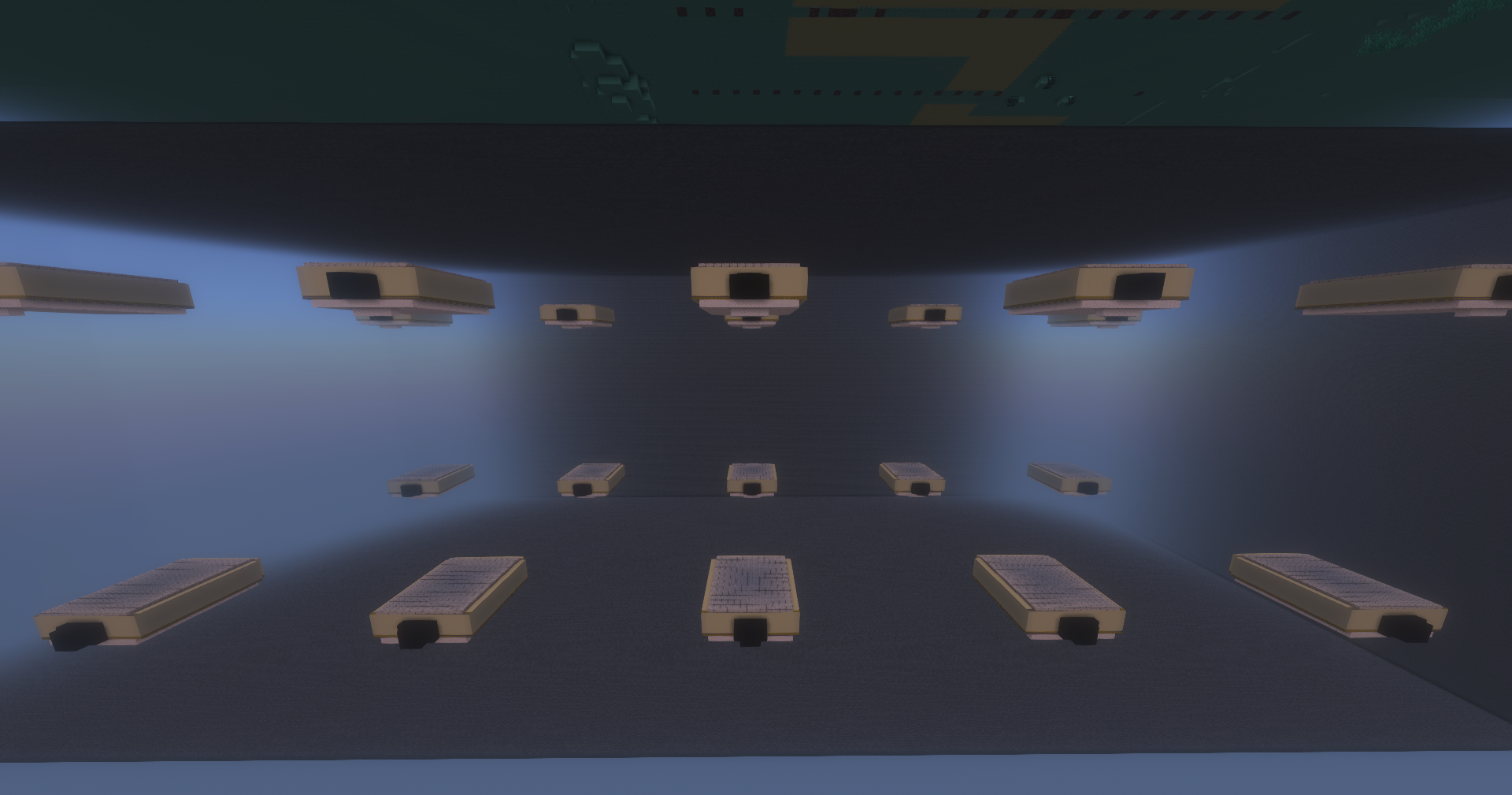 Session Example 20 copies of the same Oak's Lab. When different players enter the same TeleportBlock at the same time, each one are sorted in one of the empty rooms so they can have their own unique private experience!
 -
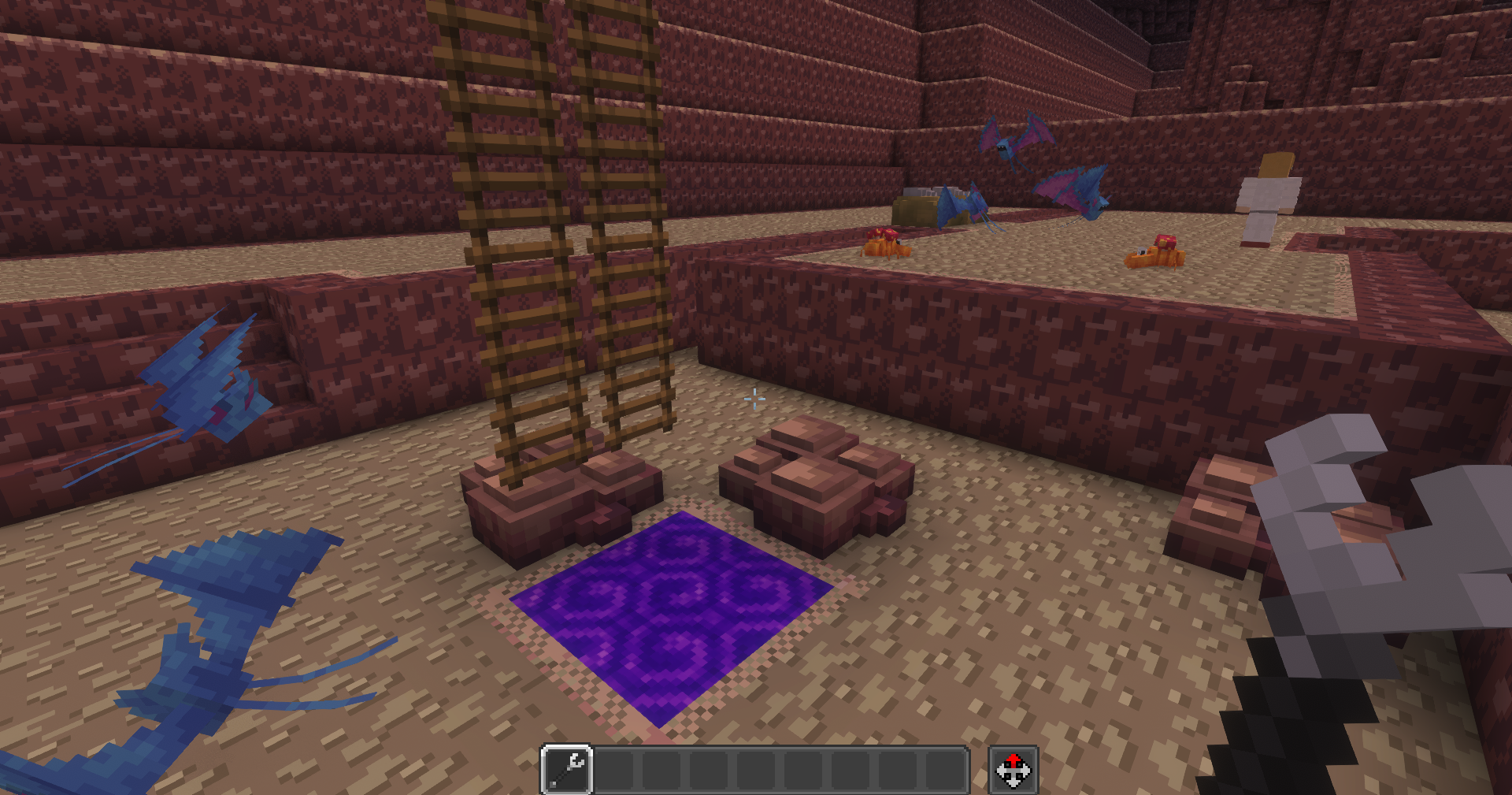 Mt. Moon You can use it to travel between cave floors!
Versions
Files
Relations
Project Relations
More like this
Similar Mods
Suggestions use data such as tags, dependencies, dependents, descriptions, titles, and more to rank how much they overlap with this mod.
On ModDex
Community snapshot
By the numbers
Statistics

Get it on
Available Platforms
On ModDex
Community snapshot
By the numbers