Community listing page, reviews here may not be monitored by the author.
Keys4Macros


No reviews yet
Assign keys to commands

Community voices
Reviews
No reviews yet. Be the first to review this project!
Get it on
Available Platforms
Compatibility
Supported Environments
Runs entirely on the client. Works on vanilla servers.
About
Project Details
For authors
Embed Badge
If you're the author of this project, you can embed a live badge anywhere that supports HTML or Markdown. It updates automatically whenever ratings change.
Use HTML for any page that supports it, or Markdown for README files and Markdown-based descriptions.
Identifiers
Platform IDs
About
Description
 Assign keys to commands
Features :
- Define a key to execute a command or send chat message (called a macro)
- Mod need to be installed on client only
- Work fine in multiplayer. When you press the key, the command is sent as a chat message and proceeded by the server like if you had typed it.
- Create as many macros as you want
- Macro can have some variable (changing part like a player name)
- Server admins can now force macros for players with the mod
- Create macros for a specific world / server (called location)
- Edit macro in your default text editor
- Execute mutiple command in one macro (use \n to separate 2 commands)
Create a macro :
To open the macro configuration screen :
- While in-game : press key K (configurable with other minecraft key)
- While on main menu : Go to mods, then select Keys4Macros and finally Config
To define a new Macro, hit the New Macro button
Then fill the text box with the text that will be sent in chat (Start with a / for a command)
Then next button define the key for the macro
Next button switch between SEND (directly send the value of the text box) & WRITE (prefill the chat with the content of the text box)
Last button allow you to delete the macro
You can create as much macro as you want, it come in addition of Minecraft keybindings
Screenshots :


Discord :
Feel free to join my discord if you need help or fi you have any issue, any questions or any suggestions :

Misc :
Can I use this mod in multiplayer?
- Yes technically the mod work fine on server. However, it can be against some server rules, be sure to check them out. I won't handle any responsibility for a sanction due to this mod.
Can I use this mod in my mod pack / make a video on or with this mod ?
- Yes, you can use this mod freely, and put it in every modpack you want. Just remember to give credit and link back to the official download page, it's the only links that are SAFE.
A mod to execute macros command with a key
Features :
- Define key to execute command. This mod is only needed on the client and work well on server too.
- When you press the key. The command is sent as a chat message and proceded by the server like any other command.
- Create as many macros as you want through a configuration file.
Discord
Feel free to join my discord if you need help or fi you have any issue, any questions or any suggestions : https://discord.gg/rzzd76c
Create a macro
To open the configuration file, open the forge mod list GUI, select Keys4Macros and hit the Config button. Finally hit the Open config button.
Each [[Macros.Macro]] block define a macro. You can duplicate this block as much as you want.
- key is the number corresponding to the key you want. The list can be found here : https://www.glfw.org/docs/3.3/group__keys.html
- command is the command to execute when the key is pressed, including the '/' When you're satisfied with your configuration, hit the Reload Config button or restart the game.
Example configuration
The following configuration set the numpad key 0 to 3 to switch between all the gamemodes :
[Macros]
    [[Macros.Macro]]
        key = 320
        command = "/gamemode adventure"
    [[Macros.Macro]]
        key = 321
        command = "/gamemode survival"
    [[Macros.Macro]]
        key = 322
        command = "/gamemode creative"
    [[Macros.Macro]]
        key = 323
        command = "/gamemode spectator"
Misc
Can I use this mod in my mod pack / make a video on or with this mod ? Yes, just remember to give credit and link back to the official download page, since they're the only links that are SAFE. You can use the mod freely, and put it in every modpack you want. You just need to put a link to this page, in the place where you tell people the mods in your modpack. If you make a video on this mod make sure to put a link to this page in the decription of the video.
Screenshots
Gallery
-
 Splash
 -
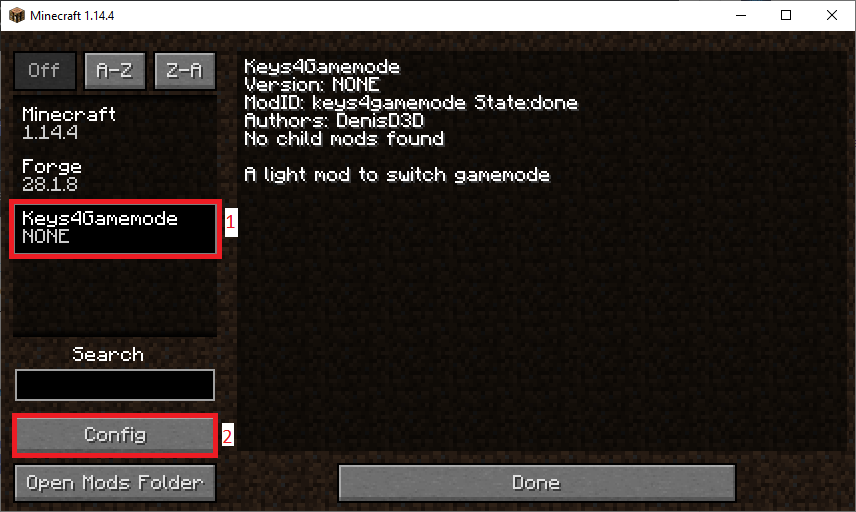 Change Macro Step 2
 -
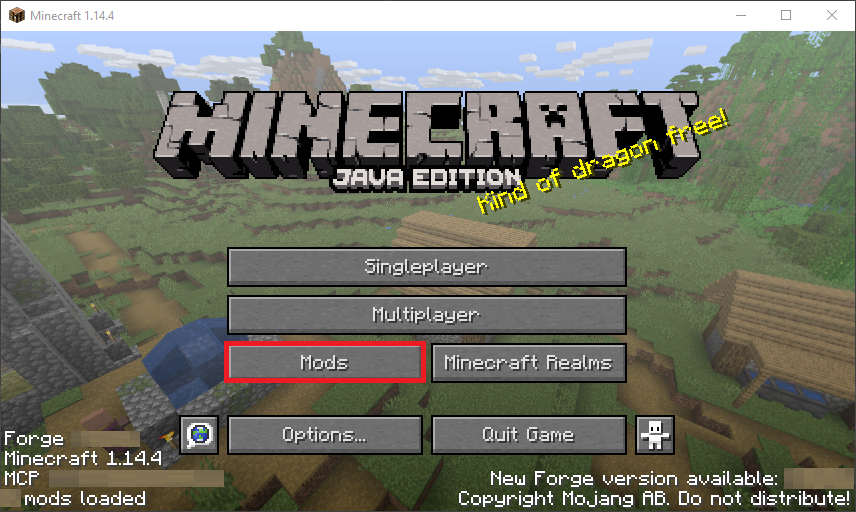 Change Macro Step 1
Versions
Files
Relations
Project Relations
More like this
Similar Mods
Suggestions use data such as tags, dependencies, dependents, descriptions, titles, and more to rank how much they overlap with this mod.
On ModDex
Community snapshot
By the numbers
Statistics
 (opens in a new tab)
Get it on
Available Platforms
On ModDex
Community snapshot
By the numbers