
KeyStrokes Overlay With Lua
No reviews yet
A highly customizable keystrokes overlay for Fabric that uses Lua scripts for dynamic visual themes and real-time design editing
Fabric is a mod loader for versions 1.14+ of Minecraft, particularly popular for client side and optimization mods.
Community voices
Reviews
Click once to include, again to exclude, again to clear
No reviews yet. Be the first to review this project!
Get it on
Available Platforms
 Modrinth
Compatibility
Supported Environments
About
Project Details
For authors
Embed Badge
If you're the author of this project, you can embed a live badge anywhere that supports HTML or Markdown. It updates automatically whenever ratings change.
Use HTML for any page that supports it, or Markdown for README files and Markdown-based descriptions.
Identifiers
Platform IDs
Resources
External Links
About
Description
⌨️ KeyStrokes Overlay With Lua
A powerful and flexible keystrokes display mod for Minecraft Fabric, featuring a unique Lua-based engine for deep visual customization.
✨ Key Features:
- Lua-Powered Themes: All visual styles (Classic, Modern, Apple, and Lunar) are handled via external Lua scripts. Create your own unique look by adding
.luafiles toconfig/keystrokes/ThemeManager/. - Live Hot-Reloading: Modify your theme scripts while the game is running and see the changes instantly using the "Reload Lua" button in the settings menu.
- Intuitive In-Game Menu: Press the 'K' key to open the settings interface.
- Full RGB Customization: Real-time color sliders that sync directly with your Lua scripts for ultimate control.
- Flexible UI: Independently drag and reposition the keyboard and mouse overlays. Support for custom scaling (Auto, Fixed, or Slider-based).
🚀 Installation:
- Ensure you have Fabric Loader installed for Minecraft 1.20 or higher.
- Download the mod and place the
.jarfile into yourmodsfolder. - Launch Minecraft and press 'K' to open the settings.
- Explore the
config/keystrokes/ThemeManager/folder to tweak the default scripts or add new ones.
📜 Scripting Guide: Create Your Own Theme
Creating a theme is easy. Just create a .lua file in the config/keystrokes/ThemeManager/ folder. Here is a starter template:
-- Save this as "my_custom_theme.lua" in config/keystrokes/ThemeManager/

-- Optional: This runs once when the theme is loaded or selected
function onThemeLoad()
    -- Sets the default color of the menu sliders (R, G, B, A)
    setMenuColor(255, 165, 0, 255) -- Default to Orange
end

-- This runs every frame for every key and mouse button
-- Parameters: label (String), isPressed (Boolean), x, y, w, h (Position/Size), r, g, b, a (Menu Colors)
function renderKey(label, isPressed, x, y, w, h, r, g, b, a)
    -- Combine the R, G, B, A values from the menu into a single color
    local menuColor = bit.bor(bit.lshift(a, 24), bit.lshift(r, 16), bit.lshift(g, 8), b)

    if isPressed then
        -- Draw a solid background using the menu color
        fill(x, y, w, h, menuColor)
        -- Tell the mod to draw the text in Black
        setTextColor(0xFF000000)
    else
        -- Draw a semi-transparent black background when not pressed
        fill(x, y, w, h, 0x80000000)
        -- Tell the mod to draw the text in White
        setTextColor(0xFFFFFFFF)
    end
end
Screenshots
Gallery
-
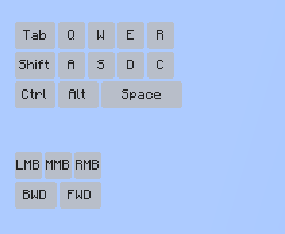 Apple Style
 -
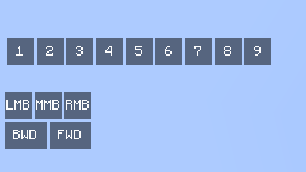 Classic Style
 -
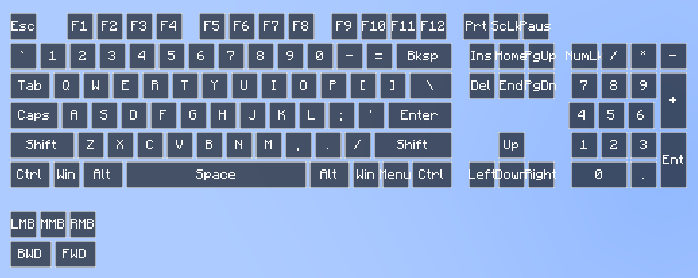 Lunar Style
 -
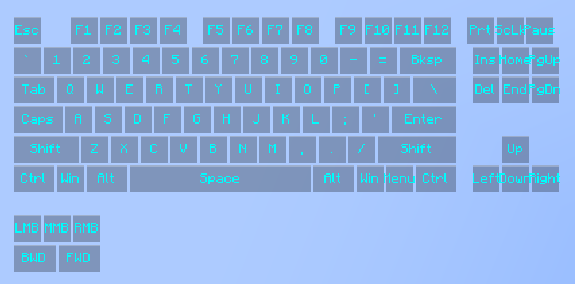 Modern Style
Versions
Files
Relations
Project Relations
More like this
Similar Mods
Suggestions use data such as tags, dependencies, dependents, descriptions, titles, and more to rank how much they overlap with this mod.
On ModDex
Community snapshot
By the numbers
Statistics

Want to reach Minecraft players?
We're looking for a server hosting partner to feature here and other parts of the site. Interested? Send us a message!
Get in touchGet it on
Available Platforms
On ModDex
Community snapshot
By the numbers
Statistics
Resources