
Community listing page, reviews here may not be monitored by the author.
KyuubiSoft Chatpresets

No reviews yet
A simple mod to add button somewhere on the screen that writes text in the chat.
Community voices
Reviews
No reviews yet. Be the first to review this project!
Get it on
Available Platforms
Compatibility
Supported Environments
Runs entirely on the client. Works on vanilla servers.
About
Project Details
For authors
Embed Badge
If you're the author of this project, you can embed a live badge anywhere that supports HTML or Markdown. It updates automatically whenever ratings change.
Use HTML for any page that supports it, or Markdown for README files and Markdown-based descriptions.
Identifiers
Platform IDs
Resources
External Links
About
Description
KyuubiSoft ChatPresets



Overview
KyuubiSoft ChatPresets is a client-side Fabric mod that revolutionizes your Minecraft chat experience with customizable quick-access buttons. Say goodbye to typing the same messages repeatedly!
Features
Core Features
- Quick Chat Buttons - Access your favorite messages with a single click
- Minecraft Item Icons - Use any Minecraft item as your button icon
- Drag & Drop - Position your button bar anywhere on screen
- Server-Specific Configs - Different presets for different servers
- RGB Color Picker - Customize text and background colors
Customization Options
- Horizontal/Vertical Layout - Arrange buttons your way
- Adjustable Button Size - From 8x8 to 64x64 pixels
- Background Toggle - Show or hide button backgrounds
- Chat-Only Mode - Buttons appear only when chat is open
- Per-Server Settings - Automatic preset switching
Getting Started
-
Open Configuration
- Press
P(default) or click the mod in Mod Menu - Access settings from the main menu or in-game
- Press
-
Create Your First Preset
- Click "+ Add New Preset"
- Enter a name and your chat message
- Choose an icon from 100+ Minecraft items
- Pick your colors with the RGB picker
-
Use Your Presets
- Click any button to open chat with your message
- Drag the button bar to reposition
- Toggle visibility as needed
Configuration
General Settings
- Orientation: Horizontal or Vertical layout
- Position: X/Y coordinates or drag to move
- Button Size: 8-64 pixels
- Visibility: Toggle on/off
- Background: Show/hide button backgrounds
- Drag Mode: Enable/disable repositioning
Advanced Options
- Only Show if Chat Visible: Buttons appear only with chat open
- Server-Specific Configs: Separate settings per server
- Text Length: Up to 1000 characters per preset
Commands
All commands start with /chatpresets:
/chatpresets list - Show all presets
/chatpresets add <name> <text> - Create new preset
/chatpresets remove <name> - Delete preset
/chatpresets use <name> - Copy preset text to chat
/chatpresets reload - Reload configuration
Technical Details
- Minecraft Version: 1.21.1
- Mod Loader: Fabric
- Dependencies: Fabric API
- Client-Side Only: No server installation needed
- Performance: Minimal impact, efficient rendering
Compatibility
- ✅ Works with most client-side mods
- ✅ Compatible with Mod Menu
- ✅ No conflicts with chat mods
- ✅ Multiplayer friendly
License
This mod is licensed under the MIT License. Feel free to use it in modpacks!
Made with ❤️ by KyuubiSoft
Screenshots
Gallery
-
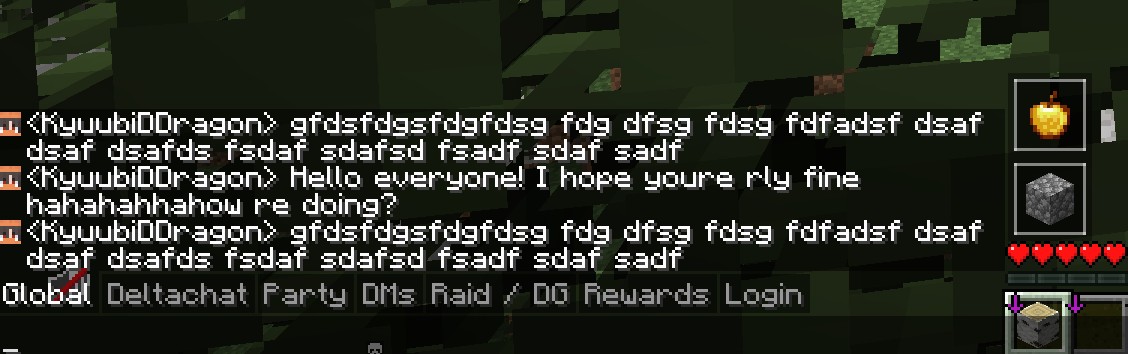 Icons
Icons -
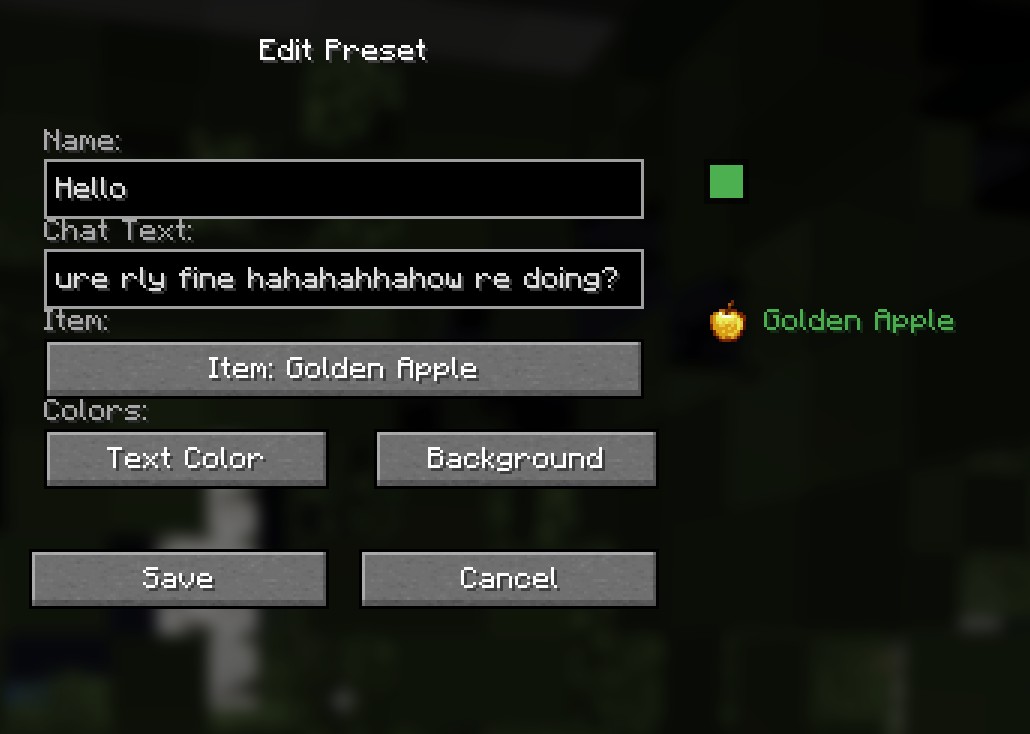 Preset Edit
 -
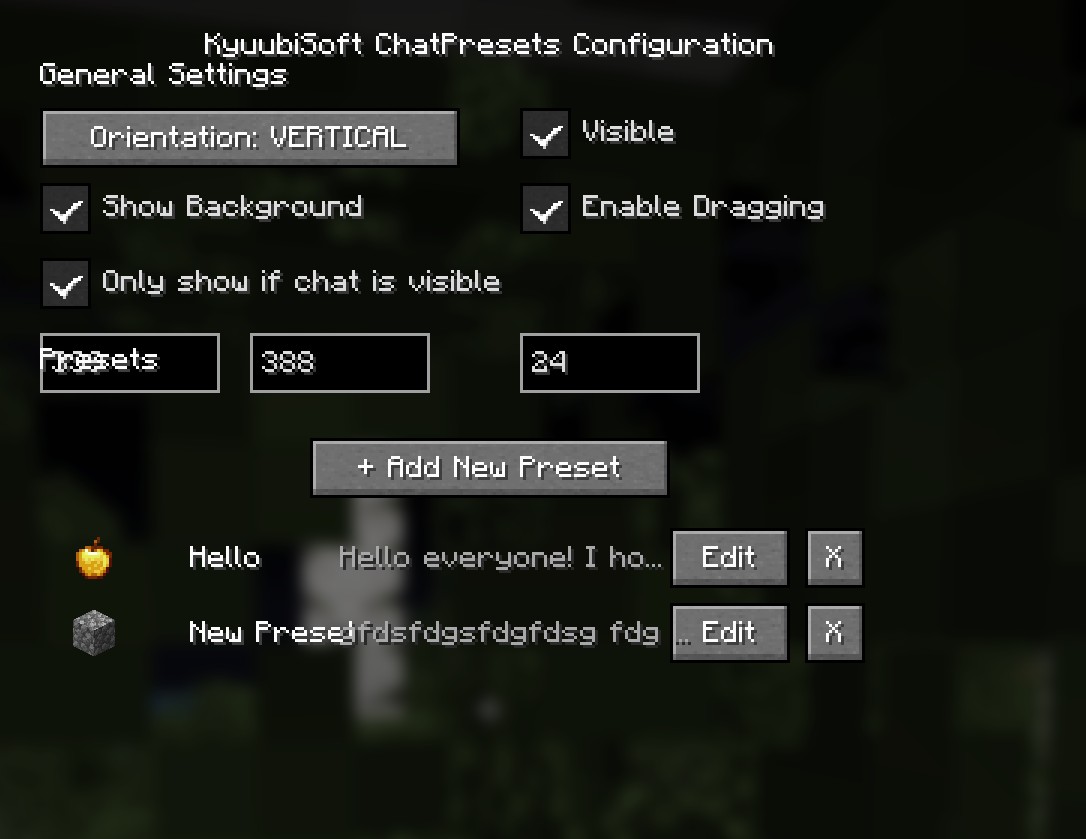 Settings Overview
Versions
Files
Relations
Project Relations
More like this
Similar Mods
Suggestions use data such as tags, dependencies, dependents, descriptions, titles, and more to rank how much they overlap with this mod.
On ModDex
Community snapshot
By the numbers
Statistics

Want to reach Minecraft players?
We're looking for a server hosting partner to feature here and other parts of the site. Interested? Send us a message!
Get in touchGet it on
Available Platforms
On ModDex
Community snapshot
By the numbers
Statistics
Resources