
Lazy Chunk Load
No reviews yet
The vanilla chunk loading system schedules a massive number of chunks around the player all at once, causing instant server CPU overload and TPS collapse
Enhances game performance and optimizes resource usage.
Forge is a popular mod loader for versions 1.1+ of Minecraft.
Neoforge is a fork of the Minecraft Forge available for versions 1.20.1+ of Minecraft. Many Forge mods are compatible with Neoforge and vice versa.
Fabric is a mod loader for versions 1.14+ of Minecraft, particularly popular for client side and optimization mods.
Community voices
Reviews
Click once to include, again to exclude, again to clear
No reviews yet. Be the first to review this project!
Get it on
Available Platforms
 Modrinth
Compatibility
Supported Environments
About
Project Details
For authors
Embed Badge
If you're the author of this project, you can embed a live badge anywhere that supports HTML or Markdown. It updates automatically whenever ratings change.
Use HTML for any page that supports it, or Markdown for README files and Markdown-based descriptions.
Identifiers
Platform IDs
Resources
External Links
About
Description
Lazy Chunk Load
The vanilla chunk loading system schedules a massive number of chunks around the player all at once, causing instant server CPU overload and TPS collapse. Lazy Chunk Load improves this process: it controls chunk loading speed like a faucet — automatically turning down when the CPU is busy and opening up when idle — so exploring new terrain no longer stutters.
What This Mod Does
🚶 Anti-Lag Exploration
With this mod installed, the server automatically adjusts chunk loading frequency based on current CPU usage. Full speed when usage is low, automatically slows down when usage spikes — TPS stays rock-solid throughout.
- It doesn't make chunk loading faster — it makes it smoother. Trade a bit of instant speed for a stutter-free experience.
- True prevention, not an after-the-fact fix.
🔄 Background Preloading
When you're standing still, the mod automatically uses idle CPU to preload ungenerated chunks around you.
Priority: chunks under your feet first, then in your line of sight, then to the sides and behind.
- Enabled by default, works while idling.
- Automatically pauses when the CPU is busy — never steals resources.
- Status output to log every 5 seconds.
🛡️ Additional Protections
- Login Warmup: No limits for the first 10 seconds after joining a world, ensuring initial terrain loads quickly.
- Save Safety: Automatically pauses all chunk loading during world saves to prevent save stalling.
- Emergency Bypass: When the player steps on an unloaded chunk, all limits are bypassed and the chunk loads immediately.
- Hotspot Chunk Tracking: Frequently-accessed chunks are marked as hotspots; preload extends their retention time.
- Dimension Whitelist/Blacklist: Restrict preloading scope via
dimension_blacklist/dimension_whitelistto avoid wasting CPU in custom dimensions.
Installation
Drop it into your mods folder — no configuration needed to work out of the box. Server-side only; clients do not need to install it.
Singleplayer works perfectly fine too.
| Platform | Supported Versions |
|---|---|
| Fabric | 1.21.x |
| Fabric | 26.1+ |
| Forge | 1.20.1 |
| NeoForge | 1.21.1 |
💡 Fully compatible with optimization mods like C2ME, Lithium, and VulkanMod. Does not modify chunk generation algorithms — only adjusts loading rhythm.
🗺️ Automatically detects Chunky pre-generation tasks and lifts CPU limits during generation for full speed; restores automatically when complete.
Monitoring
Every 5 seconds a status line is logged to logs/latest.log:
[LazyChunkLoad] Tick:1200 CPU:45% Sched:3/t Warmup:N Preload:ON Main:OK
| Field | Meaning |
|---|---|
Tick |
Current tick count |
CPU |
CPU usage percentage |
Sched |
Chunks loaded last tick |
Warmup |
Y=Warming up / N=Normal |
Preload |
ON=Active / OFF=Disabled / PAUSED=CPU too high |
Main |
OK=Full speed / SLOW=Throttled |
Configuration
The config file is located at config/lazychunkload.json (auto-generated, takes effect immediately on changes).
If you just want to use the mod normally, you don't need to read any of this — the defaults are already best practice.
📝 Full Configuration Reference (click to expand)
| Option | Default | Description |
|---|---|---|
cpu_threshold |
0.85 | CPU usage threshold for throttling (0~1, higher = more lenient) |
warmup_ticks |
200 | How many ticks after login to skip limits (20 ticks = 1 second) |
preload_enabled |
true | Enable background preloading |
preload_radius |
64 | Preload radius (in chunks) |
preload_delay_seconds |
1 | Seconds of standing still before preloading begins |
distance_weight |
0.5 | Distance priority weight (closer = more priority) |
direction_weight |
0.4 | Direction priority weight (forward-facing = more priority) |
aging_weight |
0.1 | Aging priority weight (long-unloaded = more priority) |
direction_multiplier |
5.0 | Direction bonus multiplier |
aging_factor_ms |
10000 | How many milliseconds count as "aged" |
log_loading |
false | Log detailed info to console |
performance_tips |
true | Output debug log when CPU or MSPT exceeds threshold (no longer sent to chat) |
There is also a runtime config at config/lazychunkload-runtime.json:
| Option | Default | Description |
|---|---|---|
limit_enabled |
false | Set to true to completely disable CPU limits (full speed) |
tips_disabled |
false | Set to true to disable chat performance tips |
How It Works
- Checks CPU usage once per tick (1-second cache, near-zero overhead).
- CPU below 85%: chunks load normally, no restrictions.
- CPU above 85%: chunk loading frequency is automatically reduced — the higher the CPU, the stronger the limit, but even in the worst case, at least one pass is allowed every 0.2 seconds — ensuring terrain never gets permanently stuck.
- When you're standing still: background scanning of ungenerated chunks around you, loaded in prioritized batches.
- When you're exploring: stepping on an empty chunk triggers an immediate emergency bypass with no limits applied.
Screenshots
Gallery
-
 With Big Globe Performance test with firework elytra and C2ME: - Environment: No pre-generated chunks - Average TPS: ~18 (stable) - Test device: Intel i5-13400F and RTX 5060 Ti - Voxy LOD: 2048 view distance
 -
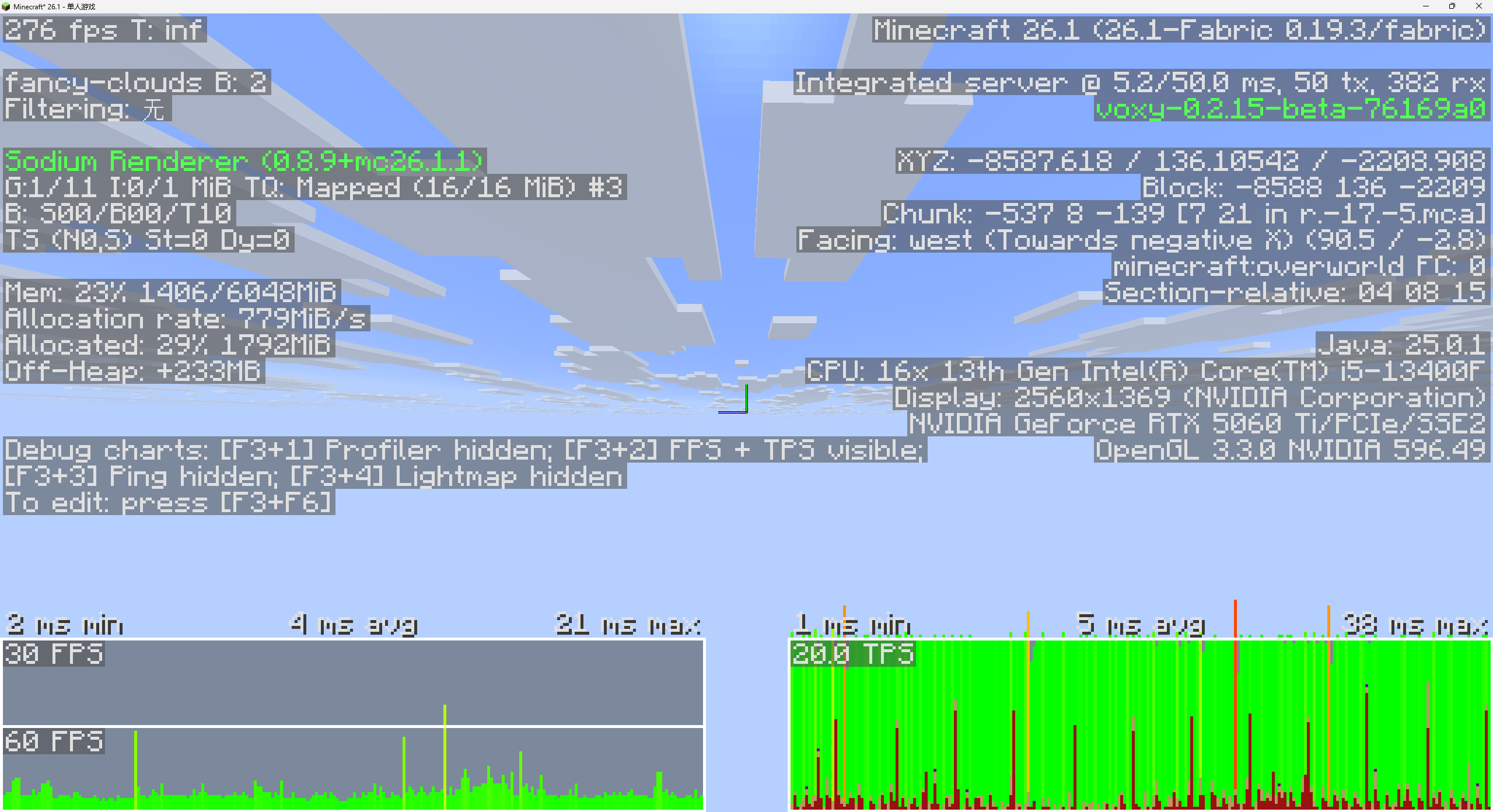 TPS Stress Test - 77 Blocks/s Max Speed 77 blocks/s speed test. Chunk gen can't fully keep up, but TPS stays completely stable.
 -
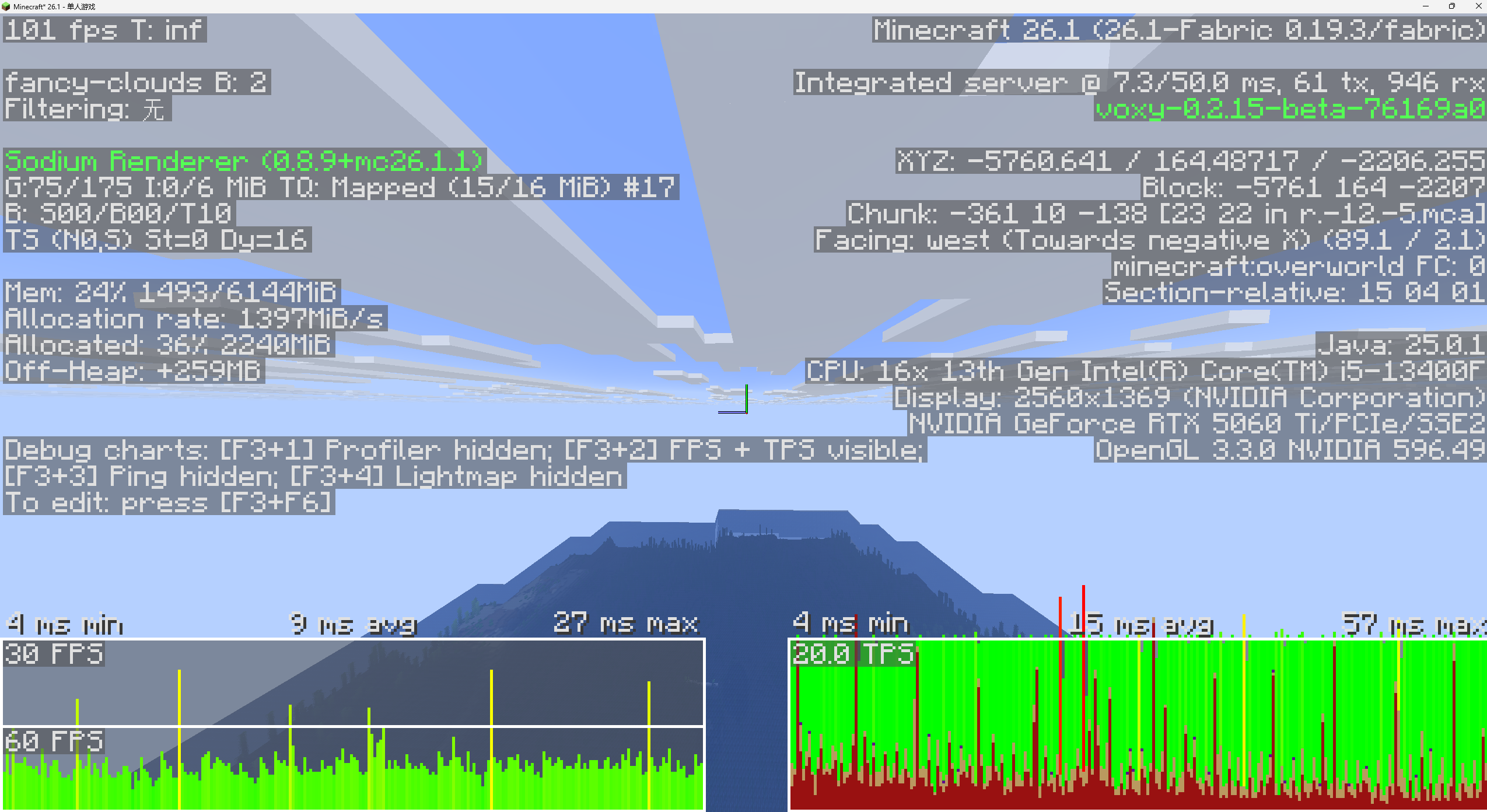 Optimized Performance: TPS Impact & C2ME Compatibility TPS stability test at 77 blocks/s in Spectator mode. Graphs show stable TPS during rapid world gen. Seamlessly paired with C2ME to eliminate lag under high load.
Versions
Files
Relations
Project Relations
More like this
Similar Mods
Suggestions use data such as tags, dependencies, dependents, descriptions, titles, and more to rank how much they overlap with this mod.
On ModDex
Community snapshot
By the numbers
Statistics

Want to reach Minecraft players?
We're looking for a server hosting partner to feature here and other parts of the site. Interested? Send us a message!
Get in touchGet it on
Available Platforms
On ModDex
Community snapshot
By the numbers
Statistics
Resources