LG's Command Items - Easy Custom Items
No reviews yet
This datapack adds a way to add commands directly as a component to items! Great way to add custom items with some additional features like cooldowns!
Data Packs were introduced to vanilla Minecraft in version 1.13 and allow the server to modify data about the game, or run commands. Data Packs are compatible with all mod loaders.
Forge is a popular mod loader for versions 1.1+ of Minecraft.
Neoforge is a fork of the Minecraft Forge available for versions 1.20.1+ of Minecraft. Many Forge mods are compatible with Neoforge and vice versa.
Fabric is a mod loader for versions 1.14+ of Minecraft, particularly popular for client side and optimization mods.
Quilt is a fork of the Fabric mod loader. Many Fabric mods are compatible with Quilt and vice versa.
Community voices
Reviews
Click once to include, again to exclude, again to clear
No reviews yet. Be the first to review this project!
Get it on
Available Platforms
 Modrinth
Compatibility
Supported Environments
About
Project Details
For authors
Embed Badge
If you're the author of this project, you can embed a live badge anywhere that supports HTML or Markdown. It updates automatically whenever ratings change.
Use HTML for any page that supports it, or Markdown for README files and Markdown-based descriptions.
Identifiers
Platform IDs
Resources
External Links
About
Description
🔀 LG's Command Items datapack
This datapack adds a way to add commands directly to items when triggering a specific event, events stacks meaning you can have a command for Right-Click as well as a command when attacking a mob or getting attacked!
Usage Tutorial
Use /function a:open_menu command, then click Add Commands button, select your input and slot, then confirm with the red "Confirm" button, it will add the command to your selected input + slot combination
Current Triggers & Slots
Triggers
- Tick (20 times per second)
- Use Item (on right-click, requires the item to be consumable, the Item Modifier makes it easy to turn an item into consumable, check commands)
- Using Item (Triggers whenever you're using the item)
- Player Hurt Entity (whenever player attacks an entity)
- Player Killed Entity (whenever player kills an entity)
- Entity Hurt Player (whenever the player gets damaged)
- Inventory Changed (whenever players' inventory changes)
Slots
- Mainhand
- Offhand
- Head
- Chest
- Legs
- Feet
Limitations
You can only put one command into each trigger + slot combo, to use several commands, it is recommended to use functions
For any ticking trigger, I recommend not using cooldowns simply for optimization purposes, it won't fry your ticks if you don't do so, but with several players using those, it may very likely affect your performance negatively
Other Additions
- Cooldowns - You can easily add cooldowns to your commands, they generate no scoreboards and are bound directly to items
- Swap Hand Items - Simply swaps your mainhand and offhand items
- Show Cooldown - When on cooldown, displays the cooldown on the chat, not recommended to use on ticking triggers so not to flood your chat
- Consume On Trigger - Once triggered, consumes 1 of the used items
⚠️ Important commands!
/function a:open_menu
/function a:copy_item
/function ci:reset_cds
🔴 YouTube Showcase
Screenshots
Gallery
-
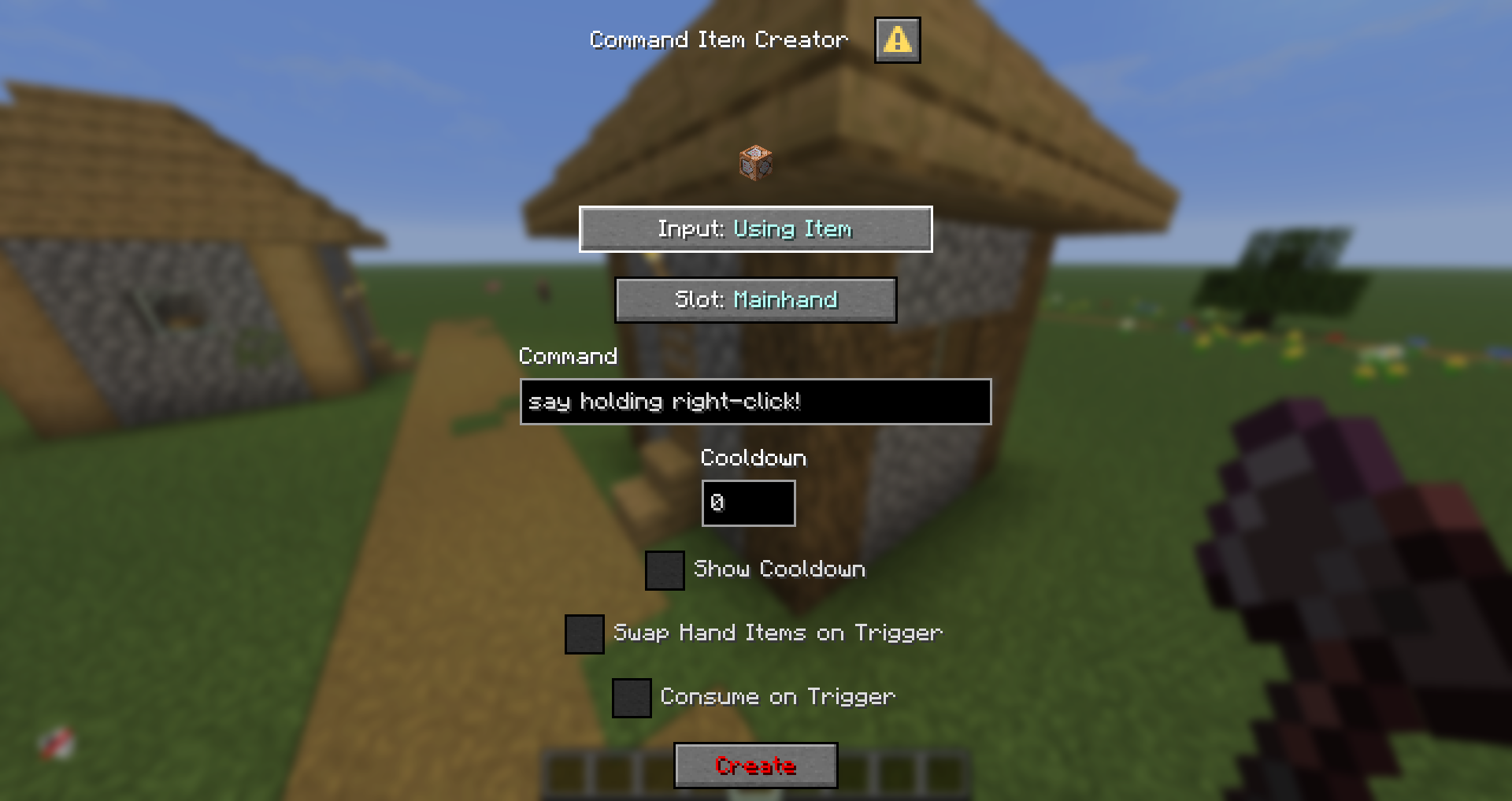 Add commands to an item
 -
 Item Modifier section
 -
 Icon
Icon
Versions
Files
Relations
Project Relations
More like this
Similar Mods
Suggestions use data such as tags, dependencies, dependents, descriptions, titles, and more to rank how much they overlap with this mod.
On ModDex
Community snapshot
By the numbers
Statistics

Want to reach Minecraft players?
We're looking for a server hosting partner to feature here and other parts of the site. Interested? Send us a message!
Get in touchGet it on
Available Platforms
On ModDex
Community snapshot
By the numbers
Statistics
Resources