
Community listing page, reviews here may not be monitored by the author.
LiteGrid

No reviews yet
A 3x3 mob-spawn safety HUD: live block-light readings of the tiles around you, color-coded by spawn risk. Toggle with L.

Community voices
Reviews
No reviews yet. Be the first to review this project!
Get it on
Available Platforms
Compatibility
Supported Environments
The author has not specified where this runs.
About
Project Details
For authors
Embed Badge
If you're the author of this project, you can embed a live badge anywhere that supports HTML or Markdown. It updates automatically whenever ratings change.
Use HTML for any page that supports it, or Markdown for README files and Markdown-based descriptions.
Identifiers
Platform IDs
Resources
External Links
About
Description
LiteGrid is a tiny spawn-proofing helper. It draws a 3×3 grid in the bottom-right corner showing the block light level of the floor tile you're standing on and the eight tiles around you, so you can tell at a glance whether mobs can spawn here.
What you see
- Nine cells in a 3×3 grid, each showing a number from
0to15— that block's light value. - Cell colors:
- Green — block light ≥ 8 (well-lit, mob-safe).
- Amber — block light 1–7 (some light, dim).
- Red — block light 0 (hostile mobs can spawn here at night).
- A white outline marks your own tile.
- A footer says either
Spawn-prooforMobs spawn: N/9so you know if the area around you is safe to leave unlit overnight.
Use it for
- Spawn-proofing your base, mob farms, or paths between buildings — instantly see the gaps your torches don't cover.
- Quickly checking a cave area before AFK'ing.
- Teaching new players where mobs spawn and why torches matter.
Features
- One key to toggle the HUD on/off (default L, raw GLFW polling — same key works on every supported MC version).
- Hides automatically when you press F1.
- Reads the block light component (the part that matters for mob spawning), not the sky component — so a daylit grass field still shows red, accurately predicting what happens at night.
- Pure client-side — install on the client only, works on any server, no cheats, no game state changes.
- Tiny render cost — nine block-light lookups per frame and a few rectangles.
Compatibility
Works on Minecraft 1.21.8, 1.21.9, 1.21.10, and 1.21.11 (Fabric Loader 0.16+). One JAR for all four — install via Fabric, drop into your mods/ folder.
Why not just press F3?
F3 shows light at your eye position only, packed in among 40 other debug values. LiteGrid shows the spatial spread around your feet — exactly what you care about when placing torches — without covering half your screen.
Screenshots
Gallery
-
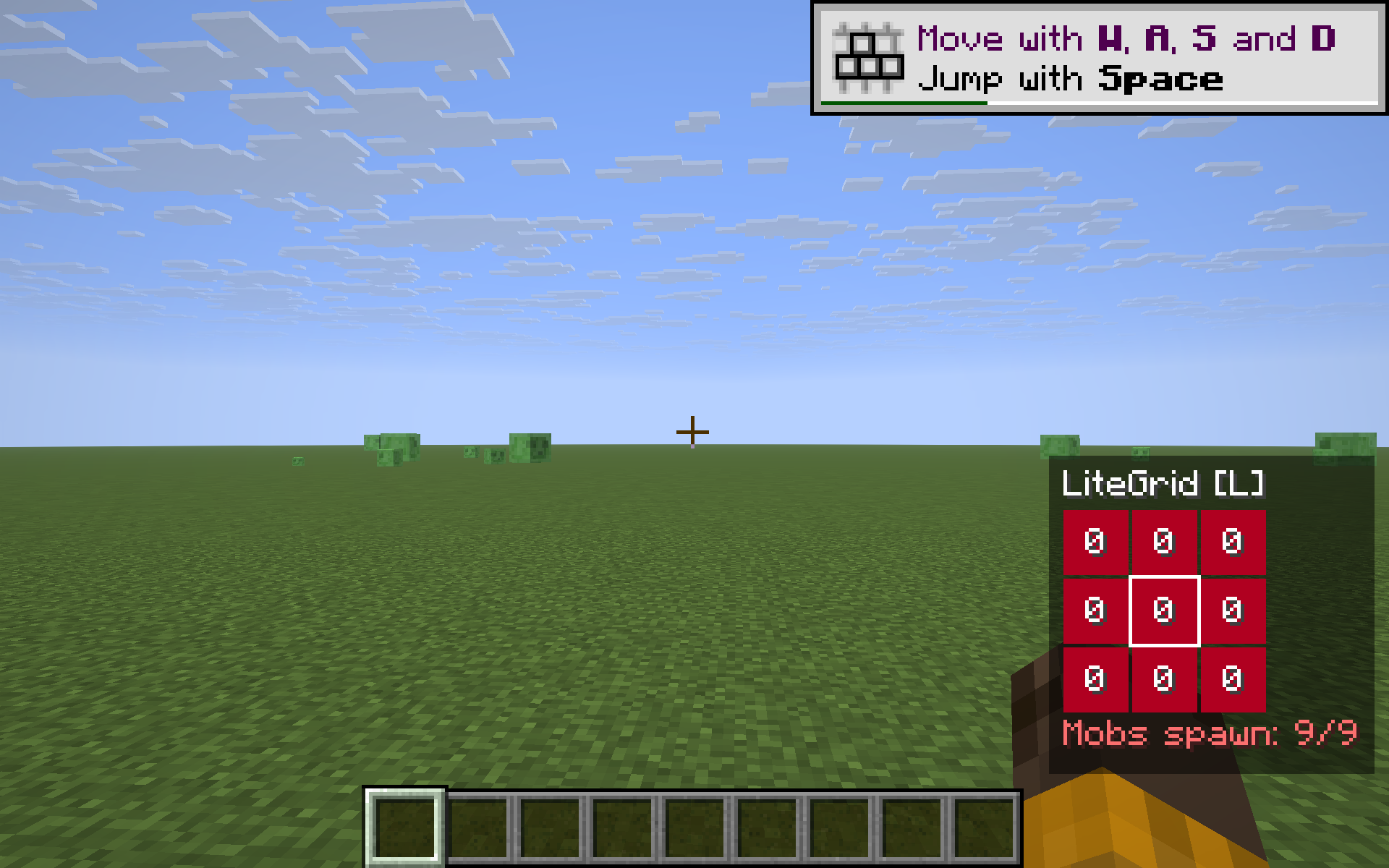 open-daylight
Versions
Files
Relations
Project Relations
More like this
Similar Mods
Suggestions use data such as tags, dependencies, dependents, descriptions, titles, and more to rank how much they overlap with this mod.
On ModDex
Community snapshot
By the numbers
Statistics

 (opens in a new tab)
Get it on
Available Platforms
On ModDex
Community snapshot
By the numbers
Statistics
Resources