Community listing page, reviews here may not be monitored by the author.
Litematica Share

No reviews yet
A minecraft mod to share a litematica to your friends and easily take control of your builds.
Community voices
Reviews
No reviews yet. Be the first to review this project!
Get it on
Available Platforms
About
Project Details
For authors
Embed Badge
If you're the author of this project, you can embed a live badge anywhere that supports HTML or Markdown. It updates automatically whenever ratings change.
Use HTML for any page that supports it, or Markdown for README files and Markdown-based descriptions.
Identifiers
Platform IDs
Resources
External Links
About
Description
📐 Litematica Share
Litematica Share is a lightweight companion mod for Litematica that makes positioning, adjusting, and sharing schematics effortless. Take full control of your schematics directly from keybinds and chat without opening complex menus.
⚠️ Warning: The schematic file must be compatible with the Litematica version both players are using. A
.litematicfile created in a newer version will not work on an older version. To prevent errors, it is highly recommended to use online converters to change your.litematicfile to a.schemformat before sharing.
⚙️ How It Works
- Both Players Need the Mod: Both sender and receiver must have Litematica Share installed.
- Same Schematic File: Ensure both players have the same
.litematic(or.schem/.schematic) file in their local schematics folder (subfolders are searched automatically!). - Share: Press your share keybind (default:
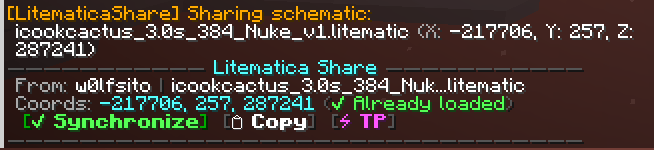
Y) or run/liteshare share. - One-Click Sync: The recipient clicks the interactive card in chat to instantly load and snap the schematic into place.
✨ Features
👥 1. Smart Sharing & Interactive Chat Cards
[✔ Synchronize]Button: Automatically finds the file (even inside subfolders) and applies exact coordinates, rotation, and mirror settings.[📋 Copy]Button: Copies the sync command straight to your clipboard.[⚡ TP]Button: Quick teleport to the schematic origin (/tp).- Responsive Layout: Adapts borders and long filenames to your chat width without breaking into extra lines.
🛡️ 2. Privacy & Clan/Faction Channels
- Configure custom prefixes (e.g.,
/ff,@,/clan chat,/t) to share only in private channels and prevent coordinate leaks in global chat.
🎮 3. Keyboard Positioning Controls
- Directional Nudge: Move schematics Forward, Backward, Left, Right, Up, or Down by 1 block relative to where you look.
- Snap to Player: Instantly move the schematic origin to your current position.
- Quick Rotate & Mirror: Rotate 90° or flip the schematic with a single keypress.
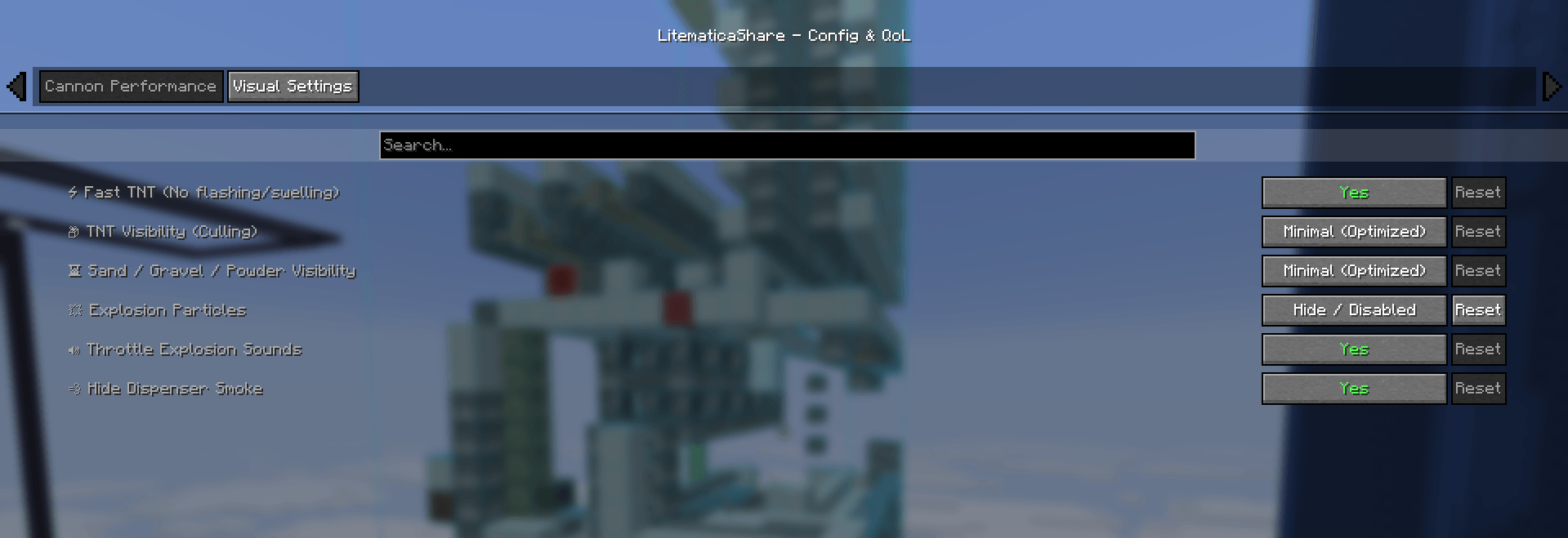
⚡ 4. Cannon & FPS Performance (Anti-Lag)
- Fast TNT: Removes swelling & white flashing animations to save massive CPU/GPU performance.
- TNT & Sand Culling: Renders only 1 entity per cluster/column during cannon shots.
- Audio & Particle Limiters: Prevents sound freezes and disables dispenser smoke.
⌨️ Commands & Keybinds
| Command / Keybind | Description |
|---|---|
Y or /liteshare share |
Share current schematic placement to chat/channel |
/liteshare replace <from> <to> |
Instantly swap blocks in your active schematic (e.g. /liteshare replace obsidian crying_obsidian) |
/liteshare search <name> |
Quick search for schematic files in your folders |
/liteshare list |
List all currently loaded schematics in Litematica |
/liteshare apply <data> |
Manually apply shared schematic placement data |
(Alias) /litesync |
All commands can also be executed with /litesync |
| Nudge / Move / Rotate | Bindable hotkeys in Minecraft Controls options |
📦 Dependencies
- Fabric Loader (1.20.x – 1.21.x)
- Fabric API
- Litematica
- (Optional) Cloth Config & ModMenu
Screenshots
Gallery
-
 Screenshot 2026-08-31 054808.png Screenshot 2026-08-31 054808.png
 -
 Screenshot 2026-08-31 054927.png Screenshot 2026-08-31 054927.png
Versions
Files
Relations
Project Relations
More like this
Similar Mods
Suggestions use data such as tags, dependencies, dependents, descriptions, titles, and more to rank how much they overlap with this mod.
On ModDex
Community snapshot
By the numbers
Statistics
Want to reach Minecraft players?
We're looking for a server hosting partner to feature here and other parts of the site. Interested? Send us a message!
Get in touchGet it on
Available Platforms
On ModDex
Community snapshot
By the numbers
Statistics
Resources