
Community listing page, reviews may not be monitored by the author.
Little Whale AI

No reviews yet
Little Whale AI (小鲸鱼AI) - Your own AIBot in Minecraft

Community voices
Reviews
No reviews yet. Be the first to review this project!
Get it on
Available Platforms
Compatibility
Supported Environments
Runs entirely on the server. Also works in singleplayer.
About
Project Details
For authors
Embed Badge
If you're the author of this project, you can embed a live badge anywhere that supports HTML or Markdown. It updates automatically whenever ratings change.
Use HTML for any page that supports it, or Markdown for README files and Markdown-based descriptions.
Identifiers
Platform IDs
Resources
External Links
About
Description
A lightweight, fully asynchronous Fabric mod that brings a friendly AI player named Little Whale into your Minecraft server. Powered by any OpenAI-compatible API, it can chat with players in private or public, understand context, and speak their language.
✨ Features
- 3 Chat Modes – Switch between private, public, or mixed mode:
- Private (mode 1): Players use
@ai <message>to talk to the AI. Only the sender sees the reply. - Public (mode 2): Every public chat message is treated as conversation with the AI. The AI replies publicly to everyone. Context is globally shared.
- Mixed (mode 3):
@aitriggers private conversation, while normal chat triggers public AI replies. Private and public contexts are kept separate.
- Player-aware AI – In public/mixed modes, the AI sees who said what via
[PlayerName]: messageformat. It can address players by name naturally. - Multilingual – The AI automatically replies in the same language the player used (Chinese, English, etc.).
- Plain Text Only – The AI is instructed never to use Markdown, code blocks, or special formatting, keeping output clean for the in-game chat.
- Safe & Non‑blocking – All HTTP requests run on background threads; the server main thread is never blocked.
- Context Management – Auto-clears conversation history after a configurable interval or manually via commands.
- Fully Configurable – Change the API endpoint, model, temperature, system prompt, prefix, and more through
config/aichat.json. - Admin Commands – Powerful
/aichatcommands to clear contexts, reload config, and view status.
- Private (mode 1): Players use
📦 Installation
- Install Fabric for Minecraft 1.21.8.
- Download the mod
.jarfile and place it into themods/folder. - Launch the server or client. A default configuration file will be generated at
config/aichat.json. - Edit
config/aichat.jsonand fill in yourapiKeyand (optionally)apiUrl. Save the file. - Run
/aichat reload(requires OP) or restart the server.
⚙️ Configuration (config/aichat.json)
| Key | Type | Default | Description |
|---|---|---|---|
apiUrl |
String | https://open.bigmodel.cn/api/paas/v4/chat/completions |
API endpoint (OpenAI-compatible) |
apiKey |
String | "" |
Your API key |
systemPrompt |
String | (multilingual, anti-prefix, plain‑text prompt) | System prompt that defines AI behavior |
modelName |
String | "general" |
Model name to send to the API |
temperature |
Double | 0.7 |
Creativity of responses (0.0–2.0) |
autoClearContext |
Boolean | true |
Enable automatic context clearing |
contextExpireSeconds |
Integer | 300 |
Seconds between auto‑clears |
prefix |
String | "<LittleWhale> " |
Prefix added to every AI reply (supports color codes) |
mode |
Integer | 2 |
Chat mode: 1 = private, 2 = public, 3 = mixed |
🎮 Usage
Chat Triggers
- Private / Mixed: Start your message with
@ai. Example:@ai How do I craft a furnace? - Clear private context:
@ai clear(works in private/mixed mode) - Public mode: Just talk in chat – every message triggers a public AI reply.
Admin Commands (requires OP, permission level 2)
| Command | Description |
|---|---|
/aichat clear |
Clear your own private context (mode 1/3) |
/aichat clear <player> |
Clear the private context of a specific player |
/aichat clearglobal |
Clear the global public conversation context |
/aichat clearall |
Clear all contexts (private + global) |
/aichat reload |
Reload the configuration without restarting |
/aichat info |
Display current settings (API, model, mode, etc.) |
Screenshots
Gallery
-
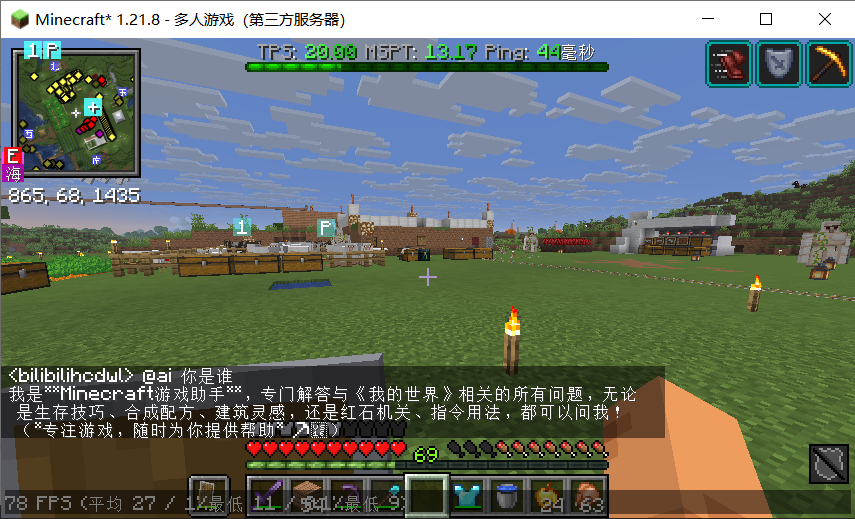 in Chinese server
Versions
Files
Relations
Project Relations
More like this
Similar Mods
Suggestions use data such as tags, dependencies, dependents, descriptions, titles, and more to rank how much they overlap with this mod.
On ModDex
Community snapshot
By the numbers
Statistics


Get it on
Available Platforms
On ModDex
Community snapshot
By the numbers
Statistics
Resources