
Community listing page, reviews here may not be monitored by the author.
LLocks!


No reviews yet
Simple locks
Community voices
Reviews
No reviews yet. Be the first to review this project!
Get it on
Available Platforms
Compatibility
Supported Environments
Runs entirely on the server. Also works in singleplayer.
About
Project Details
For authors
Embed Badge
If you're the author of this project, you can embed a live badge anywhere that supports HTML or Markdown. It updates automatically whenever ratings change.
Use HTML for any page that supports it, or Markdown for README files and Markdown-based descriptions.
Identifiers
Platform IDs
Resources
External Links
About
Description


About
English
This mod will add a lock and key, with the lock you will be able to close blocks with GUI
Русский
Данный мод добавит замок и ключ, с помощью замка вы сможете закрывать блоки с GUI
Guide
English
1. Rename a Lock in the Anvil with a password of your choice
2. Shift-right-click the Chest with the Lock
3. The Lock will be replaced with a Key of the same name.
4. Use the Key to unlock the Chest.
(note: you can use any item with the given name to unlock the Chest)
Русский
1. Переименуйте замок в Наковальне, введя пароль по своему усмотрению
2. Щелкните правой кнопкой мыши по сундуку с замком.
3. Замок будет заменен одноименным ключом.
4. Используйте ключ, чтобы отпереть сундук
(примечание: для отпирания сундука можно использовать любой предмет с таким названием).
Other
All content
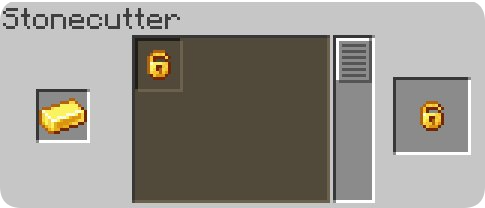
- Lock
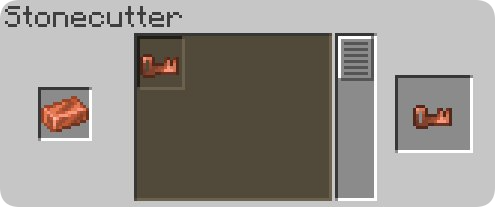
- Key
Recipes
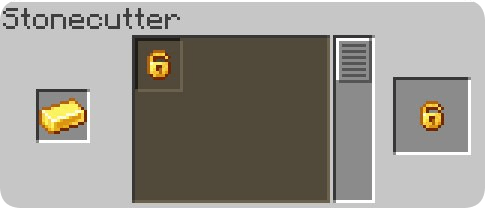
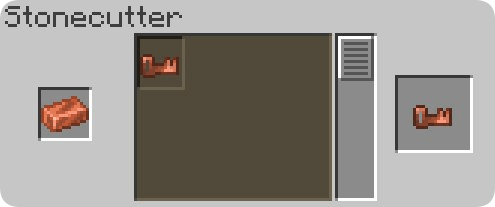
 IDKLO81J

About
English
This mod will add a lock and key, with the lock you will be able to close blocks with GUI
Русский
Данный мод добавит замок и ключ, с помощью замка вы сможете закрывать блоки с GUI
Guide
English
- Rename a Lock in the Anvil with a password of your choice
- Shift-right-click the Chest with the Lock
- The Lock will be replaced with a Key of the same name.
- Use the Key to unlock the Chest.
- (note: you can use any item with the given name to unlock the Chest)
Русский
- Переименуйте замок в Наковальне, введя пароль по своему усмотрению
- Щелкните правой кнопкой мыши по сундуку с замком.
- Замок будет заменен одноименным ключом.
- Используйте ключ, чтобы отпереть сундук
- (примечание: для отпирания сундука можно использовать любой предмет с таким названием).
Other
All content
- Lock
- Key
Recipes
Screenshots
Gallery
-
 Banner
Versions
Files
Relations
Project Relations
More like this
Similar Mods
Suggestions use data such as tags, dependencies, dependents, descriptions, titles, and more to rank how much they overlap with this mod.
On ModDex
Community snapshot
By the numbers
Statistics
Want to reach Minecraft players?
We're looking for a server hosting partner to feature here and other parts of the site. Interested? Send us a message!
Get in touchGet it on
Available Platforms
On ModDex
Community snapshot
By the numbers
Statistics
Resources