
Loadout Keybinds - Hypixel Skyblock
No reviews yet
Bind Hypixel Skyblock Loadout slots to your keyboard.
Fabric is a mod loader for versions 1.14+ of Minecraft, particularly popular for client side and optimization mods.
Community voices
Reviews
Click once to include, again to exclude, again to clear
No reviews yet. Be the first to review this project!
Get it on
Available Platforms
 Modrinth
Compatibility
Supported Environments
About
Project Details
For authors
Embed Badge
If you're the author of this project, you can embed a live badge anywhere that supports HTML or Markdown. It updates automatically whenever ratings change.
Use HTML for any page that supports it, or Markdown for README files and Markdown-based descriptions.
Identifiers
Platform IDs
Resources
External Links
About
Description
Loadout Keybinds
Bind SkyBlock loadout slots to your keyboard or mouse for instant loadout swapping — no more clicking through the menu.
Referenced Mod
Features
- Keybind slots 1–12 in the Loadouts menu, bindable to keyboard keys or mouse buttons
- In-game config screen — run
/loadoutconfigor/ldconfigto:- Rebind any slot to a key or mouse button
- Choose a highlight style: Outline, Fill, or Both
- Pick your own highlight color with a full saturation/value + hue color picker
- Toggle the equip sound
- Toggle the "You equipped Loadout X!" chat message
- Last-used slot highlight — always see which loadout you're currently on, whether you switch it with a bound key, a bound mouse button, or just a normal click. Tracks per-page, so it won't show the wrong slot after using "Next Page". Right-click (Edit) is correctly ignored.
/loadoutquick-open keybind — bind a key (Controls → Loadout Keybinds) to instantly send/loadout- Settings persist across restarts (
config/loadoutkeybinds.json)
Default Keybinds
Slots 1–12 default to 1 2 3 4 5 6 7 8 9 0 - =. Change any of them anytime with /ldconfig.
Versions
| Minecraft | Fabric API | Notes |
|---|---|---|
| 1.21.11 | 0.141.4+1.21.11 | |
| 26.1.2 | 0.150.0+26.1.2 | |
| 26.2 | 0.154.2+26.2 |
Download the file matching your Minecraft version.
Requirements
- Fabric Loader 0.18.4+ (0.19.3+ for 26.x)
- Fabric API matching your Minecraft version
No other dependencies — pure Java, no Kotlin required.
Commands
| Command | Description |
|---|---|
/loadoutconfig, /ldconfig |
Opens the settings screen |
/loadout (via keybind) |
Instantly sends /loadout |
Screenshots
Gallery
-
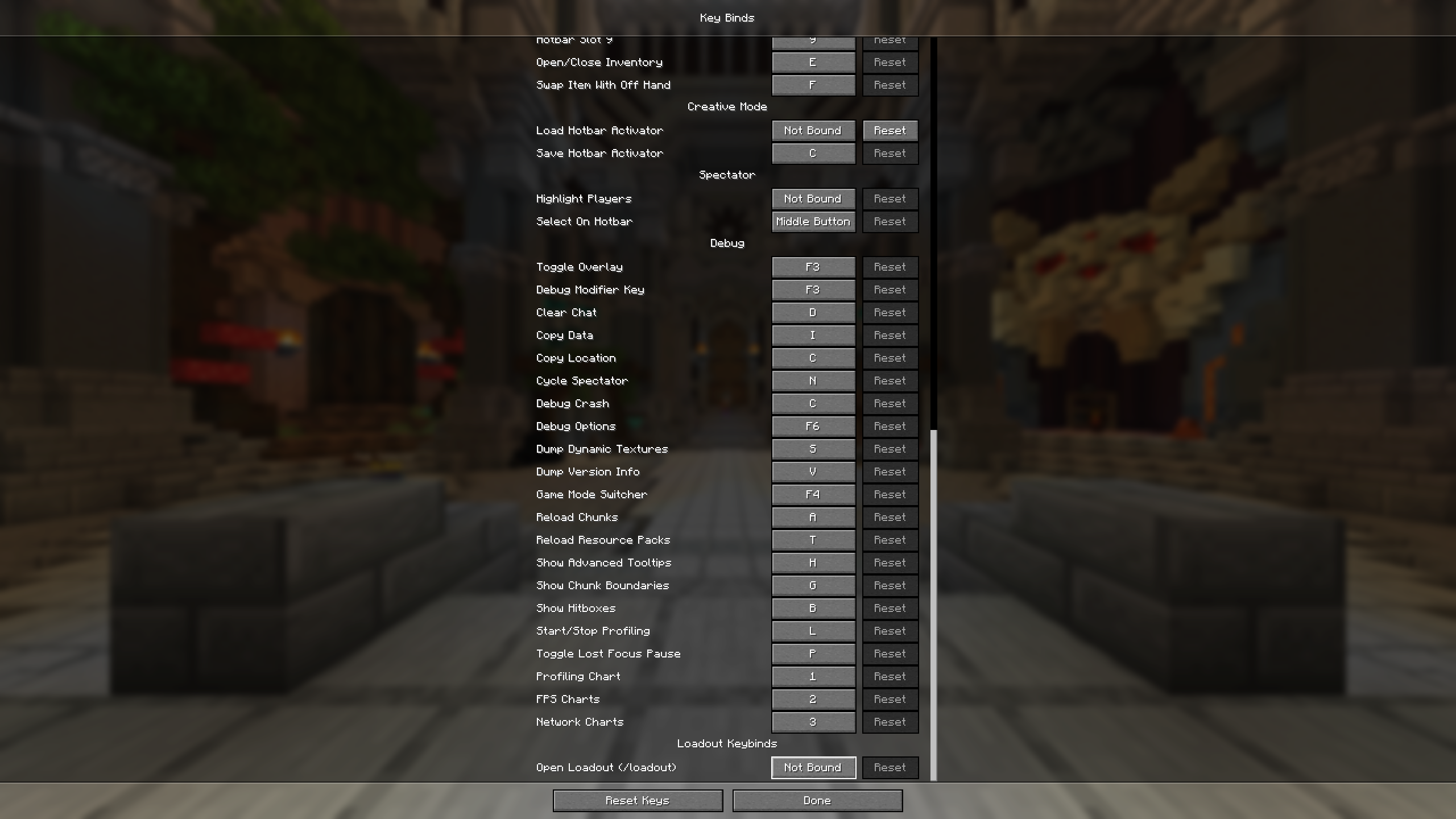 Open Loadout Keybinds You can set Open Loadout Keybinds using basic Minecraft Key Binds.
 -
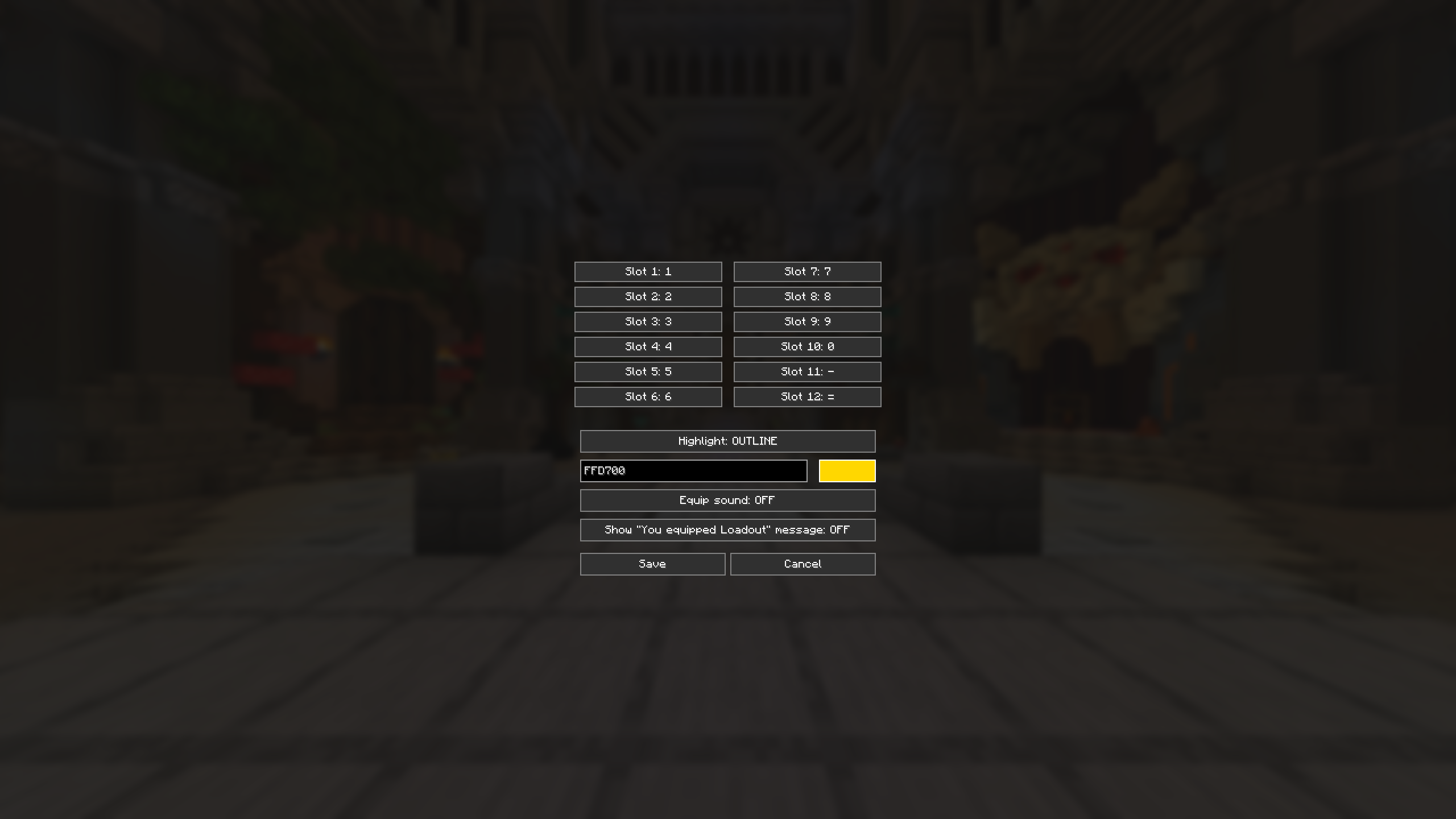 Config Screen You can open this screen using `/ldconfig` to configure key settings, highlights, and loadout message options.
Versions
Files
Relations
Project Relations
More like this
Similar Mods
Suggestions use data such as tags, dependencies, dependents, descriptions, titles, and more to rank how much they overlap with this mod.
On ModDex
Community snapshot
By the numbers
Statistics

Want to reach Minecraft players?
We're looking for a server hosting partner to feature here and other parts of the site. Interested? Send us a message!
Get in touchGet it on
Available Platforms
On ModDex
Community snapshot
By the numbers
Statistics
Resources