Community listing page, reviews here may not be monitored by the author.
Lockout

No reviews yet
A challenging multiplayer Speedrun race

Community voices
Reviews
No reviews yet. Be the first to review this project!
Get it on
Available Platforms
About
Project Details
For authors
Embed Badge
If you're the author of this project, you can embed a live badge anywhere that supports HTML or Markdown. It updates automatically whenever ratings change.
Use HTML for any page that supports it, or Markdown for README files and Markdown-based descriptions.
Identifiers
Platform IDs
Resources
External Links
About
Description
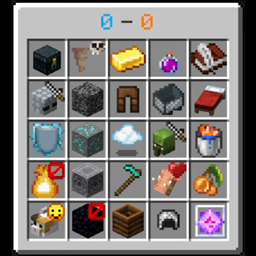
A Speedrun Race where 2 teams are given 25 random goals/tasks to complete in the game. Once one person completes a goal, the other person can't anymore. They are in the same world with a compass that points to the other team. They are each the color blue on the board on their own view. First to 13 goals wins
Mod created by Atsign for SmallAnt
How To Play
This is a Forge mod.
Every participant must have Forge+Lockout running client-side AND on the Forge Server to work properly.
To start a Blackout:
Use the in-game teams commands to create a team, then start the blackout using the team name.
/Blackout team <teamname>
To start a 1v1 match:
/Lockout <player1> <player2>
This will open the board, give each player a compass to track the other player, reset inventories, health, hunger, and time. The board will automatically close once the match starts.
The default keybind for re-opening the board is B, but this can be changed in the options menu.
To start a Teams match:
Use the in-game teams commands to create and add any number of players to each team, then start the lockout using the team names.
/Lockout @a[team=<team1>] @a[team=<team2>]
Right click with the compass to cycle who you are tracking.
Additional Commands / Info
Choose how many seconds the board is initially open before the match starts.
/LockoutSetStartTime <seconds>
Choose the position of the board on your screen (1 is Top Left, 2 is Top Right, 3 is Bottom Left, 4 is Bottom Right).
/LockoutLocation <position>
In the event of a server crash/reset, this command can be used to continue an ongoing lockout match. If only a player disconnects and reconnects this command does NOT need to be used.
/LockoutResume <Player1> <Player2>
In the event of a goal not being registered this command can be used to give a specific player a goal.
/GiveGoal <player> <goal_index>
-Piglin bartering is modified to have 1.16.1 trades.
-Raids will act as if the game is on Normal difficulty
-Villagers will convert to zombie villagers 50% of the time when killed by a zombie (as if the game is on Normal Difficulty).
Screenshots
Gallery
Versions
Files
Relations
Project Relations
More like this
Similar Mods
Suggestions use data such as tags, dependencies, dependents, descriptions, titles, and more to rank how much they overlap with this mod.
On ModDex
Community snapshot
By the numbers
Statistics
 (opens in a new tab)
Get it on
Available Platforms
On ModDex
Community snapshot
By the numbers
Statistics
Resources