Community listing page, reviews may not be monitored by the author.
LockyLocks


No reviews yet
Secure your treasures with durable locks and forged keys, a personal touch of protection.

Community voices
Reviews
No reviews yet. Be the first to review this project!
Get it on
Available Platforms
Compatibility
Supported Environments
Must be installed on both the client and the server.
About
Project Details
For authors
Embed Badge
If you're the author of this project, you can embed a live badge anywhere that supports HTML or Markdown. It updates automatically whenever ratings change.
Use HTML for any page that supports it, or Markdown for README files and Markdown-based descriptions.
Identifiers
Platform IDs
Resources
External Links
About
Description
🔐 LockyLocks – Secure Your Storage in Style!
Tired of your friends snooping into your chests? Want to protect your loot with a personal touch?
Introducing LockyLocks, a simple yet powerful Minecraft mod that lets you lock your containers with customized locks and keys!
🔑 Features
-
🧱 Two Lock Types:
-
Iron Lock – High durability, lasts up to maximum 36 Minecraft days.
-
Copper Lock – Lower durability, lasts up to maximum 24 Minecraft days.
-
-
🔐 Personalized Security:
-
You can name your lock (e.g., “Secret”) and only a key with the exact same name (case-sensitive!) will unlock it.
-
However, only the player who locked the container can unlock it – even if someone else gets a correctly named key, it won’t work for them!
-
-
📦 Container Support:
-
Lockable containers include:
-
✅ Chests (including double chests)
-
✅ Barrels
-
✅ Shulker Boxes
-
-
-
⚙️ Durability System:
-
Locks wear down each in-game day they’re in use.
-
When a lock’s durability runs out, it breaks automatically and unlocks the container.
-
Keys have limited use too – they can be used up to 35 times before breaking.
-
-
🛡️ Block Break Protection:
-
Locked containers are protected from breaking or destroying by default.
-
You can toggle this in the config at:
/config/lockylocks-common.toml
SetprotectLockedContainers = falseto disable protection.
-
-
🎮 Multiplayer Friendly:
-
Only the owner of a lock can unlock it with a correctly named key.
-
Great for servers with shared bases or competitive play!
-
🧪 Crafting Recipes
🔑 Iron Key:
Your tool to unlock what you've secured.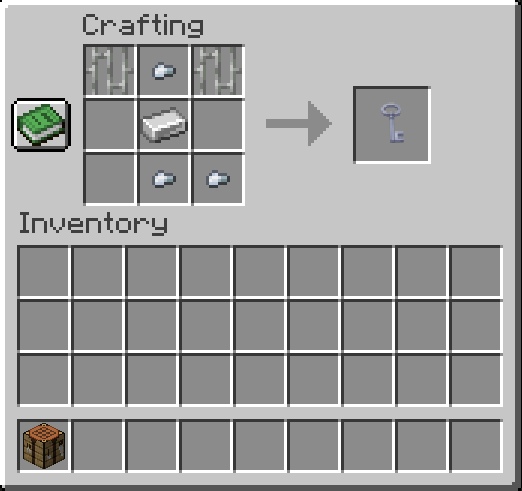
*🔧 Iron Lock:
Use this recipe to create a strong lock with high durability.*
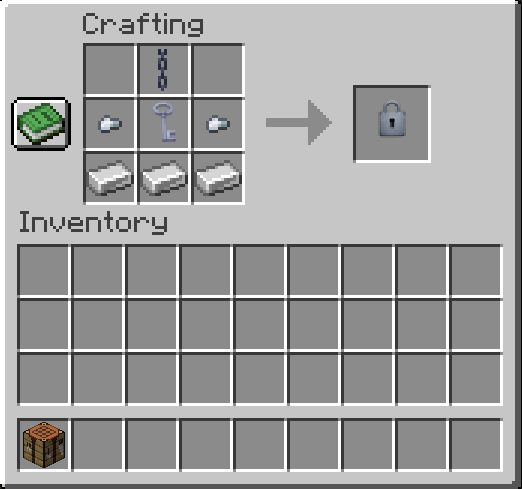
🛠️ Copper Lock:
A more affordable lock option with slightly less durability.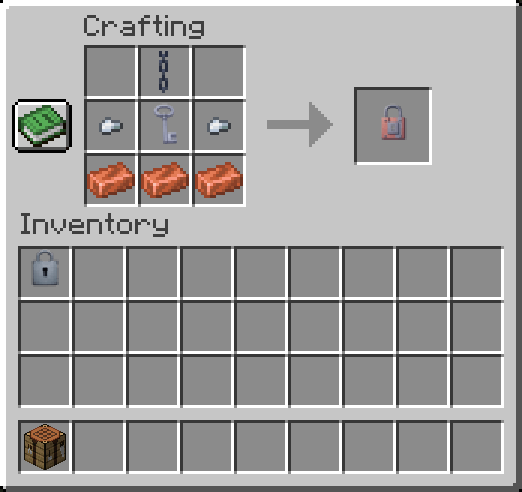
💬 Feedback & Ideas
Have ideas for new lock types, key mechanics, or multiplayer enhancements?
Feel free to reach out or contribute!
🗝️ With LockyLocks, your stuff stays YOURS.
☕ Fuel My Code with Coffee!
Liked the mod? Keep me caffeinated and semi-functional 😴 by dropping a coffee here. Thanks, you legend! 😎
🔒 LockyLocks
Secure your containers with style and control! LockyLocks is a lightweight yet powerful utility mod that lets you lock containers like Chests, Barrels, and Shulker Boxes using customizable locks and keys.
✨ Features
🧱 Two Types of Locks:
-
Iron Lock: More durable, lasts maximum 36 Minecraft days.
-
Copper Lock: Less durable, lasts maximum 24 Minecraft days.
🗝️ One Key to Unlock Each Lock:
-
Only one key type currently: Iron Key.
-
Key must have exact same name as the lock (case-sensitive) and be used by the player who locked it.
-
Even if someone else gets a correctly named key, they can’t unlock it unless they are the owner.
🛡️ Break Protection:
-
By default, locked containers cannot be broken.
-
Can be toggled via config file:
-
/config/lockylocks-common.toml →
protectLockedContainers = false
- to disable protection.
⚙️ Durability Mechanics:
-
Locks wear down daily while active. Once broken, the container unlocks automatically.
-
Keys can be used 35 times before breaking.
📦 Supported Containers:
- Works with Chests, Double Chests, Barrels, and Shulker Boxes.
📸 Recipes
- Please see the Gallery section
⚒️ Configurable Options
Located in:
/config/lockylocks-common.toml
Available settings:
protectLockedContainers = true
→ Set to false if you want players to break locked containers.
☕ Fuel My Code with Coffee!
Liked the mod? Keep me caffeinated and semi-functional 😴 by dropping a coffee here. Thanks, you legend! 😎
Screenshots
Gallery
-
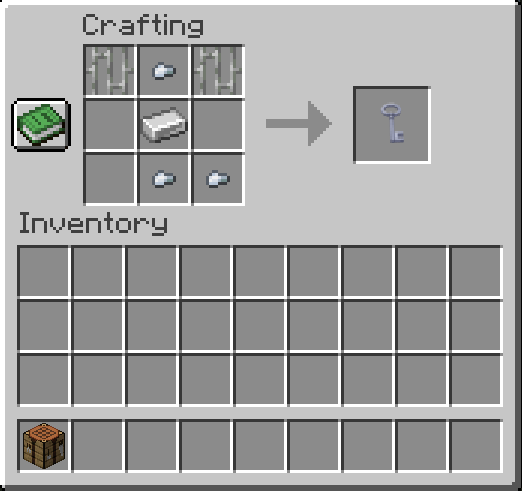 iron_key_recipe.png iron_key_recipe.png
 -
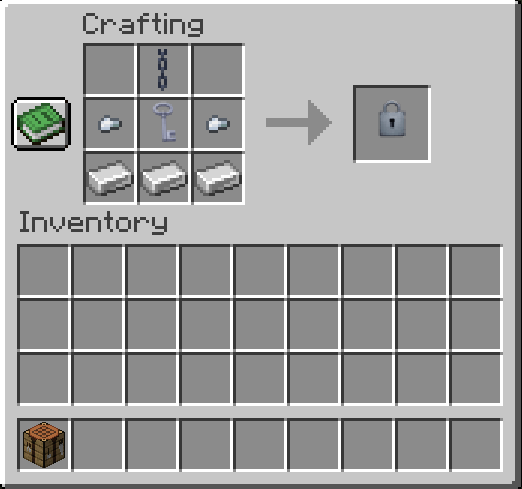 iron_lock_recipe.png iron_lock_recipe.png
 -
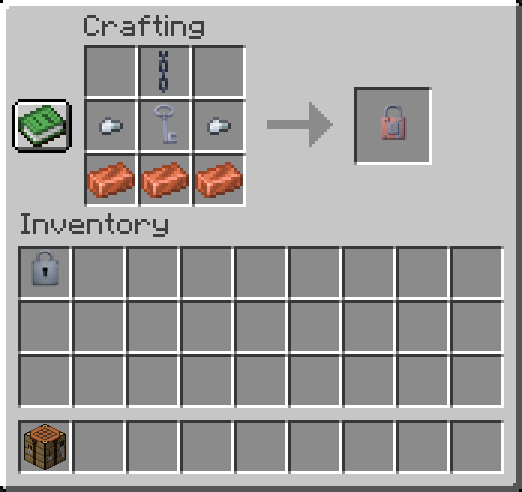 copper_lock_recipe.png copper_lock_recipe.png
-
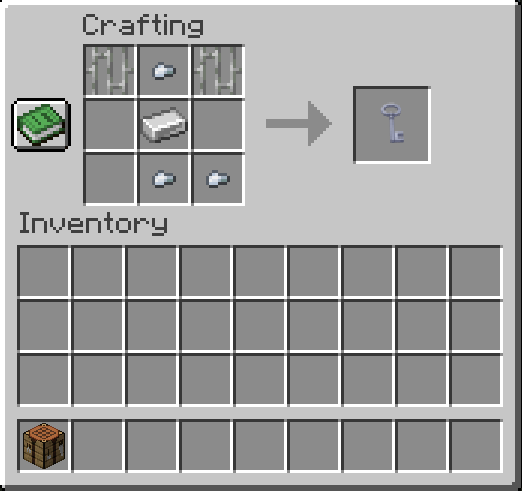 Iron Key Recipe Recipe of the Iron Key
 -
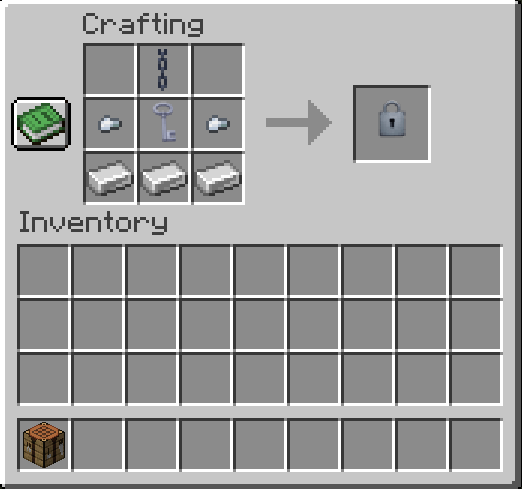 Iron Lock Recipe Recipe of the Iron Lock
 -
 Copper Lock Recipe Recipe of the Copper Lock
Versions
Files
Relations
Project Relations
More like this
Similar Mods
Suggestions use data such as tags, dependencies, dependents, descriptions, titles, and more to rank how much they overlap with this mod.
On ModDex
Community snapshot
By the numbers
Statistics

Get it on
Available Platforms
On ModDex
Community snapshot
By the numbers
Statistics
Resources