
Log Scope
No reviews yet
A lightweight title screen log viewer
Fabric is a mod loader for versions 1.14+ of Minecraft, particularly popular for client side and optimization mods.
Community voices
Reviews
Click once to include, again to exclude, again to clear
No reviews yet. Be the first to review this project!
Get it on
Available Platforms
 Modrinth
Compatibility
Supported Environments
About
Project Details
For authors
Embed Badge
If you're the author of this project, you can embed a live badge anywhere that supports HTML or Markdown. It updates automatically whenever ratings change.
Use HTML for any page that supports it, or Markdown for README files and Markdown-based descriptions.
Identifiers
Platform IDs
About
Description
LogScope

A lightweight, real-time log viewer for your Minecraft title screen



✨ Features
- 📊 Real-time log monitoring directly from the title screen
- 🎨 Color-coded messages (Info, Warning, Error)
- 🔄 Automatic updates as new logs appear
- 📜 Scrollable log window with smooth navigation
- 🎯 Single-click toggle for instant access
- 🪶 Lightweight and performance-friendly
📸 Screenshots
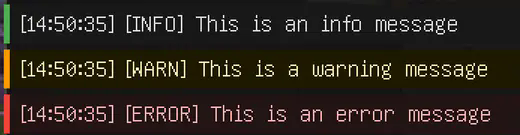
Color-coded logs
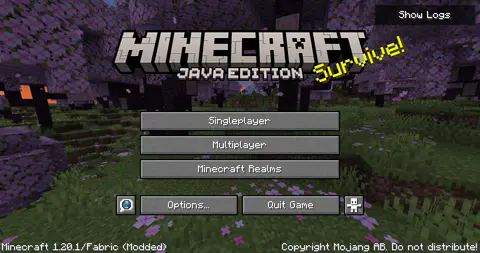
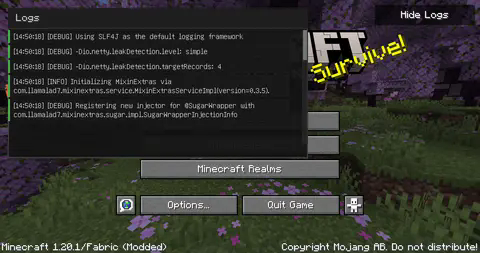
LogScope in action
🚀 Quick Start
- Click the "Show Logs" button in the top-right corner of your title screen
- View logs in real-time as they appear
- Scroll through the log history using your mouse wheel or the scrollbar
- Click "Hide Logs" to close the window
📋 Requirements
- Minecraft (Compatible version)
- Fabric Loader ≥0.15.11
- Fabric API
💻 Installation
- Install Fabric Loader and Fabric API
- Download the latest version of LogScope
- Drop the .jar file into your
modsfolder - Launch Minecraft and enjoy!
💡 Credits
LogScope adapts and builds upon the Console widget originally implemented in Sodium by JellySquid3 and contributors. The implementation has been modified to work as a standalone feature on the title screen.
📜 License
LogScope is licensed under the EUPL v1.2 license - see the LICENSE file for details.
Made with ❤️ for the Minecraft community
Screenshots
Gallery
-
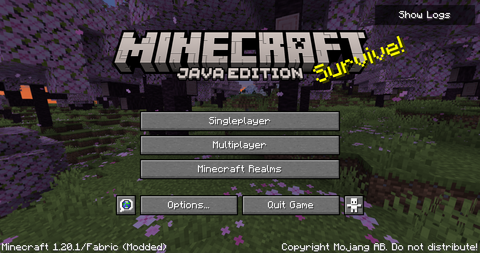 Title screen without logs displayed The vanilla title screen without any logs being displayed, the logs will only be shown if the "Show logs" button in the top-right corner is pressed.
 -
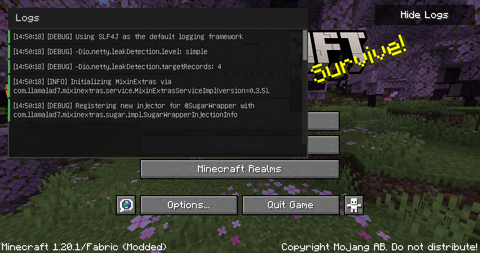 Title screen with logs displayed The title screen with logs being displayed. Once you are done analyzing the logs just press the "Hide logs" button in the top-right corner of the screen, that will completely hide them.
 -
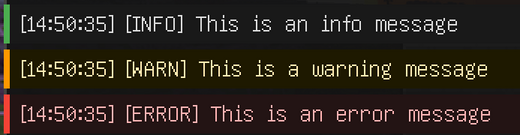 Example info, warn and error messages Each log message type will be displayed in its own color, so info, debug, trace etc. will be displayed in white. Warn will be displayed in yellow, error and fatal messages will be displayed in red.
Versions
Files
Relations
Project Relations
More like this
Similar Mods
Suggestions use data such as tags, dependencies, dependents, descriptions, titles, and more to rank how much they overlap with this mod.
On ModDex
Community snapshot
By the numbers
Statistics

Want to reach Minecraft players?
We're looking for a server hosting partner to feature here and other parts of the site. Interested? Send us a message!
Get in touchGet it on
Available Platforms
On ModDex
Community snapshot
By the numbers