
Community listing page, reviews here may not be monitored by the author.
Login Music

No reviews yet
A simple Minecraft mod that can play music when players join in the world.
Community voices
Reviews
No reviews yet. Be the first to review this project!
Get it on
Available Platforms
 Modrinth
Compatibility
Supported Environments
Must be installed on both the client and the server.
About
Project Details
For authors
Embed Badge
If you're the author of this project, you can embed a live badge anywhere that supports HTML or Markdown. It updates automatically whenever ratings change.
Use HTML for any page that supports it, or Markdown for README files and Markdown-based descriptions.
Identifiers
Platform IDs
About
Description
A simple Minecraft mod that can play music when players join in the world.
This mod uses AI to assist in development.
Inspired by TartaricAcid's Net Music !
| Milestone | Big changes | |
|---|---|---|
| 1.1.0 | javafx has given place to com.googlecode.soundlibs:mp3spi, which provides MP3 support now. |
|
| 1.2.0 | the music config has changed to JSON type. | |
| 1.2.1 | Music can be played directly through the Internet without downloading; lyrics support! | |
| 1.2.2 | Audio backend loading, Players can receive audio from other players on the server. |
The logo comes from here, designed by juicy_fish.
Functions
- Play music
- Supported file types: mp3, wav
- Music Downloading screen
- Allow download switch
- Play different musics based on the player's name (uuid)
- Show lyrics while playing music
File Structure
Destructive changes:
Since mod version 1.2.5, the config file's storage has been changed! If you upgrade from previous version, please move them to the new place!
All music files are stored in the /data/login_music folder.
{version folder}
├── config
│   ├── login_music-music.json      # Specific musics
│   └── login_music-client.toml     # Client config
│
├── data/login_music        # Store music files
│   ├── MusicsCache
│   │   ├── music_1.mp3
│   │   ├── music_2.wav
│   │   └── ...
│   └── LyricsCache
│       ├── music_1.lrc
│       ├── music_2.lrc
│       └── ...
└── ...
Configuration
Music Config JSON
Since mod version 1.2.0, the music config has changed to JSON type, just as shown below.
If you enter a server with this mod, the config file on the server has higher priority, which will cover your custom settings.
{
    "musics": [
        {
            "id": "Default",
            "music": "Default.mp3",
            "musicUrl": "https://www.example.com/example.mp3",
            "lyric": "Default.lrc",
            "lyricUrl": "https://www.example.com/example.lrc"
        }, {
            "id": "Steve",
            "music": "login_music.mp3",
            "musicUrl": "https://www.example.com/login_music.mp3",
            "lyric": "login_music.lrc",
            "lyricUrl": "https://www.example.com/login_music.lrc"
        }
    ]
}
The music will be downloaded if
InternetAccessis settrue(the default setting isfalse), otherwise, the music is played through network audio streams, which may cause a short pause when entering a world.
For example, When a player named Steve enters the world, the mod will try to find the music matched the name Steve (in this case it's login_music.mp3 ) in the folder /LoginMusic first.
Then try to download it from its related url if it has failed before.
Tips: If there is a file with the same name in the folder, it will skip the download even if the file does not match the URL.
If more entries need to be configured, please follow the JSON's rule.
Since mod version 1.2.4, you can open Login Music Config from the main menu if Cloth Config API has been installed.
Client Side
login_music-client.toml is effective only for the client:
[Lyrics]
    #Whether to show lyrics while playing music
    ShowLyrics = true
    #Defines the position of the lyrics
    #Allowed Values: UP, MIDDLE, DOWN
    LyricsPosition = "DOWN"
    #Defines the color of the lyrics you want to use
    LyricsColor = 16777215

[Music]
    #Range of music play (a non negative integer)
    # Default: 3
    # Range: 0 ~ 100
    range = 3
    #Whether to allow downloading music from the internet
    InternetAccess = false
    #Whether to play musics from other players
    AllowOthersMusic = true
Server Side
login_music-server.toml:
[Selection]
    #Keywords for music selection (name/uuid)
    #Allowed Values: NAME, UUID
    type = "NAME"
Command
All the commands need permission level 2.
| Command | Function |
|---|---|
/loginmusic reload |
reload config |
/loginmusic list |
show music config available currently |
/loginmusic show <targetPlayer> |
show targetPlayer's music config |
/loginmusic play |
replay your login music |
Login Music
A simple Minecraft mod that can play music when players join in the world.
This mod uses AI to assist in development.
Inspired by TartaricAcid's Net Music !
| Milestone | Big changes |
|---|---|
| 1.1.0 | javafx has given place to com.googlecode.soundlibs:mp3spi, which provides MP3 support now. |
| 1.2.0 | the music config has changed to JSON type. |
| 1.2.1 | Music can be played directly through the Internet without downloading; lyrics support! |
| 1.2.2 | Audio backend loading, Players can receive audio from other players on the server. |
| 1.2.6 | Add cache system. Refactor the code. |
The logo comes from here, designed by juicy_fish.
Functions
- MP3 supported
- Audio backend loading
- Play different musics based on the player's name (uuid)
- Show lyrics while playing music
- ...
File Structure
Destructive changes:
Since mod version 1.2.5, the config file's storage has been changed! If you upgrade from previous version, please move them to the new place!
All music files are stored in the /data/login_music folder.
{version folder}
├── config
│   ├── login_music-music.json      # Specific musics
│   ├── login_music-client.toml     # Client config
│   └── login_music-common.toml     # Common config
│
├── data/login_music        # Store music files
│   ├── MusicsCache
│   │   ├── music_1.mp3
│   │   ├── music_2.wav
│   │   └── ...
│   └── LyricsCache
│       ├── music_1.lrc
│       ├── music_2.lrc
│       └── ...
└── ...
Configuration
Since mod version 1.2.0, the music config has changed to JSON type, just as shown below.
If you enter a server with this mod, the config file on the server has higher priority, which will cover your custom settings.
{
  "defaultMusic": {
    "id": "Default",
    "musicName": "Default.mp3",
    "musicPath": "https://www.example.com/example.mp3",
    "lyricName": "Default.lrc",
    "lyricPath": "https://www.example.com/example.lrc"
  },
  "musics": [
    {
      "id": "Steve",
      "musicName": "login_music_1.mp3",
      "musicPath": "https://www.example.com/login_music_1.mp3",
      "lyricName": "login_music_1.lrc",
      "lyricPath": "https://www.example.com/login_music_1.lrc"
    },
    {
      "id": "Alex",
      "musicName": "login_music_2.mp3",
      "musicPath": "https://www.example.com/login_music_2.mp3",
      "lyricName": "login_music_2.lrc",
      "lyricPath": "https://www.example.com/login_music_2.lrc"
    }
  ]
}
The music will be downloaded if
InternetAccessis settrue(the default setting isfalse), otherwise, the music is played through network audio streams, which may cause a short pause when entering a world.
For example, When a player named Steve enters the world, the mod will try to find the music matched the name Steve (in this case it's login_music_1.mp3 ) in the folder data/login_music first. Then try to download it from its related url if it has failed before.
If there is a file with the same name in the folder, it will skip the download even if the file does not match the URL.
If more entries need to be added, please follow the JSON's rule.
Since mod version 1.2.4, you can open Login Music Config from the main menu if Cloth Config API has been installed.
Command
The Command system has been rebuilt since 1.2.6, all the commands need permission level 2.
| Command | Function |
|---|---|
/loginmusic reload |
reload music config |
/loginmusic list |
show music config available currently |
/loginmusic stop |
stop you current playing music |
/loginmusic play |
replay your login music |
/loginmusic cache list |
show the cached file |
/loginmusic cache clear |
clear the cached file |
Screenshots
Gallery
-
 Music loading screen
 -
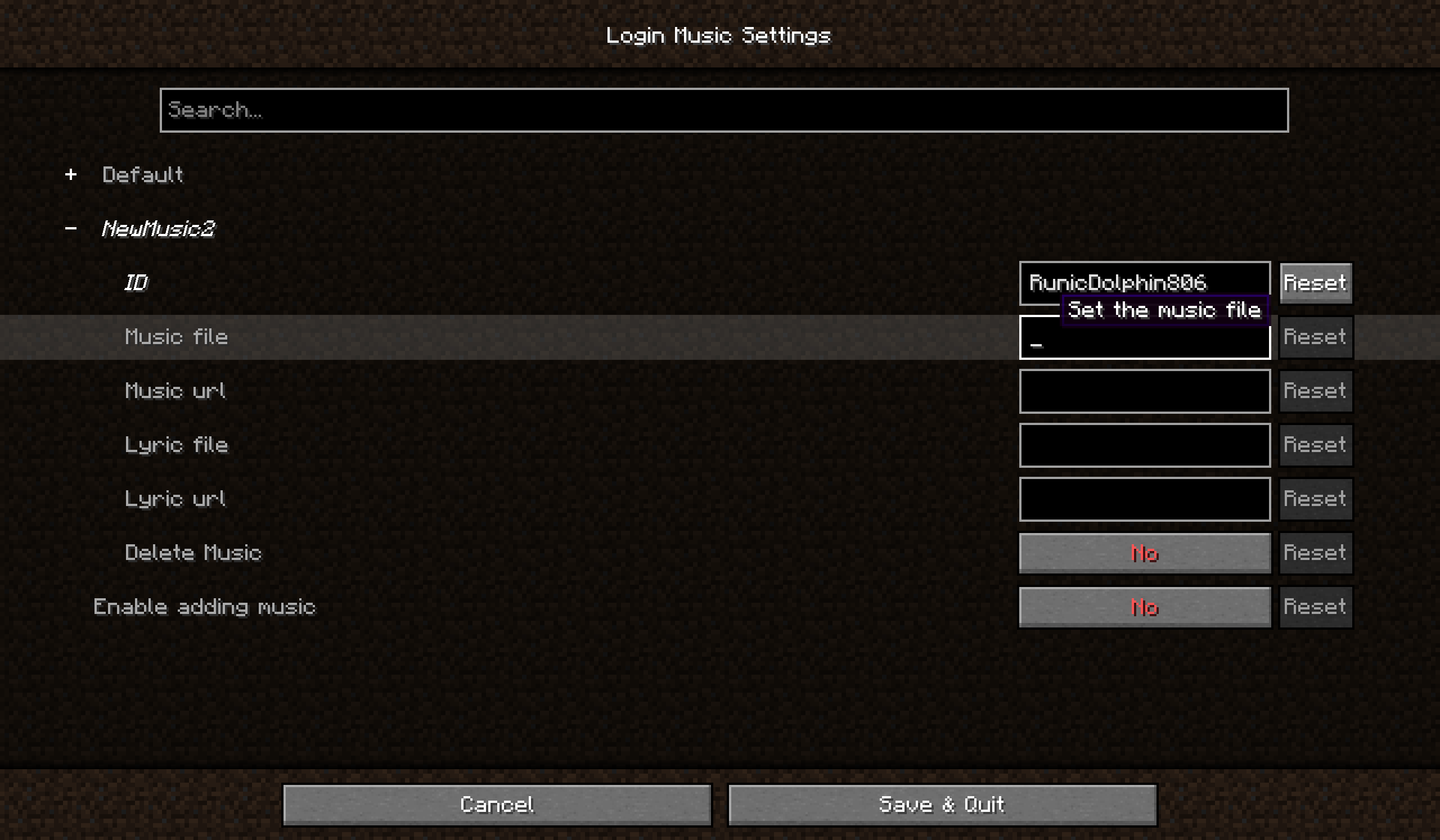 Music Config screen You can add, update or delete your music config by a visual interface.
Versions
Files
Relations
Project Relations
More like this
Similar Mods
Suggestions use data such as tags, dependencies, dependents, descriptions, titles, and more to rank how much they overlap with this mod.
On ModDex
Community snapshot
By the numbers
Statistics
Want to reach Minecraft players?
We're looking for a server hosting partner to feature here and other parts of the site. Interested? Send us a message!
Get in touchGet it on
Available Platforms
Modrinth
On ModDex
Community snapshot
By the numbers