
Community listing page, reviews here may not be monitored by the author.
Loot Piles

No reviews yet
This project is an lootchest, with cooldown, with config files for any group of itens with any weight
Community voices
Reviews
No reviews yet. Be the first to review this project!
Get it on
Available Platforms
About
Project Details
For authors
Embed Badge
If you're the author of this project, you can embed a live badge anywhere that supports HTML or Markdown. It updates automatically whenever ratings change.
Use HTML for any page that supports it, or Markdown for README files and Markdown-based descriptions.
Identifiers
Platform IDs
Resources
External Links
About
Description
Loot Piles
NeoForge mod for Minecraft 1.21.1 that adds tiered scrap pile loot blocks with shared cooldowns and a performance-focused server architecture.
Features
- Five scrap pile tiers: Common, Uncommon, Rare, Epic, Legendary
- Right-click with an empty hand to search a pile and spawn loot
- Shared cooldown per block position (not per player)
- Central
SavedDatacooldown manager — no ticking block entities - Configurable cooldown durations via
config/lootpiles-server.toml - Admin commands for spawning, resetting, and inspecting piles
- Blockbench block model with a 64×64 base texture and tier tinting (
tintindex: 0) - Flattened depleted model when a pile is on cooldown, keeping the original tier color
- Tier-colored item names in inventory and JEI (
CUSTOM_NAMEdata components) metal_scraploot item- Optional JADE tooltips and JEI info pages (included in dev runs only)
Requirements
- Minecraft 1.21.1
- NeoForge 21.1.64+
- Java 21
Development
./gradlew build
./gradlew runClient
./gradlew runServer
- Client uses
run-client/(singleplayer saves) - Server uses
run-server/(dedicated world + console) - Dev username is always
Devin NeoForge userdev
Test server OP setup
- Accept the EULA in
run-server/eula.txt(eula=true) on first launch - Start the server:
.\gradlew.bat runServer - Player
Devis granted OP automatically on first run (dev/server/ops.jsonis copied) - To grant OP manually from the server console:
op Dev - Connect from the client: Multiplayer →
localhost(withonline-mode=false)
Fixing invalidplayerdata on the client
This happens when a world under run/saves/ is corrupted (stats/advancements exist but playerdata/ is missing).
Fix: delete broken worlds and create a new one:
Remove-Item -Recurse -Force run\saves\Dev, run\saves\"New World"
# or delete everything:
Remove-Item -Recurse -Force run\saves\*
With the current Gradle setup, saves live under run-client/saves/ after running runClient.
JADE and JEI are loaded via localRuntime for local testing only.
Commands (OP level 2)
| Command | Description |
|---|---|
/scrappile spawn <tier> [x y z] |
Place a scrap pile |
/scrappile reset all |
Clear all cooldowns in the current dimension |
/scrappile reset <x> <y> <z> |
Reset one pile |
/scrappile status <x> <y> <z> |
Show tier and cooldown status |
Alias: /lootpiles
Configuration
Server config file: config/lootpiles-server.toml
Default cooldowns (ticks):
| Tier | Ticks | Time |
|---|---|---|
| Common | 12000 | 10 min |
| Uncommon | 24000 | 20 min |
| Rare | 36000 | 30 min |
| Epic | 60000 | 50 min |
| Legendary | 120000 | 100 min |
Visual design
- Active pile: full Blockbench model (
scrap_pile.json) usinglootpile_base.png(64×64 atlas) - Depleted pile: flattened model (
scrap_pile_empty.json) switched via blockstate whendepleted=true - Tier colors: applied client-side through block tint index and item display names
| Tier | Block tint | Item name style |
|---|---|---|
| Common | #909090 |
Gray |
| Uncommon | #1EFF00 |
Green |
| Rare | #0070DD |
Blue, bold |
| Epic | #A335EE |
Purple, bold |
| Legendary | #FF8000 |
Orange, bold, underlined |
Publishing (CurseForge)
Repository secrets
| Secret | Description |
|---|---|
CURSEFORGE_TOKEN |
CurseForge API token |
CURSEFORGE_PROJECT_ID |
Numeric CurseForge project ID |
Release by tag
git tag v1.0.0
git push origin v1.0.0
The Publish Mod to CurseForge workflow builds the jar, uploads to CurseForge, and generates a GitHub release changelog when no per-version file exists.
Manual release
Run the Publish Mod to CurseForge workflow from the Actions tab and set the mod version input (e.g. 1.0.0).
Changelogs
Per-version changelogs live in docs/changelogs/<version>.md (for example docs/changelogs/1.0.0.md). When that file exists, it is uploaded to CurseForge as the release notes.
Version type is inferred automatically:
*-alpha→ alpha*-beta→ beta- otherwise → release
License
MIT — see LICENSE.
Screenshots
Gallery
-
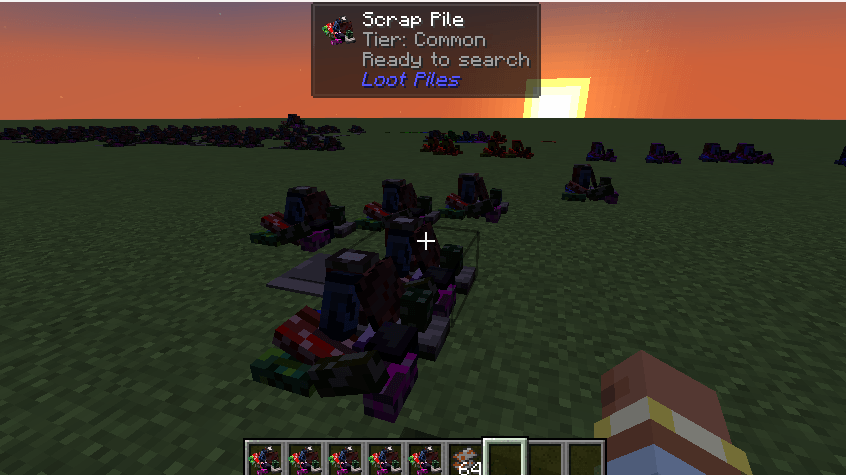 Scrap Pile Base Scrap Pile in game
Versions
Files
Relations
Project Relations
More like this
Similar Mods
Suggestions use data such as tags, dependencies, dependents, descriptions, titles, and more to rank how much they overlap with this mod.
On ModDex
Community snapshot
By the numbers
Statistics
Want to reach Minecraft players?
We're looking for a server hosting partner to feature here and other parts of the site. Interested? Send us a message!
Get in touchGet it on
Available Platforms
On ModDex
Community snapshot
By the numbers
Statistics
Resources