
Community listing page, reviews here may not be monitored by the author.
lootlock

No reviews yet
blocks end crystals and charged respawn anchors for a short configurable moment after every kill so muscle memory doesn't blow up the loot you just earned.
Community voices
Reviews
No reviews yet. Be the first to review this project!
Get it on
Available Platforms
Compatibility
Supported Environments
Runs entirely on the client. Works on vanilla servers.
About
Project Details
For authors
Embed Badge
If you're the author of this project, you can embed a live badge anywhere that supports HTML or Markdown. It updates automatically whenever ratings change.
Use HTML for any page that supports it, or Markdown for README files and Markdown-based descriptions.
Identifiers
Platform IDs
Resources
External Links
About
Description
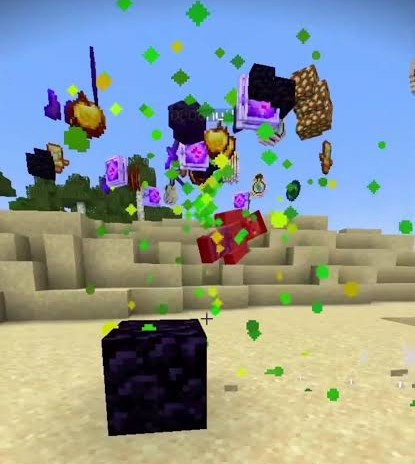
You just won a Crystal PvP fight — your opponent's crystal popped, and their gear is sitting right there in the crater. Then, out of pure habit, you place one more crystal (or pop a charged anchor) two blocks away and turn the whole drop into confetti. LootLock exists so that doesn't happen to you.
What it does
Right after you land a kill, LootLock briefly stops you from:
- Placing a new End Crystal
- Attacking (detonating) an existing End Crystal
- Using a charged Respawn Anchor
...for a short, configurable window (1 second by default) — just long enough to walk over and grab the drops before your hands do something you'll regret.
It's not a blind, universal block, either. If another player who isn't on your friends list is still nearby, LootLock stays out of the way completely, so it never costs you a beat during a real group fight. Want it to kick in every single time regardless? There's a toggle for that too.
Configuration
Everything below is adjustable from an in-game screen — open it from Mod Menu, or bind your own key under Controls.
| Setting | What it does |
|---|---|
| Block duration | How long the block lasts after a kill (0–5s) |
| Enemy detection range | How close a non-friend player needs to be for the block to skip (5–60 blocks) |
| Block mode | "Only when alone" vs. "Always" |
| HUD countdown | Toggle the on-screen bar |
| Block sound | Toggle the short "blocked" cue |
| Accent color | Recolor the HUD bar (presets or custom hex) |
| Friends list | Players who never count as "someone's nearby" |
Good to know
- 100% client-side. There's nothing to install on the server — LootLock works on any server, including ones you don't control, by briefly holding back your own inputs.
- Works with or without Mod Menu installed.
- No dependencies beyond Fabric API.
- Your settings stay in a local config file — nothing is sent anywhere.
License
Released under CC0-1.0 — public domain. Do whatever you want with it.
Screenshots
Gallery
Versions
Files
Relations
Project Relations
More like this
Similar Mods
Suggestions use data such as tags, dependencies, dependents, descriptions, titles, and more to rank how much they overlap with this mod.
On ModDex
Community snapshot
By the numbers
Statistics

Want to reach Minecraft players?
We're looking for a server hosting partner to feature here and other parts of the site. Interested? Send us a message!
Get in touchGet it on
Available Platforms
On ModDex
Community snapshot
By the numbers
Statistics
Resources