
Community listing page, reviews here may not be monitored by the author.

Community voices
Reviews
No reviews yet. Be the first to review this project!
Get it on
Available Platforms
Compatibility
Supported Environments
Runs entirely on the client. Works on vanilla servers.
About
Project Details
For authors
Embed Badge
If you're the author of this project, you can embed a live badge anywhere that supports HTML or Markdown. It updates automatically whenever ratings change.
Use HTML for any page that supports it, or Markdown for README files and Markdown-based descriptions.
Identifiers
Platform IDs
About
Description
LuxName
Give your items custom color-coded names using a chat command. No server mod needed, no anvil required - just hold the item and type.
Usage
Hold an item in your main hand and type in chat:
/rename <name>
To remove a rename:
/rename clear
Renames save between sessions and reload automatically.
Color codes
Use & followed by a letter or number:
| Code | Color |
|---|---|
| &0 | Black |
| &1 | Dark Blue |
| &2 | Dark Green |
| &3 | Dark Aqua |
| &4 | Dark Red |
| &5 | Dark Purple |
| &6 | Gold |
| &7 | Gray |
| &8 | Dark Gray |
| &9 | Blue |
| &a | Green |
| &b | Aqua |
| &c | Red |
| &d | Light Purple |
| &e | Yellow |
| &f | White |
Formatting codes
| Code | Effect |
|---|---|
| &k | Obfuscated (scrambled) |
| &l | Bold |
| &m | Strikethrough |
| &n | Underline |
| &o | Italic |
| &r | Reset all formatting |
Use && to write a literal ampersand.
Examples
/rename &cDiamond Sword- red name/rename &6&lLegendary Axe- bold gold/rename &b&oFrost Blade- italic aqua/rename &cRed &aGreen &9Blue- multiple colors
Notes
- Client-side only. Works on any server without installing anything server-side.
- Renames are visual only - other players without LuxName see the original item name.
- Renames are stored by item type and damage value along with other factors, so items of the same type don't share a rename.
- Requires Fabric loader and Fabric API.
Screenshots
Gallery
-
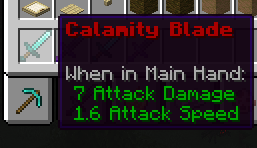 Bold and Colored Text on an item Done using &4&l on an item to make the name bold and red.
 -
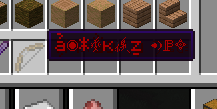 &k text Formatting codes with (&)
Versions
Files
Relations
Project Relations
More like this
Similar Mods
Suggestions use data such as tags, dependencies, dependents, descriptions, titles, and more to rank how much they overlap with this mod.
On ModDex
Community snapshot
By the numbers
Statistics

Want to reach Minecraft players?
We're looking for a server hosting partner to feature here and other parts of the site. Interested? Send us a message!
Get in touchGet it on
Available Platforms
On ModDex
Community snapshot
By the numbers