
Community listing page, reviews here may not be monitored by the author.
MaceUtils

No reviews yet
A Utility mod made mainly for Mace and Spear PVP on Servers
Community voices
Reviews
No reviews yet. Be the first to review this project!
Get it on
Available Platforms
Compatibility
Supported Environments
Runs entirely on the client. Works on vanilla servers.
About
Project Details
For authors
Embed Badge
If you're the author of this project, you can embed a live badge anywhere that supports HTML or Markdown. It updates automatically whenever ratings change.
Use HTML for any page that supports it, or Markdown for README files and Markdown-based descriptions.
Identifiers
Platform IDs
Resources
External Links
About
Description



MaceUtils
A Fabric HUD & GUI mod built for Mace PVP on Minecraft 1.21.11
Getting Started
Press Escape in-game and click the small M button next to the Options button to open the MaceUtils menu.
The menu has three tabs: Mace, Spear, and Combat — each controlling a different set of features. A Settings button in the top-right of the menu gives access to advanced options.
Mace Tab
Mace Hit Sound
Plays a bow-hit ding sound whenever you land a mace hit. Volume and pitch are configurable in Settings.
Damage HUD
Displays a panel in the top-left corner when you're holding a mace showing your current fall height and the estimated mace damage it would deal. Color-coded bar — red when fall isn't
enough, green when it is. Fades out gradually after you switch off the mace, and snaps back if you pick it back up.
Spear Tab
Spear HUD
A left-side panel that appears while holding any spear. Shows:
- Velocity meter — bar showing your current horizontal speed as a percentage of max charge damage, with the estimated damage value
- Speed readout — current blocks/tick
- Jab cooldown bar — shows exactly when your attack is ready again
- Target analysis — when your crosshair is on a living entity, shows their current HP, a health bar, and whether your current speed is LETHAL or how much more speed you need
- Reach warning — flashes
TOO CLOSE!if your target is within 2 blocks
Velocity Meter toggle
Hides/shows the velocity bar portion if you just want the cooldown and target info.
Reach Warning toggle
Hides/shows the too-close alert.
Combat Tab
Combat HUD
A sliding panel in the top-right corner that appears automatically when you attack any entity. Features:
- Target name and distance — distance color-coded green/orange/red based on range
- Health bar — live HP with color that shifts green → orange → red as the target gets low
- Combat timer bar — 15-second countdown per target, resets on re-hit
- Multiple targets — tracks all entities you've hit; top 2 shown expanded, rest shown compact with a small health bar
- Target count label in the panel header
All entries animate in with a slide and fade out when targets die or time out.
Combat Glow
Entities currently in your combat tracker get a red outline glow (client-side only, visible only to you).
Totem HUD
A small panel in the bottom-right corner showing how many Totem of Undying you're carrying across your entire inventory. Animated — bounces and flashes green when you pick one up, shakes and
flashes red when one is consumed.
Reset Counter
Resets the internal totem pop counter back to zero. Useful for recording sessions.
Settings Screen
Open from the Settings button in the top-right of the main menu.
| Setting | Default | Range |
|---|---|---|
| Combat timeout | 15s | 5s – 60s |
| Health bar | ON | — |
| Distance display | ON | — |
| Timer bar | ON | — |
| Target count | ON | — |
| HUD opacity | 100% | 10% – 100% |
| Sound pitch | 1.0 | 0.5 – 2.0 |
| Sound volume | 1.0 | 0.1 – 2.0 |
All settings save automatically when you close the menu.
Commands
MaceUtils registers subcommands under /studiolib maceutils:
| Command | Description |
|---|---|
/studiolib maceutils status |
Shows which features are currently enabled |
/studiolib maceutils reset-totem |
Resets totem pop counter to 0 |
/studiolib maceutils reload-config |
Reloads config from disk |
Requirements
- Minecraft 1.21.11
- Fabric Loader
- Fabric API
- AStudioLib
Made by AttackStudioYT — YouTube
Screenshots
Gallery
-
 Mace Damage HUD
 -
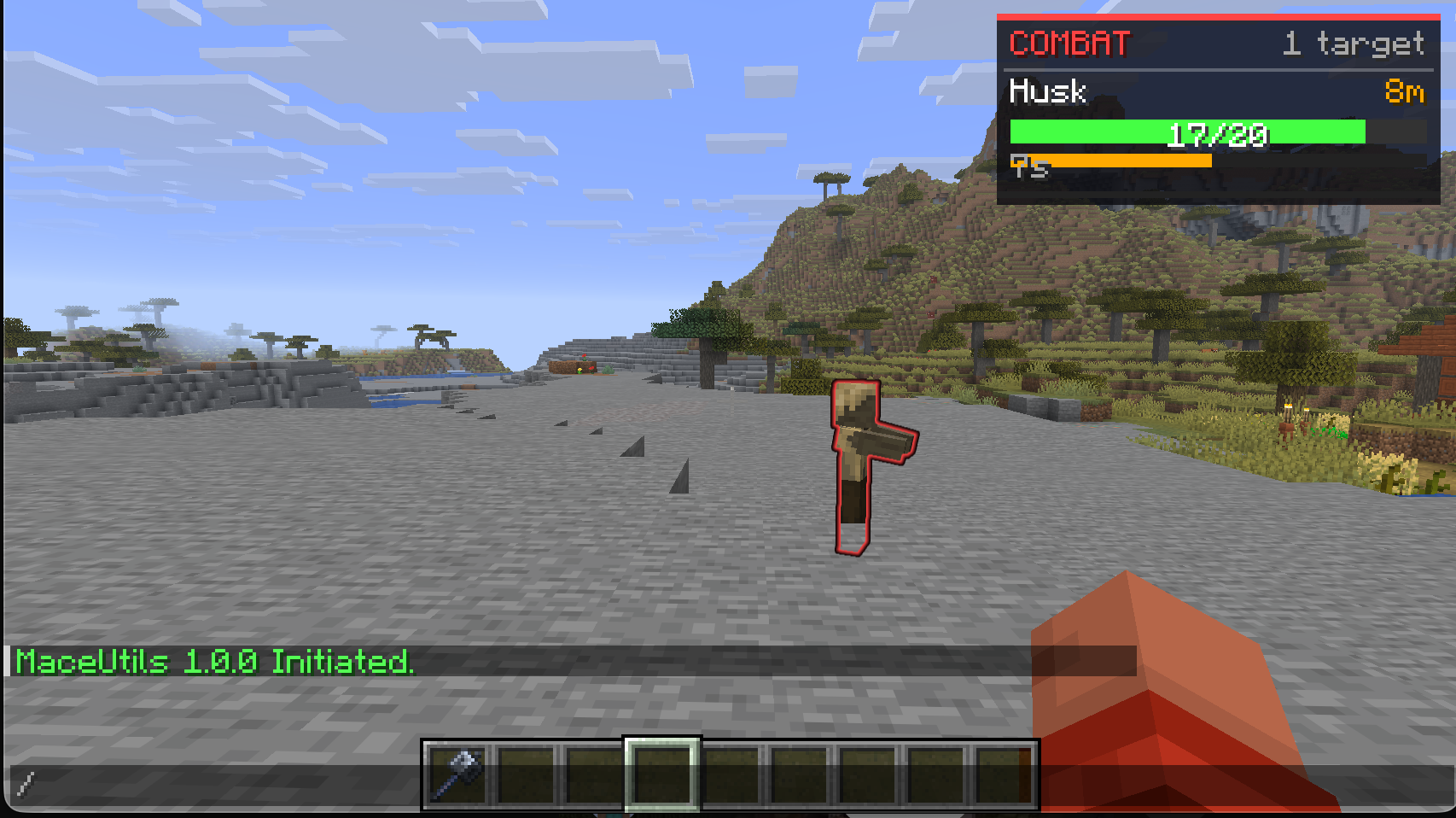 The Advanced Combat HUD
Versions
Files
Relations
Project Relations
More like this
Similar Mods
Suggestions use data such as tags, dependencies, dependents, descriptions, titles, and more to rank how much they overlap with this mod.
On ModDex
Community snapshot
By the numbers
Statistics

Want to reach Minecraft players?
We're looking for a server hosting partner to feature here and other parts of the site. Interested? Send us a message!
Get in touchGet it on
Available Platforms
On ModDex
Community snapshot
By the numbers
Statistics
Resources