
Community listing page, reviews here may not be monitored by the author.


Community voices
Reviews
No reviews yet. Be the first to review this project!
Get it on
Available Platforms
Compatibility
Supported Environments
Runs entirely on the client. Works on vanilla servers.
About
Project Details
For authors
Embed Badge
If you're the author of this project, you can embed a live badge anywhere that supports HTML or Markdown. It updates automatically whenever ratings change.
Use HTML for any page that supports it, or Markdown for README files and Markdown-based descriptions.
Identifiers
Platform IDs
About
Description
MacroGrid
Command macros for Minecraft — one keypress away.
MacroGrid is a client-side Fabric mod that adds a customizable in-game button panel for running commands and chat messages instantly — no more retyping the same /tp, /gamemode or /time set over and over.
Press G. Click a button. (You can change this in the controls settings)
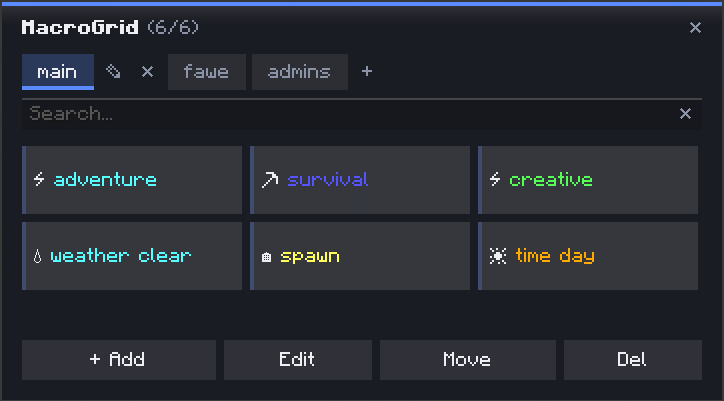
✨ Features
- ➕ Add — create a button in seconds: name, color, icon, done
- 🎨 Colors & icons — 10 colors and 35+ icons to tell your buttons apart at a glance
- 🧩 Multi-action buttons — chain multiple commands and chat messages on a single button, executed in order
- 📁 Tabs / profiles — organize buttons into separate tabs (e.g.
main,fawe,admins) — create, rename and delete tabs freely - 👁️ Live preview — see exactly how a button will look (color + icon + name) before saving
- ✏️ Edit / ✋ Move / ❌ Del — dedicated toolbar modes for managing your grid; Move swaps two buttons' positions, Delete requires a confirmation click so you don't lose a button by accident
- 🔍 Search bar — instantly filter buttons by name, even across a big grid
- 💾 Persistent — buttons are saved to a JSON config in your
.minecraft/configfolder, editable by hand if you want to bulk-edit
🚀 How to use
- Press
Gto open MacroGrid - Click + Add
- Give it a name, pick a color and icon, then add one or more commands/messages
- Hit Save — your button is ready to use
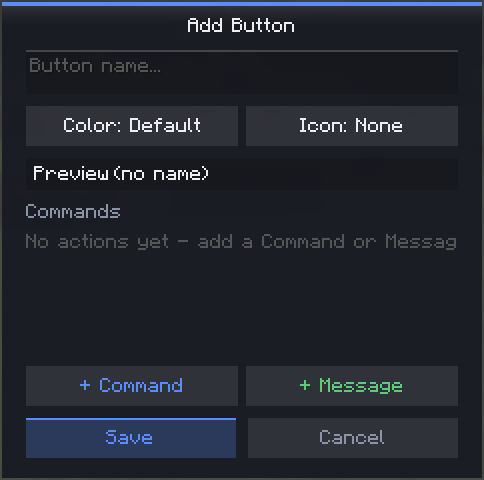
🔧 Managing buttons & tabs
| Action | How |
|---|---|
| Run a button | Click it (default mode) |
| Edit | Toolbar → Edit, then click a button |
| Move | Toolbar → Move, click one button, then another to swap positions |
| Delete | Toolbar → Del, click a button, click again to confirm |
| New tab | Click + next to the tabs |
| Rename tab | Click the pencil icon on the active tab |
| Delete tab | Click the ✕ next to the active tab (requires at least one other tab to exist) |
💻 Example — multiple actions on one button
A single button can run more than one thing, in order — for example a "Prep" button that sets gamemode and time together:
/gamemode creative
/time set day
📦 Requirements
- Fabric API
🔗 Links
Screenshots
Gallery
Versions
Files
Relations
Project Relations
More like this
Similar Mods
Suggestions use data such as tags, dependencies, dependents, descriptions, titles, and more to rank how much they overlap with this mod.
On ModDex
Community snapshot
By the numbers
Statistics

 (opens in a new tab)
Get it on
Available Platforms
On ModDex
Community snapshot
By the numbers