
Community listing page, reviews here may not be monitored by the author.
Manhunt Compass

No reviews yet
using datapacks to Implemented Dream's Manhunt Game,plays can choose speed_runner and hunters by Graphical user interface
Community voices
Reviews
No reviews yet. Be the first to review this project!
Get it on
Available Platforms
About
Project Details
For authors
Embed Badge
If you're the author of this project, you can embed a live badge anywhere that supports HTML or Markdown. It updates automatically whenever ratings change.
Use HTML for any page that supports it, or Markdown for README files and Markdown-based descriptions.
Identifiers
Platform IDs
Resources
External Links
About
Description
 donate,通过微信请作者吃点好的

Manhunt Compass – 猎人指南针
A multiplayer Manhunt datapack with team dialog, compass tracking, auto‑start, and auto‑stop for full‑automatic game loops
支持多人猎人对战:队伍选择 + 指南针追踪 + 自动开始 + 自动停止(适配全自动循环)
📖 English
Version: 1.0.11 | Author: isLogic | Minecraft: 1.20.5+
🎯 What is Manhunt Compass?
This datapack turns your Minecraft world into a full-featured Manhunt (Hunter vs. Speedrunner) game without any mods.
- 🟢 Speed Runners try to beat the Ender Dragon.
- 🔴 Hunters chase them down with a compass that always points to the nearest runner.
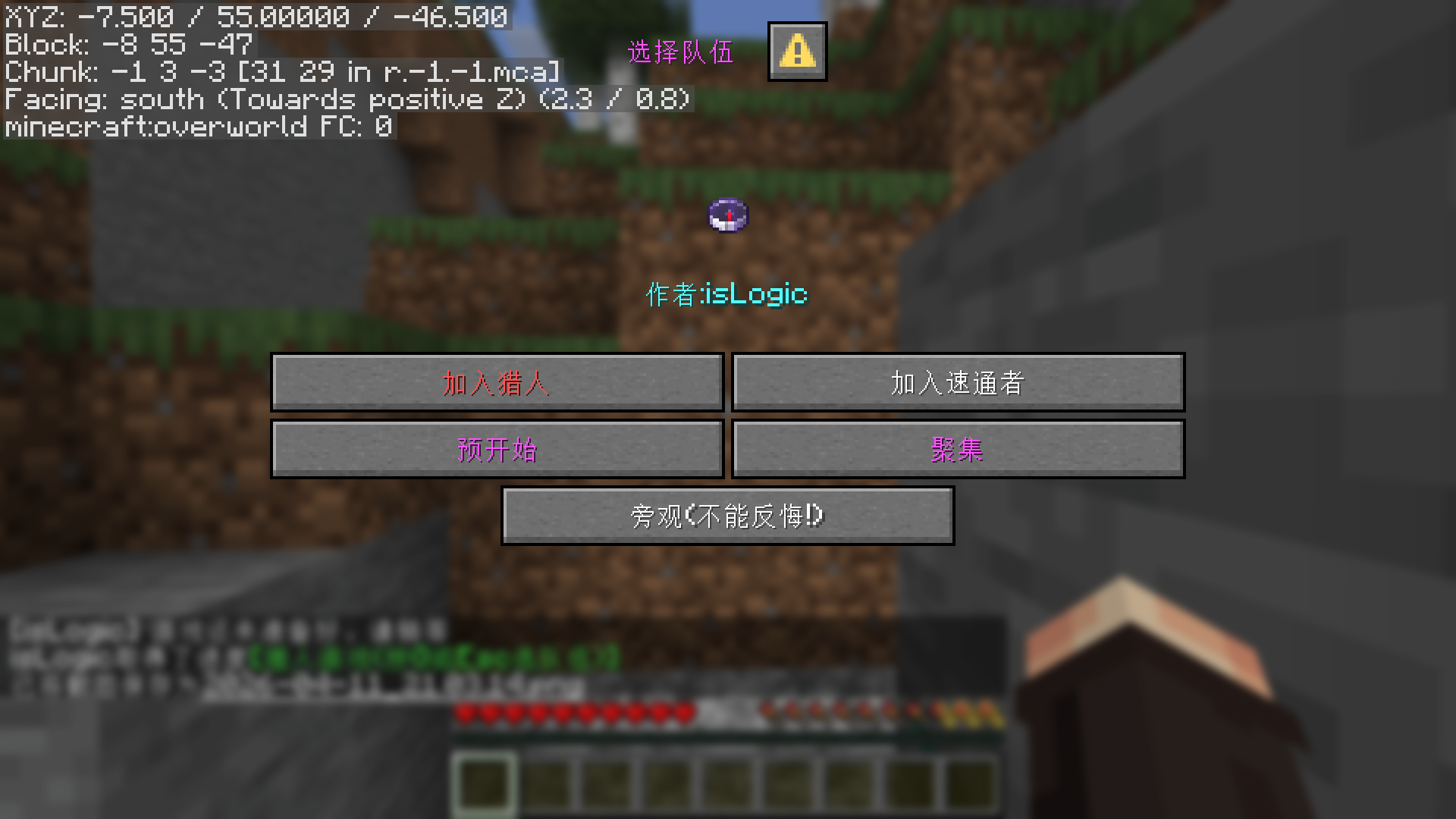
Press G, pick a side – the game starts automatically when all players have chosen!
✨ Key Features
- ✅ Graphical team selection dialog (pause screen + quick actions) – press
Gor click the button. - 🔄 Auto‑start – the game begins as soon as every online player has chosen a team (no manual command).
- 🧭 Hunter compass – dynamically tracks the closest speed runner (works across dimensions after entering same dimension).
- 📍 Dimension change saving – saves runner’s position when entering Nether/End (useful for admin debugging).
- 👁️ Spectator mode – join as spectator if you just want to watch (irreversible).
- 🛑 Auto‑stop on game end – when the game finishes (all runners eliminated or Ender Dragon killed), the datapack automatically executes the
stopcommand. - 🔁 Fully automatic game loop – by combining auto‑stop with an external server restart script (e.g.
restart.shthat respawns the world and starts the server), you can achieve endless, hands‑free Manhunt sessions.
🎮 How to Play
- Install the datapack (drop the
.zipintodatapacks/and/reload). - Press
Gto open the team dialog. - Choose your team – Hunter (red), Speed Runner (green), or Spectator (purple).
- The game starts automatically once every online player has picked a side.
- Hunters use their compass to find runners; runners try to finish the game.
- When the game ends, the server stops automatically (if you have configured the pack to do so – see notes).
⚙️ Installation & Auto‑Loop Setup
-
Basic installation
- Download the
.zipfile. - Put it into your world’s
datapacksfolder. - Run
/reloador re‑enter the world.
-
For automatic game‑to‑game loop (server restart script)
- The datapack executes
stopwhen the game ends. - Create a simple restart script (example:
restart.sh) that:- Waits for the server to stop.
- Resets the world to a fresh snapshot (or deletes playerdata/region files).
- Starts the server again.
- With this setup, your server will continuously run Manhunt games without any admin intervention.
- The datapack executes
- Download the
📌 Notes
- Spectator mode is permanent – you cannot rejoin as a player afterwards.
- Hunters never lose their compass – the pack automatically gives a new one if dropped.
- The “Gather” button in the dialog teleports all players to the speed runner (great for match setup).
- Auto‑stop on game end is enabled by default. If you only want a one‑time game, you can remove the
stopcommand from the datapack’s win/loss functions (or edit the pack yourself). - The pack does not modify world files – resetting the world for a fresh game is up to your external script.
🐛 Known Issues / Support
- Compass tracking only works when the hunter and runner are in the same dimension (vanilla limitation).
- Report issues on Modrinth or contact the author.
📘 中文介绍
版本:1.0.11 | 作者:isLogic | 适用版本:Minecraft 1.20.5+
🎯 这是什么?
一款 纯数据包 的猎人游戏(Manhunt),无需任何模组。
- 🟢 速通者 – 目标是击败末影龙。
- 🔴 猎人 – 手持指南针,它会自动指向最近的速通者。
按下 G 键选队,自动开始,打完自动关服 – 配合重启脚本,实现全自动循环对局!
✨ 功能亮点
- ✅ 图形化队伍选择界面(按
G或通过暂停菜单打开)。 - 🔄 自动开始 – 当所有在线玩家都选好队伍后,游戏自动启动,无需额外指令。
- 📍 维度变化记录 – 速通者进入下界或末地时自动保存坐标。
- 👁️ 旁观模式 – 只观战不参与,不可逆。
- 🛑 游戏结束自动 stop – 对局结束(全速通者死亡或末影龙死亡)后,数据包自动执行
stop命令关闭服务器。 - 🔁 全自动循环游戏 – 配合外部服务器重启脚本(例如自动重置世界并启动服务器),可以 无人值守、无限连续地进行 Manhunt 游戏。
🎮 怎么玩?
- 安装数据包 – 将压缩包放入存档的
datapacks文件夹,执行/reload。 - 按
G键 – 打开队伍选择对话框。 - 选择身份 – 猎人(红)、速通者(绿)或旁观(紫)。
- 自动开始 – 所有玩家选队完毕后,游戏立刻开始。
- 猎人 跟随指南针追踪;速通者 尽快通关末地。
- 游戏结束时 – 服务器会自动停止(默认开启)。
⚙️ 安装 & 全自动循环设置
-
基础安装
- 下载
.zip文件。 - 放入存档的
datapacks文件夹。 - 执行
/reload或重进世界。
-
实现全自动循环(需要外部脚本)
- 数据包在游戏结束时执行
stop。 - 编写一个自动重启脚本(例如
start.sh) - 配置完成后,你的服务器就能连续自动进行无数场 Manhunt 游戏,无需人工干预。
- 数据包在游戏结束时执行
- 下载
📌 注意事项
- 旁观模式无法反悔,切出后不能再成为猎人/速通者。
- 猎人指南针不会丢失 – 数据包会自动补发。
- 对话框中的 “聚集” 按钮可将所有人传送至速通者身边(适合开局前集合)。
- 游戏结束自动 stop 功能默认开启。如果你只需要单次游戏,可以自行删除数据包胜利/失败函数中的
stop命令。 - 数据包本身不会重置世界,世界重置需要由外部脚本完成。
🐛 已知问题 / 支持
- 遇到问题欢迎在 Modrinth 评论区反馈或联系作者。
Enjoy the hunt – on loop!
无限狩猎,自动循环!
donate,通过微信请作者吃点好的
Screenshots
Gallery
-
 chose team,选队伍
 -
 Donate通过微信请作者吃点好的
Versions
Files
Relations
Project Relations
More like this
Similar Mods
Suggestions use data such as tags, dependencies, dependents, descriptions, titles, and more to rank how much they overlap with this mod.
On ModDex
Community snapshot
By the numbers
Statistics

Want to reach Minecraft players?
We're looking for a server hosting partner to feature here and other parts of the site. Interested? Send us a message!
Get in touchGet it on
Available Platforms
On ModDex
Community snapshot
By the numbers
Statistics
Resources