
Community listing page, reviews here may not be monitored by the author.
Litematica Material HUD & Chest Finder

No reviews yet
Displays a list of materials and the chests in which they are located
Community voices
Reviews
No reviews yet. Be the first to review this project!
Get it on
Available Platforms
Compatibility
Supported Environments
Runs entirely on the client. Works on vanilla servers.
About
Project Details
For authors
Embed Badge
If you're the author of this project, you can embed a live badge anywhere that supports HTML or Markdown. It updates automatically whenever ratings change.
Use HTML for any page that supports it, or Markdown for README files and Markdown-based descriptions.
Identifiers
Platform IDs
Resources
External Links
About
Description
Displays a list of materials and the chests in which they are located
Add-on for Litematica that shows what you need to build, where the blocks are located, and helps you build using EasyPlace fixes, along with many other features described below
Fully client-side. Nothing to install on the server, no custom packets, Litematica's protocol untouched.
Quick Start
- Load a schematic in Litematica
- Pick a Render Layers mode: one layer, a range, everything above/below, or the whole schematic.
- Y — the material list for that layer appears.
- U — every chest, barrel, copper chest and shulker holding those blocks gets a colored mark. Ctrl + U clears them.
- Layer done? Ctrl + B highlights what's missing, wrong or extra.
Material List for the Current Layer
A simple and easy-to-understand list of materials.
Place a block and it drops off the list, so the panel always shows what's actually left — with a progress bar for the layer, and counts in single blocks, stacks and shulker boxes.
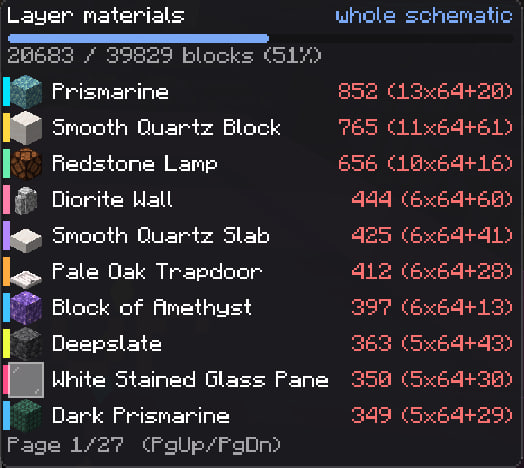
Colors of block names: 🟢 enough · 🟡 some · 🔴 none, plus an optional red need N.
Sorted by what's needed most; long lists can flip with Page Up / Page
Chest Finder
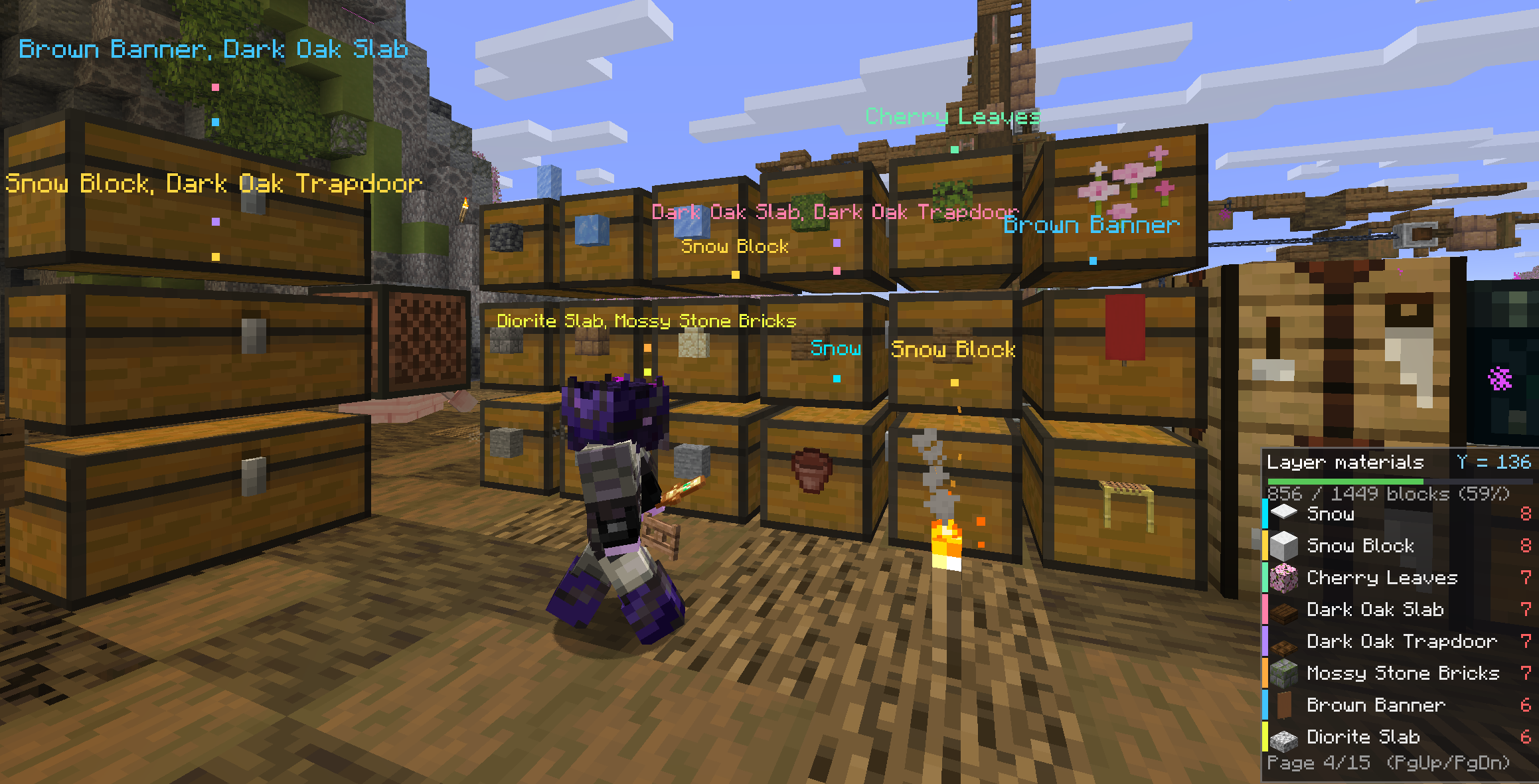
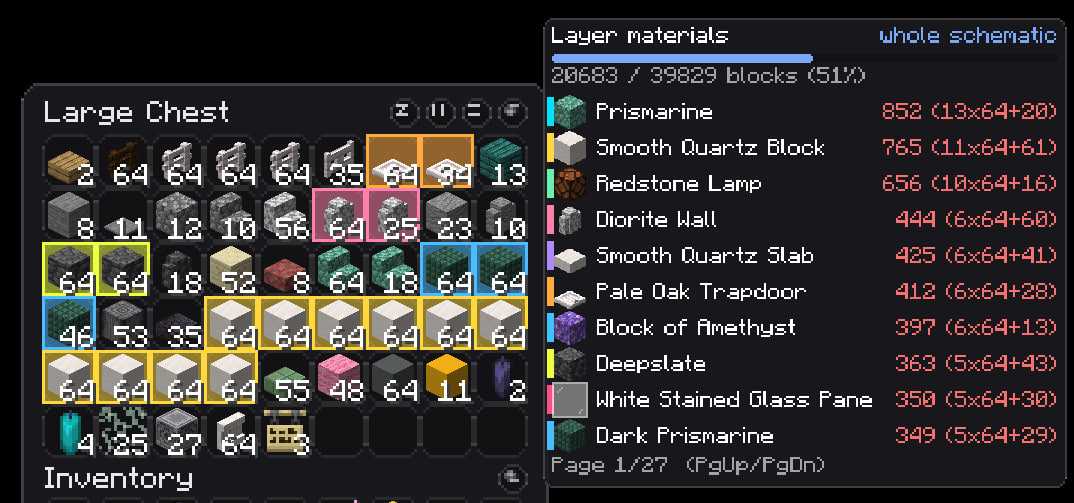
Every container you open is quietly noted — contents and location, remembered per world and per server even after you log off. An item frame on a container counts too, no need to open it.
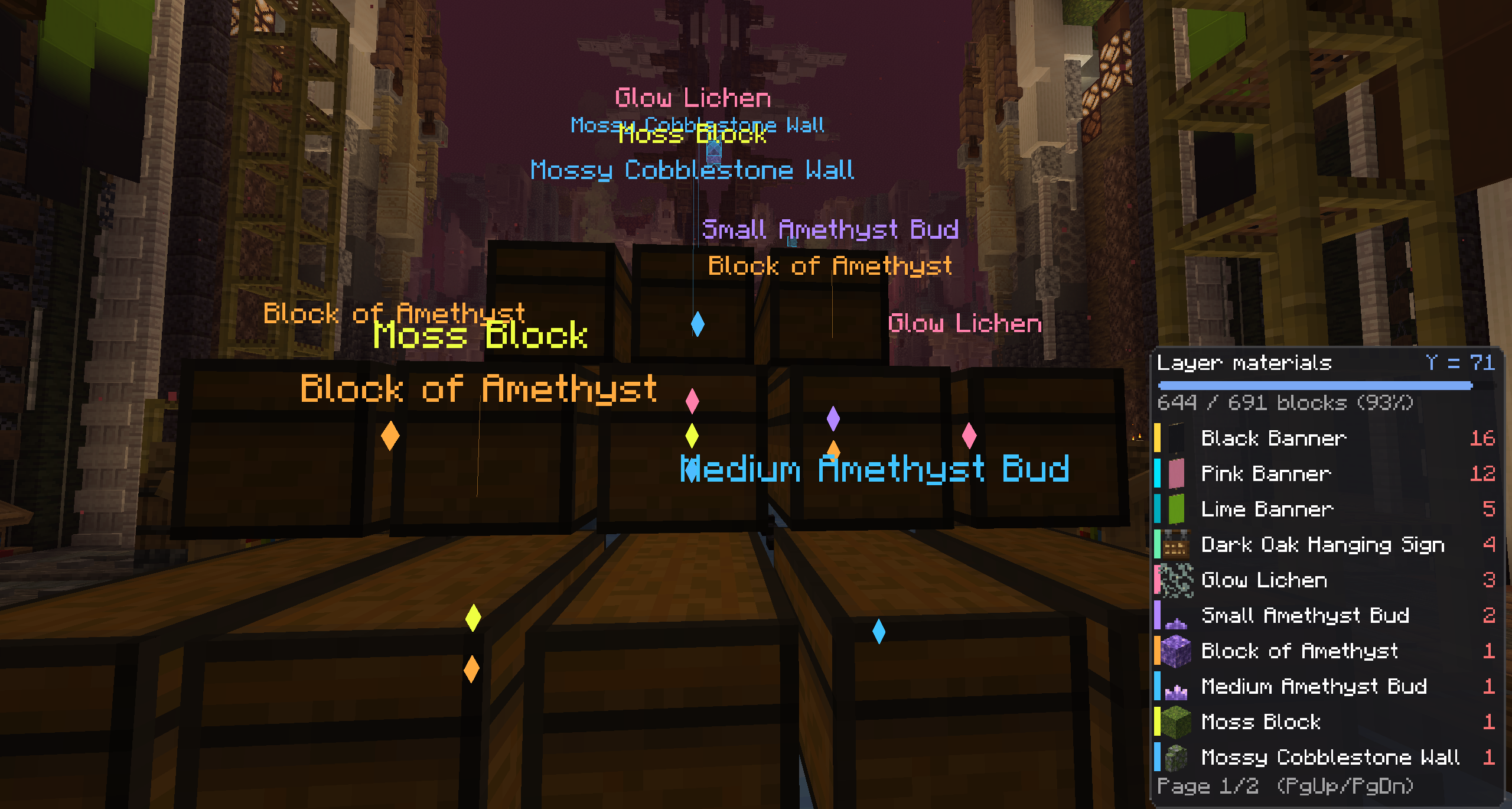
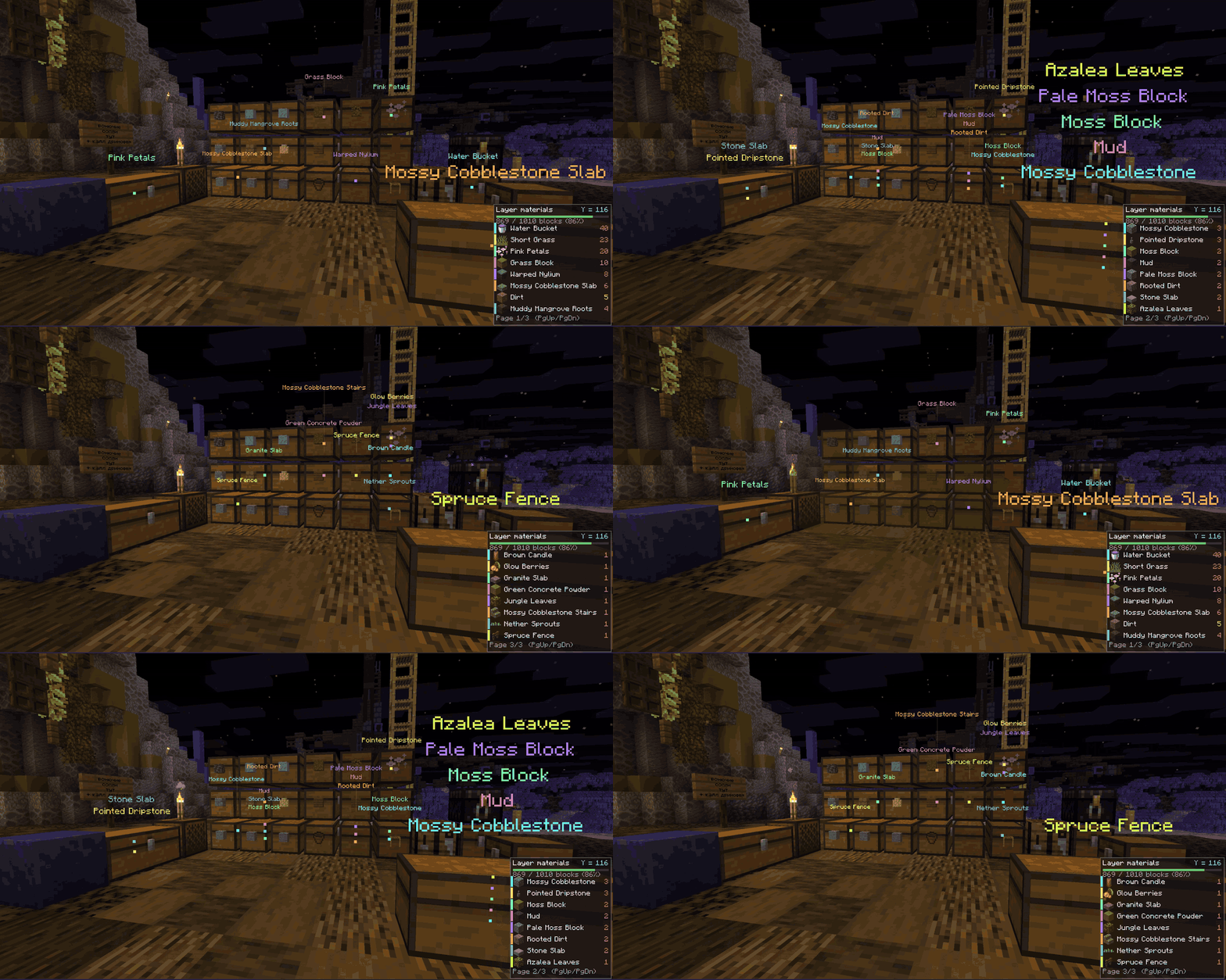
Press U and every storage within 96 blocks (up to 256) holding something from the current page lights up through walls, each block in its own color matching its stripe in the HUD. Names float above each mark, one line per block. Open the chest and the matching slots glow in the same colors — shulker boxes and bundles get outlined too, so you're not opening them one by one. Already carrying enough of something? It's skipped, so the search only ever points at what you're short on.
Verification
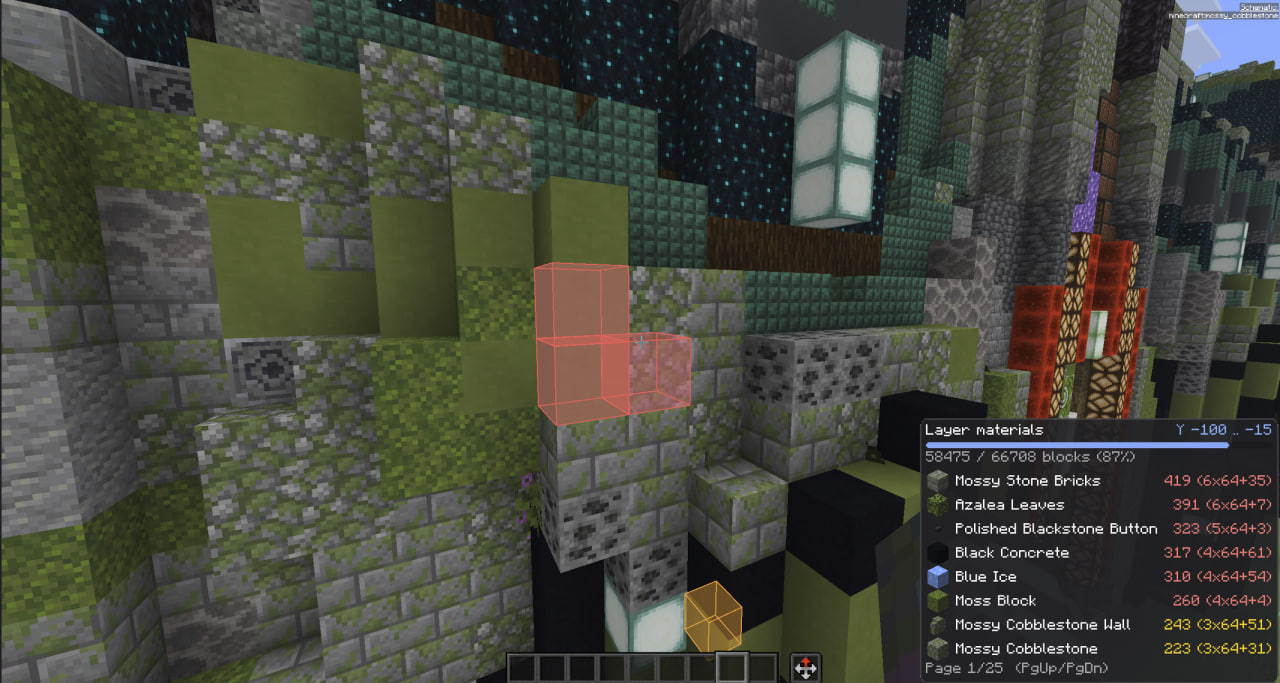
It scans for incorrectly installed blocks and highlights them (even through walls)
🔴 missing · 🟠 wrong block · 🟡 wrong state (stair direction, repeater delay, door) · 🔵 extra. X-ray keeps the boxes visible through terrain, and a draw range plus a box cap keep FPS steady on massive builds.
🔧 Easy Place Fixes
A module with fixes and additions for EasyPlace that resolves old issues and adds useful features
- Never overshoot. Candles, sea pickles, turtle eggs, petals, moss carpet and snow layers get exactly as many clicks as the schematic asks, each waiting for the server to confirm the last.
- Right state, first try. Every click candidate is simulated against the schematic across all properties — rotation, axis, half, door hinge, bell attachment, stair side, all 16 sign and skull rotations. If the orientation can't be matched, the position is skipped instead of filled crooked. Sneak is sent as a real input packet, so blocks go flush against chests, furnaces and doors instead of opening them.
- States you can't place, only interact. Flint and steel lights candles and campfires, a shovel puts them out, a water bucket handles waterlogging, and doors, trapdoors and gates get opened to match — one use per click, only toward the schematic.
- Banners, decorated pots and player heads. Their pattern, sherds and profile live in item components, not block state, so three banners of one color look identical to Litematica and the pattern came out random. Now the required item is built with its block data and matched on the identifying components — and if you don't have that pattern, the position is skipped rather than ruined.
- Shelves stay empty. Automatic clicks on a shelf go with sneak, so the block gets placed instead of the shelf getting filled.
- Plays nice with EasyPlaceFix. If the standalone mod is present it's switched off while this module is on — two rotation spoofers in one click is exactly how builds go crooked. Toggle the module off and the other mod returns to whatever state it was in, with a chat notice both ways.
⌨️ Keys
| Key | What it does |
|---|---|
| Y | Show / hide the material list |
| Page Up / Page Down | Flip list pages — works with a container open |
| U | Mark nearby storage holding blocks from the current page |
| Ctrl + B | Toggle verification |
| Ctrl + Y | Settings |
⚙️ Settings
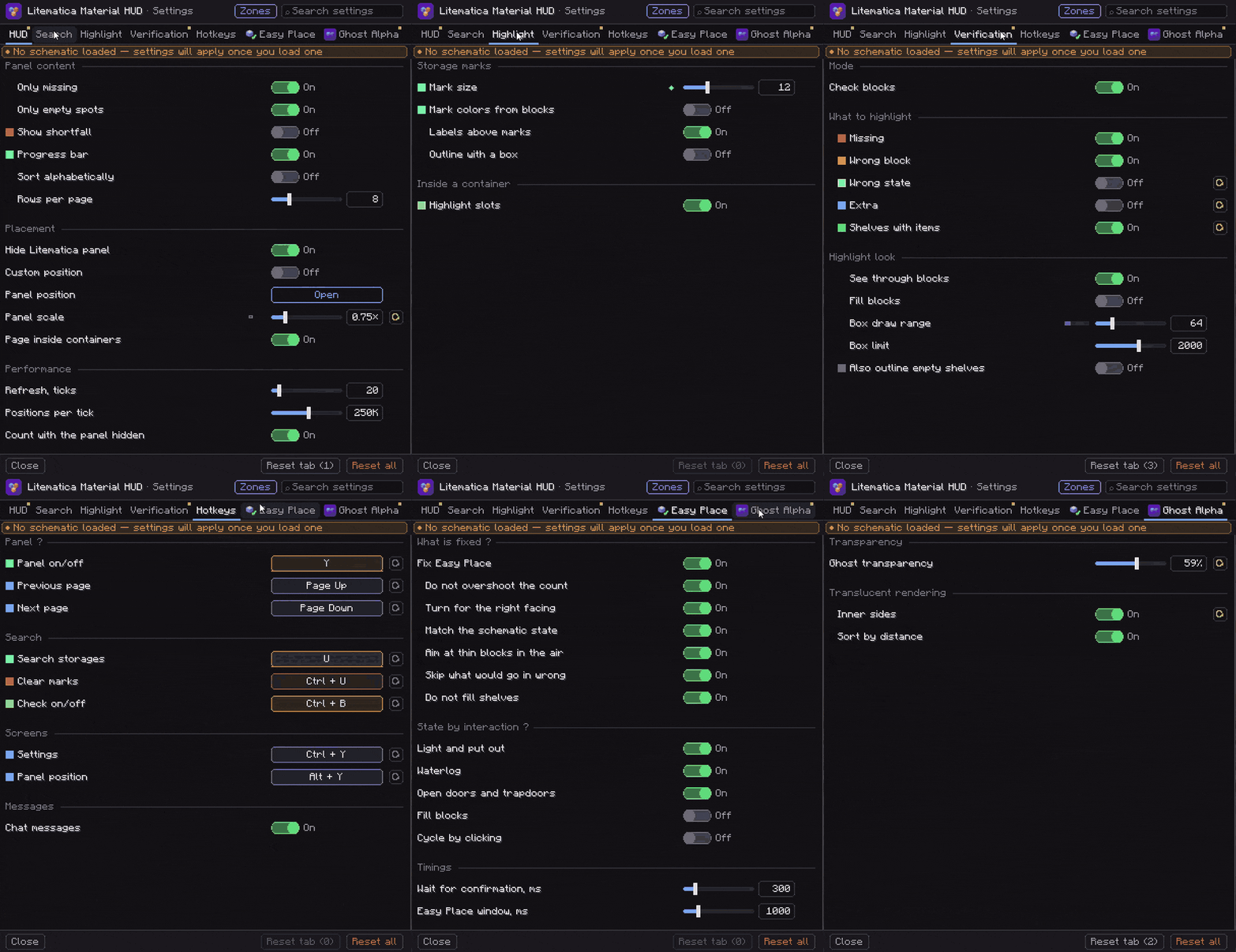
Seven tabs — HUD, Search, Highlight, Verification, Hotkeys, Ghost Alpha, Easy Place — with a search box to jump to a setting by name, a reset button on every row, and one-click reset for a tab or for everything. Rows share colors with whatever they control in the world. The Ghost Alpha and Easy Place tabs appear only when you don't have those standalone mods installed. A Zone Focus tab appears when the standalone Litematica Zone Focus is installed — it edits that mod's live settings, so both mods always agree.
Reachable from Ctrl + Y, the Material HUD… button on Litematica's own screens, or Mod Menu. Alt + Y opens drag-and-drop panel placement that snaps to edges and center, with Cancel to put everything back.
🧩 Works Great With Zone Focus
Litematica Zone Focus narrows your schematic down to just the part you're actually building. Pair the two and the material list follows that zone — its own list, its own chest markers, one shared settings screen.
Building something huge? Both the list and the chest marks then only ever show the one small area you're working on right now.

📦 Requirements
| Minecraft | 26.2 · 26.1.x · 1.21.11 |
| Fabric Loader | 0.18.2+ |
| Java | 25+ |
| Required | Litematica (tested on 0.28.4) · malilib · Fabric API |
| Optional | Mod Menu — adds a settings button |
💬 Questions, bugs or ideas? Join the Discord
Screenshots
Gallery
Versions
Files
Relations
Project Relations
More like this
Similar Mods
Suggestions use data such as tags, dependencies, dependents, descriptions, titles, and more to rank how much they overlap with this mod.
On ModDex
Community snapshot
By the numbers
Statistics

Want to reach Minecraft players?
We're looking for a server hosting partner to feature here and other parts of the site. Interested? Send us a message!
Get in touchGet it on
Available Platforms
On ModDex
Community snapshot
By the numbers
Statistics
Resources