Community listing page, reviews may not be monitored by the author.
Matter Control

No reviews yet
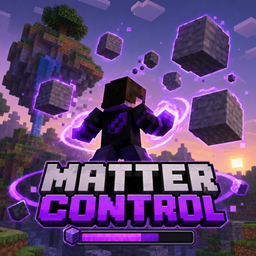
A Minecraft mod that lets players absorb, manipulate, shape, and control matter with complete mouse precision, transforming the world into their ultimate weapon.

Community voices
Reviews
No reviews yet. Be the first to review this project!
Get it on
Available Platforms
About
Project Details
For authors
Embed Badge
If you're the author of this project, you can embed a live badge anywhere that supports HTML or Markdown. It updates automatically whenever ratings change.
Use HTML for any page that supports it, or Markdown for README files and Markdown-based descriptions.
Identifiers
Platform IDs
Resources
External Links
About
Description
Matter Control
Take control of the world's matter itself. Tear chunks out of the terrain, lift mountains of blocks, raise towers in real time, trap enemies inside solid rock, summon giant hands and hurl it all, with every movement driven by your mouse.
Nothing here is automatic: matter goes exactly where you aim, at the size you choose, the moment you want it.
✨ Features
- 🌍 Matter absorption: pull blocks from the world into your matter bar, with an adjustable radius
- 🖱️ Full mouse control: structures follow your crosshair in real time, and you adjust distance, size and rotation with the scroll wheel
- 🏗️ Real-time construction: towers, walls, platforms, bridges, stairs, pillars and spheres grow while you hold the button
- ⛓️ Prisons: matter rises from the ground and encases your enemy, then you can lift, crush or throw the prison with them inside
- ✋ Giant matter hands: open and close the fingers, grab mobs and structures, crush and throw
- ☄️ Controllable projectiles: rocks orbit around you, you aim, launch and steer them mid-flight, or let them home in on targets
- 💎 Compaction: compress matter into denser and denser spheres and solidify it into ultra-resistant blocks
- 💥 Disintegration: turn structures into particle clouds or scatter the pieces, then rebuild everything
- ✂️ Split, merge and reshape: turn a sphere into a wall, a wall into a tower and more
- 🎆 Visual effects: fragments with the real block textures, shockwaves on impact and camera shake
- 🌐 Multiplayer ready: everything runs on the server and other players see it all happen
- ⚡ Optimized: thousands of blocks per structure, with interior culling and distance-based LOD
🎮 Modes (switch with C)
- Manipulate: click the terrain to rip out a chunk and control it freely
- Tower: grows layer by layer, square, round or cross shaped
- Wall: vertical, sloped, curved or horizontal
- Platform: area, a path or bridge that follows your aim, or a staircase
- Pillars: several pillars at once with adjustable spacing
- Sphere: a sphere that grows at your crosshair and follows the mouse
- Projectiles: spawns orbiting rocks to launch and steer
- Prison: traps the creature you click
- Hands: summons controllable giant hands
⌨️ Main Controls
Every key can be rebound in Options, Controls, Matter Control.
- V: toggle powers on and off
- G (hold): absorb matter, scroll while holding G to change the radius
- C: next mode, with Shift goes to the previous mode
- Left click: select a structure, with Shift adds to the selection, in Manipulate mode it rips out terrain
- Right click (hold): move the selection with the mouse, or build in construction modes
- Scroll: distance or size
- Alt and scroll: size or distance, the opposite of scroll
- Ctrl and scroll: secondary parameter like thickness or spacing
- Z and scroll: rotate, with Alt tilts, with Shift rolls
- R (hold): compact or crush
- Y (hold): expand
- X: throw, with Ctrl drops it
- B: change the mode's shape, or create a hand or projectile
- H: split in two, with Shift splits into many pieces
- J: merge the selected pieces
- N: disintegrate, with Shift scatters the pieces
- U: rebuild
- K: reshape between sphere, wall, tower, platform and cube
- P: solidify into the world
- M: projectiles home in on targets
- Backspace: dissolve back into matter, with Ctrl frees the prisoner
⚙️ Configuration
The server config file, found in the serverconfig folder inside your world, lets you adjust:
- Maximum matter capacity and absorption speed
- Radius and reach
- Which blocks can be absorbed, with whitelist, blacklist and tag support
- How much matter each block is worth
- Structure, block and hand limits per player
- Costs and damage
The client config file controls the particle amount and LOD distance, which helps on weaker PCs.
📋 Requirements
- Minecraft 1.21.1
- NeoForge 21.1 (21.1.77 or newer recommended)
- Java 21
- Must be installed on both client and server
⚠️ Note
This mod is in beta. Expect some bugs, and structures can tear up a lot of terrain, so back up your world before playing.
Found a bug or have an idea? Leave a comment!
Screenshots
Gallery
Versions
Files
Relations
Project Relations
More like this
Similar Mods
Suggestions use data such as tags, dependencies, dependents, descriptions, titles, and more to rank how much they overlap with this mod.
On ModDex
Community snapshot
By the numbers
Statistics

Get it on
Available Platforms
On ModDex
Community snapshot
By the numbers
Statistics
Resources