
Maykesh's Advanced Fabric Hub Management Mod
No reviews yet
This mod, is designed to be a dedicated hub management solution, on a fabric server. This mod's current version is compiled for +1.21.x . If you need support for additional Minecraft versions, feel free to reach out at [email protected].
Fabric is a mod loader for versions 1.14+ of Minecraft, particularly popular for client side and optimization mods.
Community voices
Reviews
Click once to include, again to exclude, again to clear
No reviews yet. Be the first to review this project!
Get it on
Available Platforms
 Modrinth
Compatibility
Supported Environments
About
Project Details
For authors
Embed Badge
If you're the author of this project, you can embed a live badge anywhere that supports HTML or Markdown. It updates automatically whenever ratings change.
Use HTML for any page that supports it, or Markdown for README files and Markdown-based descriptions.
Identifiers
Platform IDs
Resources
External Links
About
Description
🏰 Advanced Fabric Hub



The all-in-one lobby and hub management solution for modern Fabric servers.
Advanced Fabric Hub transforms your spawn area into a fully functional, interactive lobby without needing a dozen separate plugins. From server navigation menus to double-jumping and player stackers, it includes everything you need to welcome players in style.
🚀 Why Use This Mod?
- 📦 All-in-One: Replaces separate mods for Hub Protection, Navigator, Auth, and Fun features.
- 🛠️ Fully Configurable: Every feature can be toggled or tweaked via
config/fabrichub.json. - ⚡ Lightweight: Built purely for Fabric 1.21+ with minimal performance impact.
- 🔌 Offline-Ready: Includes a built-in Authentication system (Login/Register) for offline-mode servers.
✨ Features
🛡️ Hub Protection & Management
- Protected Radius: Set a safe zone around spawn (
/sethubradius) where blocks cannot be broken and damage is disabled. - Void Teleport: Falling into the void automatically brings you back to spawn.
- Adventure Mode: Forces players into Adventure mode and prevents item drops/pickups.
- No Hunger/Damage: Keeps players fed and safe while in the hub.
🧭 Navigation & Tools
- Server Navigator: A configurable chest GUI menu for executing commands or switching servers.
- Player Hider: A tool (and command
/toggleplayers) to hide other players and reduce lag. - Hub Items: Automatically gives Navigator and Visibility tools on join.
- Smart Teleport:
/hubsaves your last location, and/backreturns you to your survival adventure.
🎡 Fun & Mechanics
- Double Jump: Launch yourself into the air with spacebar (configurable cooldown).
- Player Stacking: Right-click other players to ride them! Stack as high as you want.
- Silk Touch Spawners: Mine mob spawners to pick them up.
- Mob Heads: Mobs have a configurable chance to drop their heads on death.
🔐 Security & Auth
- Authentication System:
/registerand/logincommands for securing player accounts. - Session Management: Remembers logins for the session.
- Resource Pack Enforcer: Automatically prompts/sends a server resource pack on join.
📜 Commands
Player Commands
/hubor/lobby- Go to the hub./back- Return to your previous location./navigator- Open the server menu./toggleplayers- Hide/Show other players./register <pass> <pass>- Create an account./login <pass>- Login to your account.
Admin Commands
/sethub- Set the global spawn point./sethubradius <blocks>- Set the protection radius.
⚙️ Configuration
The configuration file config/fabrichub.json allows you to customize every aspect.
{
  "hub": {
    "radius": 150,
    "teleportOnJoin": true,
    "doubleJumpEnabled": true
  },
  "auth": {
    "enabled": true,
    "minPasswordLength": 5
  },
  "navigator": {
    "enabled": true,
    "items": [
      { "name": "Survival Server", "command": "server survival", "material": "grass_block" },
      { "name": "Creative Server", "command": "server creative", "material": "diamond_block" }
    ]
  }
}
For additional Minecraft version support, contact me at my discord server(link bellow):
https://discord.gg/BmUZ6jHcJz -- our SMP with all my mods on it...test our server out will ya? thx!
[DISCLAIMER: Portions of this project were developed with AI‑assisted tools as part of PhaseZero Labs’ workflow.]
Screenshots
Gallery
-
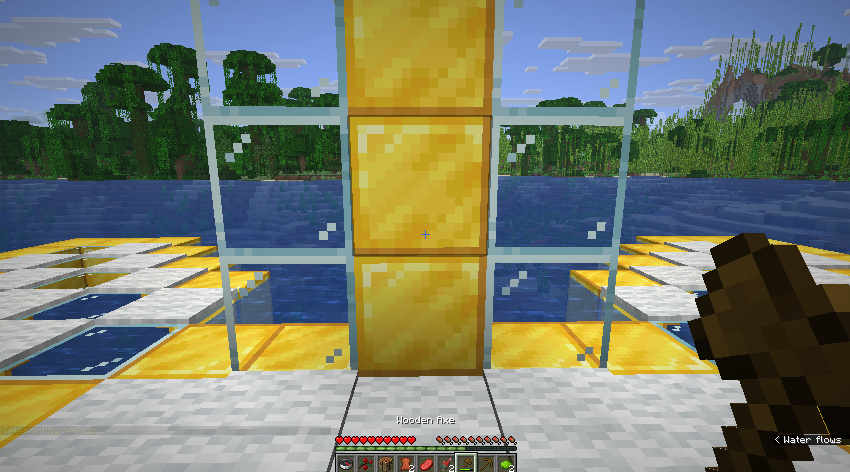 lobby(in my own server) I have set my lobby here, and at this exact location. I spawned in with no problems.
Versions
Files
Relations
Project Relations
More like this
Similar Mods
Suggestions use data such as tags, dependencies, dependents, descriptions, titles, and more to rank how much they overlap with this mod.
On ModDex
Community snapshot
By the numbers
Statistics

Want to reach Minecraft players?
We're looking for a server hosting partner to feature here and other parts of the site. Interested? Send us a message!
Get in touchGet it on
Available Platforms
On ModDex
Community snapshot
By the numbers
Statistics
Resources