
MCAI Assistant
No reviews yet
AI assistant mod for Minecraft server and client - connects to OpenAI-compatible API.
Fabric is a mod loader for versions 1.14+ of Minecraft, particularly popular for client side and optimization mods.
Community voices
Reviews
Click once to include, again to exclude, again to clear
No reviews yet. Be the first to review this project!
Get it on
Available Platforms
 Modrinth
Compatibility
Supported Environments
About
Project Details
For authors
Embed Badge
If you're the author of this project, you can embed a live badge anywhere that supports HTML or Markdown. It updates automatically whenever ratings change.
Use HTML for any page that supports it, or Markdown for README files and Markdown-based descriptions.
Identifiers
Platform IDs
Resources
External Links
About
Description
MCAI - Minecraft AI Assistant


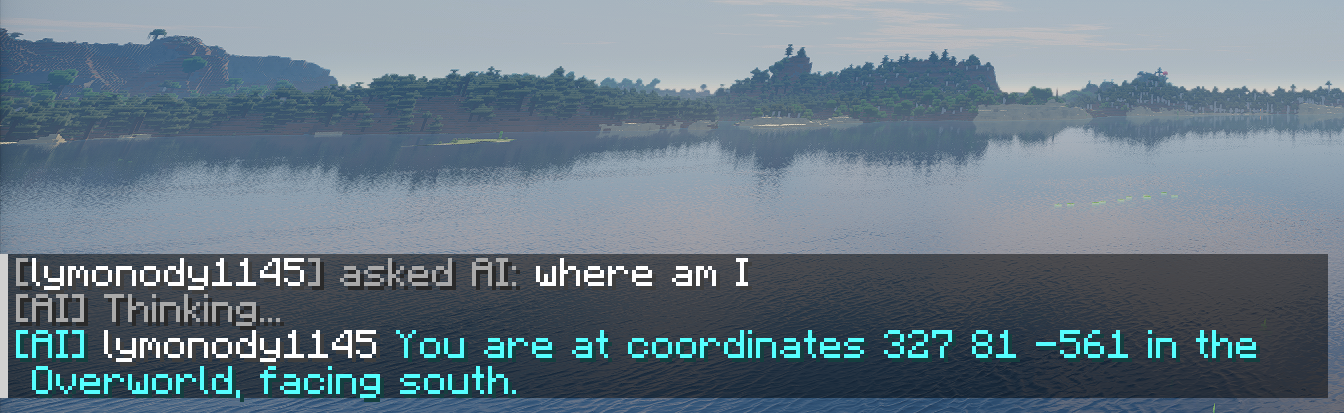
MCAI is a Fabric mod that lets AI manage your Minecraft server. This entire project is AI-developed.
TL;DR: Players type /ai how do I enchant a diamond sword?, AI answers. Someone swears? AI warns or kicks. Dangerous ops need admin approval.
Quick Start
| What | How |
|---|---|
| Chat with AI | /ai <question> or !ai <question> |
| AI executes commands | /ai give me a diamond sword (admin approval) |
| Check behavior score | /aiscore |
| Search wiki | /aikb enchantment |
| Admin approve | /aiaccept 1 approve / /aireject 1 reject |
Features
AI Chat
- Players use
!aior/aito chat with AI - AI has full server context (chat logs, weather, time, players)
- Multi-turn conversation with history
Auto Behavior Review
- AI analyzes chat every 30 minutes
- Three-tier penalty: score deduction -> yellow card -> red card (kick)
- Admin messages are trusted; admins can declare server rules
Admin Approval
- Dangerous commands (op, ban, kick) require manual admin approval
- 3-minute timeout auto-cancels pending approvals
- Strict mode: only whitelisted safe commands skip approval
Game Knowledge Base
- Built-in Chinese Minecraft Wiki entries
- Online search with local fallback
Installation
Requirements
- Minecraft Fabric server 26.1+
- Java 25
- A DeepSeek API Key (Recommended) or any OpenAI-compatible API
Steps
- Download the latest JAR from Releases
- Place it in
mods/folder - Start the server to auto-generate config
- Edit
config/mcai/config.json, fill in your API Key - Config auto-reloads; or run
/aireloadmanually
Single-Player Usage
The mod works in single-player too (no dedicated server required):
- Install Fabric client (same version 26.1+ as the server)
- Place the JAR in
.minecraft/mods/folder - Launch the game and enter a single-player world
- Config and commands are identical to the server setup
- You are the world owner with full admin permissions by default
- (Optional) Install Mod Menu for in-game config editing
Tip: The behavior review system is auto-disabled in single-player (no need to review yourself).
Commands
Player Commands
| Command | Description |
|---|---|
!ai <msg> /ai <msg> |
Chat with AI |
/aiscore |
Check behavior score |
Admin Commands
| Command | Description |
|---|---|
/aiaccept <n> |
Approve pending action |
/aireject <n> |
Reject pending action |
/aiquery |
List pending approvals |
/aiclear |
Clear AI chat history |
/aireload |
Manually reload config (auto-reloads on file change) |
/aikb <keyword> |
Search knowledge base |
Review Management
| Command | Description |
|---|---|
/aicheck start |
Trigger manual review |
/aicheck approve <id> |
Approve kick |
/aicheck reject <id> |
Reject kick |
/aicheck last |
View last review result |
/aicheck last reasoning |
View AI reasoning |
Configuration
File: config/mcai/config.json. Auto-reloads on change (or use /aireload).
| Key | Default | Description |
|---|---|---|
apiEndpoint |
https://api.deepseek.com |
API endpoint |
apiKey |
"" |
API key |
model |
deepseek-v4-flash |
Model name |
strictMode |
true |
Strict mode |
aiCooldownSeconds |
60 |
Non-admin AI cooldown (seconds) |
aiMaxConcurrent |
3 |
Max concurrent non-admin AI calls |
reviewIntervalMinutes |
30 |
Review interval (min) |
yellowCardThreshold |
-30 |
Yellow card threshold |
redCardThreshold |
-60 |
Red card threshold |
systemPromptPath |
"" |
System prompt file (under config/mcai/) |
reviewPromptPath |
"" |
Review prompt file |
Prompt files system_prompt.txt / review_prompt.txt are auto-created on first start.
Importing Knowledge Bases
Screenshots
Gallery
Versions
Files
Relations
Project Relations
More like this
Similar Mods
Suggestions use data such as tags, dependencies, dependents, descriptions, titles, and more to rank how much they overlap with this mod.
On ModDex
Community snapshot
By the numbers
Statistics

Want to reach Minecraft players?
We're looking for a server hosting partner to feature here and other parts of the site. Interested? Send us a message!
Get in touchGet it on
Available Platforms
On ModDex
Community snapshot
By the numbers
Statistics
Resources