
Community listing page, reviews here may not be monitored by the author.
Gatekeeper

No reviews yet
A Fabric mod for Minecraft that replaces username/password login with cryptographic key authentication.
Community voices
Reviews
No reviews yet. Be the first to review this project!
Get it on
Available Platforms
Compatibility
Supported Environments
Must be installed on both the client and the server.
About
Project Details
For authors
Embed Badge
If you're the author of this project, you can embed a live badge anywhere that supports HTML or Markdown. It updates automatically whenever ratings change.
Use HTML for any page that supports it, or Markdown for README files and Markdown-based descriptions.
Identifiers
Platform IDs
About
Description
Gatekeeper replaces username/password login on offline-mode servers with cryptographic key authentication. Every player holds a unique digital key that the server recognises — no password to guess, share, or steal.
Designed for small offline-mode servers where the operator personally knows every player.
Runs on Fabric and on Paper — both server implementations speak the same protocol, and the same Fabric client mod works with either.
How it works
When you connect to a Gatekeeper server for the first time, the mod silently generates a unique key pair for that server and stores it on your computer. Every subsequent connection your game proves — cryptographically — that it holds the right key, without ever transmitting it over the network. The server checks your key against its approved list and lets you in.
No passwords. No shared secrets. Nothing to forget or leak.
Requirements
- Server: either Fabric with Fabric API, or Paper
- Client: Fabric with Fabric API
- Every connecting client must have the mod installed, whichever server platform you run
- Client and server must be on matching versions — an outdated client is turned away with a message naming the version to install
- The server must run with
online-mode=falseinserver.properties
Spigot, CraftBukkit and Folia are not supported: holding a player in the configuration phase needs Paper's connection API.
Installation
Server (Fabric)
- Install Fabric and Fabric API.
- Drop
gatekeeper-<version>.jarinto themods/folder. - Set
online-mode=falseinserver.properties. - Start the server — a
config/mcgatekeeper/directory is created automatically.
Server (Paper)
- Drop
gatekeeper-paper-<version>.jarinto theplugins/folder. - Set
online-mode=falseinserver.properties. - Start the server — a
plugins/McGatekeeper/directory is created automatically.
Important:
online-mode=falsewithout Gatekeeper means anyone who knows a player's username can impersonate them. Gatekeeper eliminates that risk, but it means you must approve every new player before they can join.
Client
- Install Fabric and Fabric API.
- Drop
gatekeeper-<version>.jarinto yourmods/folder. - That's it — keys are generated and stored automatically.
First connection
The first time a player connects:
- A key pair is generated for that server in the background.
- The connection screen shows a message saying the server is waiting for admin approval.
- An operator runs
/gate allow <username> <label>to approve the player and register their key.
The player is let in immediately and their key is remembered for all future connections from that device.
Admin commands
| Command | What it does |
|---|---|
/gate allow <player> <label> |
Approves a waiting player and registers their key |
/gate list <player> |
Lists all registered keys for a player with fingerprints |
/gate reset <player> |
Removes all keys for a player |
/gate reset <player> <label> |
Removes a single key (e.g. a lost device) |
Tab-complete on /gate allow suggests players currently awaiting approval.
Requires operator level 3 on Fabric, or the mcgatekeeper.admin permission (granted to operators by default) on Paper.
Key management
You can view and manage your stored keys via Mods → Gatekeeper → Manage Keys (requires Mod Menu). Each entry shows the server address the key was last used with, plus short fingerprints for both the server and client keys.
For full technical documentation, the security model, and source code, see the GitHub repository.
Screenshots
Gallery
-
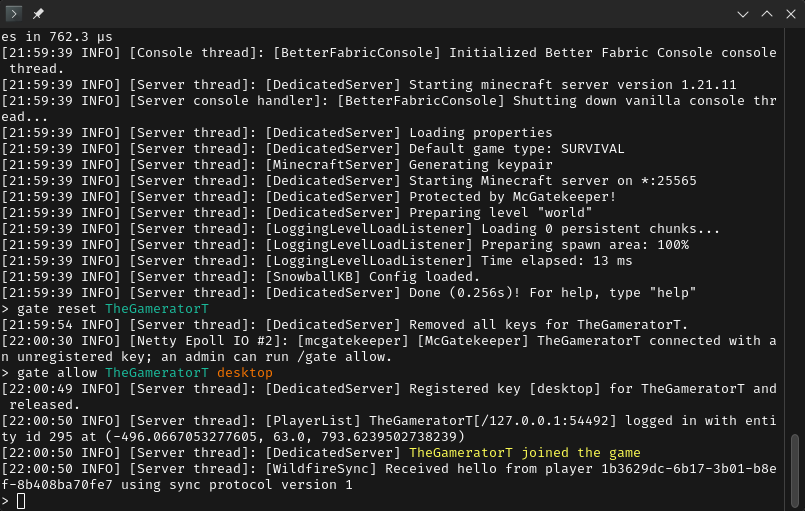 Operator Accepting a Player A player is blocked from joining by having their keys reset and is later allowed to join.
 -
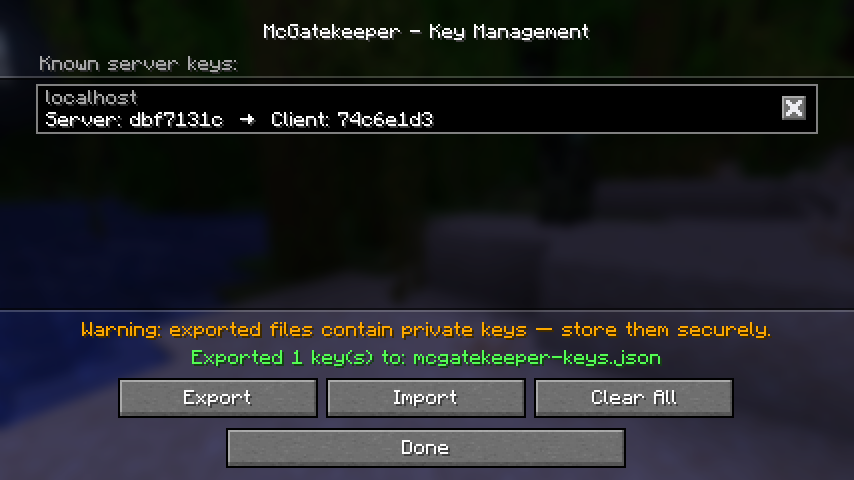 Key Management Screen This screen allows the player to export, import and delete keys.
 -
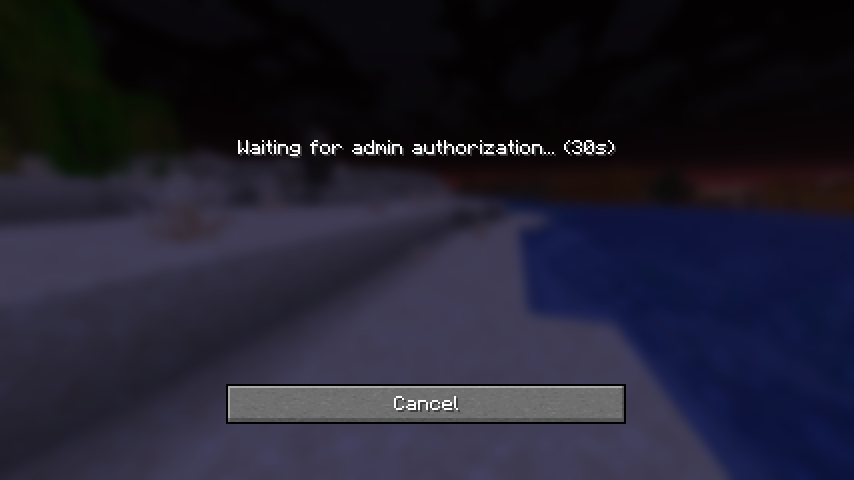 Pending Authorization Screen The screen shown while the player waits for admission into the server.
Versions
Files
Relations
Project Relations
More like this
Similar Mods
Suggestions use data such as tags, dependencies, dependents, descriptions, titles, and more to rank how much they overlap with this mod.
On ModDex
Community snapshot
By the numbers
Statistics

Want to reach Minecraft players?
We're looking for a server hosting partner to feature here and other parts of the site. Interested? Send us a message!
Get in touchGet it on
Available Platforms
On ModDex
Community snapshot
By the numbers