
Community listing page, reviews here may not be monitored by the author.
mcipm

No reviews yet
Minecraft Interprocess Management
Community voices
Reviews
No reviews yet. Be the first to review this project!
Get it on
Available Platforms
About
Project Details
For authors
Embed Badge
If you're the author of this project, you can embed a live badge anywhere that supports HTML or Markdown. It updates automatically whenever ratings change.
Use HTML for any page that supports it, or Markdown for README files and Markdown-based descriptions.
Identifiers
Platform IDs
Resources
External Links
About
Description
Due to CurseForge uncooperative, we have to stop updating this project on CurseForge (another reason is the text editor on this site is too hard to use); please go to our project page at SourceForge https://sourceforge.net/projects/rivoreo-mc-plugins/ or ModForest https://www.modforest.com/minecraft/mods/mcipm/ for future updates.
Provide access to Minecraft internal data structures (entities only, in current version) from external command. Useful for external debugging and scripting (for example using Unix shell).
Downloads
=========
CurseForge is not cooperative on released file types and file names, so we can no longer update releases on CurseForge; please download releases from our SourceForge project.
Download the mod itself: https://sourceforge.net/projects/rivoreo-mc-plugins/files/mcipm/mcipm-1.0.0-mc-1.12.jar/download
Download the dependencies package: https://sourceforge.net/projects/rivoreo-mc-plugins/files/mcipm/mcipm-dependencies-20200421.tar.bz2/download.
All released files, including full source packages, client source packages and client binary packages, are available from our SourceForge.net project FRS: https://sourceforge.net/projects/rivoreo-mc-plugins/files/mcipm/
The latest version of MCIPM client packages are:
https://sourceforge.net/projects/rivoreo-mc-plugins/files/mcipm/mcipm-client-1.0.1-src.tar.bz2/download (Source code)
https://sourceforge.net/projects/rivoreo-mc-plugins/files/mcipm/mcipm-client-1.0.1-solaris-i386.tar.bz2/download (Solaris i386 build)
https://sourceforge.net/projects/rivoreo-mc-plugins/files/mcipm/mcipm-client-1.0.1-solaris-amd64.tar.bz2/download (Solaris amd64 build)
https://sourceforge.net/projects/rivoreo-mc-plugins/files/mcipm/mcipm-client-1.0.1-freebsd-armhf.tar.bz2/download (FreeBSD arm hard-float build)
https://sourceforge.net/projects/rivoreo-mc-plugins/files/mcipm/mcipm-client-1.0.1-freebsd-i386.tar.bz2/download (FreeBSD i386 build)
https://sourceforge.net/projects/rivoreo-mc-plugins/files/mcipm/mcipm-client-1.0.1-freebsd-amd64.tar.bz2/download (FreeBSD amd64 build)
https://sourceforge.net/projects/rivoreo-mc-plugins/files/mcipm/mcipm-client-1.0.1-gnu-linux-arm.tar.bz2/download (GNU/Linux arm soft-float build)
https://sourceforge.net/projects/rivoreo-mc-plugins/files/mcipm/mcipm-client-1.0.1-gnu-linux-armhf.tar.bz2/download (GNU/Linux arm hard-float build)
Install Mod
===========
To install the mod to Minecraft Forge, copy "mcipm-<version>.jar" into "mods" directory; you will also need to extract all files from "mcipm-dependencies-20200421.tar.bz2" into "mods" directory to provide the Java libraries it depends.
For example:
$ cd /path/to/your/minecraft/server/directory/
$ cp /path/to/mcipm-1.0.0.jar mods/
$ cd mods
$ tar -x -f /path/to/mcipm-dependencies-20200421.tar.bz2
Build/Install Client Tool
=========================
To build the client tool from source, simply extract the client source package, compile all ".c" files with your C compiler and link them together; for example:
$ tar -x -f /path/to/mcipm-client-1.0.1-src.tar.bz2
$ gcc -Wall -O1 *.c -o mcipm
To use the prebuilt binary package, simply extract the package and use the executable file, as it has no additional dependencies.
Client Tool Man Page
====================
mcipm(1) FreeBSD General Commands Manual mcipm(1)
NAME
mcipm - Minecraft Interprocess Management
SYNOPSIS
mcipm [<global-options>] entitystat <selector-option> [<selector-option> ...] [<other-options>]
mcipm [<global-options>] kill <world> <entity-id> [<entity-id> ...]
mcipm [<global-options>] version
DESCRIPTION
This tool is a client for the MCIPM mod for Minecraft, which perform
management tasks on a running Minecraft server instance.
The major and minor versions (first 2 numbers in a full version number)
between the MCIPM mod (server) and this tool (client) must be match, or
the behavior is unpredictable.
Global options:
-S, --socket-path <path>
Specify the path of an Unix domain socket that the server is
listening on. Default is mcipm (thus in current working
directory).
--version
Display version, copyright and licensing information of this
tool. The program will exit afterward.
Subcommands:
entitystat <selector-option> [<selector-option> ...] [<other-options>]
Display various data structures about entities in a Minecraft
server, selected by one or more selector options. At least one
selector option must be specified; if more than one selector
options are specified, entities will be selected by matching at
least one of specified selector.
Selector options:
-A, --all
Select all entities in all worlds.
-W, --world <world-id-name>
Select all entities in specified world.
-i, --entity-id <entity-id>
Select entity by a numeric ID.
-t, --entity-type <entity-type>
Select specified <entity-type> of entities.
Other options:
-o, --format <column>[=<title>|,<column>[...]]
Display entities information according to the columns
specified here. If this option being specified multiple
times, later specified columns are appended to already
specified columns.
Available column names are:
world id type name location rotation state width height
chunk uuid ticks maxhealth health phealth idletime
attacktarget growingage itemage itempickupdelay owner
thrower itemdamage itemlifespan itemcount
The default columns set is world,id,location,type,name.
--sort [+|-]<column>[,[+|-]<column>[...]]
Sort the output lines based on specified columns; + or -
character specifies the sorting direction of given column,
default is +. The column names are same as what describes
above for -o or --format option.
-w By default if the last column is name and stdout is a
terminal, the entity name may get truncated to fit terminal
window width; specify this option to disable truncation of
entity names.
kill <world> <entity-id> [<entity-id> ...]
Kill one or more entities by <entity-id> in <world>. The specified
entities will be killed in a way that similar to the in-game
command kill.
version
Query version information of the Minecraft server, this may include
MCIPM mod version, Minecraft Forge version and Minecraft version.
EXAMPLES
List all chickens with their entity ID, world, location and growing
age:
mcipm entitystat -t minecraft:chicken -o id,world,location,growingage
List all entities in overworld:
mcipm entitystat -W overworld -o id,type,name
VERSION
This man page describes version 1.0.1 of the mcipm tool.
BUGS
It may wait for the server reply forever if the Minecraft server side
failed to reply after request; in this case, press ^C to interrupt this
program.
mcipm(1)
Screenshots
Gallery
-
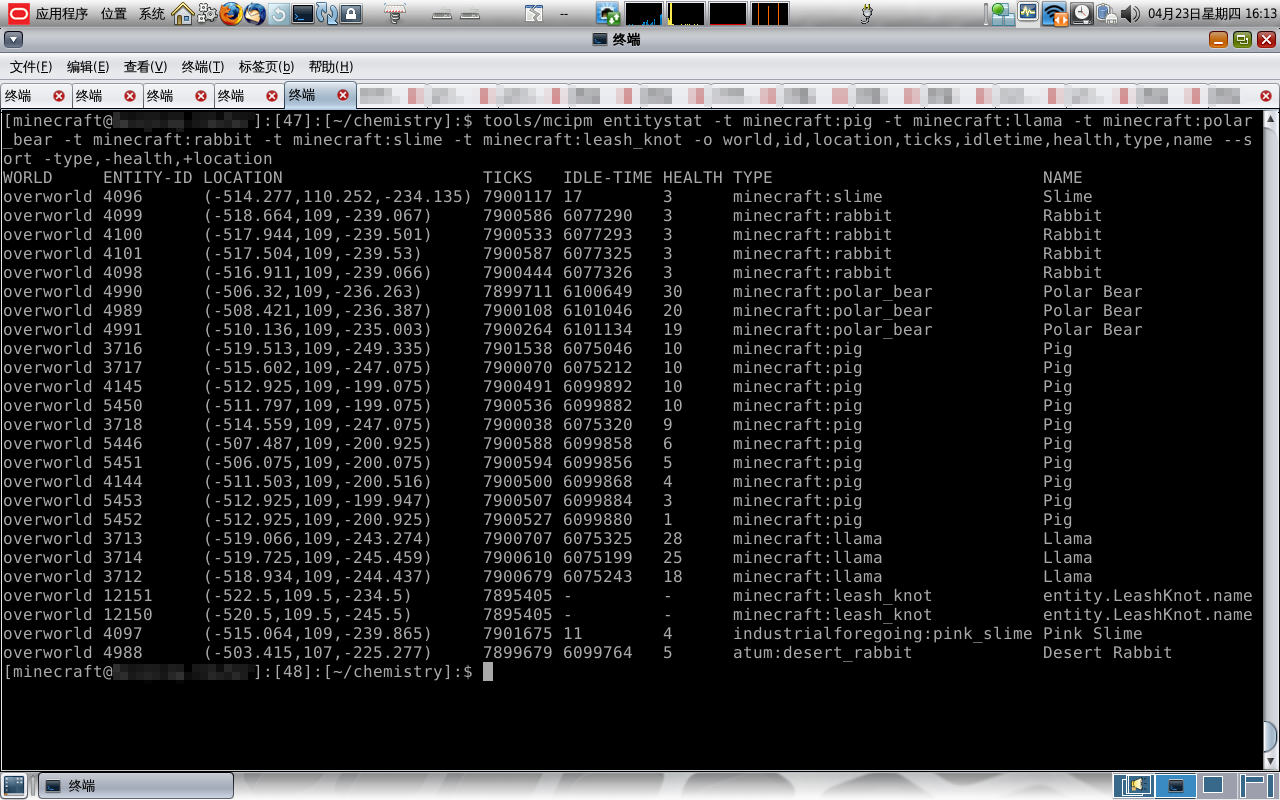 mcipm-entitystat-example
Versions
Files
Relations
Project Relations
More like this
Similar Mods
Suggestions use data such as tags, dependencies, dependents, descriptions, titles, and more to rank how much they overlap with this mod.
On ModDex
Community snapshot
By the numbers
Statistics
Want to reach Minecraft players?
We're looking for a server hosting partner to feature here and other parts of the site. Interested? Send us a message!
Get in touchGet it on
Available Platforms
On ModDex
Community snapshot
By the numbers
Statistics
Resources