
Community listing page, reviews here may not be monitored by the author.
MCMidi


No reviews yet
MCMidi is a Minecraft Fabric mod that allows you to play MIDI files in-game with high-quality sound and real-time visualization.
Community voices
Reviews
No reviews yet. Be the first to review this project!
Get it on
Available Platforms
Compatibility
Supported Environments
Runs entirely on the client. Works on vanilla servers.
About
Project Details
For authors
Embed Badge
If you're the author of this project, you can embed a live badge anywhere that supports HTML or Markdown. It updates automatically whenever ratings change.
Use HTML for any page that supports it, or Markdown for README files and Markdown-based descriptions.
Identifiers
Platform IDs
About
Description
MCMidi
MCMidi is a Minecraft Fabric mod that allows you to play MIDI files in-game with high-quality sound and real-time visualization.
Features
- MIDI Playback: Play
.midior.midfiles directly within your Minecraft client. - Custom SoundFonts: Support for
.sf2SoundFont files to customize your instrument sounds. - Real-time Visualization: A dedicated "Midi Control Center" with multiple visualization tabs:
- Detail: Real-time MIDI message log, BPM, and playback position.
- Nodes: Visual representation of active MIDI nodes. (Not implemented.)
- Piano: A virtual piano roll showing active notes.(Not implemented.)
- Waveform: Dynamic waveform visualization. (Not implemented.)
- In-Game Configuration: Integrates with Mod Menu and Cloth Config for seamless setting adjustments.
- Client-Side Commands: Quick control over playback using console commands.
Command Usage
Manage your MIDI playback using the following client-side commands:
/midi play <filename>: Plays a MIDI file from your local library./midi stop: Stops the current MIDI playback.
How to Use
- Prepare your files:
- Place your
.midior.midfiles in themidi/musics/directory within your Minecraft instance folder. - (Optional) Place your
.sf2SoundFont files in themidi/soundfonts/directory.
- Place your
- Launch Minecraft: Open the Midi Control Center by pressing
,(default keybind). - Configure Settings: Open the Mod Menu from the main menu, find MCMidi, and click the gear icon to adjust volume or select a custom SoundFont.
Implemented Architecture
MCMidi is built with a focus on modularity and maintainability:
- Dependency Injection: Uses an abstracted
IConfigManagerto handle configuration without global static state. - Abstracted Tab System: Leverages
KarasunikiLib'sITabBarandITabContentinterfaces to provide a flexible and extensible UI. - Decoupled MIDI Engine: Uses the
IMidiEngineinterface, allowing the mod to support different MIDI drivers or external devices in the future.
Dependencies
This mod requires the following libraries:
- Fabric API
- KarasunikiLib
- Cloth Config API
- Mod Menu (Optional, recommended for configuration UI)
Contribution
Contributions are welcome! If you have suggestions, bug reports, or would like to submit a pull request, please follow these steps:
- Fork this repository and create your branch from
master. - Make your changes with clear commit messages.
- Ensure your code builds and passes any existing checks.
- Submit a pull request with a description of your changes.
For major changes, please open an issue first to discuss what you would like to change.
License
This project is licensed under the MIT License. See LICENSE for details.
MCMidi
MCMidi is a Minecraft Fabric mod that allows you to play MIDI files in-game with high-quality sound and real-time visualization.
Features
- MIDI Playback: Play
.midior.midfiles directly within your Minecraft client. - Custom SoundFonts: Support for
.sf2SoundFont files to customize your instrument sounds. - Real-time Visualization: A dedicated "Midi Control Center" with multiple visualization tabs:
- Detail: Real-time MIDI message log, BPM, and playback position.
- Nodes: Visual representation of active MIDI nodes. (Not implemented.)
- Piano: A virtual piano roll showing active notes.(Not implemented.)
- Waveform: Dynamic waveform visualization. (Not implemented.)
- In-Game Configuration: Integrates with Mod Menu and Cloth Config for seamless setting adjustments.
- Client-Side Commands: Quick control over playback using console commands.
Command Usage
Manage your MIDI playback using the following client-side commands:
/midi play <filename>: Plays a MIDI file from your local library./midi stop: Stops the current MIDI playback.
How to Use
- Prepare your files:
- Place your
.midior.midfiles in themidi/musics/directory within your Minecraft instance folder. - (Optional) Place your
.sf2SoundFont files in themidi/soundfonts/directory.
- Place your
- Launch Minecraft: Open the Midi Control Center by pressing
,(default keybind). - Configure Settings: Open the Mod Menu from the main menu, find MCMidi, and click the gear icon to adjust volume or select a custom SoundFont.
Implemented Architecture
MCMidi is built with a focus on modularity and maintainability:
- Dependency Injection: Uses an abstracted
IConfigManagerto handle configuration without global static state. - Abstracted Tab System: Leverages
KarasunikiLib'sITabBarandITabContentinterfaces to provide a flexible and extensible UI. - Decoupled MIDI Engine: Uses the
IMidiEngineinterface, allowing the mod to support different MIDI drivers or external devices in the future.
Dependencies
This mod requires the following libraries:
- Fabric API
- KarasunikiLib
- Cloth Config API
- Mod Menu (Optional, recommended for configuration UI)
Contribution
Contributions are welcome! If you have suggestions, bug reports, or would like to submit a pull request, please follow these steps:
- Fork this repository and create your branch from
master. - Make your changes with clear commit messages.
- Ensure your code builds and passes any existing checks.
- Submit a pull request with a description of your changes.
For major changes, please open an issue first to discuss what you would like to change.
License
This project is licensed under the MIT License. See LICENSE for details.
Screenshots
Gallery
-
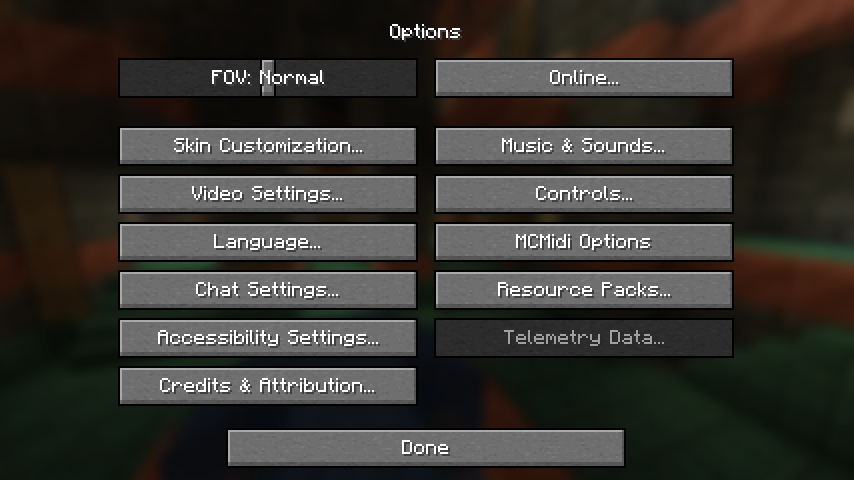 Options screen
 -
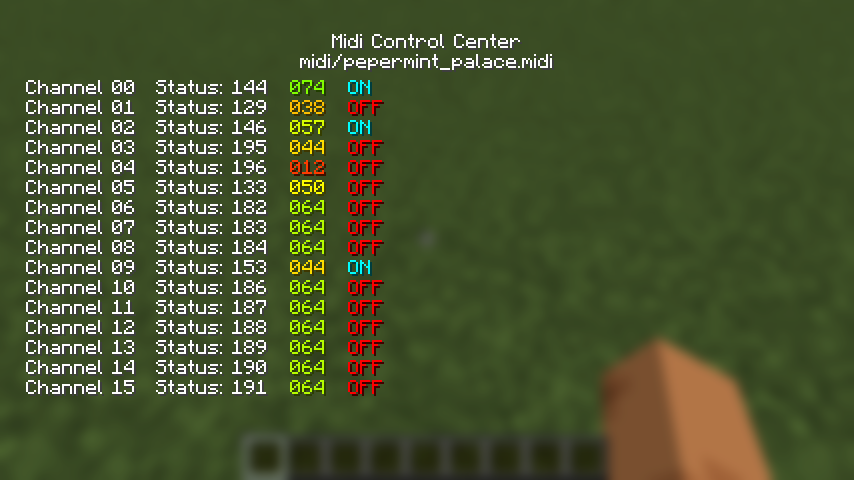 Playing a midi file in world
 -
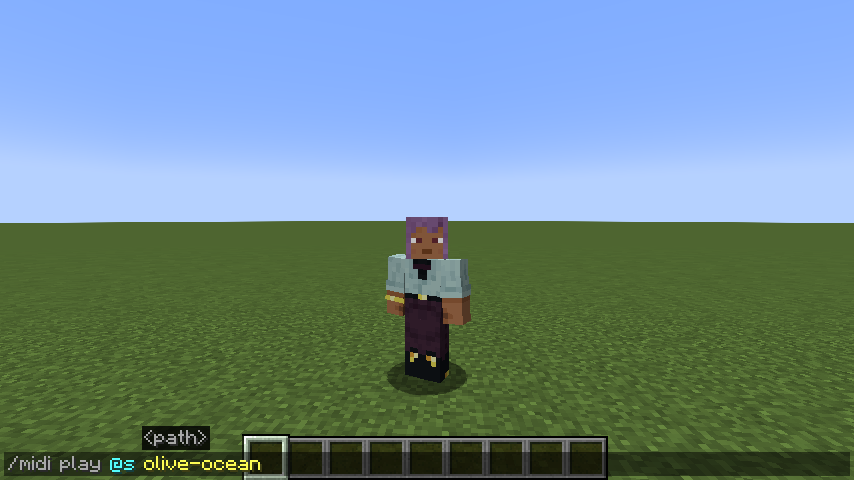 Command example
Versions
Files
Relations
Project Relations
More like this
Similar Mods
Suggestions use data such as tags, dependencies, dependents, descriptions, titles, and more to rank how much they overlap with this mod.
On ModDex
Community snapshot
By the numbers
Statistics
Want to reach Minecraft players?
We're looking for a server hosting partner to feature here and other parts of the site. Interested? Send us a message!
Get in touchGet it on
Available Platforms
On ModDex
Community snapshot
By the numbers