mcsudo
No reviews yet
Add Linux commands to Minecraft.
Community voices
Reviews
Click once to include, again to exclude, again to clear
No reviews yet. Be the first to review this project!
Get it on
Available Platforms
 Modrinth
Compatibility
Supported Environments
About
Project Details
For authors
Embed Badge
If you're the author of this project, you can embed a live badge anywhere that supports HTML or Markdown. It updates automatically whenever ratings change.
Use HTML for any page that supports it, or Markdown for README files and Markdown-based descriptions.
Identifiers
Platform IDs
About
Description
Sudo
This module adds some commonly used Linux commands to the game, including sudo, echo, cat, and export.
Some Linux mechanisms have also been added, such as the home folder and the .bashrc file.
Instructions
Parameters
Some commands support parameters, you can use _ plus parameters.
Variables
Some commands also support the use of variables. You can use variables in the form of ${variable name}. For how to set variables, please see export.
Dynamic variables
Dynamic variables are recalculated on every execution, here are all dynamic variables:
home: the current user’s home folderuuid: uuid of the current userplayer: the username of the current userexp: the current user’s experience valuelevel: the level of the current userhealth: current user’s healthmax_health: the current user’s maximum healthworld: current world namelocation: current location (format is x.y.z)server: current server namemotd: motd of the current servertime: current time (Unix timestamp)
Order
echo
usage:
/echo <content> # Output content
cat
usage:
/cat <file path> # Output file content
write
usage:
/write <file path> <content> #Write file content, which will overwrite the original content.
export
usage:
/export <variable name> <variable value> #Set variables
/export public_<variable name> <variable value> # Set public variables, sudo permissions are required
apt
Install mods from Modrinth.
usage:
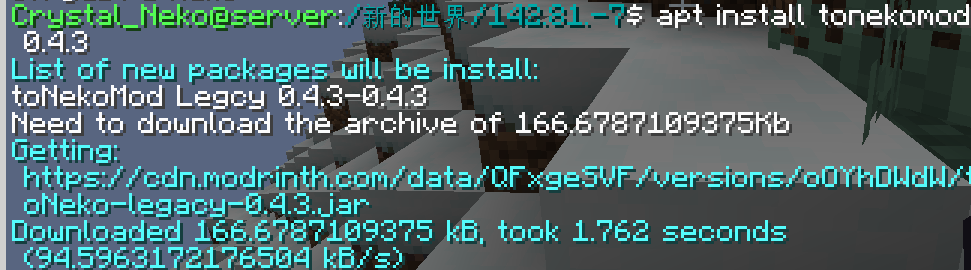
/apt install <slug> <version> # Install module
/apt search <slug> # Search module
image of apt command:
bash
Call the system to execute bash commands (only supports Linux).
usage:
/bash <command>
WARNNING:THIS COMMAND IS DANGEROUS. IT MAYBE DAMAGE YOUR SYSTEM.
neofetch
You know the command.
Special files
.bashrc
This file executes the commands inside when the player logs in. The commands are separated by ; and there is no / before the command.
The file is located in home/<player name>/.bashrc. Players can modify this file without sudo permissions.
Screenshots
Gallery
-
apt-install apt install command
-
 apt-search apt search command
Versions
Files
Relations
Project Relations
More like this
Similar Mods
Suggestions use data such as tags, dependencies, dependents, descriptions, titles, and more to rank how much they overlap with this mod.
On ModDex
Community snapshot
By the numbers
Statistics

Want to reach Minecraft players?
We're looking for a server hosting partner to feature here and other parts of the site. Interested? Send us a message!
Get in touchGet it on
Available Platforms
On ModDex
Community snapshot
By the numbers