Community listing page, reviews here may not be monitored by the author.
MemoryJournal

No reviews yet
Turn your Minecraft adventures into a keepsake. Write, paste items, photos, sounds, waypoints & more into a shareable, multiplayer-synced journal.
Community voices
Reviews
No reviews yet. Be the first to review this project!
Get it on
Available Platforms
About
Project Details
For authors
Embed Badge
If you're the author of this project, you can embed a live badge anywhere that supports HTML or Markdown. It updates automatically whenever ratings change.
Use HTML for any page that supports it, or Markdown for README files and Markdown-based descriptions.
Identifiers
Platform IDs
Resources
External Links
About
Description
Memory Journal
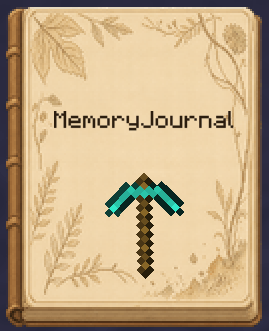
Memory Journal turns your Minecraft adventures into a physical keepsake you can carry around and flip through again and again. Right-click the journal to open it and edit it like a real notebook: write, stick on stickers, insert photos, record sounds, save waypoints... and bind every adventure into a book.
✨ Features
- A physical journal item: hold it, store it in your inventory, and right-click to open the editor.
- Multi-page layout: cover, back cover, and as many content pages as you like — add, remove, and flip through pages freely.
- Rich sticker elements: see the list below.
- Bookmarks: mark important pages; bookmarks pull out on hover for quick navigation.
- Custom fonts: a built-in font picker with recently-used history to make your text stand out.
- Element editing: copy / cut / paste, resize, rotate, bring to front / send to back, show / hide, edit notes, delete.
- Read-only modes: edit / read-only / locked read-only, so shared journals aren't accidentally modified.
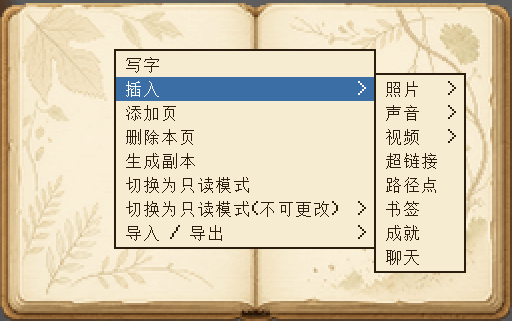
📌 Elements you can insert
| Element | Description |
|---|---|
| Text | Free writing with line breaks and custom fonts |
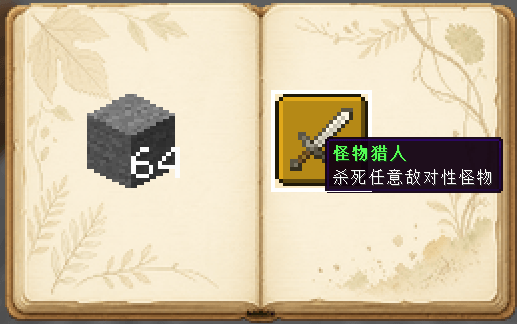
| Item sticker | Click an item in your inventory to paste it (configurable whether it's consumed; consumed items can be taken back) |
| Block sticker | Shift+click a block to paste it as a block sticker |
| Photo | Local file or web URL |
| Sound | Insert audio |
| Video | Insert video |
| Hyperlink | Insert a clickable link |
| Waypoint | Record coordinates and teleport with one click (permission configurable) |
| Achievement | Insert unlocked advancements |
| Chat log | Capture and paste chat messages |
| Image | Inline image |
🌐 Multiplayer & Sharing
- Master + copies: a master journal can create multiple copies (count configurable); copies can't create further copies.
- Online sync: the master and all copies share the same data — when online, edits sync to other players so everyone records the same journal together.
- Permission control: waypoint teleport, item consumption, and more are all configurable.
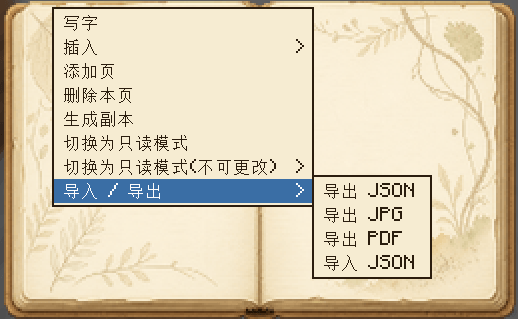
📤 Import / Export
- Export JSON: fully save the journal data and re-import it later.
- Export JPG: render the journal to images.
- Export PDF: generate a printable PDF journal.
- Import JSON: import a journal from a file.
⚙️ Configuration
| Option | Description |
|---|---|
allowWaypointTeleport |
Allow non-op players to teleport via waypoints |
consumeItemOnPaste |
Consume one item when pasting (consumed items can be taken back) |
maxCopyCount |
Max number of copies a master journal can create |
📦 Requirements
- Minecraft 1.21.11
- NeoForge 21.11.45+
Screenshots
Gallery
-
 bcabdc3a-089f-4c52-8742-37f398caecb2.png bcabdc3a-089f-4c52-8742-37f398caecb2.png
 -
 c44f76ec-97d4-4d62-a151-d10e87de180f.png c44f76ec-97d4-4d62-a151-d10e87de180f.png
 -
 0c86f2db-a814-490f-9260-cd33811bbd80.png 0c86f2db-a814-490f-9260-cd33811bbd80.png
 -
 fd68490f-e83c-4f36-b857-69633713b9e7.png fd68490f-e83c-4f36-b857-69633713b9e7.png
Versions
Files
Relations
Project Relations
More like this
Similar Mods
Suggestions use data such as tags, dependencies, dependents, descriptions, titles, and more to rank how much they overlap with this mod.
On ModDex
Community snapshot
By the numbers
Statistics
Want to reach Minecraft players?
We're looking for a server hosting partner to feature here and other parts of the site. Interested? Send us a message!
Get in touchGet it on
Available Platforms
On ModDex
Community snapshot
By the numbers
Statistics
Resources