
Mentalitys | World Web Map
No reviews yet
1.20.1 mod: live 2D world map in browser with player markers & auto-render on chunk load.
Adds new methods of transportation for players.
Community voices
Reviews
Click once to include, again to exclude, again to clear
No reviews yet. Be the first to review this project!
Get it on
Available Platforms
 Modrinth
Compatibility
Supported Environments
About
Project Details
For authors
Embed Badge
If you're the author of this project, you can embed a live badge anywhere that supports HTML or Markdown. It updates automatically whenever ratings change.
Use HTML for any page that supports it, or Markdown for README files and Markdown-based descriptions.
Identifiers
Platform IDs
About
Description
World Web Map - Minecraft 1.20.1 Server Web Map Mod
Server-side Minecraft 1.20.1 web map mod for Forge and Fabric.
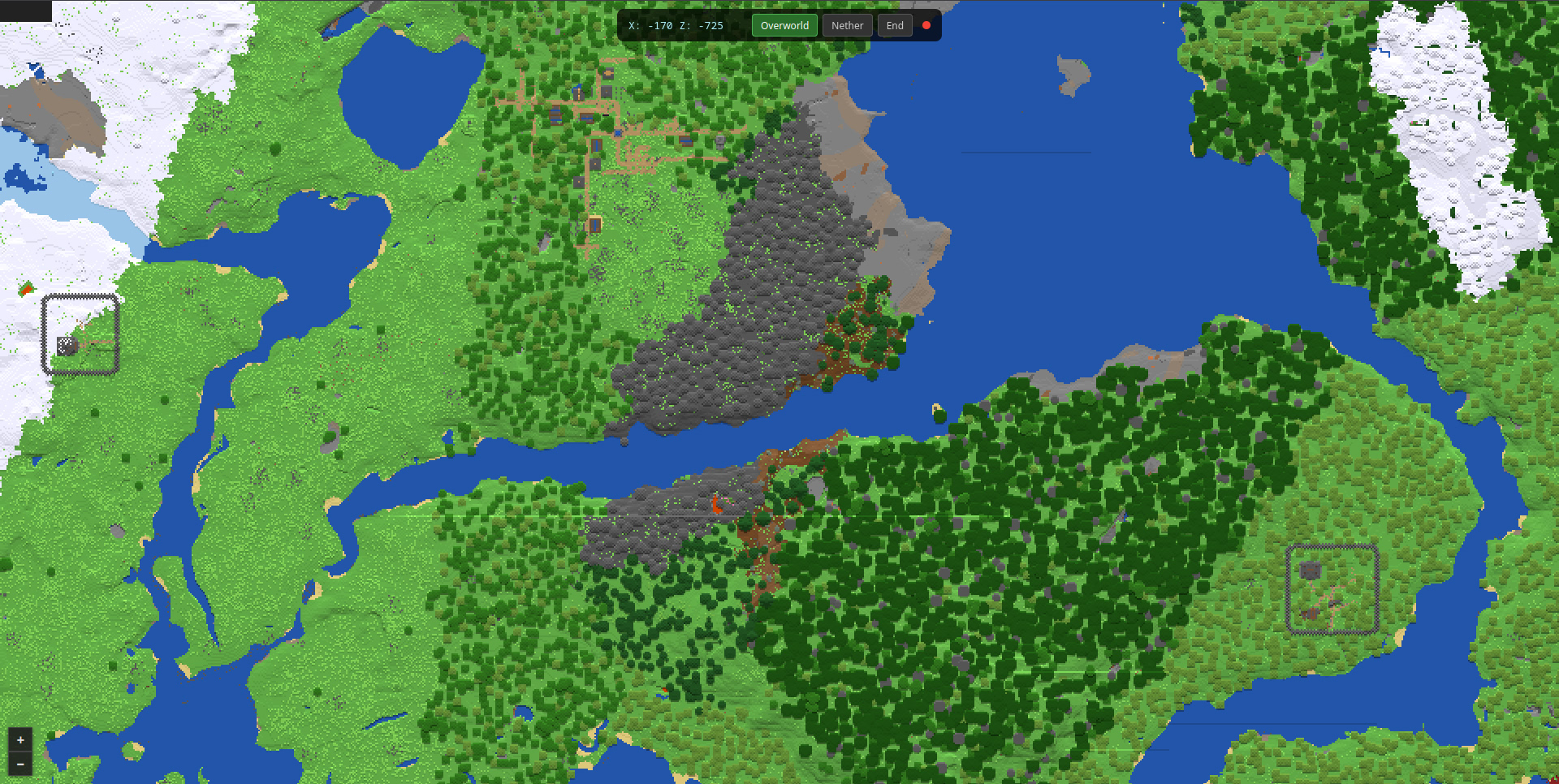
World Web Map renders a 2D top-down map of your Minecraft world and serves it in a browser:
http://server-ip:8123
No client mods are required. Players only need a browser.
Versions and Requirements
| Loader | Version | Minecraft | Loader version | Extra dependency | Java | Jar |
|---|---|---|---|---|---|---|
| Forge | 0.2.1 | 1.20.1 | Forge 47.x, tested on 47.2.0 | none | 17 | forgewebmap-0.2.1.jar |
| Fabric | 0.2.1 | 1.20.1 | Fabric Loader 0.15.11+ | Fabric API 0.92.2+1.20.1 | 17 | fabricwebmap-0.2.1.jar |
Features
- 2D top-down map with height shading.
- Live player markers with names, updated every 2 seconds.
- Biome name shown under the cursor or mobile center point.
- Dimension switcher for Overworld, Nether, and The End.
- Auto-render as players explore, with chunk-load debounce.
- Robust compositing so previously rendered pixels survive re-renders.
- PNG tile writes are atomic and skipped when unchanged.
- Leaflet 1.9.4 browser UI with zoom, pan, dark styling, and mobile controls.
Commands
All commands require operator level 2. Syntax is the same for Forge and Fabric.
| Command | Description |
|---|---|
/webmap status |
Show web server status, queue size, worker count, and rendered tile count |
/webmap render <tileX> <tileZ> |
Render one Overworld tile; tile coords are floor(blockCoord / 256) |
/webmap render-area <minX> <minZ> <maxX> <maxZ> |
Queue a rectangular Overworld area, max 10,000 tiles |
/webmap fullrender <radius> |
Render a square around spawn, radius in tiles |
/webmap stoprender |
Clear the render queue |
/webmap reload |
Reload config and restart the web server if bind or port changed |
Tile coordinates:
tileX = floor(blockX / 256)
tileZ = floor(blockZ / 256)
Example:
/webmap render 0 0
This renders blocks 0..255 x 0..255.
Config and Storage
| Aspect | Forge | Fabric |
|---|---|---|
| Config file | config/forgewebmap-common.properties |
config/fabricwebmap-common.properties |
| Tile path | world/forgewebmap/tiles/ |
world/fabricwebmap/tiles/ |
| Static web files | packaged under /web/ in the mod jar |
packaged under /web/ in the mod jar |
Config is created automatically on first run.
| Key | Default | Description |
|---|---|---|
enabled |
true |
Enable the mod |
bindAddress |
0.0.0.0 |
HTTP bind address; use 127.0.0.1 for local-only access |
port |
8123 |
HTTP port |
tileSize |
256 |
Tile size in blocks and pixels |
renderThreads |
1 |
Background PNG render worker threads |
maxTilesPerTick |
1 |
Max tiles sampled per render interval |
ticksBetweenRenders |
20 |
Server ticks between queue processing steps |
enablePlayerMarkers |
true |
Show players on the map |
enableAutoRender |
true |
Queue tile renders when chunks load |
chunkRenderDebounceMs |
5000 |
Delay after the last chunk-load event before rendering that tile |
renderRadiusAroundPlayers |
4 |
Reserved for player-radius rendering behavior |
saveTilesInsideWorldFolder |
true |
Store tiles under the world folder |
tilesDirectory |
loader-specific | Relative tile output directory |
logRenderProgress |
true |
Log every 50 rendered tiles |
Tile layout:
world/<loader-webmap>/tiles/
├── overworld/
│   └── 0/
│       ├── 0_0.png
│       └── ...
├── the_nether/
│   └── 0/
└── the_end/
    └── 0/
API Endpoints
| Method | Path | Description |
|---|---|---|
GET |
/ |
Web map frontend |
GET |
/app.js |
Frontend JavaScript |
GET |
/style.css |
Frontend CSS |
GET |
/tiles/{dim}/{zoom}/{x}/{z}.png |
PNG map tile |
GET |
/api/status |
Mod status, queue size, worker count, rendered tile count |
GET |
/api/players |
Online players with name, dimension, coordinates, and yaw |
GET |
/api/config |
Tile size, zoom range, and available dimensions |
GET |
/api/biome?dim=overworld&x=100&z=200 |
Biome display name and registry ID |
Loader Differences
| Aspect | Forge | Fabric |
|---|---|---|
| Mod entrypoint | @Mod class |
ModInitializer.onInitialize() |
| Lifecycle hooks | Forge server events | ServerLifecycleEvents |
| Tick hook | TickEvent.ServerTickEvent |
ServerTickEvents.END_SERVER_TICK |
| Chunk-load hook | ChunkEvent.Load |
ServerChunkEvents.CHUNK_LOAD |
| Command hook | RegisterCommandsEvent |
CommandRegistrationCallback.EVENT |
| Logging | Forge LogUtils |
SLF4J LoggerFactory |
Behavior is intended to be identical across both loaders.
Known Limitations
- 2D only: no 3D, isometric, or cave map yet.
- Simple block-color palette: no resource pack textures or biome tinting yet.
- Render commands currently target Overworld only, although tile storage supports all three vanilla dimensions.
fullrenderrenders a square around spawn, not every existing region file.- Unloaded or ungenerated chunks stay transparent until rendered/generated; previously rendered pixels are preserved during re-renders.
- No authentication and no HTTPS; anyone with network access to port 8123 can view the map.
- Only zoom level
0is rendered natively; Leaflet scales it visually for other zoom levels.
Screenshots
Gallery
-
 URL site
Versions
Files
Relations
Project Relations
More like this
Similar Mods
Suggestions use data such as tags, dependencies, dependents, descriptions, titles, and more to rank how much they overlap with this mod.
On ModDex
Community snapshot
By the numbers
Statistics

Want to reach Minecraft players?
We're looking for a server hosting partner to feature here and other parts of the site. Interested? Send us a message!
Get in touchGet it on
Available Platforms
On ModDex
Community snapshot
By the numbers