
Community listing page, reviews here may not be monitored by the author.
merchantmind


No reviews yet
An AI-powered shopkeeper mod with a rotating catalog of 11 categories, smart barter trading, bulk-bonus selling, per-world saves, and a Charge & Slam combat mechanic — made entirely with AI assistance.

Community voices
Reviews
No reviews yet. Be the first to review this project!
Get it on
Available Platforms
Compatibility
Supported Environments
Must be installed on both the client and the server.
About
Project Details
For authors
Embed Badge
If you're the author of this project, you can embed a live badge anywhere that supports HTML or Markdown. It updates automatically whenever ratings change.
Use HTML for any page that supports it, or Markdown for README files and Markdown-based descriptions.
Identifiers
Platform IDs
Resources
External Links
About
Description
Merchant Mind
Merchant Mind is a comprehensive AI shopkeeper mod for Minecraft that adds a dynamic, rotating shop to a server or singleplayer world. Driven by a custom economy and item-value appraisers, it offers systems for reserving, purchasing, installment payments, trading, selling, and restocking gear, along with several optional quality-of-life combat features.
This project currently has two maintained Fabric builds with the same intended gameplay systems:
- Merchant Mind 3.4.9+mc26.1.2 — Fabric for Minecraft Java 26.1.2.
- Merchant Mind 3.4.2+mc1.21.11 — Fabric port for Minecraft Java 1.21.11.
The gameplay goal is the same between the two builds, but they are compiled against different Minecraft/Fabric APIs. They are not interchangeable: install the JAR that matches your Minecraft version. The 1.21.11 build is a compatibility port, so small rendering, menu, networking, or loader-level differences may exist even when the feature behavior is intended to match.
Features
The AI Shopkeeper
The mod introduces a Shop accessible through the configured keybind. The shop features a rotating catalog organized into 11 categories: Weapon, Armor, Tools, Throwables, Resources, Blocks, Utility, Food, Redstone, Decor, and Rare. Each category maintains its own restock state and shelves a random selection from its item pool. When a category is scheduled to restock or becomes sold out, its available shelves are refilled.
Reserve and Purchase Flow
A player can reserve an available listing before paying for it. A reservation lasts 15 minutes. A listing that is actively reserved is protected from being replaced by any restock operation; its item and authoritative price remain unchanged until the reservation is completed, cleared, or expires.
After reserving an item, the action changes to Pay so it is distinct from the normal purchase action. The payment screen provides two choices:
- Pay full: pays the complete remaining balance and delivers the item immediately.
- Installment: opens a separate payment view with a slider. The maximum payment is limited by both the player's current balance and the amount still owed for the item.
Installment payments are authoritative on the server. After a partial payment, the item remains reserved and the UI can show the amount paid, the original item price, and the remaining balance. When the remaining balance reaches zero, the item is delivered and the purchased listing is removed.
Iron Restock Shortcut
During an active restock, an optional iron slot can open on the shop screen. Players can submit the configured number of Iron Ingots to finish the restock immediately. Iron is an optional speed-up and is not required to start a restock. The exact restock duration and shortcut cost are controlled by the current build's shop configuration and should not be assumed to be identical across unrelated older releases.
Per-World Saves
The shop's inventory, restock timers, reservations, payment progress, and player coin balances are saved locally to the specific world folder (<save>/data/merchantmind_shop.json). Every world maintains a separate economy and shop state.
Intelligent Trading (Barter System)
The Trade tab lets you swap items directly rather than going through coins. The mod calculates the value of the items offered and matches them against the shop's current inventory using a deterministic value-matching algorithm. It selects a return item based on total value and unit value, while bundle limits help prevent mass-conversion exploits. Any leftover value that the returned bundle cannot absorb can be returned as coins through the existing trade flow.
Smart Selling
The Sell tab lets you sell items for coins. The appraiser calculates a base value from the item's internal worth and applies the current bulk-value rules. The payout is bounded by the economy rules so buying from the shop and immediately selling back is not intended to create an arbitrage profit.
Charge & Slam Combat
Hold the Slam key to charge your weapon. The longer you hold, the more damage your next qualifying sword or axe attack can deal, up to the current build's configured maximum. The charge is consumed when a qualifying hit lands. A custom HUD bar can display charge progress and bonus damage, together with a screen-stretch wind-up effect while charging.
Combat Tweaks
The mod includes several server-side combat adjustments:
- Arrow Reflect: Arrows shot at the player by mobs can be reflected back according to the mod's combat rules.
- Instant Pearl Heal: Ender Pearl landing/despawn handling can apply the configured regeneration effect.
- Jump Crits: Critical hits on hostile mobs while airborne can receive the configured bonus.
- Mob Suppression: Selected mob-spawn rules can reduce combat clutter.
- Item Clearing: A dedicated keybind can clear dropped items in the world.
- Cinematic Respawn (Optional): If the Cinematic Respawn mod is installed, the player can receive the optional cinematic respawn behavior.
Keybinds
Keybinds are configurable in the Minecraft controls menu. The defaults are defined by the current client build and may be changed by the player or by another keybind conflict. The main actions include opening the Merchant Shop, clearing dropped items, and charging the Slam ability.
Version Scheme
Merchant Mind follows Semantic Versioning + build metadata in the format MAJOR.MINOR.PATCH+mc<minecraft_version>. The version is maintained in gradle.properties (mod_version), and fabric.mod.json receives it from Gradle through ${version} during the build.
| Component | When to increment | Notes |
|---|---|---|
| MAJOR | Breaking change — old saves or configs no longer work | Reset MINOR and PATCH to 0 |
| MINOR | New feature added, everything old still works | Reset PATCH to 0 |
| PATCH | Bug-fix-only, no new features, nothing broken | |
| +mc | Minecraft version this build targets | No effect on version comparison |
The current target/version combinations are 3.4.9+mc26.1.2 and 3.4.2+mc1.21.11. Do not install a JAR on a different Minecraft target just because the mod version number looks similar.
Technical Details
| Mod Loader | Fabric |
| Minecraft targets | 26.1.2 and 1.21.11, using separate JARs |
| Fabric API | Required; use a version compatible with the selected Minecraft target |
| Fabric Loader | Required; use a version compatible with the selected Minecraft target |
| License | MIT |
| Optional | Cinematic Respawn |
The 26.1.2 build uses the Fabric/Minecraft 26.1.2 dependency line. The 1.21.11 build uses the Fabric/Minecraft 1.21.11 dependency line. The two builds must not be mixed with the other Minecraft version.
Note: The mod's internal economy assigns a fixed base worth to items and uses that value to calculate buy and sell prices. The exact resulting price can also depend on the current shop rules and price variation, so the description should not be read as a promise that every item always has one fixed displayed price.
This mod — and this description — was made with AI assistance, in Thailand. The description is intended to document the implemented systems, but it is not a guarantee that every modpack, loader version, resource pack, or third-party mod will be compatible.
Contact & Feedback
Found a bug? Want a new feature? Have an idea? Email [email protected]. When reporting a problem, please include the Minecraft version, Fabric Loader version, Fabric API version, Merchant Mind JAR version, and the crash/log details if available.
The source code is available on GitHub. Merchant Mind requires Fabric API; optional features may also interact with other installed mods such as Cinematic Respawn.
A Note About the Shop Menu
The shop menu may show a short performance hitch when it opens, depending on the hardware, resource pack, installed mods, and the first-time loading of GUI assets. This is not a claim that every installation will stutter, and it is not evidence that FPS is always unaffected. If the menu freezes, crashes, or fails to open, please report the complete environment and log details through the contact address above.
Merchant Mind
Merchant Mind is a comprehensive AI shopkeeper mod for Minecraft that adds a dynamic, rotating shop to your server or singleplayer world. Driven by a custom economy and "neural" appraisers, it offers a unique way to trade, sell, and restock your gear — along with a handful of quality-of-life combat tweaks.
Features
The AI Shopkeeper
The mod introduces a "Shop" accessible via the pause menu or a dedicated keybind. The shop features a rotating catalog of items organized into 11 categories: Weapon, Armor, Tools, Throwables, Resources, Blocks, Utility, Food, Redstone, Decor, and Rare. Each category maintains its own independent restock timer and shelves a random selection from its item pool. When a category sells out or a scheduled timer runs out, the shelves are cleared and refilled with new random items.
Reservations and Payment
Players can reserve available shop listings before paying for them. Pressing Reserve completes the reservation without immediately opening the payment screen.
After an item has been reserved, its action changes to Pay so that it is clearly separated from the normal purchase action. Pressing Pay opens a separate payment screen for the reserved item.
The payment screen supports:
- Full Payment: Pay the entire remaining balance at once.
- Installment Payment: Pay part of the remaining balance and continue paying later.
- Installment Slider: Select the amount to pay using a slider.
- Server-Side Reservation Validation: Reservations are checked by the server to prevent duplicate reservations and prevent other players from purchasing an item that has already been reserved.
- Reservation Persistence: The reservation state remains available when the shop screen is closed and reopened, as long as the reservation has not expired.
Iron Restock Shortcut
Restocking takes 2 minutes and 30 seconds (150 seconds) by default. During an active restock, an optional iron slot opens on the shop screen. Players can submit 4 Iron Ingots to instantly finish the restock, providing a strategic choice between waiting for free or paying iron to skip ahead. Iron is never required to start a restock — it is purely an optional speed-up.
Per-World Saves
The shop's inventory, restock timers, and player coin balances are saved locally to the specific world folder (<save>/data/merchantmind_shop.json). Every world maintains a completely separate economy. If you open a second world in the same session, it starts with a clean shop — it does not inherit stock, balances, or timers from the first world.
Intelligent Trading (Barter System)
The "Trade" tab lets you swap items directly rather than going through coins. The mod calculates the true worth of the items you offer and matches them against the shop's current inventory using a deterministic value-matching algorithm. It selects the best return item based on both total value and unit value, with a square-root bundle curve that prevents mass-conversion exploits (e.g., turning 64 oak logs into 64 arrows). Any leftover value that the returned bundle could not absorb comes back to you as coins.
Smart Selling
The "Sell" tab lets you sell items for coins. The appraiser calculates a base value from the item's worth and applies a capped bulk bonus of up to +35% for larger hauls — meaning selling in bulk always yields a better per-item rate, never worse. The payout is additionally clamped to 70% of the goods' true worth, which makes arbitrage impossible: buying from the shop and immediately selling back will always be a net loss at any volume.
Charge & Slam Combat
Hold the Slam key (default: V) to charge your weapon. The longer you hold, the more damage your next sword or axe attack will deal — up to a maximum bonus of +14.0 damage at full charge (38 ticks, roughly 1.9 seconds). The bonus scales on a smooth curve, so even a partial hold gives a meaningful boost. A custom HUD bar above the hotbar displays your charge percentage and the resulting bonus damage in real time, along with a screen-stretch wind-up effect that intensifies as you charge. The charge is consumed the moment a qualifying hit lands.
Combat Tweaks
The mod includes several server-side combat adjustments:
- Arrow Reflect: Arrows shot at the player by mobs are reflected back, dealing 3x the damage to the shooter.
- Instant Pearl Heal: The moment a thrown Ender Pearl lands or despawns, the player instantly receives a massive regeneration effect (6 hearts + Regeneration III).
- Jump Crits: Landing a critical hit on a hostile mob while airborne grants a small bonus damage boost.
- Mob Suppression: Skeletons and baby zombies have an 83% chance to be culled upon spawning, significantly reducing combat clutter.
- Item Clearing: A dedicated keybind instantly clears all dropped items in the world.
- Cinematic Respawn (Optional): If the Cinematic Respawn mod is installed, the player automatically switches to a third-person cinematic view upon death and returns to first-person after moving.
Keybinds
All keybinds are configurable in the Minecraft controls menu. By default:
| Key | Action |
|---|---|
B |
Open Merchant Shop |
K |
Clear Dropped Items |
V |
Charge & Slam (hold to charge) |
Version Scheme
Merchant Mind follows Semantic Versioning + build metadata in the format MAJOR.MINOR.PATCH+mc<minecraft_version>. The version number is always maintained in gradle.properties (mod_version), and fabric.mod.json reads it automatically via ${version} — it is never hardcoded.
| Component | When to increment | Notes |
|---|---|---|
| MAJOR | Breaking change — old saves or configs no longer work | Reset MINOR and PATCH to 0 |
| MINOR | New feature added, everything old still works | Reset PATCH to 0 |
| PATCH | Bug-fix-only, no new features, nothing broken | |
| +mc* | Minecraft version this build targets | No effect on version comparison |
Only one position is incremented per release, matching the biggest change in that release. If a release contains both bug fixes and new features, only MINOR is incremented — a new feature always outranks a bug fix.
Technical Details
| Mod Loader | Fabric |
| Minecraft | 26.1.2 |
| Dependencies | Fabric API, Fabric Loader (>=0.19.3) |
| License | MIT |
| Optional | Cinematic Respawn |
Note: The mod's internal economy assigns a fixed "worth" to every item, which determines its buy and sell prices. The buy price is 125% of worth and the sell price is 45% of worth, making arbitrage structurally impossible.
World Creation and Compatibility Notice
I did not personally test the world creation process. I asked an AI to test Minecraft with only Merchant Mind and Fabric API installed. In that test environment, the AI was able to click through the Minecraft GUI, create a new world, and enter it successfully.
However, I cannot guarantee that the mod will work correctly with every modpack. If creating a world does nothing, or if the game crashes while entering a world, the problem may be caused by another installed mod.
In particular, a crash involving cardinal-components-leveldata and PrimaryLevelData may indicate that the installed Cardinal Components version is not compatible with Minecraft 26.1.2. If this happens, try updating that mod to a version compatible with Minecraft 26.1.2 or temporarily removing it from the modpack.
If the mod still cannot create or open a world in your setup, please send the details, including the crash report or latest log, to:
Please do not blame me if the mod does not work correctly in your environment. The AI test used only Merchant Mind and Fabric API, while your modpack may contain many additional mods that can affect world creation, world loading, mixins, or the Minecraft GUI.
This mod — and this description — was made entirely with AI assistance, in Thailand. Everything you see here is AI-generated. Is the mod good? Yes, I think so. But if you have a problem with people using AI to make mods, that is your problem, not mine. Don't believe this summary was written by AI? That is also your problem.
Contact & Feedback
Found a bug? Want a new feature? Have an idea? Email me at [email protected] — I will review it and decide whether it is worth adding. The source code is available on GitHub, but it is source code only — there is no issue tracker for bug reports. Please use the email above instead.
This mod does not use any external libraries. The only dependency is Fabric API.
A Note About the Shop Menu
You might notice the shop menu stutters when you open it. Your FPS is probably fine — it is the shop menu itself. There is a known bug that AI tried to fix, and then tried to fix again, and it still does the same thing. If you can tolerate that kind of behavior, congratulations — this mod is for you.
Screenshots
Gallery
-
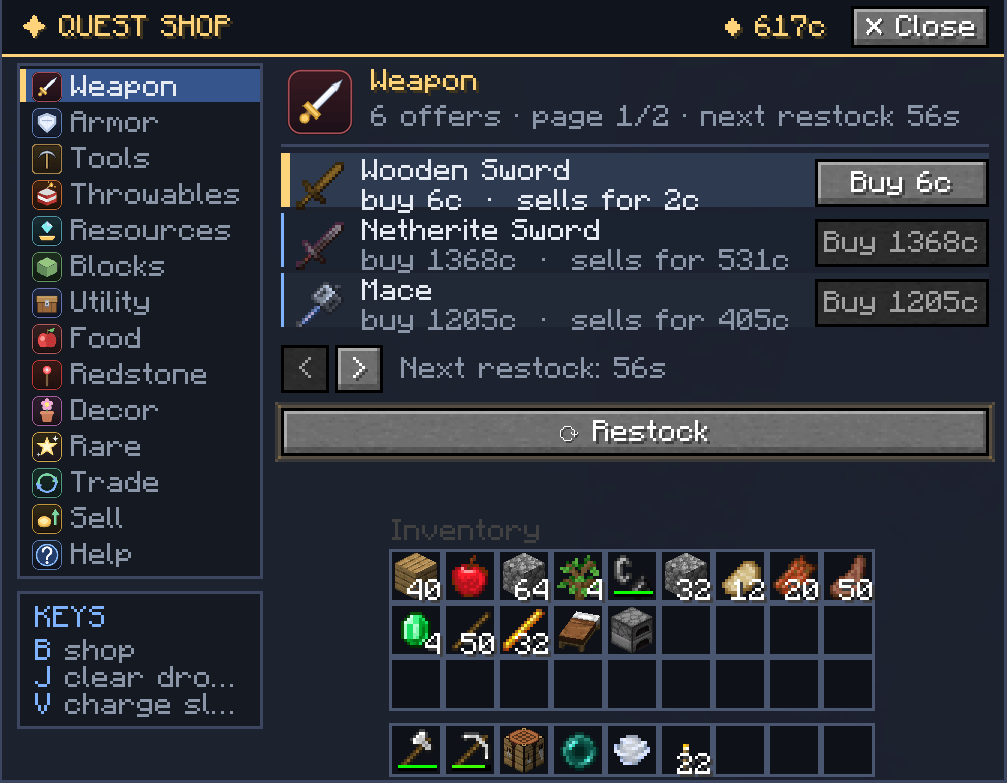 Screenshot 2026-07-28 150458.png Screenshot 2026-07-28 150458.png
 -
 Screenshot 2026-07-28 151136.png Screenshot 2026-07-28 151136.png
-
 Slam ui If press v to charge slam damage
 -
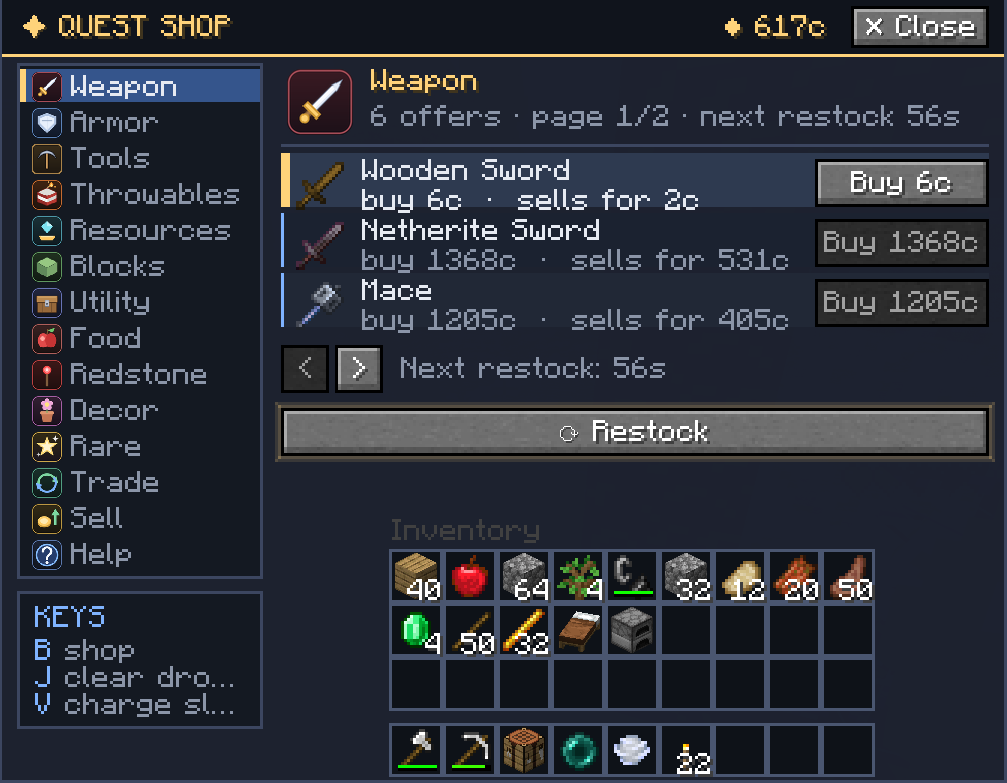 Ui shop The ui shop menu
Versions
Files
Relations
Project Relations
More like this
Similar Mods
Suggestions use data such as tags, dependencies, dependents, descriptions, titles, and more to rank how much they overlap with this mod.
On ModDex
Community snapshot
By the numbers
Statistics
 (opens in a new tab)
Get it on
Available Platforms
On ModDex
Community snapshot
By the numbers
Statistics
Resources