
Community listing page, reviews here may not be monitored by the author.
MI-Multiblock-EMI

No reviews yet
The MI Multiblock Guide for EMI adds a convenient 3D view of Modern Industrialization multiblock designs directly within EMI: layer-by-layer assembly, controller and hatch highlighting, a materials list, and add-on support.
Community voices
Reviews
No reviews yet. Be the first to review this project!
Get it on
Available Platforms
About
Project Details
For authors
Embed Badge
If you're the author of this project, you can embed a live badge anywhere that supports HTML or Markdown. It updates automatically whenever ratings change.
Use HTML for any page that supports it, or Markdown for README files and Markdown-based descriptions.
Identifiers
Platform IDs
Resources
External Links
About
Description
MI Multiblock Guide for EMI
An addon for Modern Industrialization that shows its multiblocks inside EMI as a rotatable 3D model, with a layer-by-layer walkthrough, hatch highlighting, a full material list and a dedicated guide window.
Minecraft 1.21.1 · NeoForge · client-side only
This is an addon. It requires Modern Industrialization and EMI to be installed — it does not work on its own and adds no content of its own.
The problem it solves
Modern Industrialization already lists multiblocks in EMI, but only as a flat "Multiblock Materials" list — block types and counts. That tells you what to gather, never how the structure actually looks: where the controller goes, what each layer looks like, or which blocks may be replaced by a hatch.
So you end up with a wiki open on a second monitor, or you keep rebuilding until "Shape Invalid" finally turns into "Shape Valid".
What this addon adds
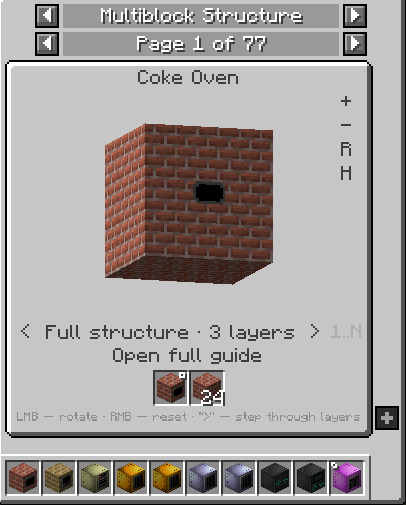
A new EMI category, Multiblock Structure, with one entry per shape — including per-variant entries such as Electric Blast Furnace coil tiers or Distillation Tower heights.
In the EMI panel
- A real 3D model of the structure. Left-drag to rotate, right-click to reset,
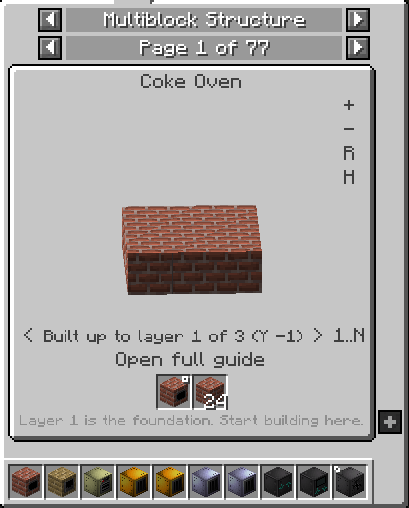
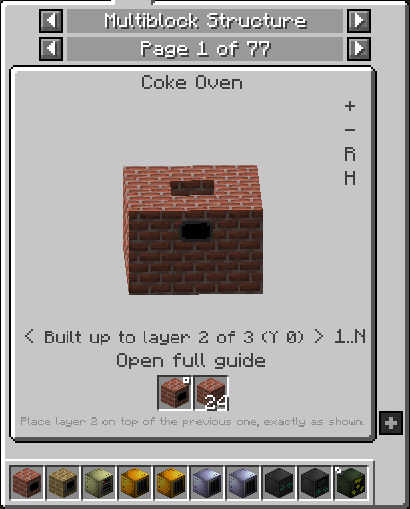
+/−/Rfor zoom and reset. - Step-by-step assembly. The
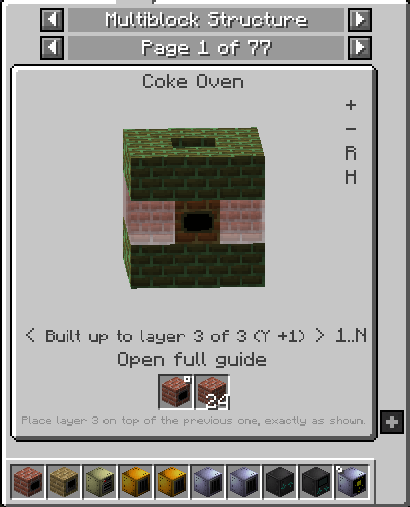
<>arrows walk through build stages: by default you see the structure assembled from the bottom up to the selected layer — exactly what stands in front of you in-game. The1..N/1button switches to single-layer view when you want to read the pattern. - The hint line follows the step: "Layer 1 is the foundation, start here" → "Place layer 3 on top of the previous one, exactly as shown".
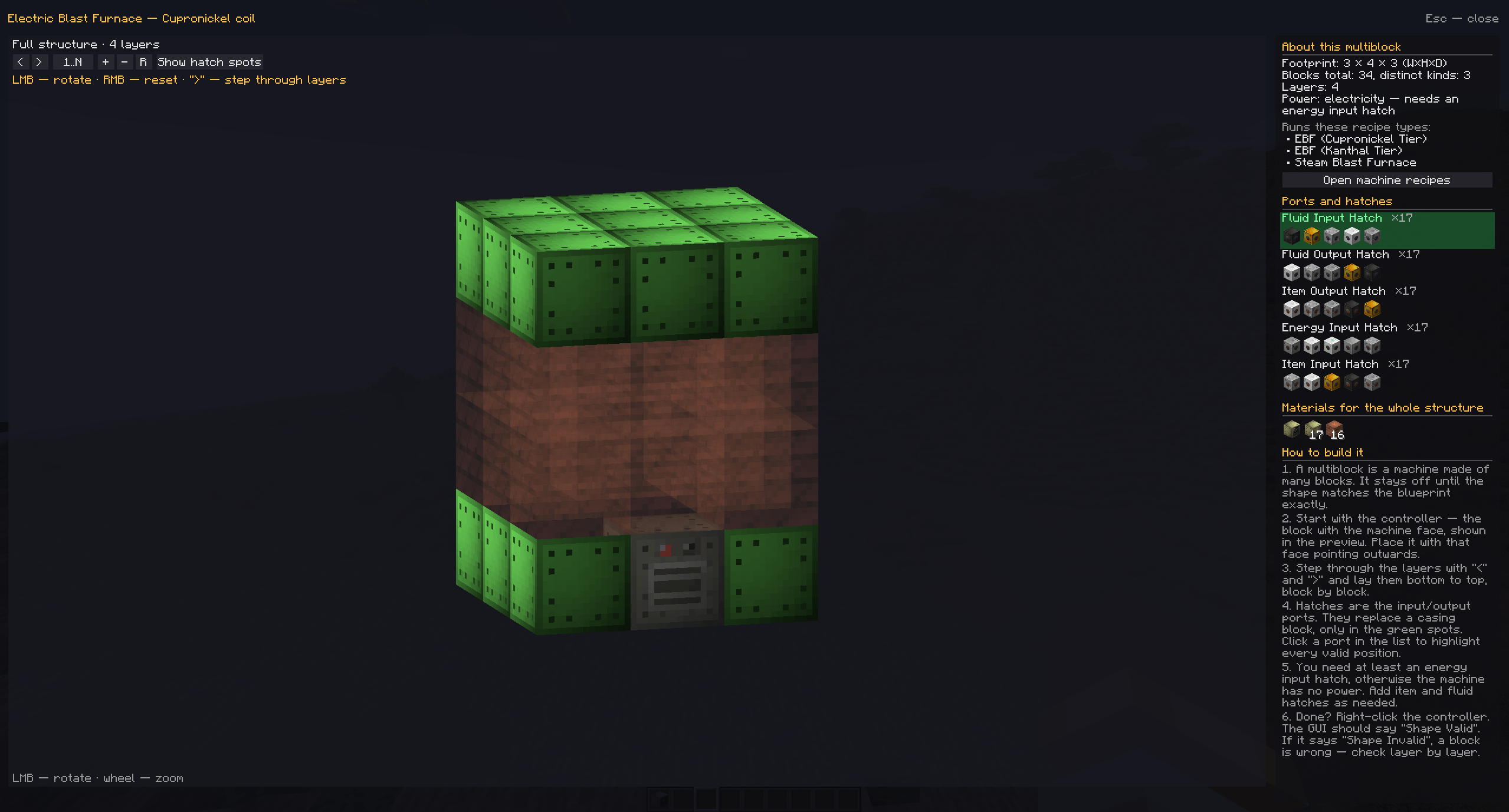
Hhighlights hatch positions: valid hatch spots turn green, everything else dims. Off by default, so blocks keep their real colours.- Material list for the whole structure, as ordinary EMI slots — hover for a tooltip,
Rfor the recipe,Ufor uses. - Hovering a block in 3D shows its name, its offset from the controller (
X 1, Y 0, Z 2) and every hatch type allowed at that position.
In the full-size guide window
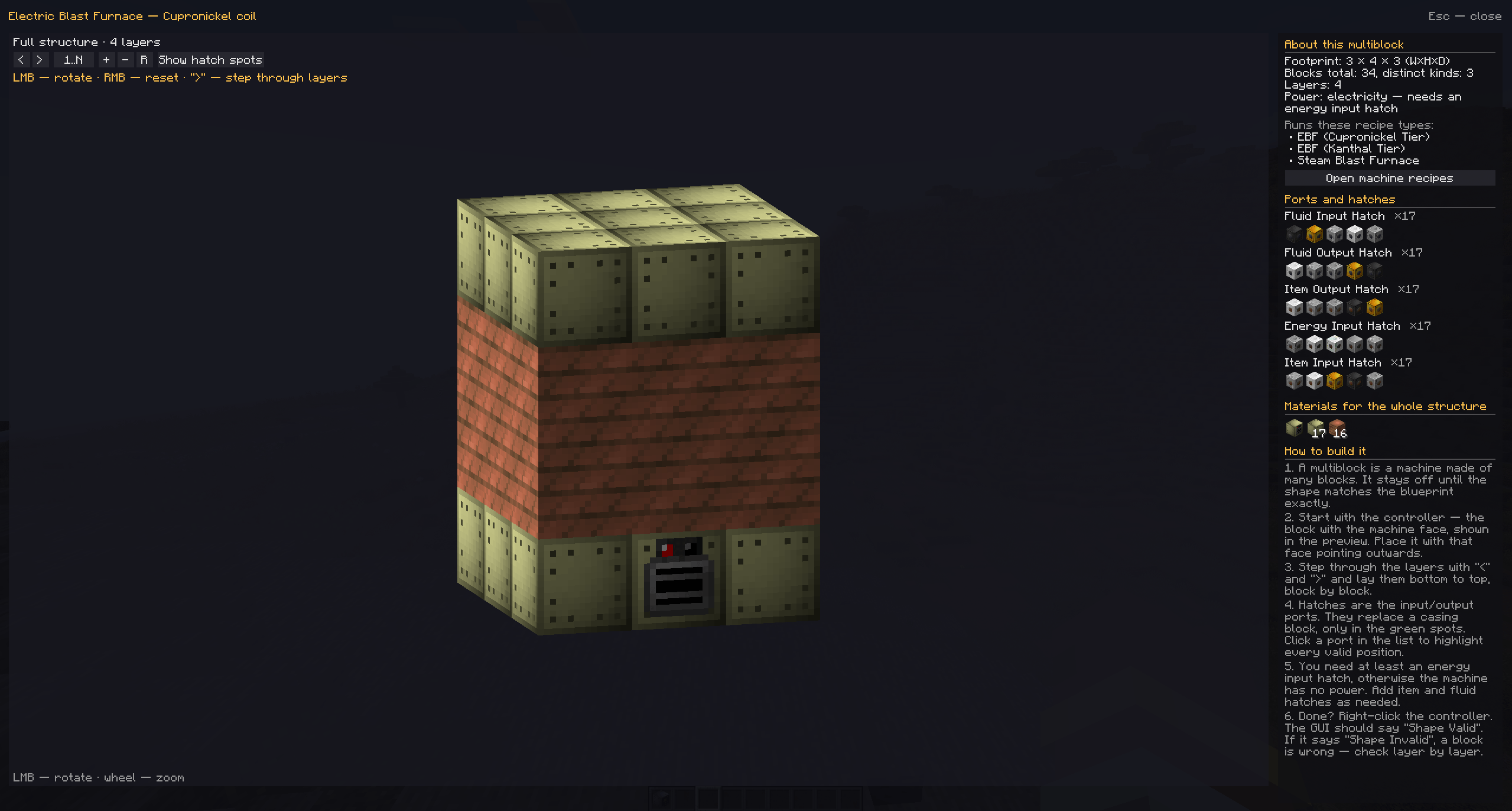
- A large scene: left-drag to rotate, scroll to zoom.
- About this multiblock — footprint, block and layer counts, power type (electric or steam), the recipe types the machine runs, and a button that jumps straight to its recipes in EMI.
- Ports and hatches — which port types the structure accepts and how many slots each has. Click a row and the matching positions light up in 3D while the rest of the structure fades. Icons of the matching hatches are listed below each port.
- Materials — the full list with counts.
- How to build it — six plain-language steps for players meeting multiblocks for the first time.
Addons work automatically
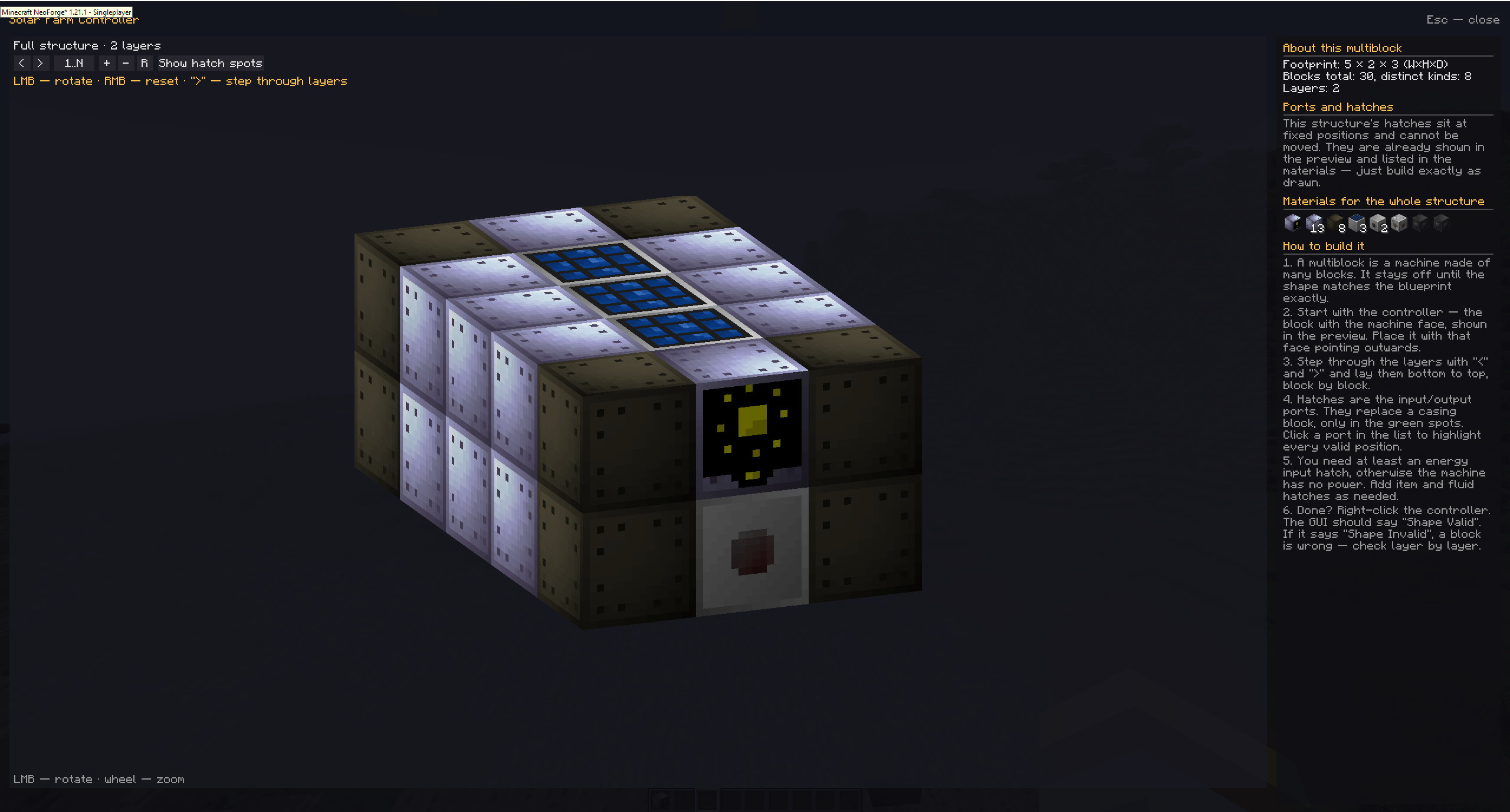
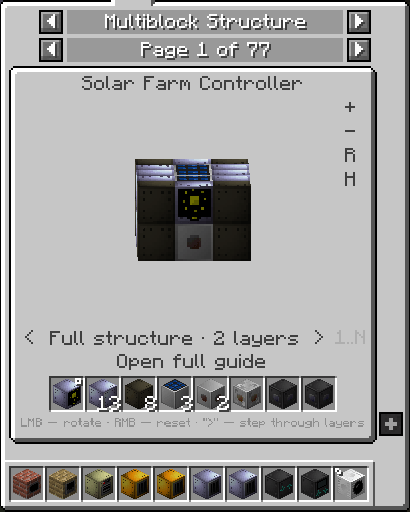
There is no hardcoded machine list. Shapes are read straight from Modern Industrialization's own shape registry, so multiblocks added by other mods show up on their own. On a test pack with Extended Industrialization, Industrialization Overdrive, Solar Industrialization and Yet Another Industrialization, 77 shapes are detected — including Processing Array, Farmer, Pyrolyse Oven, Solar Farm and Large Electric Furnace.
The preview also handles the awkward cases: a controller is turned so its machine face ends up on the outside of the structure rather than walled in by a neighbouring block, and mods that draw part of a machine in a BlockEntityRenderer instead of the baked model are rendered too.
Requirements
- Minecraft 1.21.1, NeoForge 21.1
- Modern Industrialization
- EMI
- GuideME (normally already installed as an MI dependency)
Client-side only: it registers no blocks, items or recipes, writes nothing to the world and sends no packets. Installing it on a dedicated server does nothing.
Compatibility
Tested with Sodium and Iris. Rendering goes through the vanilla BlockRenderDispatcher in GUI space without overriding the projection, so shader and performance mods do not interfere with it.
Licence
All Rights Reserved — free to use, and free to include in modpacks (including paid ones) without asking, as long as you link back to this page. Re-uploading the mod elsewhere or distributing modified builds is not allowed. The full terms ship in the LICENSE file inside the download, together with third-party notices for Modern Industrialization, EMI and GuideME.
Screenshots
Gallery
-
 01-emi-panel.png 01-emi-panel.png
 -
 01-emi-panel-layer1.png 01-emi-panel-layer1.png
 -
 01-emi-panel-layer2.png 01-emi-panel-layer2.png
 -
 03-hatches.png 03-hatches.png
 -
 04-guide-window.png 04-guide-window.png
 -
 05-ports-highlight.png 05-ports-highlight.png
 -
 06-addon-solar-farm.-guide-windowspng.PNG 06-addon-solar-farm.-guide-windowspng.PNG
 -
 06-addon-solar-farm.png 06-addon-solar-farm.png
Versions
Files
Relations
Project Relations
More like this
Similar Mods
Suggestions use data such as tags, dependencies, dependents, descriptions, titles, and more to rank how much they overlap with this mod.
On ModDex
Community snapshot
By the numbers
Statistics
Want to reach Minecraft players?
We're looking for a server hosting partner to feature here and other parts of the site. Interested? Send us a message!
Get in touchGet it on
Available Platforms
On ModDex
Community snapshot
By the numbers
Statistics
Resources