
Mind Your Bruises
No reviews yet
A client-side Minecraft mod that colors the entity hurt overlay based on damage type.
Fabric is a mod loader for versions 1.14+ of Minecraft, particularly popular for client side and optimization mods.
Community voices
Reviews
Click once to include, again to exclude, again to clear
No reviews yet. Be the first to review this project!
Get it on
Available Platforms
 Modrinth
Compatibility
Supported Environments
About
Project Details
For authors
Embed Badge
If you're the author of this project, you can embed a live badge anywhere that supports HTML or Markdown. It updates automatically whenever ratings change.
Use HTML for any page that supports it, or Markdown for README files and Markdown-based descriptions.
Identifiers
Platform IDs
About
Description
Mind Your Bruises
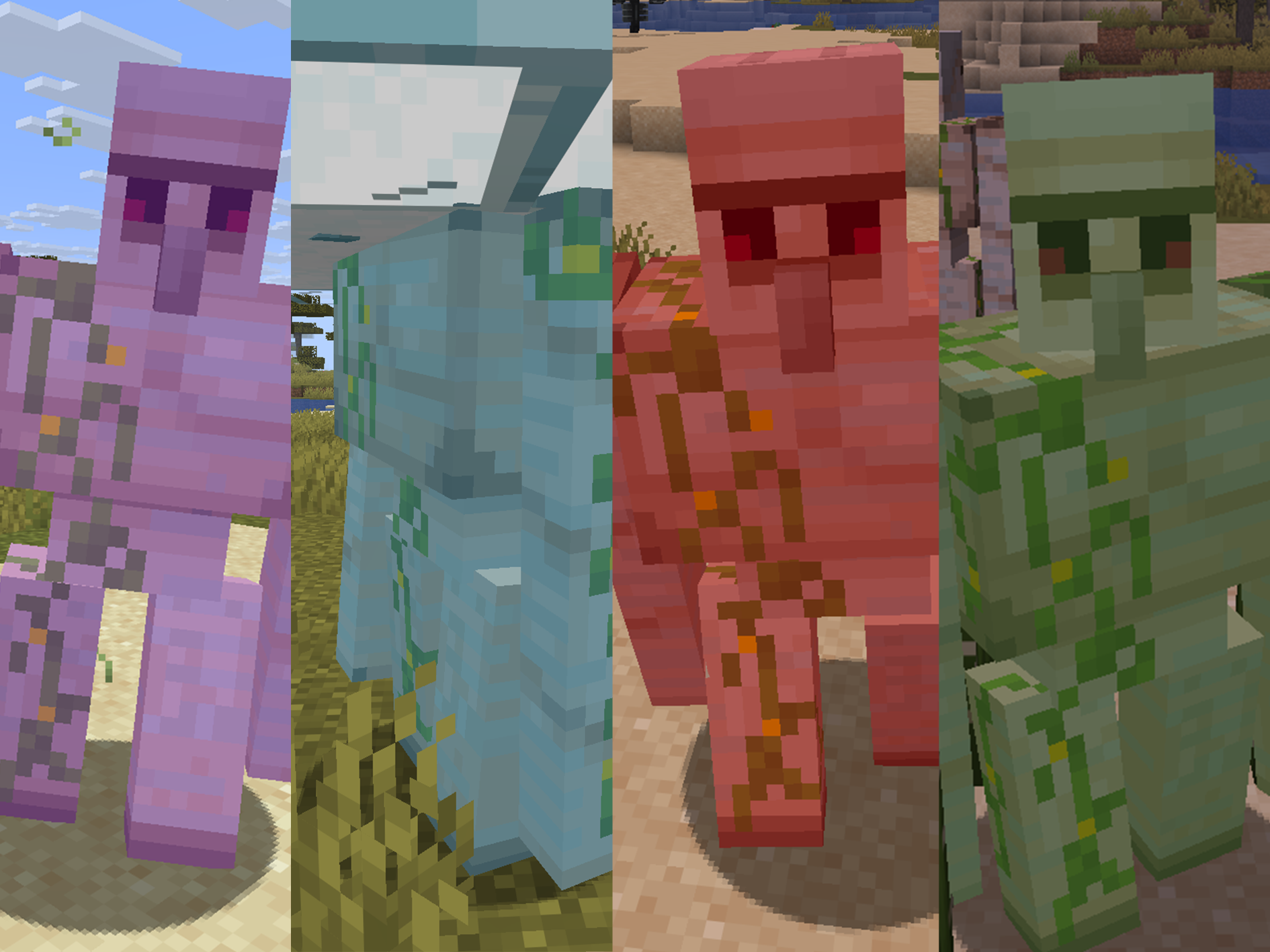
Mind Your Bruises is a client-side Minecraft Fabric mod for 1.21.11 that recolors the vanilla entity hurt overlay based on the damage type that caused it.
The mod keeps vanilla red as the fallback color, then uses different overlay rows for broad damage categories such as fire and explosion, frost and drowning, plant, arcane/wither/void-like damage, shock, starvation, and ender pearl damage.
Features
- Recolors the vanilla entity hurt overlay on the client.
- Uses different colors for broad damage categories such as fire and explosion, frost and drowning, plant, arcane/wither/void-like damage, shock, starvation, and ender pearl damage.
- Keeps vanilla red as the fallback color for unmatched damage types.
- Supports JSON configuration for colors and damage type overrides.
- Supports custom damage types from mods and datapacks through
damageTypeOverrides.
Configuration
Mind Your Bruises creates this config file after the game starts:
.minecraft/config/mind-your-bruises.json
In a development environment, the file is created under:
run/config/mind-your-bruises.json
The config uses one JSON file directly under config/.
If Mod Menu and YetAnotherConfigLib are installed, you can also open the in-game configuration screen from the Mod Menu entry. The in-game screen supports the main toggle, fixed color group color pickers, and advanced damage type overrides.
Example config:
{
  "enabled": true,
  "fireColor": "#ff7014",
  "frostColor": "#4bd2ff",
  "plantColor": "#50dc3c",
  "fallbackColor": "#ff0000",
  "arcaneColor": "#b950ff",
  "shockColor": "#d8f6ff",
  "starvationColor": "#9a7a32",
  "enderColor": "#2bd6b3",
  "damageTypeOverrides": {}
}
Manual edits require a game restart.
Configuration fields:
enabled: Turns the mod's recolored hurt overlay on or off. When set tofalse, the overlay falls back to vanilla red.fireColor,frostColor,plantColor,fallbackColor,arcaneColor,shockColor,starvationColor, andenderColor: Hex RGB colors in#rrggbbformat. Missing#is accepted and normalized on save.damageTypeOverrides: Adds custom overrides on top of the built-in mappings. The left side is a damage type id and the right side is a color group. Valid color groups arefire,frost,plant,fallback,arcane,shock,starvation, andender. Built-in mappings are not written to the config file; to override one, add it here explicitly.
Default color groups:
| Color group | Default color | Built-in damage types |
|---|---|---|
fire |
#ff7014 |
Fire, lava, hot floor, fireballs, explosions, fireworks |
frost |
#4bd2ff |
Freezing and drowning damage |
plant |
#50dc3c |
Cactus and sweet berry bush damage |
arcane |
#b950ff |
Magic, indirect magic, dragon breath, sonic boom, thorns, wither, wither skull, out of world, outside border, generic kill |
shock |
#d8f6ff |
Lightning damage |
starvation |
#9a7a32 |
Starvation damage |
ender |
#2bd6b3 |
Ender pearl damage |
fallback |
#ff0000 |
Unmatched damage types, vanilla physical damage, bee stings, suffocation, cramming |
For example, this makes a custom thorny plant damage type use the plant overlay color, and forces vanilla drowning damage back to the fallback red overlay:
"damageTypeOverrides": {
  "examplemod:thorny_vine": "plant",
  "minecraft:drown": "fallback"
}
If a damage type is not listed in damageTypeOverrides, Mind Your Bruises falls back to its built-in broad matching rules, then finally to fallbackColor.
Requirements
- Minecraft 1.21.11
- Fabric Loader 0.19.3 or newer
- Java 21 or newer
Mod Menu and YetAnotherConfigLib are optional, but recommended if you want to edit the config in game. Without them, the mod still works and can be configured by editing mind-your-bruises.json manually and restarting the game.
Compatibility
Mind Your Bruises is client-side only. It changes how hurt entities are rendered on your client and does not change damage rules, health, invulnerability frames, or server behavior.
Building
.\gradlew.bat build
The built jar will be generated under build/libs/.
Screenshots
Gallery
Versions
Files
Relations
Project Relations
More like this
Similar Mods
Suggestions use data such as tags, dependencies, dependents, descriptions, titles, and more to rank how much they overlap with this mod.
On ModDex
Community snapshot
By the numbers
Statistics

Want to reach Minecraft players?
We're looking for a server hosting partner to feature here and other parts of the site. Interested? Send us a message!
Get in touchGet it on
Available Platforms
On ModDex
Community snapshot
By the numbers