
Minecraft Bingo
No reviews yet
Be the first team to collect all required items, mobs and advancements to win the game!
Fabric is a mod loader for versions 1.14+ of Minecraft, particularly popular for client side and optimization mods.
Community voices
Reviews
Click once to include, again to exclude, again to clear
No reviews yet. Be the first to review this project!
Get it on
Available Platforms
 Modrinth
Compatibility
Supported Environments
About
Project Details
For authors
Embed Badge
If you're the author of this project, you can embed a live badge anywhere that supports HTML or Markdown. It updates automatically whenever ratings change.
Use HTML for any page that supports it, or Markdown for README files and Markdown-based descriptions.
Identifiers
Platform IDs
Resources
External Links
About
Description
Minecraft Bingo
Be the first team to collect all required items, mobs and advancements to win the game!

Minecraft Bingo lets you and your friends play a game of bingo in Minecraft. Players are divided into teams and must collect all randomly selected items, mobs and advancements to win. The mod is highly configurable and can be adjusted to suit different playing styles. The mod is designed to be played on a multiplayer server, but can also be played without a server.
Getting Started
- Install Fabric
- Download Fabric API and put it in the mods folder
- Download Minecraft Bingo from Modrinth and put it in the mods folder
- (Optional - but highly recommended) Use the Minecraft Bingo Resource Pack
Commands
/bingoor/b- Opens the bingo GUI, that shows all items to collect/bingo teams- Opens the team selection GUI/bingo settings-OPOpens the settings GUI/bingo start-OPStarts a new bingo game with the current settings/bingo stop-OPStops the current bingo game/bingo pause-OPPauses the current bingo game/bingo resume-OPResumes the current bingo game/bingo reset <suggested random string>-OPStops the server and resets the world with a new seed. The random string at the end is used to prevent accidental resets/top- Teleports you to the surface (or to the world spawn if you are in the nether or the end)/backpackor/bpor/ec- Opens the team backpack
Teams
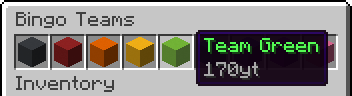
Players can join a team by using the /bingo teams command.
Team Management for OPs
Teams in Bingo are managed using the standard Minecraft team system. All teams used by Bingo are automatically created and managed by the mod (nine different teams are used).
OPs can use the vanilla /team command to manage the players in the teams. The following commands are available:
/team join <team> [<members>]-OPJoins the specified team/team leave <members>-OPLeaves the team
Settings
The settings are automatically saved between rounds so you do not have to reconfigure them every time.

All available settings from top left to bottom right:
PvP- Enable player vs player combatNo Damage- Players do not take damageNo Hunger- Players do not lose hungerKeep Inventory- Keep inventory on deathAllow Flying- Enable creative flight for all playersBlock Break Speed- Multiplier for block break speedMovement Speed- Multiplier for movement speed (including swimming)Step Height- Additional step heightCommand Top- Enable the/topcommandTeam Backpack- Enable team backpacks (/backpack)Goal Amount- The amount of items, mobs and advancements each team needs to collectGoal Type: Items- Enable items as goalsGoal Type: Mobs- Enable mobs as goalsGoal Type: Advancements- Enable advancements as goals- Enable/Disable up to 18 Pools (see Pools)
Stop Game- Stops the current game and shows the leaderboardPause/Resume Game- Pauses or resumes the current gameStart Game- Starts a new game with the current settings
Icons
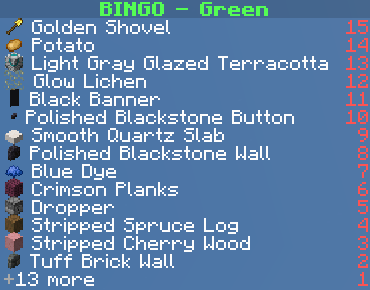
The scoreboard can display icons for each goal. For this to work, the player (client) needs to have the Minecraft Bingo Resource Pack installed.
For instructions on how to install the resource pack, see Minecraft Bingo Resource Pack.
Pools
Pools are used to group goals into different categories. Each pool contains a set of items, mobs and advancements that can be selected as goals.
Each pool has a config file that can be modified to add or remove goals.
You can also create your own custom pools by creating a new config file in the config/bingo/pools folder.
There you will also find the existing pool config files that you can modify.
Bingo comes with the following pools by default:
Overworld Easy
Requires little to no traveling and can be completed in a short amount of time.
Most goals are related to mining, crafting and fighting.
Includes: Coal, Iron, Copper
Overworld Medium
Requires a decent amount of traveling and caving.
Some trading might be helpful to complete the goals.
Includes: Gold, Redstone, Emerald, Lapislazuli, Diamond
Overworld Hard
Requires a lot of traveling.
Includes: advanced Trading, Silk Touch, basic Nether, Bees
Nether
Playable fully in the nether.
Excludes extreme items, like nether stars and armor trims.
End
Playable fully in the end.
Starting gear is recommended for end only.
Extreme
The hardest items from all dimensions.
Includes: dyed Shulker Boxes, aged Copper Variants, Trial Chambers, Beacons
FAQ
- I see weird textures in the bingo goals inventory and the scoreboard. What can I do?
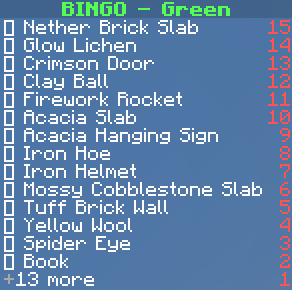
You need to install the Minecraft Bingo Resource Pack. - Do I need to install the mod on the client side?
No, the mod is server-side only and does not require the client to have it installed if it's already installed on the server.
The mod is designed to be played on a server with vanilla clients and does not require any client-side mods.
Screenshots
Gallery
-
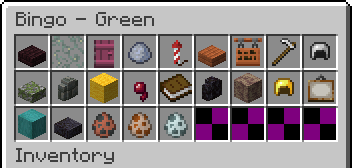
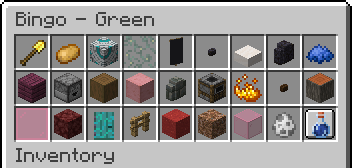 Bingo Goals Inventory The bingo goals inventory shows all items, mobs and advancements that need to be collected to win the game. Mobs are shown with their spawn egg and advancements are shown with their item and an advancement background.
 -
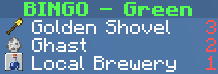
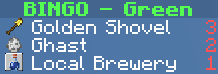 Scoreboard Goal Types with Icons Each goal type has a different icon in the scoreboard. Items show their icon (Golden Shovel), mobs show their spawn egg (Ghast) and advancements show their item with an advancement background (Local Brewery).
 -
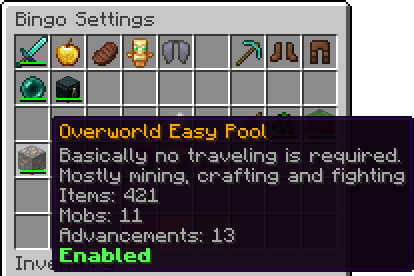 Settings Pool Every pool shows a brief description and the amount of items, mobs and advancements it contains.
 -
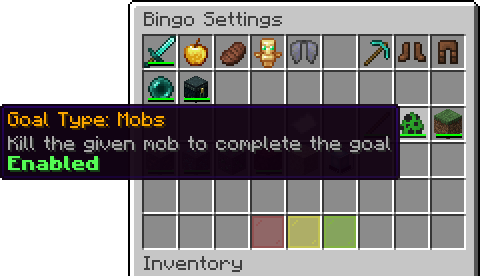 Settings Goal Type Every goal type (Items, Mobs, Advancements) can be enabled or disabled.
 -
 Bingo Welcome Message The welcome message shows the most important commands to get started.
 -
 Bingo Game Started Message The game started message shows the amount of goals and the most important commands to play the game.
 -
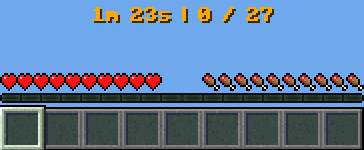 Bingo Timer and Score The timer and score are displayed in the action bar.
 -
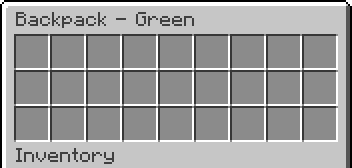 Bingo Backpack The team backpack can be accessed by every team member using the /backpack command.
Versions
Files
Relations
Project Relations
More like this
Similar Mods
Suggestions use data such as tags, dependencies, dependents, descriptions, titles, and more to rank how much they overlap with this mod.
On ModDex
Community snapshot
By the numbers
Statistics

Want to reach Minecraft players?
We're looking for a server hosting partner to feature here and other parts of the site. Interested? Send us a message!
Get in touchGet it on
Available Platforms
On ModDex
Community snapshot
By the numbers
Statistics
Resources