
Community listing page, reviews here may not be monitored by the author.

Community voices
Reviews
No reviews yet. Be the first to review this project!
Get it on
Available Platforms
Compatibility
Supported Environments
Runs on a dedicated server only; does not work in singleplayer.
About
Project Details
For authors
Embed Badge
If you're the author of this project, you can embed a live badge anywhere that supports HTML or Markdown. It updates automatically whenever ratings change.
Use HTML for any page that supports it, or Markdown for README files and Markdown-based descriptions.
Identifiers
Platform IDs
Resources
External Links
About
Description
Minecraft Server Updater
This mod is experimental!
Please assume that there may be issues!
Minecraft Server Updater (MSU) is a server-side Fabric and Forge utility for keeping a Minecraft server up to date with Modrinth-backed checks, safe staging, wrapper-based installs, automation, and rollback support.
Install the matching jar: minecraft-server-updater+fabric-… on Fabric, minecraft-server-updater+forge-… on Forge. They are separate files and are not interchangeable.
MSU is designed for server owners and admins who want update mods without having to constantly manually update them!
Core idea: Check what is outdated, stage safe updates into a holding area, then let the wrapper apply them cleanly before the next server boot.
Highlights
- Safe update flow: check → stage → apply on restart
- Modrinth-backed mod resolution
- Supports mod lists, reference mod folders, and
.mrpackfiles - Fabric Loader / launcher maintenance, or Forge loader / shim / args-file maintenance
- Optional Minecraft version upgrade checks
- Self-update support for MSU
- Automation modes for check, stage, or install workflows
- Rollback and boot verification
- Operator-only
/msucommands - Readable status output with clear safe-to-stage reasons
✨ Feature set
Safe check → stage → apply workflow
MSU does not replace running mod jars while the Minecraft server is live.
Instead, it uses a three-step process:
- Check — query Modrinth and inspect the configured source.
- Stage — download or prepare replacement files into
.minecraft-server-updater/. - Apply — on the next wrapper start, staged files are installed before Fabric or Forge starts.
This keeps update actions predictable and avoids modifying jars that the server is currently using.
Mod update checks
MSU checks whether configured mods have newer compatible builds for the Minecraft version the server is running right now.
Supported mod sources:
| Source type | What it does |
|---|---|
mod-list |
Tracks one Modrinth project slug, id, or exact name per line in .minecraft-server-updater/mod-list. |
mods-folder |
Uses jars in a reference folder as the managed mod set. |
mrpack |
Uses a Modrinth pack file or URL as the managed source. |
Mod-list entries resolve only by direct Modrinth project id/slug or an exact search hit — MSU does not guess from ambiguous names.
Server maintenance
MSU can check and stage server-side maintenance for the current Minecraft version.
- Fabric: Fabric Loader and
fabric-server-launch.jarwhen enabled. Fabric API for the running version is handled by mod checks/staging. The vanillaserver.jaronly changes when Minecraft changes version. - Forge: latest Forge for the running Minecraft version (installer-generated shim,
run.bat/run.sh, andlibraries/…/win_args.txtorunix_args.txt). The vanilla jar lives underlibraries/net/minecraft/server/<mc>/, not as a rootserver.jar.
Minecraft upgrades
When server-upgrade is enabled, MSU can check readiness for:
- Latest Minecraft release
- A specific target Minecraft version
Server upgrades are separate from routine mod checks. Mod checks always target the version the server is actually running. Server upgrade checks target the configured upgrade version and may include:
- Minecraft server jar (Fabric root
server.jar, or Forge’s library jar for that version) - Fabric launcher / loader or Forge installer output for the target version
- Fabric API for the target version on Fabric (shown under server update candidates, not as a normal mod-list update)
- Optional mod preflight for the upgrade target when enabled
- A target-compatible MSU jar when Minecraft version changes (Fabric and Forge MSU files are published separately)
Self-update
MSU can check whether a newer MSU build is available on Modrinth and stage its own replacement for the next restart. Server upgrades to a new Minecraft version may require a target-compatible MSU build to be staged together. Use the Fabric file on Fabric and the Forge file on Forge.
Combined staging
/msu stage all can combine safe selected targets into one staged restart plan, allowing server maintenance, mod updates, self updates, and compatible Minecraft upgrades to apply on one restart with one backup.
If a server upgrade is configured but not safe to stage, combined staging stops there and does not stage other targets until server preflight is resolved.
📋 Understanding check output
MSU reports safety on separate lines so you can see whether staging is allowed and why not.
Safe-to-stage lines
| Line | Meaning |
|---|---|
Server safe to stage: true |
Server maintenance or upgrade can be staged. |
Server safe to stage: false; … |
Server staging is blocked; the reason is on the same line (for example missing MSU or Fabric API on Modrinth for the target version, or mod preflight failure). |
Safe to stage mods: true/false |
Whether /msu stage mods is allowed for the running Minecraft version. |
Mods stage blocked: … |
Shown when mod staging is blocked (for example no updates available, unknown jars, policy blocks, or mrpack exact-pack issues). |
Mods ready for target: true/false |
Whether managed mods look ready for a configured server upgrade target (preflight only; not the same as “updates available today”). |
Two Minecraft versions in one check all
/msu check all can show both:
check server— uses the upgrade target (for example 26.2) when upgrade is enabledcheck mods— uses the running version (for example 26.1.2)
That is intentional, but easy to misread. Example:
- Server section:
Fabric API [missing → 0.152.1+26.2]means the server upgrade will install Fabric API for the target version — not that your mod checker found a routine mod update. - On Forge, the server section names Minecraft / Forge (for example
26.2 / 65.1.3) instead of Fabric Loader / Fabric API. - Mod section:
0 updates availablemeans nothing needs staging on the version you are running now, even if an upgrade is planned.
What blocks stage all
Combined staging follows safety in order:
- If a server upgrade is available but
Server safe to stage: false,stage allstops and does not stage mods or self until server preflight passes. - Mods are included when safe for the combined plan — including some upgrade cases where mods have no updates on the running version but are still ready for the target.
- Self-update is staged only when safe and not already handled as part of a required server-upgrade MSU swap.
Use /msu status after staging to see the combined plan before restart.
🧩 Supported update sources
MSU is built around a configured update source.
mod-list
Best for servers where you want to keep a chosen list of Modrinth projects up to date.
Default file: .minecraft-server-updater/mod-list (one project per line; not a JSON array).
Example:
fabric-api
lithium
c2me-fabric
On Forge, list Forge-loader Modrinth projects the same way (one slug, id, or exact title per line).
MSU resolves those projects through Modrinth and checks for compatible builds for the running Minecraft version.
mods-folder
Best for servers that keep a reference folder of known-good jars.
Default folder: .minecraft-server-updater/mods-folder.
MSU reads the reference jars, identifies Modrinth projects where possible, and manages updates from that set.
mrpack
Best for servers based on a Modrinth modpack.
MSU can manage projects from a .mrpack file or a Modrinth pack URL.
advanced.mrpackMode controls behavior:
| Mode | Behaviour |
|---|---|
exact (default) |
Stage the exact pack files and hashes; strict Minecraft / loader checks. |
tracking |
Treat pack project ids as a managed list and resolve latest compatible builds. |
🛡️ Safety model
MSU is designed to avoid risky live replacement.
It does not hot-swap running jars
The server keeps using the currently loaded files until restart.
Staged updates are held separately
Downloads and replacement files are prepared in the MSU staging area first.
The wrapper applies updates before boot
When the server is started with the wrapper, MSU applies the staged plan before Fabric or Forge starts. Without --wrap (Fabric) or --wrap-forge (Forge), you can still check and stage, but nothing applies on restart.
Rollback support
When a staged plan is applied, MSU can record backup metadata. If boot verification fails, rollback support helps restore the previous working files.
Unknown/custom jars are handled carefully
Unknown jars can be reported and held by local filename policy, but MSU does not treat them as Modrinth-managed or compatibility-checked unless they can be resolved.
Server upgrade preflight
When enabled, MSU checks that managed mods (and required dependencies) look compatible with the target Minecraft version before allowing a server upgrade to stage. On Fabric, Fabric API for the target version is handled as part of the server upgrade path when needed.
Destructive unmanaged mod removal
When enabled for mod-list or mrpack sources, staging may list unmanaged .jar files that would be deleted on apply. Apply is blocked until advanced.allowRemoveUnmanagedMods is true and /msu stage confirm-destructive true has been run on the active staged plan.
Boot recovery and quarantine
After a failed boot, automation and manual staging are blocked until /msu boot clear-failure. If an invalid staged plan is quarantined at apply time, acknowledge it with /msu quarantine acknowledge before staging again.
⚙️ Commands
Default command root:
/msu
All /msu commands require operator/admin permission.
Command tree
/msu
├── status
├── reload
├── check
│   ├── mods | server | self | all
├── stage
│   ├── mods | server | self | all
│   ├── confirm-destructive true | false
│   └── cancel
├── rollback [backupId]
├── boot
│   ├── clear-failure
│   └── force-retry
│       ├── current
│       └── <fingerprintId>
├── quarantine
│   ├── acknowledge
│   └── delete confirm
└── config
    ├── reset [param]
    └── set
        ├── source <type> [path]
        ├── automation <mode> [targets]
        ├── interval <minutes>
        ├── debug <on|off>
        ├── server-maintenance <on|off>
        ├── server-upgrade <token>
        ├── mrpack-mode <exact|tracking>
        ├── release-channel <channel> [mod]
        ├── held <on|off> <mod>
        └── required <on|off> <mod>
Quick reference
| Command | Purpose |
|---|---|
/msu status |
Show staged plan, runtime info, config, automation, rollback, unsafe-state warnings, and formatting state. |
/msu reload |
Reload config from disk and restart automation. |
/msu check mods |
Check configured mods for the running Minecraft version. |
/msu check server |
Check server maintenance and optional upgrade readiness. |
/msu check self |
Check for an MSU self-update. |
/msu check all |
Run all configured checks (server, mods, and self sections as applicable). |
/msu stage mods |
Stage mod updates for the running Minecraft version only. |
/msu stage server |
Stage safe server maintenance or upgrade work. |
/msu stage self |
Stage an MSU jar replacement. |
/msu stage all |
Stage all safe selected targets into one combined plan. |
/msu stage cancel |
Clear the staged plan. |
/msu stage confirm-destructive true / false |
Acknowledge or clear destructive unmanaged mod removal on the active staged plan. |
/msu rollback |
Restore the most recent apply backup. |
/msu rollback <id> |
Restore a named backup. |
/msu boot clear-failure |
Clear failed-boot record and boot failure streak (does not un-hold mods). |
/msu boot force-retry current |
Allow automation to retry the current failed-update fingerprint. |
/msu boot force-retry <fingerprintId> |
Allow automation to retry a specific failed-update fingerprint. |
/msu quarantine acknowledge |
Acknowledge a quarantined invalid staged plan so automation can continue. |
/msu quarantine delete confirm |
Delete acknowledged quarantined evidence files. |
/msu config reset |
Rewrite the config with documented defaults. |
/msu config reset <param> |
Reset a specific config section (for example source, release-channel). |
/msu config set … |
Change source, automation, interval, debug, server maintenance, upgrade, mrpack mode, release channel, held mods, or required mods. |
Long-running checks may print to the server log; in RCON you may see a background notice — read logs/latest.log for full output.
🤖 Automation
MSU can run background checks on a timer.
Automation modes:
| Mode | Behaviour |
|---|---|
disabled |
No background activity. |
check |
Report only; never stages files. |
stage |
Checks and stages safe updates; you restart when ready. |
install |
Checks, stages, then stops the server so the wrapper can apply updates on restart. |
Automation targets:
| Target | Purpose |
|---|---|
mods |
Check or stage configured mod source updates (running MC version). |
server |
Check or stage Fabric or Forge server maintenance and optional Minecraft upgrades. |
self |
Check or stage MSU self-update. |
Example:
/msu config set automation stage server mods self
/msu config set interval 360
Use install only when the server is started through the wrapper (--wrap or --wrap-forge) and you are comfortable with MSU stopping the server for restart-based installation.
Automation is blocked while a failed boot record is active, a quarantined invalid plan is pending acknowledgement, or a failed-update fingerprint has not been cleared or force-retried.
🚀 Quick start
- Put the matching MSU jar in
mods/. Fabric:minecraft-server-updater+fabric-<msu>.jar. Forge:minecraft-server-updater+forge-<msu>.jar. Do not mix both jars on one server. Current names do not embed the Minecraft version; list supported game versions on the Modrinth file. - Configure your update source.
- Run a check.
- Stage available updates.
- Start from the server root with the wrapper for your loader (replace stock
run.bat/run.shon Forge).
Fabric wrapper
Start from the directory that contains fabric-server-launch.jar. These scripts pick the first mods/minecraft-server-updater+fabric-*.jar (or mods/minecraft-server-updater.jar).
start.bat (Windows):
@echo off

REM set ram requirements here:
set MC_XMX=2G
set MC_XMS=2G

cd /d "%~dp0"
for %%F in ("mods\minecraft-server-updater+fabric-*.jar" "mods\minecraft-server-updater.jar") do (
  java -jar "%%F" --wrap -- java -Xmx%MC_XMX% -Xms%MC_XMS% -jar fabric-server-launch.jar --nogui
  goto :after
)
echo No Minecraft Server Updater jar found in mods\
pause
exit /b 1
:after
start.sh (Linux):
#!/usr/bin/env sh

# set ram requirements here
MC_XMX="${MC_XMX:-2G}"
MC_XMS="${MC_XMS:-2G}"

cd "$(dirname "$0")" || exit 1
for jar in mods/minecraft-server-updater+fabric-*.jar mods/minecraft-server-updater.jar; do
  if [ -f "$jar" ]; then
    exec java -jar "$jar" --wrap -- java -Xmx"$MC_XMX" -Xms"$MC_XMS" -jar fabric-server-launch.jar --nogui
  fi
done
echo "No Minecraft Server Updater jar found in mods/"
exit 1
On Linux: chmod +x start.sh, then ./start.sh.
Forge wrapper
Forge does not use --wrap -- java -jar …. --wrap-forge finds the installed coordinate under libraries/net/minecraftforge/forge/<minecraft>-<forge>/ and launches the same way stock run.bat does:
java @user_jvm_args.txt @libraries/net/minecraftforge/forge/<mc>-<forge>/win_args.txt --nogui
Put RAM and other JVM flags in user_jvm_args.txt. Extra arguments after --wrap-forge (usually --nogui) are Minecraft program args. Do not java -jar forge-*-shim.jar yourself; leftover installer/shim jars in the server root are not what the wrapper runs.
start.bat (Windows):
@echo off
cd /d "%~dp0"
for %%F in ("mods\minecraft-server-updater+forge-*.jar" "mods\minecraft-server-updater.jar") do (
  java -jar "%%F" --wrap-forge --nogui
  goto :after
)
echo No Minecraft Server Updater jar found in mods\
pause
exit /b 1
:after
start.sh (Linux):
#!/usr/bin/env sh
cd "$(dirname "$0")" || exit 1
for jar in mods/minecraft-server-updater+forge-*.jar mods/minecraft-server-updater.jar; do
  if [ -f "$jar" ]; then
    exec java -jar "$jar" --wrap-forge --nogui
  fi
done
echo "No Minecraft Server Updater jar found in mods/"
exit 1
After a Forge Minecraft/Forge bump, the wrapper resolves the new win_args.txt / unix_args.txt on the next start so launch does not stay pointed at the previous coordinate.
Example manual update flow
/msu check mods
/msu stage mods
/msu status
Then restart with the wrapper (start.bat, ./start.sh, or the java -jar mods/minecraft-server-updater+…jar … line above).
Example Minecraft upgrade flow
/msu config set server-upgrade latest
/msu check server
/msu stage all
/msu status
Read Server safe to stage before staging — if it is false, fix the stated reason (often publish/install a target-compatible MSU build on Modrinth) before stage all.
📝 Example configuration
Config file:
config/minecraft-server-updater.json
Example shape:
{
  "debug": false,
  "mods": {
    "sourceType": "mod-list",
    "sourcePath": ".minecraft-server-updater/mod-list",
    "releaseChannel": "any"
  },
  "server": {
    "maintenance": true,
    "upgrade": "off"
  },
  "selfUpdate": {
    "enabled": true
  },
  "automation": {
    "mode": "disabled",
    "intervalMinutes": 360,
    "targets": []
  },
  "advanced": {
    "unknownModPolicy": "error",
    "modUpgradePolicy": "warn",
    "readinessMode": "all",
    "mrpackMode": "exact",
    "preflightBeforeServerUpgrade": true
  }
}
Common config commands:
/msu config set source mod-list
/msu config set source mods-folder
/msu config set source mrpack modpack.mrpack
/msu config set server-maintenance on
/msu config set server-upgrade latest
/msu config set automation stage server mods self
/msu config set mrpack-mode exact
/msu config set debug on
If automation mode is check, stage, or install but targets is empty, automation runs with nothing to do until you add targets.
🎨 Console formatting
MSU includes styled output support for its own server-log lines.
Advanced config:
"betterFabricConsoleFormatting": "auto"
Available values:
| Value | Behaviour |
|---|---|
auto |
Default styled MSU output when console colour is allowed. |
on |
Force styled MSU output when colour is allowed. |
off |
Always use plain MSU server-log output. |
If Better Fabric Console is installed separately on Fabric, MSU avoids double-rendering and lets BFC handle Minecraft formatting. Forge uses MSU’s embedded converter. Wrapped servers keep colour when the wrapper sets -Dterminal.ansi=true.
❌ What MSU does not do
MSU is intentionally conservative.
It does not:
- Replace live jars while the server is running
- Treat unknown/custom jars as Modrinth-managed projects
- Apply staged updates without the wrapper (
--wrapor--wrap-forge) - Magically verify compatibility for non-Modrinth files
- Use fuzzy Modrinth search to resolve configured project names
- Mix “routine mod updates on today’s version” with “server upgrade staging” in a single check — read server and mod sections separately
- Run a Fabric MSU jar on Forge, or a Forge MSU jar on Fabric
Recommended workflow
Routine mod updates (same Minecraft version):
/msu check mods
/msu stage mods
/msu status
Restart with the wrapper when ready.
Planned Minecraft upgrade:
/msu check server
/msu check mods
/msu stage all
/msu status
Confirm Server safe to stage: true and review the combined plan before restart.
Scheduled staging:
/msu config set automation stage mods
/msu config set interval 360
Unattended install workflows:
/msu config set automation install server mods self
Use install mode only when the server is started through the wrapper and you are happy for MSU to stop the server for restart-based installation.
Why use MSU?
MSU gives Fabric and Forge server owners a controlled update workflow:
- See what needs updating before anything changes
- Get clear reasons when staging is blocked
- Stage files safely without touching live jars
- Apply updates before boot through the wrapper
- Keep server files and Modrinth-managed mods in sync
- Automate routine checks
- Recover with rollback support if an applied update causes problems
Screenshots
Gallery
-
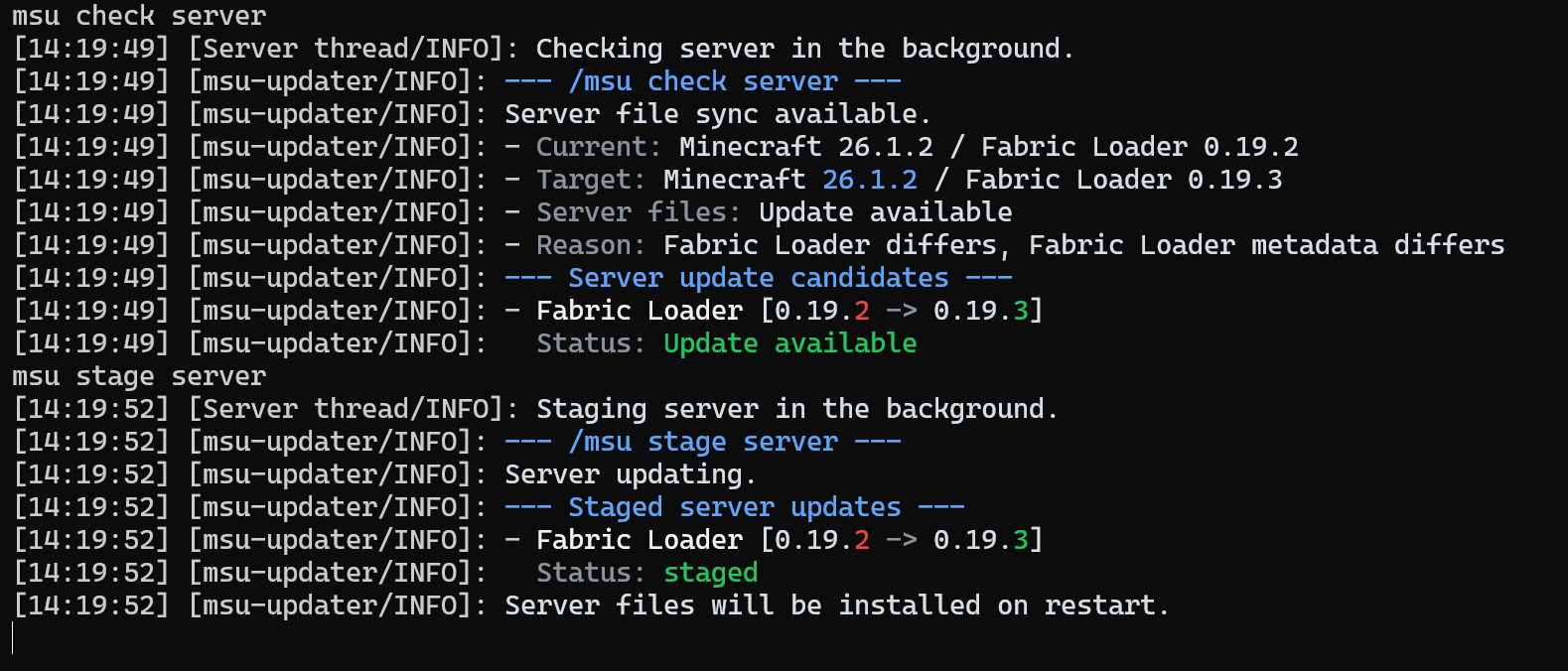 Check and stage server Updates Example of available updates for server files and manual staging.
 -
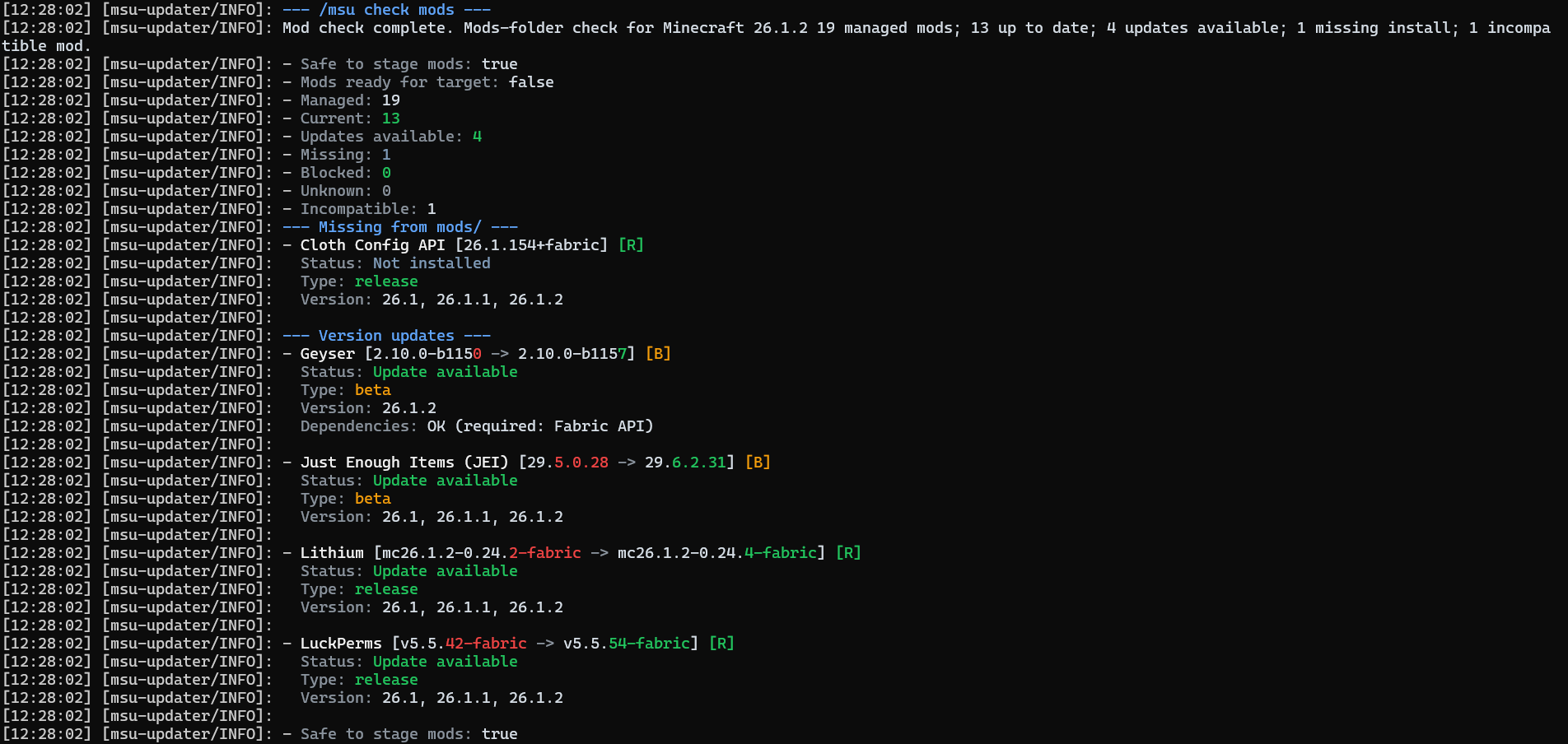 Available Mod Updates MSU Checks for mod updates and prints available updates with full colour formatting.
 -
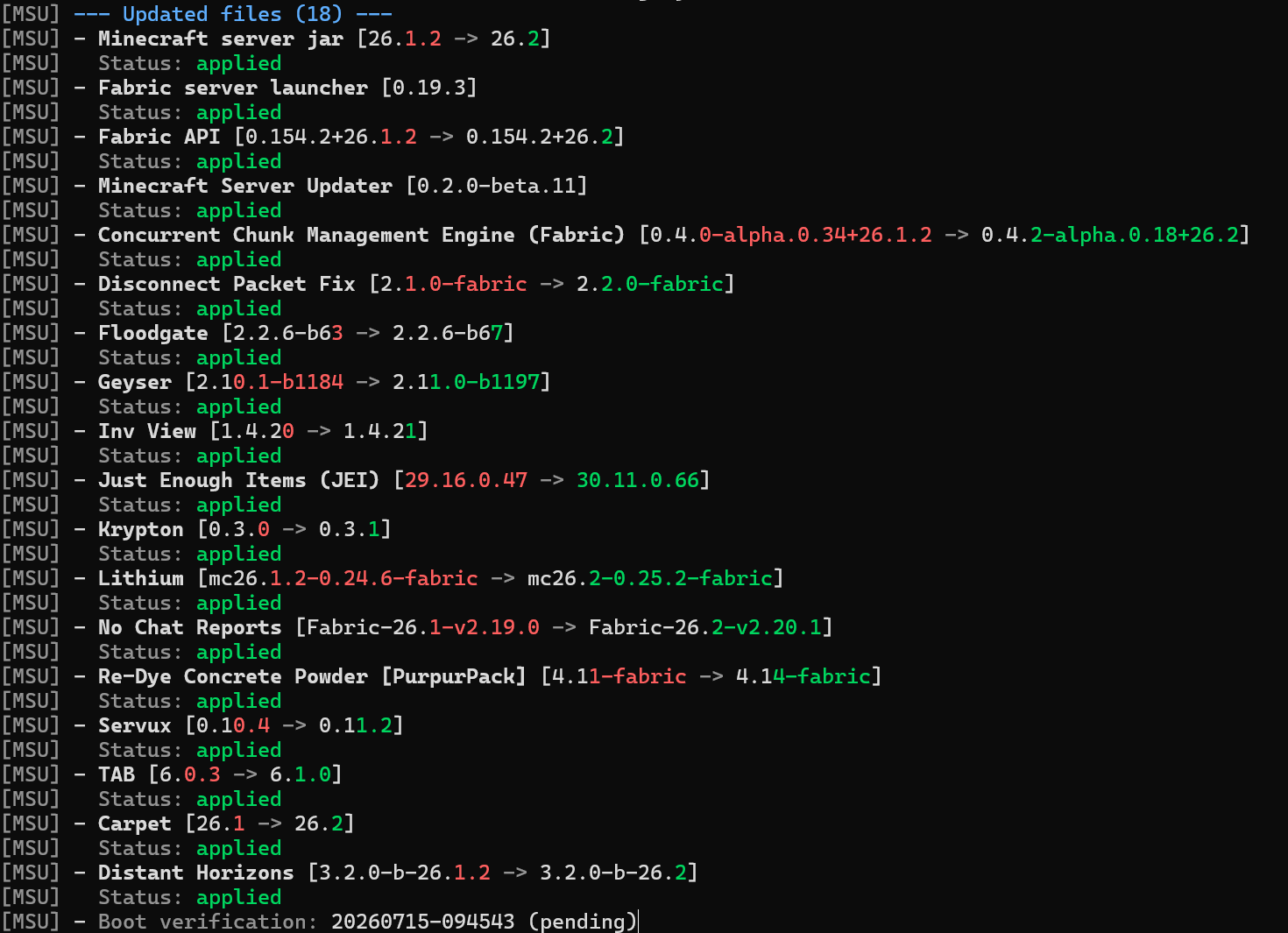 Server Version Update Command line info when server updates minecraft Version
 -
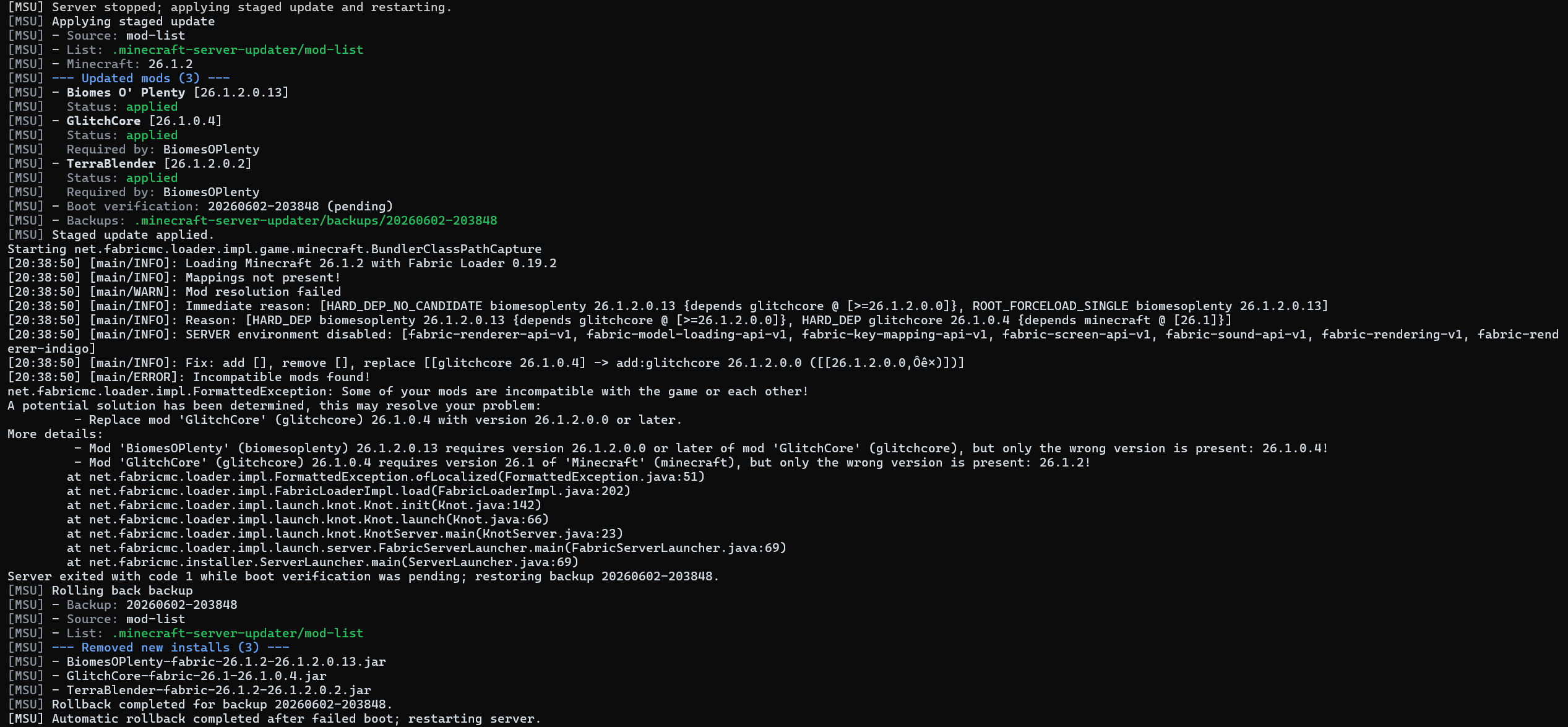 Automatic Rollback Example of automatic rollback on failed boot.
Versions
Files
Relations
Project Relations
More like this
Similar Mods
Suggestions use data such as tags, dependencies, dependents, descriptions, titles, and more to rank how much they overlap with this mod.
On ModDex
Community snapshot
By the numbers
Statistics

Want to reach Minecraft players?
We're looking for a server hosting partner to feature here and other parts of the site. Interested? Send us a message!
Get in touchGet it on
Available Platforms
On ModDex
Community snapshot
By the numbers
Statistics
Resources