
Community listing page, reviews here may not be monitored by the author.
Minerino - Twitch Chat with extra features

No reviews yet
(Fabric / Forge) Twitch Chat Integration with some features of the popular standalone software Chatterino
Community voices
Reviews
No reviews yet. Be the first to review this project!
Get it on
Available Platforms
About
Project Details
For authors
Embed Badge
If you're the author of this project, you can embed a live badge anywhere that supports HTML or Markdown. It updates automatically whenever ratings change.
Use HTML for any page that supports it, or Markdown for README files and Markdown-based descriptions.
Identifiers
Platform IDs
Resources
External Links
About
Description
Minerino | v.0.2
A Twitch Chat Integration for Minecraft!
About
This mod aims to bring a lot of features from the standalone twitch chat software chatterino (https://chatterino.com/) to Minecraft.
New in this Version
- Improved Username colors
- Support for multiple accounts (alt accounts)
- /minerino login username oauth now saves multiple accounts in the config
- /minerino login username lets you log into a specific account
- /minerino login will now show a list of saved accounts if more than one account is registered
Features
- Client-side only (Works on multiplayer servers!)
- Multiple accounts
- Join multiple channels at once
- Switch between channels you want to read
- Messages are temporarily stored so you don't miss out on any conversation
- Type in the channel you want without any prefixes!
- Custom notifications / alert
- Ignore chatters
Installation
Fabric
Download & install fabric (https://fabricmc.net/use/) (v.0.11.3 or newer) as well as the fabric api (https://www.curseforge.com/minecraft/mc-mods/fabric-api). Afterwards, put the minerino-fabric.jar in your minecraft mods folder (https://github.com/Mooosik/minerino/releases). </details>
Forge
Download & Install forge (https://files.minecraftforge.net/net/minecraftforge/forge/) (v.36.1.0 or newer) Afterwards, put the minerino-forge.jar in your minecraft mods folder (https://github.com/Mooosik/minerino/releases).
IMPORTANT FOR FORGE USERS
Forge currently does not properly support client-side commands in multiplayer. They do work, but will show up as "incorrect / unknown" in multiplayer!
Getting Started
This mod is client-side only and should be compatible with most modpacks. It currently does not feature an interface, all the basic setup is done via commands.
To avoid leaking sensitive data, I recommend you to do the first login in a singleplayer world.
(Optional: I highly recommend decreasing Chat Text Size as well as increasing Line Spacing in your Chat Settings (Minecraft > Settings > Chat Settings) for better readability)
Logging in
Use /minerino login [twitch-username oAuth] to get started. You can log into multiple accounts (alt accounts). If you don't have an authentication token already, you can generate one on this website: https://twitchapps.com/tmi/ . Keep this token secret, do not show it to anyone!
The token is only required for the first log-in. You can use /minerino login from now on. If you have multiple accounts, the command will bring up a list of all registered accounts. To log into a specific account directly, use /minerino login username
(Use /minerino logout to close the connection to twitch)
Joining channels
To join a channel, use /minerino join channel. You can join as many channels as you want.
For better readability, you only see one channel at a time.
Important! You will send messages to the channel that is currently active. There is no prefix required!
A Twitch Channels' Moderation Settings still apply
(Use /minerino leave channel to leave the channel)
Switching channels
To switch to a different channel (or the default Minecraft Chat), use /minerino switch channel.
Minerino will still receive messages from other channels and store them for you.
If you switch to a different channel, Minerino will show you all the messages you missed.
Notifications
Minerino allows you to add custom notifications, for example your username.
Use /minerino alert add notification
This means whenever your notification is mentioned in another chat, it will show you this message and play a sound. It will always show you the message, even if you're currently reading another chat.
Use /minerino alert remove notification to remove a notification.
Ignoring
Minerino allows you to ignore chatters.
Use /minerino ignore username to ignore someone OR /minerino unignore username to unignore someone.
Notes: This does not apply to minecraft chat, only for twitch. Additionally, this is not linked to the ignore feature on twitch and will only apply for the minecraft client.
All commands
- /minerino login [twitch-username oAuth]
- /minerino logout
- /minerino join channel
- /minerino leave channel
- /minerino switch channel
- /minerino list || /ml
- /minerino alert add word
- /minerino alert remove word
- /minerino ignore username
- /minerino unignore username
- /minerino help
- /minerino infoMessage true/false (FORGE ONLY: Removes default info message)
Upcoming Features
- Language File Support
- 1.17 support
- User interface for even more customization
- Emote support
Additional info
Important! This mod is not affiliated with the Chatterino software in any way!
This mod uses the twitch4j java api (https://github.com/twitch4j/twitch4j)-
Screenshots
Gallery
-
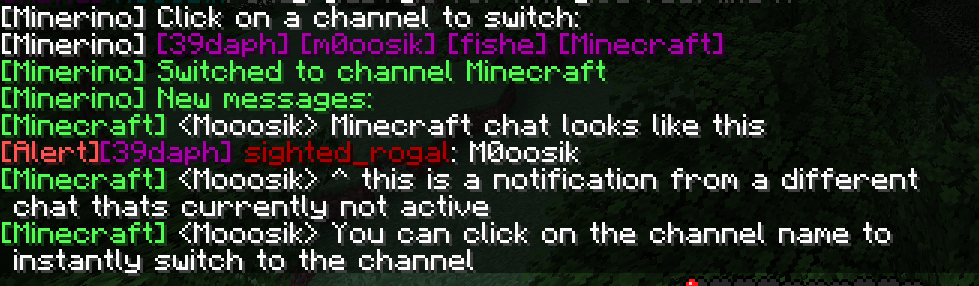 Alert from a different channel
 -
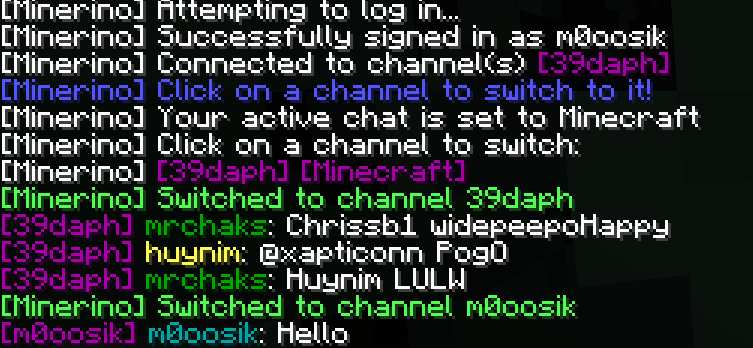 Logging in & switching channels
Versions
Files
Relations
Project Relations
More like this
Similar Mods
Suggestions use data such as tags, dependencies, dependents, descriptions, titles, and more to rank how much they overlap with this mod.
On ModDex
Community snapshot
By the numbers
Statistics
Want to reach Minecraft players?
We're looking for a server hosting partner to feature here and other parts of the site. Interested? Send us a message!
Get in touchGet it on
Available Platforms
On ModDex
Community snapshot
By the numbers
Statistics
Resources