Community listing page, reviews may not be monitored by the author.
MiniGames N ParkourBlocks+


No reviews yet
This mod adds additional blocks for parkour and minigames. These blocks can give effects and also perform special functions that can be used in mini-game building.

Community voices
Reviews
No reviews yet. Be the first to review this project!
Get it on
Available Platforms
Compatibility
Supported Environments
Must be installed on both the client and the server.
About
Project Details
For authors
Embed Badge
If you're the author of this project, you can embed a live badge anywhere that supports HTML or Markdown. It updates automatically whenever ratings change.
Use HTML for any page that supports it, or Markdown for README files and Markdown-based descriptions.
Identifiers
Platform IDs
Resources
External Links
About
Description
Mod Info:
This mod adds additional blocks for parkour and minigames. These blocks can give effects and also perform special functions that can be used in mini-game building. All the items are available under the miscellaneous tab in the creative menu. This is a forge mod.
Config file location: In your config folder there will be a file named: minigames-n-parkourblocks
Config Files only generate after you interact with the bocks atleast once.
If you made any mistakes just delete the old config and a new one will be generated.
Config settings explanation: Link
A huge thanks to Mayuen for helping with the textures.
Block Trader: This trader was made to enable players not in creative mode to obtain the special blocks. The trader can only be spawned with a spawn egg available in the creative miscellaneous tab. It sells 2 blocks for 5 diamonds and never despawns.
Blocks currently available: (Currently no crafting recipes added for these blocks)
• Super Slip Block: As the name suggests these blocks are super slippery. If any entity has any velocity while standing on this block, it will be thrown in that direction (Entities slip like on Ice but faster)
• Simple Jump: While standing on this block players can jump higher.
• Super Jump: While standing on this block player can perform massive jumps, almost double what a simple jump block allows.
• Super Bridge North: When the player right-clicks on the block, it creates a bridge in the north direction. This bridge disappears from behind.
• Super Bridge South: When the player right-clicks on the block, it creates a bridge in the south direction. This bridge disappears from behind.
• Super Bridge East: When the player right-clicks on the block, it creates a bridge in the east direction. This bridge disappears from behind.
• Super Bridge West: When the player right-clicks on the block, it creates a bridge in the west direction. This bridge disappears from behind.
• Air Walk Block: When the player right-clicks on the block, the player is able to walk horizontally in the air for a few seconds.
• Levitate Block: When the player stands on the block it grants them the levitation effect.
• Timer Block: When the player stands on this block it disappears after about 1-2 seconds. The block then reappears again after a few seconds. When the block disappears the player will fall down.
• Death Block: If any player or item touches the top surface of the block, they are instantly killed.
• Check Point Block: Players can right-click on this block and set a checkpoint. When the player dies they respawn on top of this block. (Please do not place any blocks above it [upto 4 blocks vertically] as it will block the checkpoint).
• Poison Block: When the player stands on the block it grants them the poison effect.
• Hunger Block: When the player stands on the block it grants them the hunger effect.
• Regeneration Block: When the player stands on the block it grants them the regeneration effect.
• Blindness Block: When the player stands on the block it grants them the blindness effect
• Teleporter Block: First the player needs to link the blocks using an eye of ender. To link the blocks, place both of the blocks down and then right-click on the two blocks while holding an eye of ender. Once linked simply right-click them with an empty hand to teleport between the two.
• Glowing Concrete Blocks: As the name suggests, the mod adds glowing concrete blocks of every color.
Items added:
Super Boots: Wearing these boots will completely nullify fall damage.
Recipes Available:
Glowing Blocks Crafting Recipes: This mod adds a crafting recipe for glowing concrete blocks. All you need is any concrete of desired color + 1 glowstone dust. (Can be crafted in any order).
If you enjoyed using this mod please leave a comment. Ideas and suggestions are welcome too :)
Mod Info:
This mod adds additional blocks for parkour and minigames. These blocks can give effects and also perform special functions that can be used in mini-game building. All the items are available under the miscellaneous tab in the creative menu. This is a forge mod.
Config file location: In your config folder there will be a file named: minigames-n-parkourblocks
Config Files only generate after you interact with the bocks atleast once.
If you made any mistakes just delete the old config and a new one will be generated.
Config settings explanation: Link
A huge thanks to Mayuen for helping with the textures.
Block Trader: This trader was made to enable players not in creative mode to obtain the special blocks. The trader can only be spawned with a spawn egg available in the creative miscellaneous tab. It sells 2 blocks for 5 diamonds and never despawns.
Blocks currently available: (Currently no crafting recipes added for these blocks)
• Super Slip Block: As the name suggests these blocks are super slippery. If any entity has any velocity while standing on this block, it will be thrown in that direction (Entities slip like on Ice but faster)
• Simple Jump: While standing on this block players can jump higher.
• Super Jump: While standing on this block player can perform massive jumps, almost double what a simple jump block allows.
• Super Bridge North: When the player right-clicks on the block, it creates a bridge in the north direction. This bridge disappears from behind.
• Super Bridge South: When the player right-clicks on the block, it creates a bridge in the south direction. This bridge disappears from behind.
• Super Bridge East: When the player right-clicks on the block, it creates a bridge in the east direction. This bridge disappears from behind.
• Super Bridge West: When the player right-clicks on the block, it creates a bridge in the west direction. This bridge disappears from behind.
• Air Walk Block: When the player right-clicks on the block, the player is able to walk horizontally in the air for a few seconds.
• Levitate Block: When the player stands on the block it grants them the levitation effect.
• Timer Block: When the player stands on this block it disappears after about 1-2 seconds. The block then reappears again after a few seconds. When the block disappears the player will fall down.
• Death Block: If any player or item touches the top surface of the block, they are instantly killed.
• Check Point Block: Players can right-click on this block and set a checkpoint. When the player dies they respawn on top of this block. (Please do not place any blocks above it [upto 4 blocks vertically] as it will block the checkpoint).
• Poison Block: When the player stands on the block it grants them the poison effect.
• Hunger Block: When the player stands on the block it grants them the hunger effect.
• Regeneration Block: When the player stands on the block it grants them the regeneration effect.
• Blindness Block: When the player stands on the block it grants them the blindness effect
• Teleporter Block: First the player needs to link the blocks using an eye of ender. To link the blocks, place both of the blocks down and then right-click on the two blocks while holding an eye of ender. Once linked simply right-click them with an empty hand to teleport between the two.
• Glowing Concrete Blocks: As the name suggests, the mod adds glowing concrete blocks of every color.
Items added:
Super Boots: Wearing these boots will completely nullify fall damage.
Recipes Available:
Glowing Blocks Crafting Recipes: This mod adds a crafting recipe for glowing concrete blocks. All you need is any concrete of desired color + 1 glowstone dust. (Can be crafted in any order).
If you enjoyed using this mod please leave a comment. Ideas and suggestions are welcome too
Screenshots
Gallery
-
 SuperBlocks Screenshot of few of the minigame/parkour blocks.
-
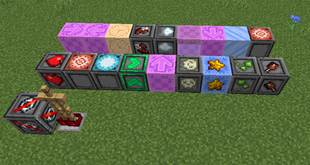 SuperBlocks Screenshot of few of the minigame/parkour blocks.
Versions
Files
Relations
Project Relations
More like this
Similar Mods
Suggestions use data such as tags, dependencies, dependents, descriptions, titles, and more to rank how much they overlap with this mod.
On ModDex
Community snapshot
By the numbers
Statistics

Get it on
Available Platforms
On ModDex
Community snapshot
By the numbers
Statistics
Resources